Kling 3 提示詞教學

為 Kling 3 寫提示詞
像導演一樣指揮場景

實用的 Kling 3 提示詞教學,搭配實際生成範例,掌握鏡頭編排、明確運鏡指令與圖片轉影片的主體鎖定技巧。

總覽

這份 Kling 3 提示詞教學的核心:把提示詞寫成場景指令,而不是物件清單,才能發揮最佳表現。最有效的寫法是先定義鏡頭結構,在開頭鎖定主體,再清楚指定動態與節奏。

提示詞實戰指南

用鏡頭思考

為每個鏡頭標示取景方式與主體動作。相較於塞成一大段,多鏡頭提示詞能帶出更流暢的敘事。

開頭就鎖定主體

在開頭介紹角色與物件,並在各段情節中維持一致稱呼,提升連貫性。

把動態寫清楚

描述攝影機與主體的移動時,使用電影動詞,例如推軌、橫搖、跟拍、保持不動,減少抖動與歧義。

依模式調整策略

需要高度一致的成品,先用圖片轉影片,再描述場景如何變化,不必重新描述所有視覺細節。

生成影片

多鏡頭分鏡

用鏡頭思考,別寫成一大段

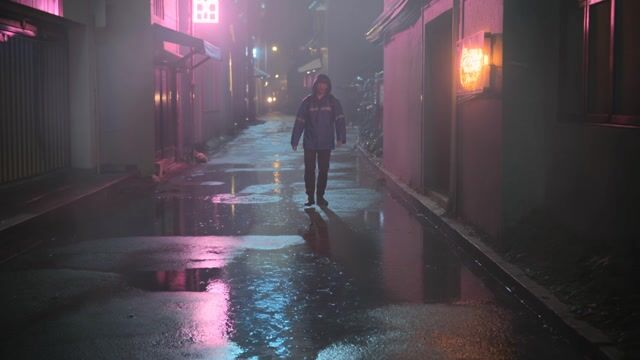
Shot 1 (0-2s): Wide rainy neon alley at night, reflective puddles, lone courier walks toward camera. Shot 2 (2-4s): Medium profile tracking shot as the courier glances left at a glowing shop sign. Shot 3 (4-6s): Tight close-up as the courier stops, breath visible in cold air, subtle handheld finish.

鏡頭標籤能改善節奏與取景轉換,尤其適合需要電影式多角度鏡頭的段落。

明確動態長鏡頭

用電影語言指揮運鏡

A cinematic long take inside a quiet library. Camera slowly dollies forward down the aisle, then gently pans right to reveal a scholar turning one page of an old book. Dust particles float in warm sunbeams. Keep movement smooth and grounded.

動態指令寫得明確,例如推軌、橫搖、保持不動,Kling 生成的影片在時間軸上會更一致,畫面漂移也更少。

圖片轉影片鎖定主體

先鎖定場景,再讓畫面動起來

Start from this exact desk scene. Add subtle monitor glow pulses, drifting steam from the mug, and a slow push-in camera move. Keep object layout and text on screen stable while introducing natural motion.

使用圖片轉影片時,提示詞應描述場景如何變化,而不是重述靜態細節,效果最好。

使用的輸入素材

起始圖片

起始圖片

提示詞範本

多鏡頭範本

適合安排劇情節奏,逐鏡掌控電影感。

Shot 1 (0-2s): [framing] of [subject] in [environment], [action]. Shot 2 (2-4s): [new framing/camera move], [subject reaction/action]. Shot 3 (4-6s): [close/impact shot], [final action/pose], [mood cue].

對白+音訊範本

適合生成含多位說話者的原生音訊。

A [scene setup] with [ambient sound details]. [Character A: role, vocal tone]: "[line]" Immediately, [Character B: role, vocal tone]: "[line]" Camera: [movement], pacing: [timing], emotional beat: [feeling].

圖片轉影片範本

適合保留來源圖片中的主體身分與畫面配置。

Start from this image. Keep [identity/layout/text elements] consistent. Add [subject motion], [environment motion], and camera [movement pattern]. Maintain continuity and realistic timing with no abrupt scene jumps.

乾淨輸出:無字幕、無多餘配樂

Kling 最常見的文字問題,是把引號內的對白變成畫面字幕。最常見的音訊問題,則是擅自加上你沒要求的音樂。訂好幾條固定規則,就能避免這兩種狀況。

明確禁止畫面文字

對白請沿用上方範本的格式:[角色:身分、聲線]: "[台詞]"。接著在提示詞結尾加上:No subtitles, no captions, no on-screen text.

三重禁止多餘配樂

Kling 沒有音樂開關。請用三重禁令:No background music, no score, no soundtrack. 接著描述你真正想要的聲音:對白、環境音、音效。

運鏡動詞放最前面

把運鏡指令放在前 8-10 個單字內,例如推軌前進、跟拍、環繞主體、固定鏡頭。Kling 會把運鏡動詞視為攝影指令。只寫「電影感」這類形容詞,沒有作用。

對白要短

每句台詞控制在 10 個單字以下,每段影片只讓一位角色說話。台詞過長或切換說話者,都會影響對嘴的穩定度。

純對白範例

單一說話者、簡短台詞,禁止文字與音樂。

Slow dolly in on a detective at a rain-streaked window, dim office at dusk. [Detective: weary, low voice]: "She was here last night." Sound: soft rain against glass, distant traffic hum. No background music, no score, no soundtrack. No subtitles, no captions, no on-screen text.

純環境音範例

不含對白,運鏡動詞放開頭,想要的聲音寫清楚。

Tracking shot alongside a cyclist on a coastal road at golden hour. Sound: wind rush, tire hum on asphalt, distant gulls. No background music, no score, no soundtrack. No subtitles, no captions, no on-screen text.

檢查清單

  • 把提示詞寫成場景指令,別堆砌關鍵字。
  • 多鏡頭提示詞要清楚標示鏡頭分界與取景方式。
  • 涉及對白或互動時,角色名稱要前後一致。
  • 分開描述攝影機運動與主體動作。
  • 最重視連貫性時,使用圖片轉影片。