Alibaba Qwen Image 3.0 Pro, built for lettering
Qwen 3 Pro (Qwen Image 3.0) AI Image Generator: Crisp Text
Set crisp Chinese and English text right in the image, from a brush script poster headline to all 18 labels on a bilingual infographic, for 1 credit an image.
Design bilingual posters, infographics and product labels with Alibaba's Qwen 3 Pro (also called Qwen Image 3.0 Pro), and use the same model for product shots, food, portraits, architecture and concept art. Attach up to three of your own images and it edits them instead. Every image on this page is one we made on Pixel Dojo, shown with the exact prompt behind it. Every top model, six studios and Sensei, the AI director, share one plan on Pixel Dojo. Credits roll over while you are subscribed, and commercial use is included on every plan.
1 credit ($0.06) per image. Included in every plan, from $10/month.
Already a member? Sign in
By Brian Lovett · Updated
Where Qwen 3 Pro shines: text, layouts and edits
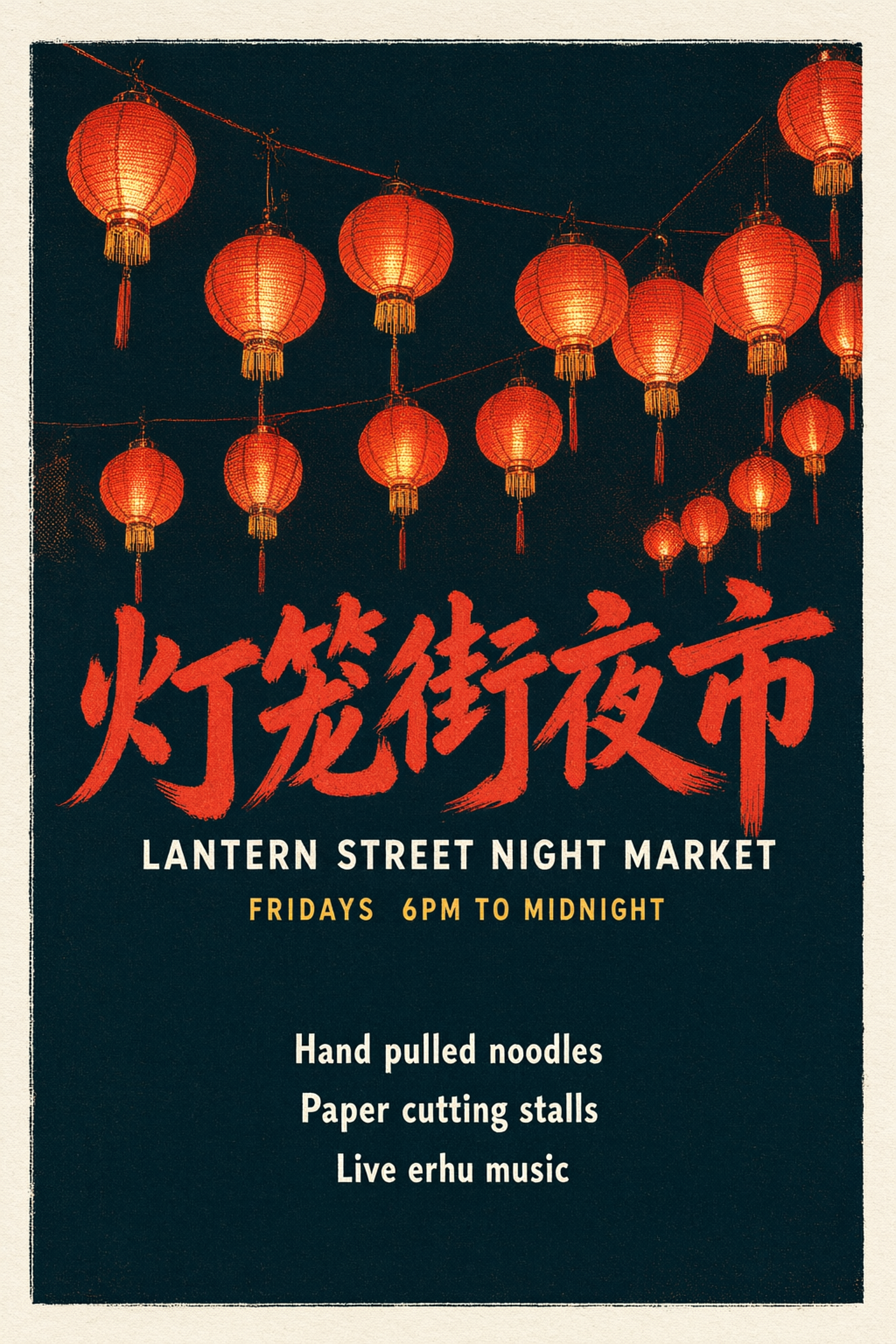
Qwen 3 Pro is built for lettering. Put the words you want in quotes and it sets them in the style you describe, in Chinese, English or both on one page. On our night market poster it painted the headline 灯笼街夜市 in bold brush script and printed every English line beneath it exactly as written. Our bilingual tea infographic sets all 18 English and Chinese labels correctly, plus a boxed brewing guide.
Alibaba designed it for dense layouts: its model page lists prompts of up to 4.5k tokens, text as small as 10 px and 12 languages, so posters, menus, infographics and storyboards fit in a single prompt.
It reads a prompt like a checklist. We asked for four open bamboo steamers, red chopsticks lifting a shrimp dumpling, chili oil, black vinegar and a teapot at the edge, and every one is in the frame. The same care shows in photographs and paintings: rain beads on a fisherman's oilskin, straight verticals on a cedar bathhouse, and a monastery built into a banyan tree above the clouds.
It also edits. Attach one to three images and the same prompt box reads your words as an instruction. We gave it our amber perfume shot and asked for emerald glass on crushed ice, and the cap, the splash and the NOCTURNE label carried over letter for letter. New images and edits both cost 1 credit on Pixel Dojo, at every size.
What you can create with Qwen 3 Pro
Six images we made with Qwen 3 Pro at 2K sizes, 1 credit each, from a bilingual poster to concept art. Each prompt reads like a creative brief, so reuse it as is or swap in your own subject. Tap Use this prompt to start from any of them.
Bilingual poster at 2:3. A brush script Chinese headline and five English lines, every character exactly as written, under a canopy of glowing paper lanterns. Swap in your own event, date and callouts.
A screen printed night market poster in portrait format on thick cream paper, deep teal background with a cluster of glowing vermilion paper lanterns hanging from a single string across the top third, warm light spilling down the page. Huge bold brush script Chinese headline in vermilion: "灯笼街夜市". Directly below in wide spaced white sans serif capitals: "LANTERN STREET NIGHT MARKET". A small date line in gold: "FRIDAYS 6PM TO MIDNIGHT". Three stacked callouts near the bottom edge in white: "Hand pulled noodles", "Paper cutting stalls", "Live erhu music". Visible halftone dots, slight ink misregistration at the color edges, every character spelled exactly as written.
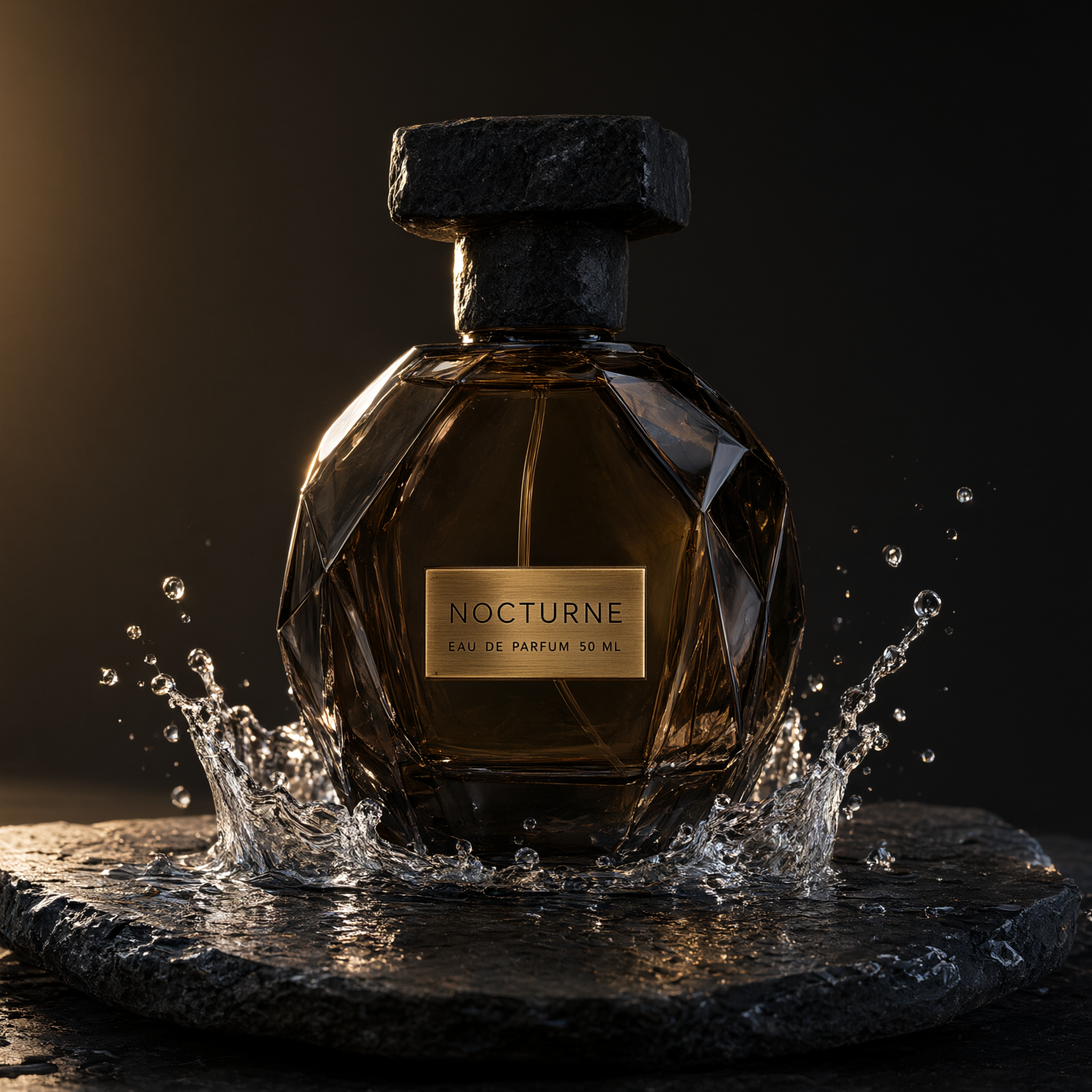
Product hero, square. A faceted amber bottle in a frozen crown splash on wet slate, with the engraved NOCTURNE label sharp and legible under a warm edge light. Start from this prompt for fragrance and beauty shots.
Studio product hero on a 100mm macro lens: a faceted smoky amber glass perfume bottle with a heavy black stone cap stands on a slab of wet black slate, a crown of water droplets frozen mid splash around its base, one hard rim light from behind carving a bright edge along the glass and a soft gold bounce from the left. The front label is a small brushed brass plate engraved "NOCTURNE" with a smaller line beneath it reading "EAU DE PARFUM 50 ML". Deep charcoal background with a faint warm gradient, crisp caustics on the slate, advertising campaign quality.
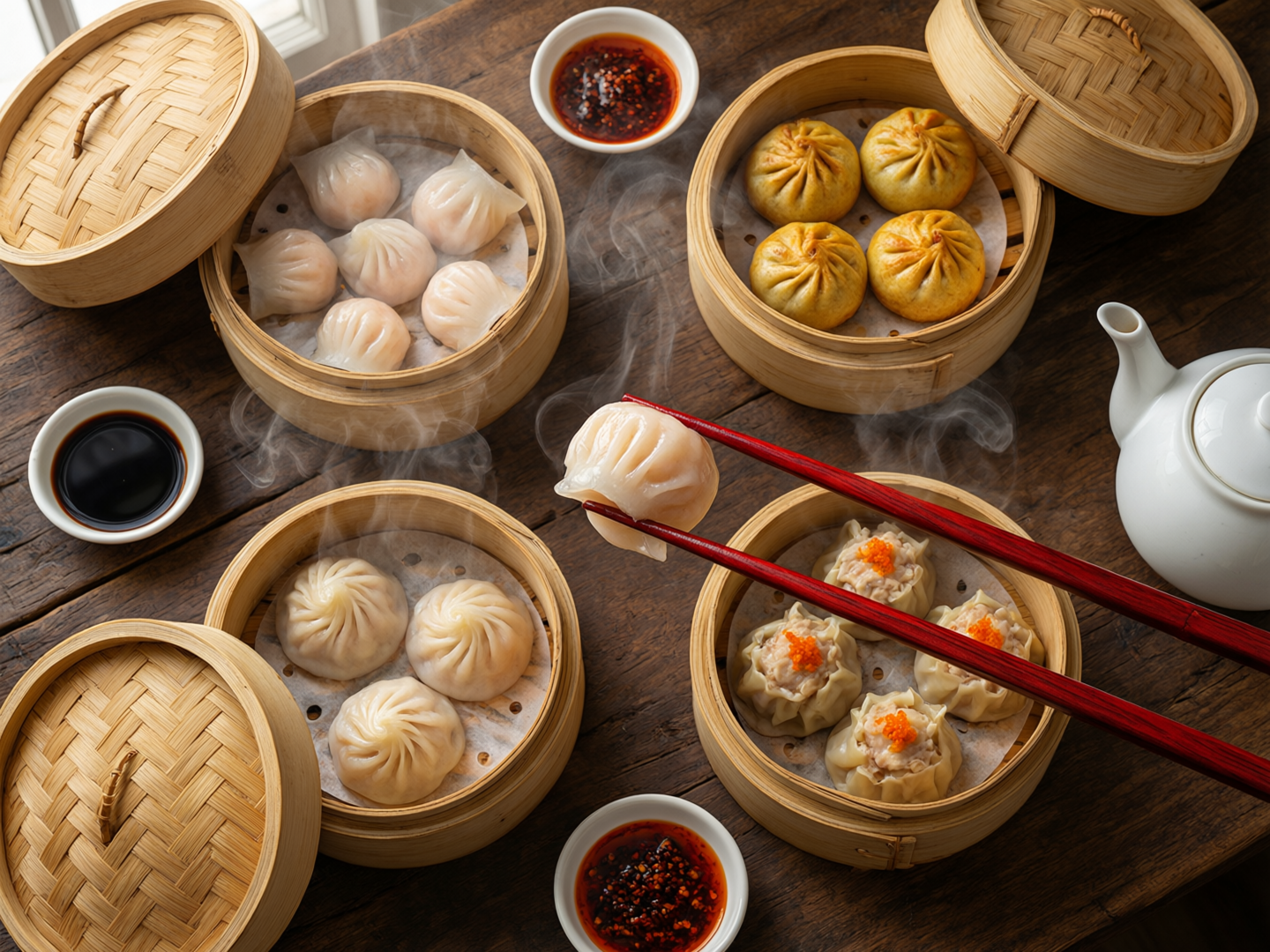
Food photo at 4:3. Four bamboo steamers of shrimp dumplings, golden buns and roe topped dumplings in curls of steam, with every item in the prompt on the table. Start from this prompt for menus and food posts.
Overhead food photograph straight down onto a weathered dark walnut table: four open bamboo steamers filled with translucent shrimp dumplings, golden pan fried buns and pleated pork dumplings topped with orange roe, thick curls of steam rising toward the camera, a pair of lacquered red chopsticks lifting one glossy shrimp dumpling in the center, small dishes of black vinegar and chili oil, a white porcelain teapot at the edge, soft window light from the upper left, rich warm color, 50mm lens, crisp detail on every pleat.
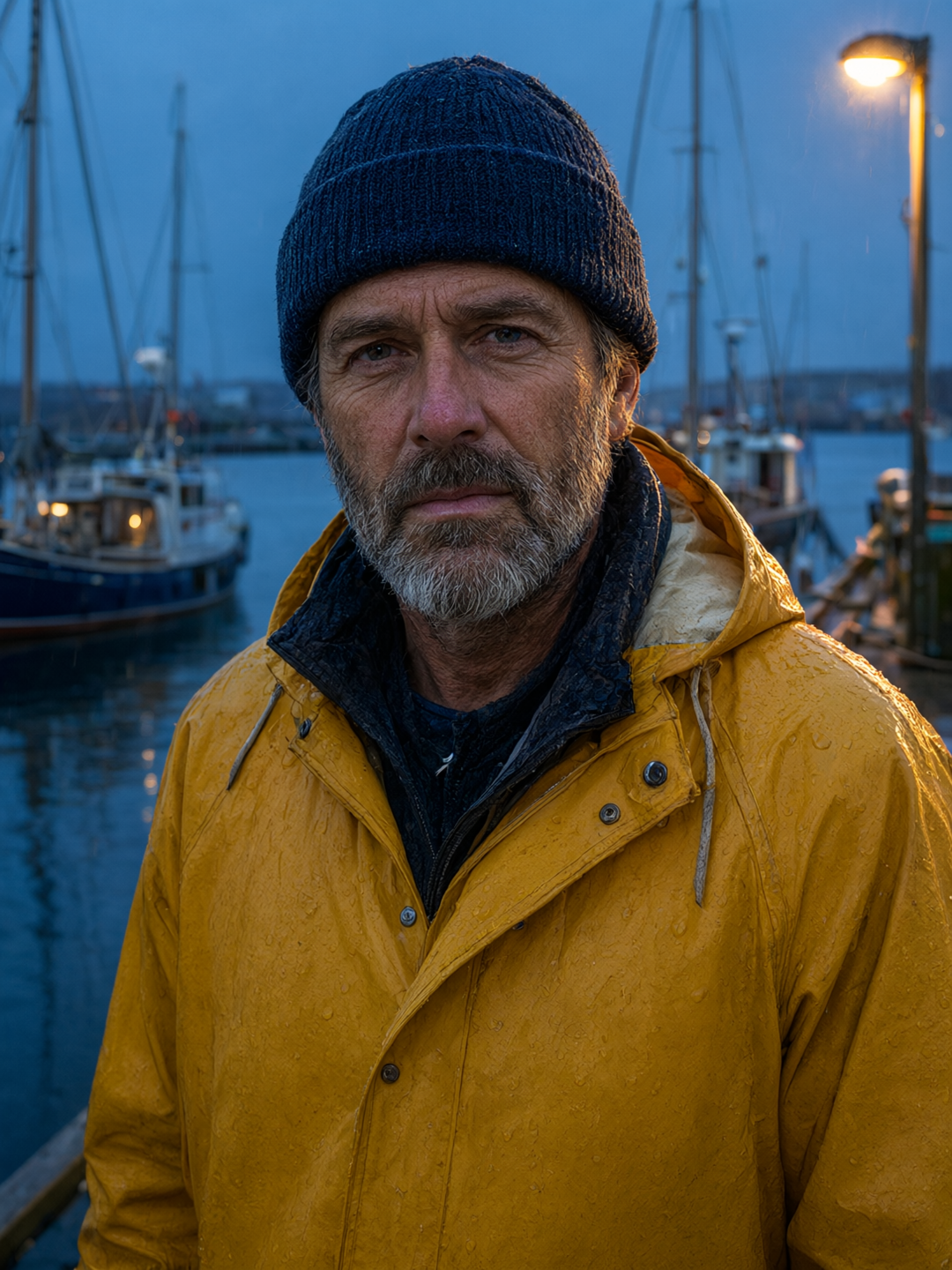
Editorial portrait at 3:4. A weathered face, a salt and pepper beard and a rain beaded saffron oilskin against blue hour boats, with a warm dock lamp glowing behind. Start from this prompt for character and campaign portraits.
Tight editorial portrait on an 85mm lens at f/1.8: a fisherman in his fifties with a salt and pepper beard, deep sun creases around his eyes and a knitted navy watch cap, wearing a saffron yellow oilskin rain jacket beaded with rain, looks straight into the lens on a harbor pier at blue hour, a warm sodium dock lamp rim lights his cheek and the wet collar, out of focus boat masts and cool blue water behind him, fine skin pores and individual raindrops visible, subtle color negative film grain.
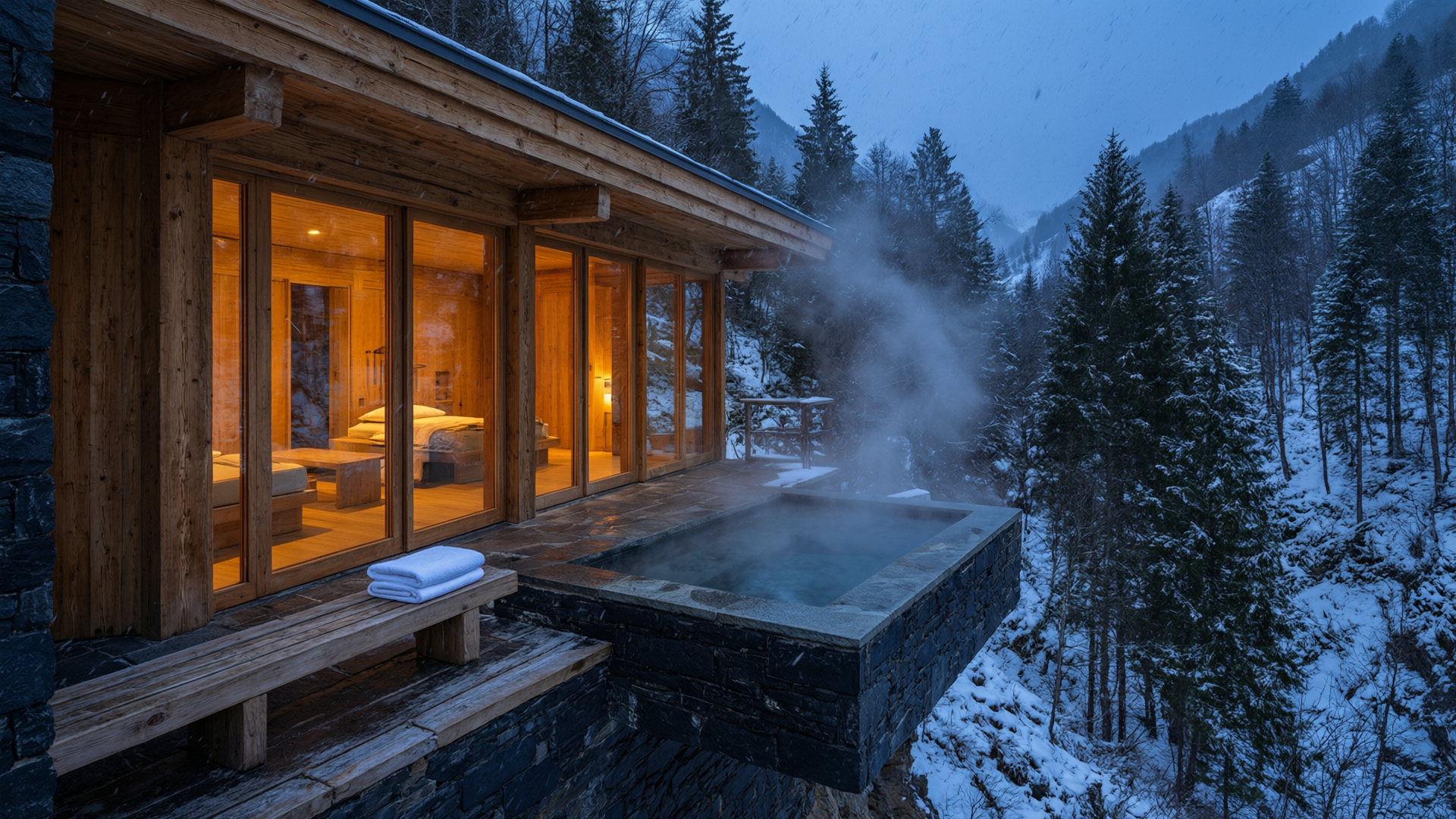
Architecture at 16:9. Glowing amber glass, cedar and dark stone, and a steaming pool hung over a snowy ravine at blue hour, like a spread from a travel magazine. Start from this prompt for hotel, travel and real estate visuals.
Architectural photograph at blue hour on a 24mm tilt shift lens: a low cedar and black stone bathhouse cantilevered over a snowy mountain ravine, floor to ceiling glass walls glowing warm amber from inside, an outdoor stone pool on the open terrace sending thick steam into the cold air, fresh snow falling in soft flakes, dark pines on the slopes behind, a folded white towel on a cedar bench beside the pool, straight verticals, crisp detail in the wood grain and stone joints, calm and quiet mood.
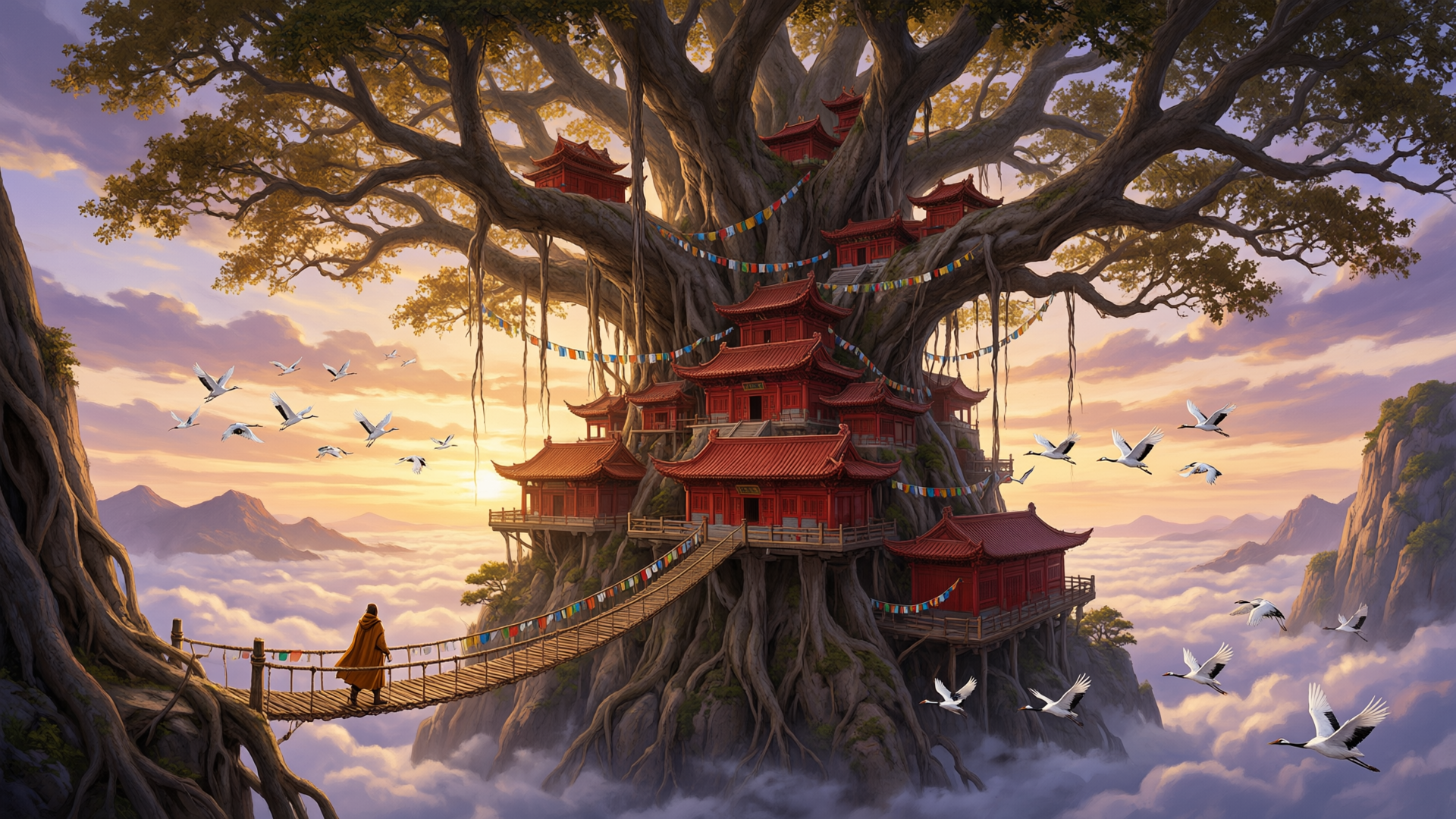
Concept art at 16:9. Red lacquered halls built into a giant banyan above a sea of clouds, with prayer flags, circling cranes and one cloaked traveler on the rope bridge for scale. Start from this prompt for game and film worlds.
Wide concept art matte painting: a colossal hollow banyan tree the size of a mountain rises out of a sea of clouds at sunrise, a monastery of red lacquered halls and curved tile roofs built into its trunk and branches, rope bridges and strings of prayer flags linking the platforms, a single small traveler in an ochre cloak crossing the nearest bridge for scale, flocks of white cranes circling, warm gold light raking across the canopy against cool violet shadows, painterly brushwork with sharp architectural detail, epic scale.
Qwen 3 Pro settings and what each one does
Besides the prompt, Qwen 3 Pro takes seven settings. Here is what each one does and how we used it.
- Size8 aspect ratios at 1K, the same 8 at 2K, or Auto
- Every size is 1 credit per image, so pick the 2K preset for your ratio. Our 2K images match the requested pixels exactly, such as 1920 x 1080 and 1080 x 1440. Auto lets the model choose the size for you.
- Reference images0 to 3
- Leave it empty for text to image, or attach up to three pictures to edit or combine them. We attached our amber perfume shot and asked for green glass on crushed ice: the glass and the surface changed while the label, cap, splash and camera angle stayed put.
- Number of images1 to 6 per request
- Ask for up to six variations at once. Each image uses 1 credit on its own.
- Prompt enhancementAPI only (prompt_extend), off by default
- On, it expands your prompt with a language model before generating. In the web tool, the Enhance button rewrites the prompt in the box so you can read it before you generate. Every prompt on this page ran with prompt_extend off, so what you see is exactly what the model read.
- Negative promptAny text, optional
- The web tool fills in a sensible default for you. Describe what you want to see and the model delivers it.
- Seed0 to 2147483647, optional
- Fix a seed to reproduce a composition while you fine tune the wording. Qwen 3 Pro holds a scene steady from run to run, which helps when you build a consistent series.
- WatermarkOff (default) or on
- On adds a small Qwen-Image mark in the bottom right corner. Every image on this page was made with it off.
Tips for crisp text and faithful edits in Qwen 3 Pro
These two images show Qwen 3 Pro's specialties: a bilingual infographic from a single prompt, and an edit of the perfume shot above. The tips below are how we wrote every prompt on this page, so you can get results like these.
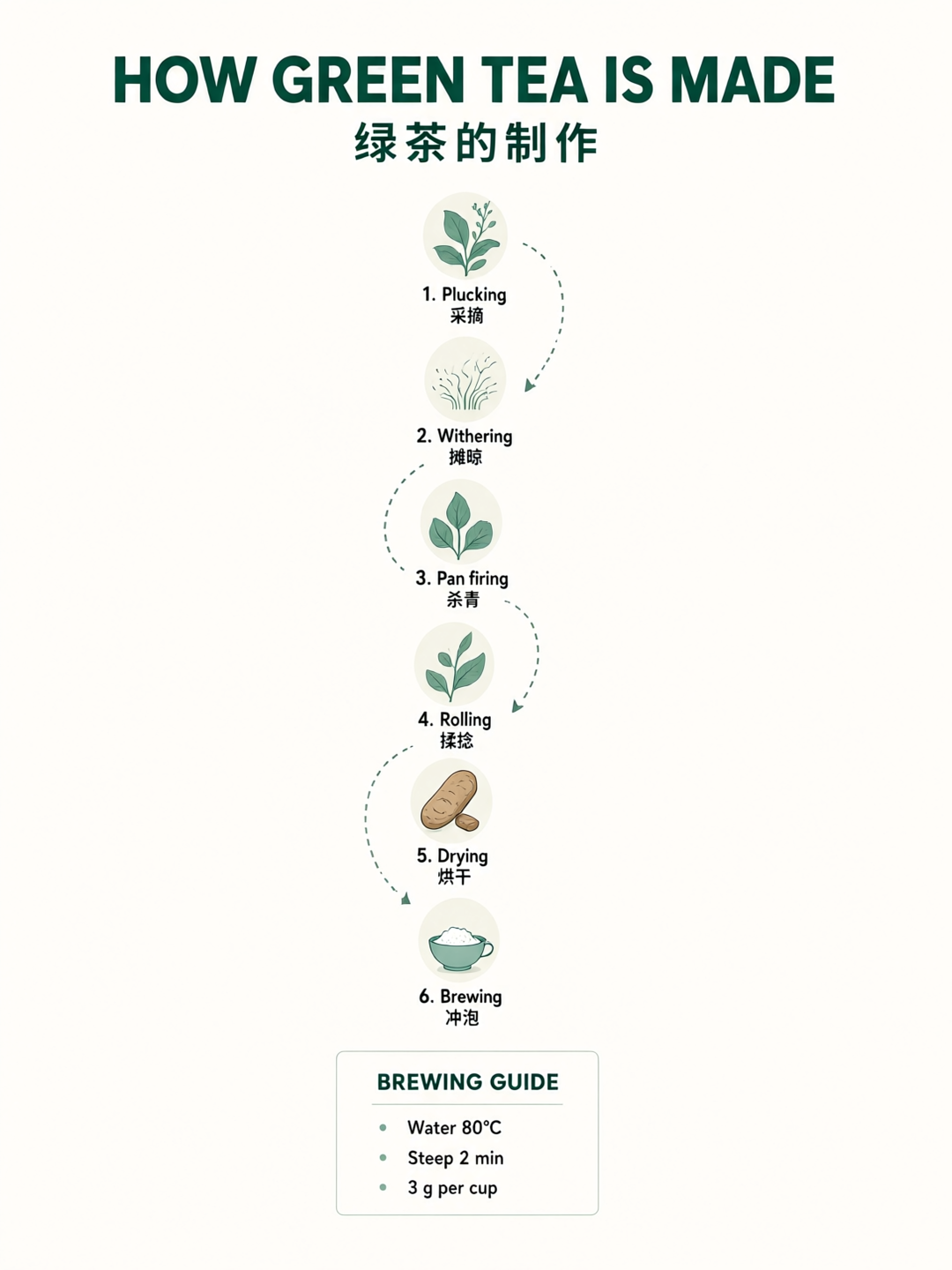
Bilingual infographic at 3:4. A bold title, six numbered steps along a dotted path and a boxed brewing guide, with all 18 English and Chinese labels exactly as written. Swap in your own process, recipe or how to.
A clean flat vector infographic poster in portrait format on a warm off white background, titled at the top in bold dark green sans serif capitals: "HOW GREEN TEA IS MADE", with the Chinese title "绿茶的制作" directly beneath it. Six numbered steps flow down the page along a winding dotted path, each with a small round illustration and a two line label, English above and Chinese below: "1. Plucking" "采摘", "2. Withering" "摊晾", "3. Pan firing" "杀青", "4. Rolling" "揉捻", "5. Drying" "烘干", "6. Brewing" "冲泡". A boxed panel at the bottom titled "BREWING GUIDE" with three short lines: "Water 80°C", "Steep 2 min", "3 g per cup". Muted palette of jade green, cream and charcoal, crisp small text, generous margins, every character spelled exactly as written.
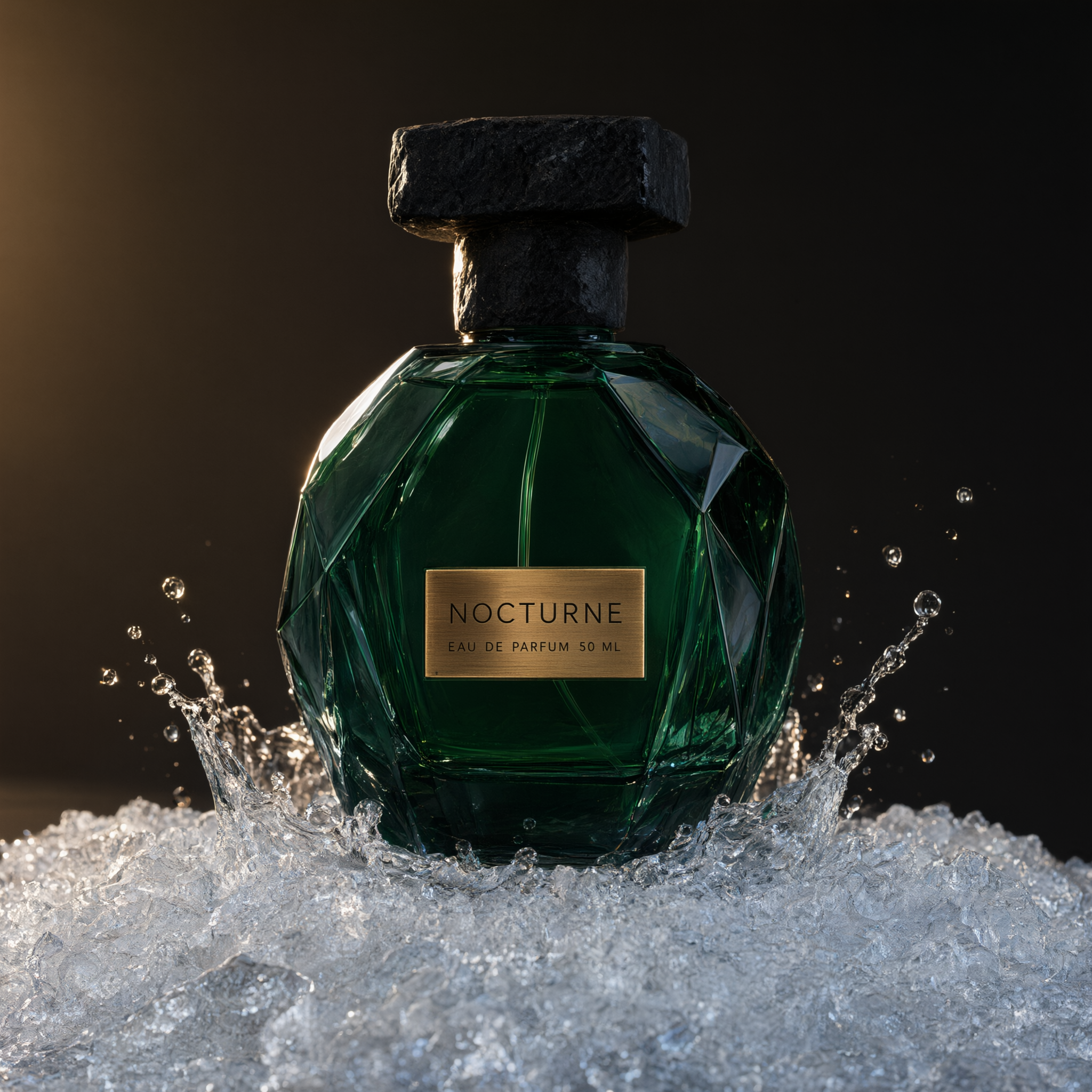
Photo edit of the perfume shot above, attached as the reference image. The glass turns deep emerald and the slate becomes crushed ice, while the stone cap, the splash and the NOCTURNE label stay as they were. Attach your own image in the tool to try this prompt.
Change the bottle glass to deep emerald green and replace the wet slate slab with a bed of crushed ice. Keep the black stone cap, the brass label with its exact text, the water splash, the camera angle and the lighting exactly the same.
- Put every word that must print in double quotes and say how it should look, like a huge brush script headline in vermilion with wide spaced white capitals below. That is how our poster got its Chinese headline and all five English lines exactly as written.
- Mix languages on one page. Give each English label its Chinese twin, as in our tea infographic, and Qwen 3 Pro sets both side by side.
- Close text prompts with "every character spelled exactly as written". Every poster and infographic prompt on this page ends that way.
- List the objects you want, one by one. Qwen 3 Pro treats the prompt like a checklist, which is how four steamers, red chopsticks, two dipping sauces and a teapot all landed in our dim sum shot.
- For edits, name what must stay. Our perfume edit lists the cap, the label text, the splash, the angle and the lighting, and every one carried over while the glass and the surface changed.
- Choose the 2K preset for your aspect ratio. It costs the same 1 credit as 1K, and every 2K image on this page matches the requested pixels exactly.
Qwen 3 Pro pricing: 1 credit per image at any size
Qwen 3 Pro is included in every Pixel Dojo plan, from $10/month, and credits roll over while you are subscribed. Each image uses 1 credit at every size: all eight 1K presets, all eight 2K presets and Auto.
Edits cost the same 1 credit, with up to three reference images attached. Ask for up to six images in one request and each one is 1 credit.
Made with Qwen 3 Pro
All how-tosThe exact prompts and settings behind each one.
Qwen 3 Pro questions
What is Qwen 3 Pro (Qwen Image 3.0 Pro)?
Qwen 3 Pro is Alibaba's Qwen Image 3.0 Pro, an image generation and editing model known for rendering text in Chinese, English and other languages. Open Qwen 3 Pro on Pixel Dojo, type a prompt or attach up to three images, pick a size and generate. It is also available through the Pixel Dojo API with the model id qwen-3-pro.
Is Qwen 3 Pro good at text in images?
Yes. Text is its standout strength. Our night market poster has a five character Chinese brush headline and five English lines exactly as written, and our bilingual tea infographic sets all 18 labels correctly. Put each string in double quotes, describe its style and position, and end the prompt with "every character spelled exactly as written".
Can I use Qwen 3 Pro images commercially?
Yes. You own what you make, on every plan.
Is Qwen 3 Pro free?
A free account gets 3 free effects every day to try Pixel Dojo. Qwen 3 Pro is included in every plan from $10/month, and credits roll over while you are subscribed. Each image is 1 credit at any size, edits included.
What resolution does Qwen 3 Pro support?
Sixteen presets: eight aspect ratios from 1:1 to 21:9 at about 1 megapixel, and the same eight at about 2 megapixels, such as 1920 x 1080 or 2048 x 872. Our 2K images match the requested size exactly.
Can Qwen 3 Pro edit my own images?
Yes. Attach one to three images and write the change as an instruction. Our edit turned an amber perfume bottle emerald and set it on crushed ice while keeping the label text, cap and lighting.
Is Qwen 3 Pro better than Qwen Image 2.0 Pro?
It is the newer Qwen flagship, built for dense bilingual text and layouts, and it costs 1 credit an image instead of 1.5 for Qwen Image 2.0 Pro. Both models are on Pixel Dojo.
Make your first Qwen 3 Pro image
Write a prompt above or start from any example on this page. One plan covers every top model, six studios and Sensei, and your credits roll over.
Start with Qwen 3 Pro