Kling 4.0 Prompting Guide

Prompt Kling 4.0
like a shot list

Kling 4.0 follows a written brief closely: up to 30 seconds of timed beats, spoken lines, readable signs and a soundtrack, all in one generation. Here is how to write that brief, with every example rendered on the live model.

Overview

A one-line prompt works: Kling 4.0 fills in the shots and the sound itself. A detailed brief is followed as written, which is where this model pulls ahead. It reads time ranges, camera directions, quoted dialogue and an audio section, and it holds characters, products and signs steady across cuts.

Up to 30 seconds

One generation can be a full scene: a timed shot list with hard cuts, or one unbroken take.

Dialogue in nine languages

Quoted lines are spoken word for word, with the accent and delivery you describe.

Text that stays legible

Signs, labels and titles keep their spelling and stay fixed to their surface while the camera moves.

Inputs with a job

Start and end frames, up to 10 reference images, reference videos, or an existing clip to edit.

Prompt Structure

Write three parts in order. The settings fix what never changes, the beats place each action in time, and the audio section describes the track.

1. Settings

Location, time of day, light direction, surfaces, color. Translate adjectives into what the camera would see: "premium" means something specific about light and material.

2. Timed beats

Second ranges like "3-7 s", one action each, sized to fit the slot. Name the camera move, its height and speed, and the shot it ends on.

3. Audio

There is no sound switch, so describe the track: ambience, effects, voices. Exclude background music and subtitles explicitly if you do not want them.

Iterate cheap

There is no seed: every render is a new take. Explore at 720p and render the keeper at 1080p.

Brief template

Settings, beats, audio. Make the ranges add up to the duration.

[Location, time of day, light, color, what stays constant.] 0-[a] s: [framing] [one action], camera [move, height, speed]. [a]-[b] s: [framing] [one action]. [b]-[end] s: [framing] [one action], ending on [what to hold]. Audio: [ambience], [effects], [voices], no background music, no subtitles.

Generated Videos

Every clip below is the first take from the prompt shown, rendered on Pixel Dojo. Play with sound on.

Three-shot commercial

Settings first, timed shots, then the soundtrack

10 s · 1080p · 16:9

Sunrise on a rocky mountain ridge, natural color, low warm side light, light mist in the valley below. Shot 1, 0-3 s: ground-level close-up as a trail shoe lands on wet granite and kicks up droplets. Shot 2, 3-7 s: the camera tracks alongside a runner in a red windbreaker climbing the ridge at shoulder height, matching her pace. Shot 3, 7-10 s: wide shot from behind as she reaches the summit and stops, mist rolling below. Hard cuts between shots. Same runner, same red windbreaker in every shot. Audio: shoes crunching on gravel, steady breathing, light wind, no dialogue, no background music, no subtitles.

The time ranges add up to the full duration, every shot has one action and its own framing, and the last line says which sounds to keep and which to leave out.
A line of dialogue

Quote the words, name the voice

10 s · 1080p · 16:9

A small cafe at night, rain streaking the front window, warm tungsten pendant lights, empty tables. 0-4 s: slow push in on a barista in her thirties with a short dark bob and a green apron, wiping down the espresso machine. 4-10 s: she looks up toward the door, smiles, and says in warm, relaxed American English: "Last order of the night. What can I get you?" Audio: rain on the glass, a low espresso machine hiss, her clear close voice, no background music, no subtitles.

Whatever sits inside the quotes is spoken word for word. Give the line its own time slot and describe the delivery in the same sentence.

One continuous take

Time ranges as camera positions, not cuts

10 s · 1080p · 16:9

One continuous gimbal shot with no cuts, walking pace, through a Victorian glass greenhouse in the morning. 0-3 s: the camera passes through an open iron door into humid air and hanging ferns. 3-7 s: it glides down a brick path between giant lily pads in a central pool, light rays cutting through the condensation. 7-10 s: it rises slowly and settles on a single white orchid in sharp focus, background soft. Audio: dripping water, distant birds, soft footsteps on brick, no music, no subtitles.

Multi-shot is on by default. "One continuous shot, no cuts" turns it off, and the beats then describe where the camera is at each moment.

Text that holds still

Spell it exactly, pin it to a surface

10 s · 1080p · 16:9

A wet alley in Tokyo at night. A pink neon sign on a brick wall reads exactly "OPEN ALL NIGHT" in bold block letters. The camera dollies slowly right past puddles reflecting the sign, and the lettering stays fixed to the wall and fully legible the whole time. A cook in a white cap steps out of a side door and lights a paper lantern. Audio: buzzing neon, rain dripping from gutters, distant traffic, no music, no subtitles.

Short text, in quotes, with where it sits and an instruction to stay fixed while the camera moves. Save long copy for an edit afterwards.

Two speakers taking turns

One voice at a time, each one distinct

10 s · 1080p · 16:9

Two old friends sit facing each other on a night train, city lights streaking past the window. Medium two-shot, steady camera. They take turns, only one person speaks at a time, and each voice is distinct. 0-4 s: the man on the left, sixties, grey beard, says in a low, dry British voice: "You kept the ticket. After all these years." 4-9 s: the woman on the right, sixties, silver curls, laughs softly and answers in a bright American voice: "Of course I did. You still owe me the trip." Audio: rhythmic train wheels, their two voices, no music, no subtitles.

Place each speaker by position, give each line a slot, and say outright that they take turns. That keeps the voices from overlapping or blending.

Vertical talking-head ad

9:16 with a spoken pitch

10 s · 1080p · 9:16

Vertical selfie video. A woman in her late twenties with curly auburn hair holds her phone at arm's length in a bright packing studio, shelves of small amber glass bottles behind her. She holds up one bottle to the lens and says in warm, natural American English at a relaxed pace: "We pack every order by hand. This one is going to Portland." She smiles at the end. Audio: her clear close voice, quiet room tone, no music, no subtitles.

Two short sentences fit comfortably in 8-10 seconds. For a longer script, raise the duration rather than adding words to the same clip.

A cast from reference photos

One portrait per person, one job per image

5 s · 1080p · 3 reference images
@Image1
@Image1
@Image2
@Image2
@Image3
@Image3

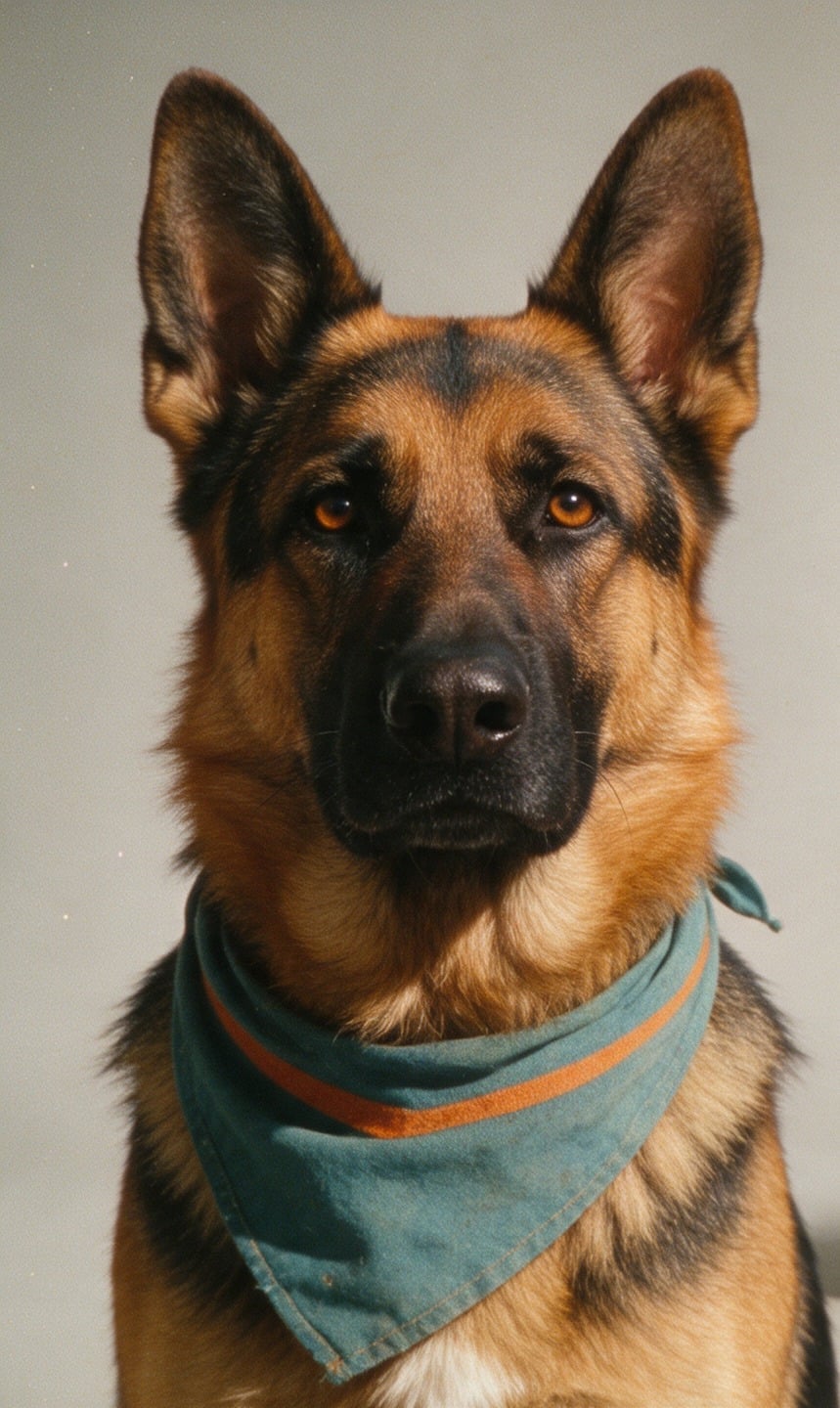
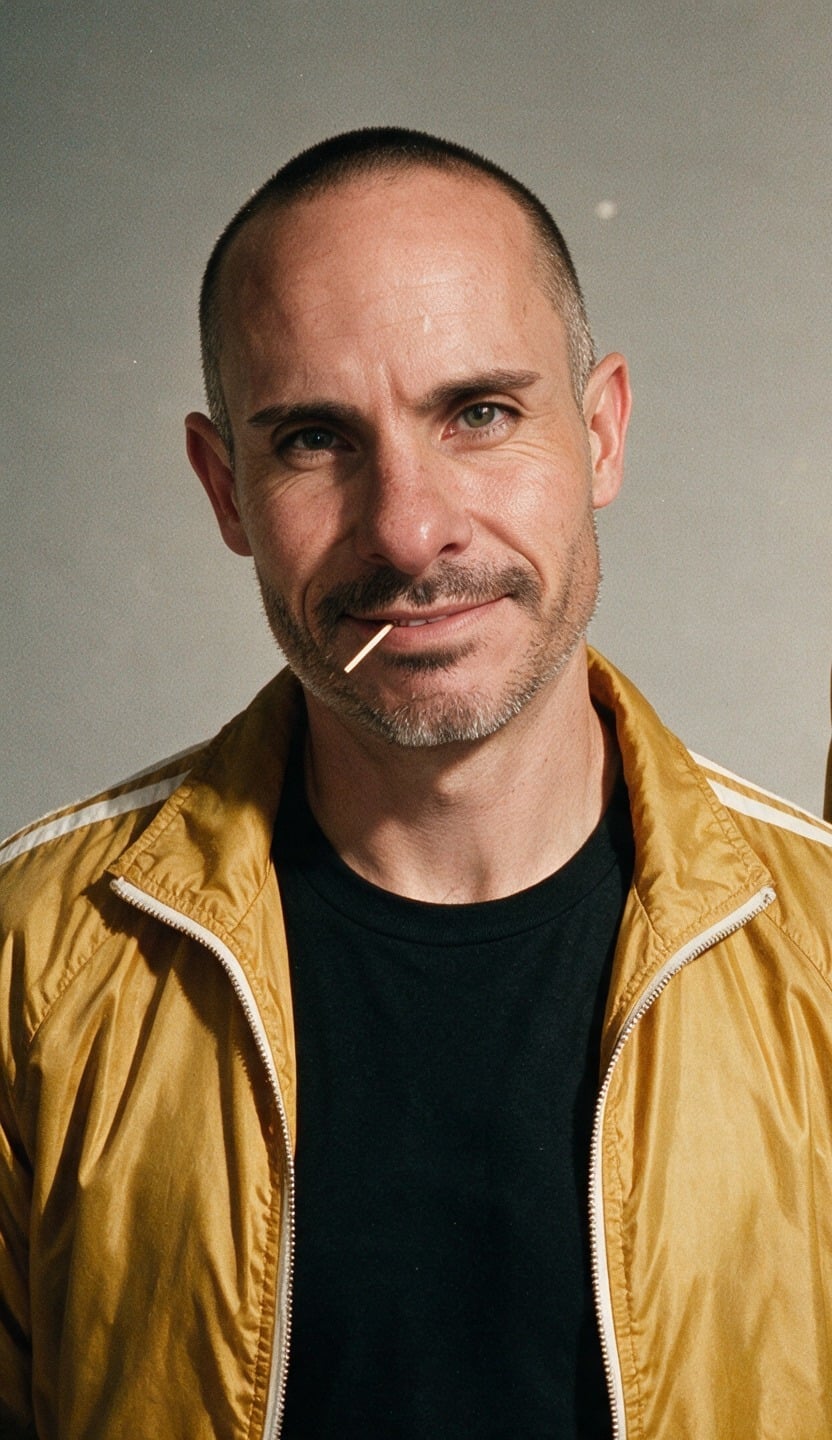
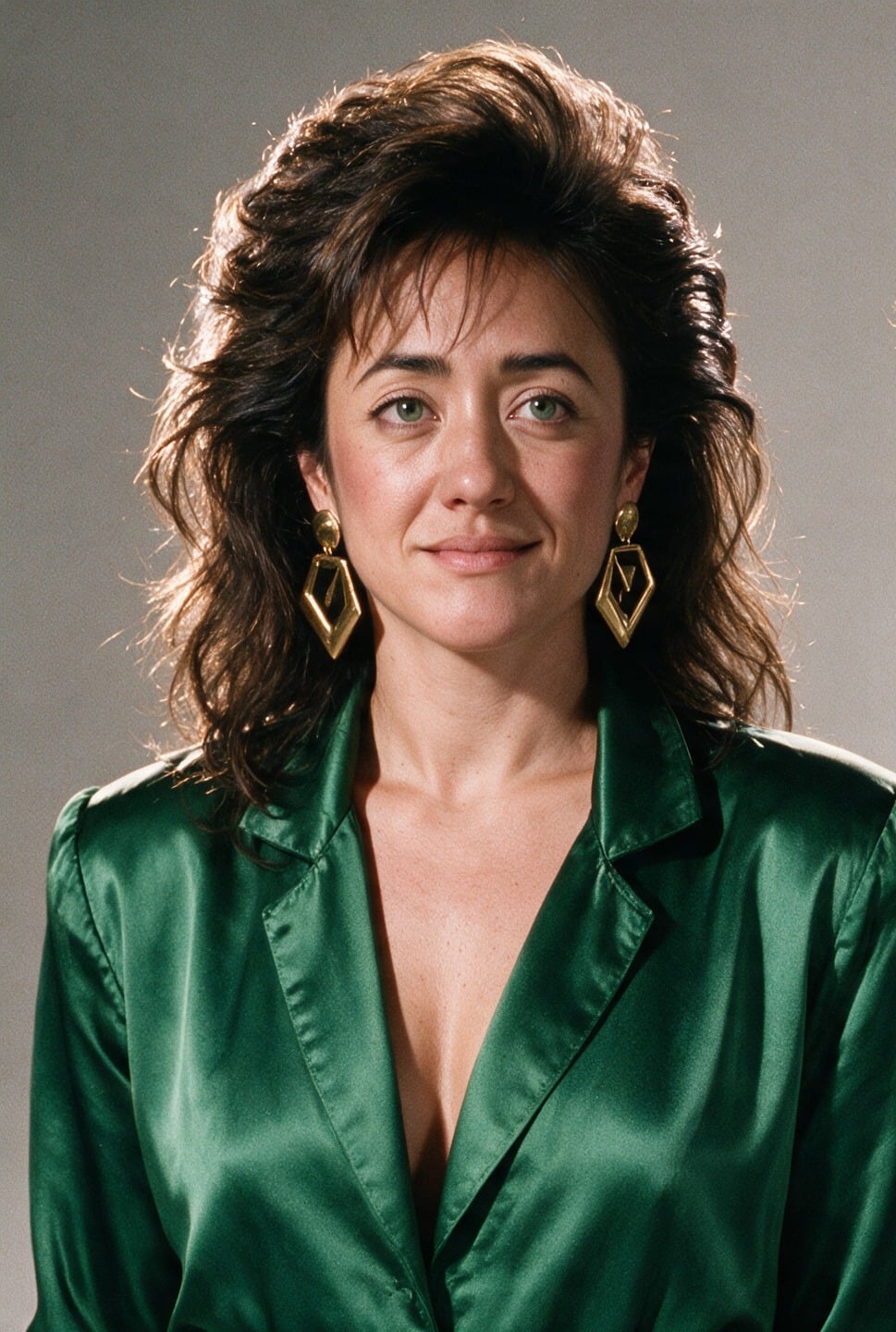
@Image1 is Brian: keep his face, shaved head, toothpick and mustard-yellow racing jacket over a black tee. @Image2 is Pamela: keep her face, dark curly hair and emerald-green jumpsuit. @Image3 is Circe, the German Shepherd: keep her markings. Sunny 1980s seaside boardwalk, 16:9 widescreen, warm saturated film look with light grain. Brian and Pamela walk toward the camera side by side with Circe trotting between them; behind them a giant three-headed blue inflatable dragon looms over the pier and puffs orange smoke. Slow backward tracking shot at chest height. Same faces in every frame. Audio: gulls, boardwalk crowd, no music, no subtitles.

Each reference gets one sentence saying who it is and what to keep. On Pixel Dojo, @Image1 is turned into the model's own image tag for you.

Shot Lists & Long Takes

Number the shots

"Shot 1, 0-5 s: macro close-up as..." One action per shot and a new framing for each, so every cut shows something new.

Fill the whole duration

Ranges that stop short of the duration leave gaps the model fills with shots you did not ask for.

Say how shots join

"Hard cuts" tells it to cut. "One continuous shot, no cuts" tells it not to.

State what must not change

End with "same runner, same jacket in every shot". Across separate generations, use references instead.

Dialogue & On-Screen Text

Quote the exact words

Name the speaker by role or position, then the line in quotes, then the delivery: age, tone, pace, accent.

Fit the line to the clip

An 8-second clip holds one or two short sentences. Short lines in long clips get padded with invented words.

One voice at a time

With two speakers, give each line a slot and say they take turns and sound distinct.

Spell text exactly

Put it in quotes, say where it sits, and ask it to stay fixed to that surface if the camera moves. Keep it short.

Dialogue template

One speaker, one line, delivery in the same sentence.

[Setting and light.] [Framing] of [speaker: age, look]. 0-[a] s: [action before the line]. [a]-[end] s: [speaker] says in [language, accent, tone, pace]: "[line]" Audio: [ambience], their clear voice, no background music, no subtitles.

Frames & References

Up to 10 images in total across start frame, end frame and references. Refer to them as @Image1, @Image2 and so on: frames come first, then references, in the order you added them.

Start and end frames

A start frame sets the opening image and the aspect ratio. Add an end frame and describe how the scene gets from one to the other.

Give every reference a role

One sentence per image: who or what it is and what to keep (face, outfit, label, layout). Unassigned images get guessed at.

Clean sources

Plain backgrounds and even light. For people, one portrait each, and ask for consistent faces.

Reference videos

Up to 5 clips (30 s total) to carry over a routine, a camera path or an ad's structure onto new people and places. Billed at the video-input rate.

Editing a Clip

Drop a clip into the Clip tile and the shot stays the same while the prompt changes what is in it. The output keeps the source's shape and length.

Start with "Edit @Video1"

That keeps the footage. Then state the one change and list what must stay: a bare "keep everything else" is weaker than naming each element.

Swap a product

Attach the new product as a reference image and name what it replaces. The hand and timing come from the source.

Add or remove a subject

Say where it sits relative to something in frame. When removing, say what fills the space behind it.

Restyle

Describe the target look concretely, rule out photorealism if the source is live action, and keep the motion and camera move unchanged.

Edit template

Keep the footage, change one thing, list what stays.

Edit @Video1: replace [what] with [new thing, or @Image1]. Keep [the person, their hands, the camera move, the lighting, the background] unchanged. Audio: keep the original room tone.

Parameters

SettingValuesNotes
Duration3-30 sWhole seconds. With a clip to edit, the clip's own length.
Resolution720p, 1080pIterate at 720p, finish at 1080p.
Aspect ratio16:9, 9:16, 1:1, 21:9Text-only clips. Frames and clips set their own shape.
ImagesUp to 10Start frame, end frame and references combined.
VideosUp to 5, 30 s totalA clip to edit plus reference videos.
AudioAlways onDescribe it in the prompt.

FAQ

Any whole number of seconds from 3 to 30, at 720p or 1080p. Long clips are cut into shots automatically unless you ask for one continuous take.