Alibaba Qwen Image 2.0 and 2.0 Pro
Qwen Image 2.0 AI Image Generator: Exact Text, Sharp Posters
Print the words you put in quotes exactly, from poster headlines and jar labels to comic balloons, chalkboard menus and slide bullets.
Make travel posters, product labels, comic pages, menu boards, presentation slides and editorial portraits with Alibaba's Qwen Image 2.0, at sizes up to about 4 megapixels, like 2048 x 2048 square or 2688 x 1536 widescreen. The standard model and Qwen Image 2.0 Pro share one tool on Pixel Dojo, and we made every image below there, each with the exact prompt behind it. Every top model, six studios and Sensei, the AI director, share one plan on Pixel Dojo. Credits roll over while you are subscribed, and commercial use is included on every plan.
1.5 credits ($0.09) per image at 2048x2048. Included in every plan, from $10/month.
Already a member? Sign in
By Brian Lovett · Updated
Why Qwen Image 2.0 is built for text in images
Qwen Image 2.0 is Alibaba's image generation model, and its standout skill is typography. Put a line of text in quotes and it prints exactly: the ORVANE poster headline, the EMBER & SALT jar label, the comic balloons, the chalkboard prices and every bullet on our solar slide all came out letter for letter.
It follows the layout you describe. We listed text in reading order, headline first and footer last, and the model placed it that way on the poster, jar label, chalkboard and slides above. That makes it an easy way to mock up travel posters, packaging, menu boards, comic pages and presentation slides.
One tool gives you two tiers. Qwen Image 2.0 Pro, at 1.5 credits, brings richer photographic light and texture to product shots, portraits and posters. The standard Qwen Image 2.0, at 0.5 credits, spells text just as well, which makes it the everyday pick for layouts, comics and slides.
Both tiers make images up to about 4 megapixels, like 2048 x 2048 square or 2688 x 1536 widescreen, and the same tool has an edit mode that takes 1 to 3 reference images plus an instruction, at the same price per image.
What you can create with Qwen Image 2.0
Travel posters, packaging, portraits, comics and menu boards, all made on Pixel Dojo with Qwen Image 2.0 and Qwen Image 2.0 Pro. Every word in them came straight from a quoted line in the prompt. Tap Use this prompt on any tile, then pick the model and size named in its caption.
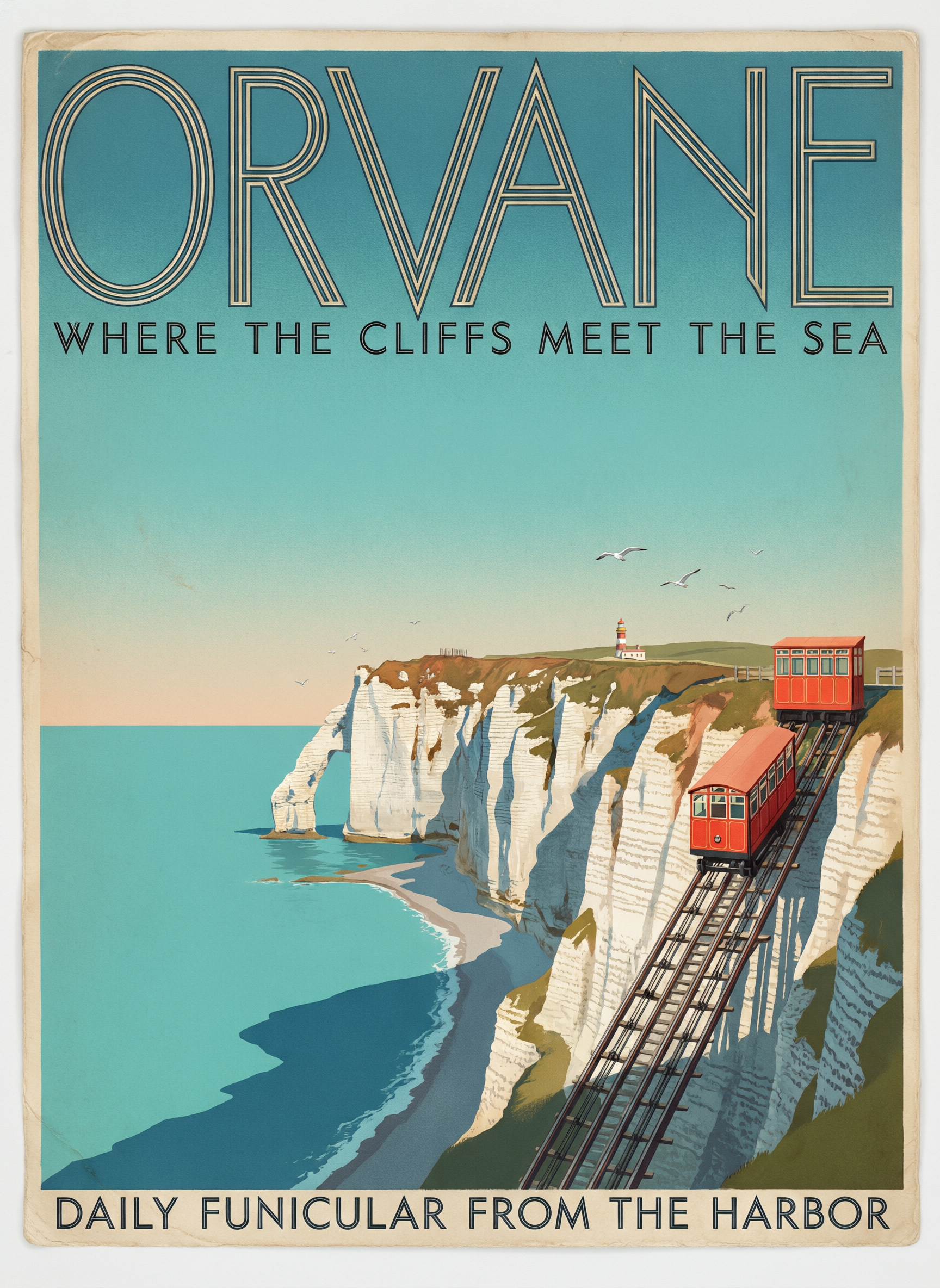
Art deco travel poster, Pro at 1728 x 2368. All three lines of type print exactly, from the towering inline ORVANE headline to the footer, over chalk cliffs, red funicular cars and a turquoise sea. Swap in your own town and tagline.
Vintage art deco travel poster in stone lithograph style: the headline "ORVANE" in towering geometric deco capitals across the top, beneath it "WHERE THE CLIFFS MEET THE SEA" in small spaced capitals, and along the bottom "DAILY FUNICULAR FROM THE HARBOR" in a narrow sans serif. The image shows sheer white chalk cliffs dropping into a turquoise sea, a bright red funicular car climbing a steep track up the cliff face, a tiny lighthouse and gulls, long afternoon shadows, flat blocks of teal, coral, cream and navy with soft grain and slightly worn paper edges. The text must be exact.
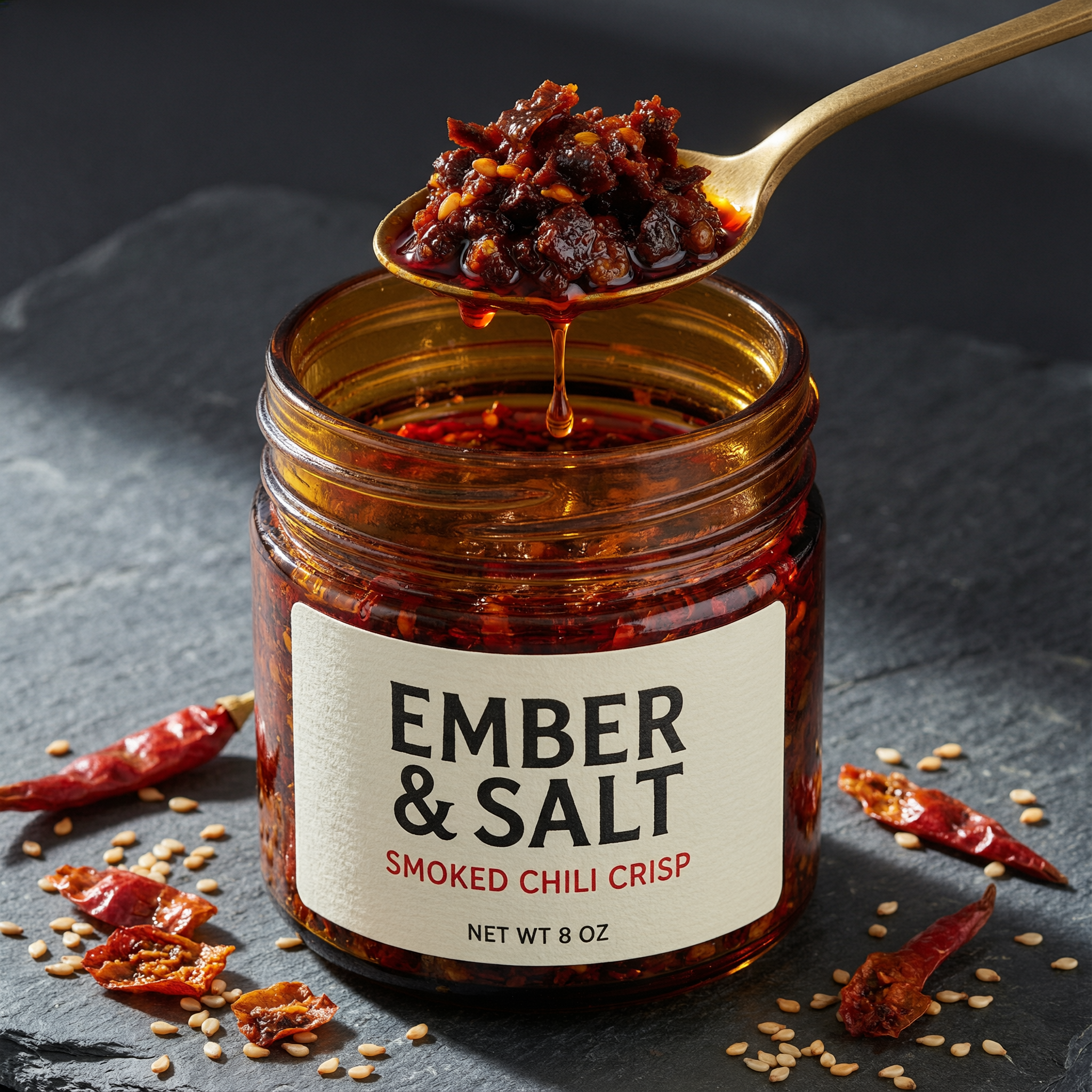
Product hero, Pro at 2048 x 2048. The EMBER & SALT label prints letter for letter, chili oil drips from a brass spoon and the amber glass glows under hard side light. Start from this prompt for packaging and label mockups.
Studio product hero photograph on a 100mm macro lens: a squat amber glass jar of chili crisp with a cream letterpress paper label reading "EMBER & SALT" in bold black serif capitals, "SMOKED CHILI CRISP" beneath it in small red capitals and "NET WT 8 OZ" along the bottom edge, a brass spoon lifting a glossy heap of chili crisp out of the open jar with oil dripping back in, dried red chilies and toasted sesame seeds scattered on dark slate, hard side light making the oil glow ruby red, clean reflections on the glass, shallow depth of field. The label text must be exact.
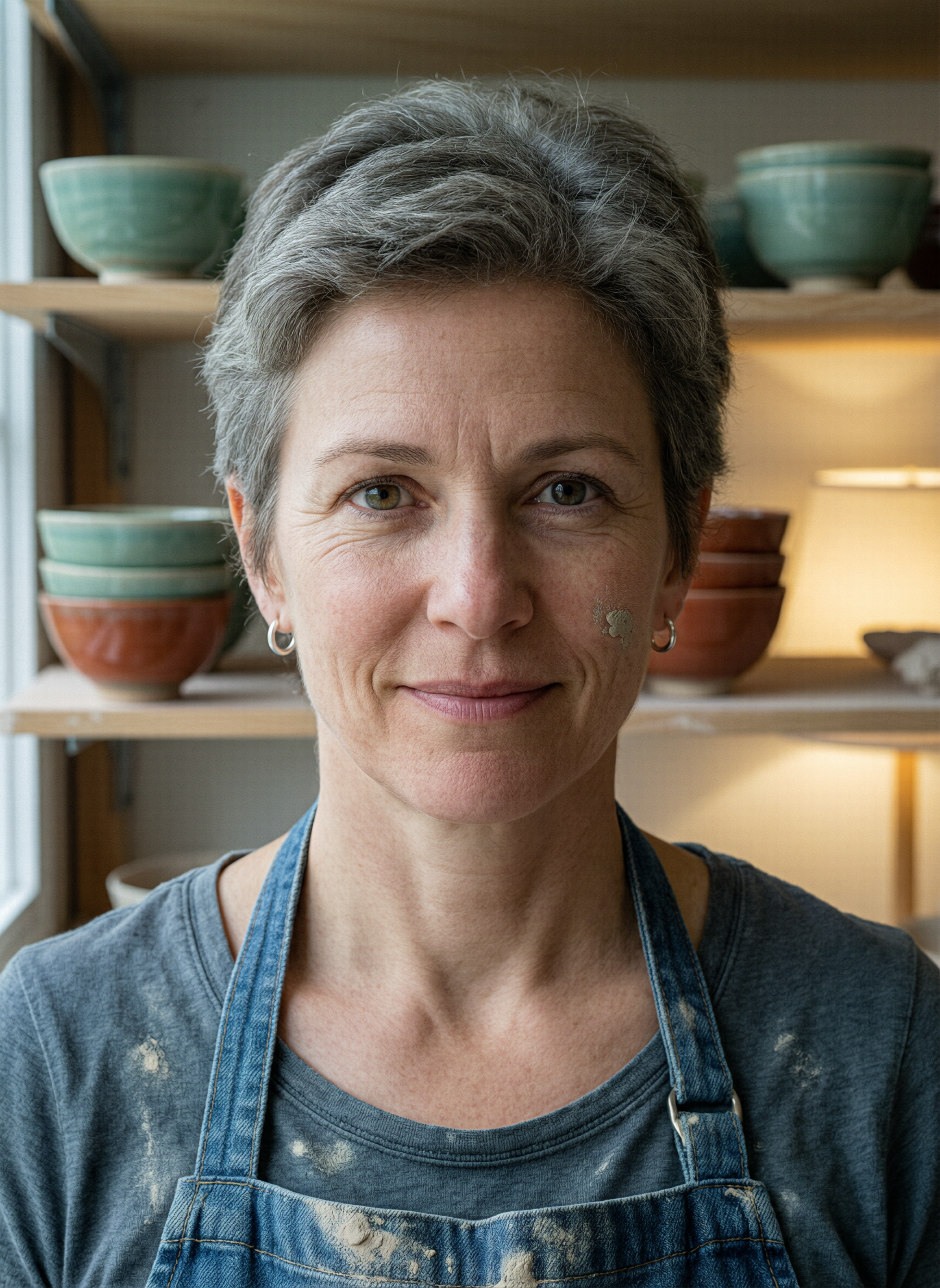
Editorial portrait, Pro at 1728 x 2368. Pores, fine lines, silver hoops and a fleck of clay on her cheek hold up at full size, with celadon and rust bowls glowing behind her. Start from this prompt for character and brand portraits.
Editorial environmental portrait on an 85mm lens at f/1.8: a potter in her fifties with close cropped grey hair, small silver hoop earrings and a denim apron streaked with dry clay looks straight into the lens with a slight knowing smile, standing in her studio in front of wooden shelves of celadon and rust glazed bowls that fall softly out of focus, cool north window light from the left and a warm lamp glow behind her, visible skin pores, fine lines and a fleck of clay on her cheek, warm color negative film look with fine grain.
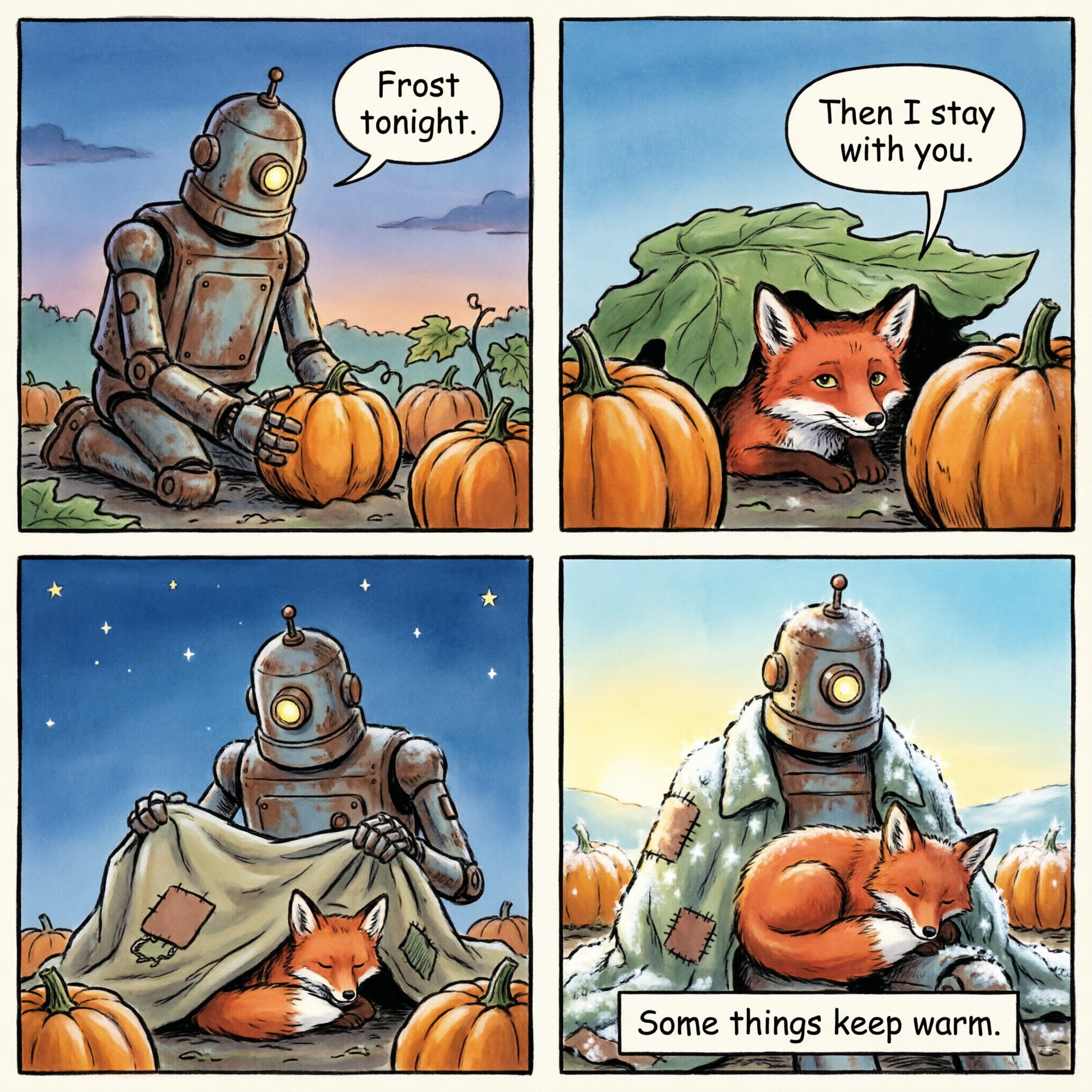
Four panel comic, the standard model at 2048 x 2048. Both speech balloons and the closing caption print exactly, and the one eyed garden robot and the fox stay on model in every panel. A whole comic page for 0.5 credits.
A four panel comic page in a clean ligne claire style with flat colors and bold ink outlines, a two by two grid with white gutters. Panel 1: a rusty old garden robot with one round lamp eye kneels beside a pumpkin patch at dusk, speech bubble "Frost tonight." Panel 2: a small red fox peeks out from under a pumpkin leaf, speech bubble "Then I stay with you." Panel 3: the robot drapes its patched canvas coat over the pumpkins and the fox beneath the first stars, no dialogue. Panel 4: morning light, frost sparkling on everything except the coat, the fox asleep in the robot lap, caption box "Some things keep warm." The lettering must be exact.
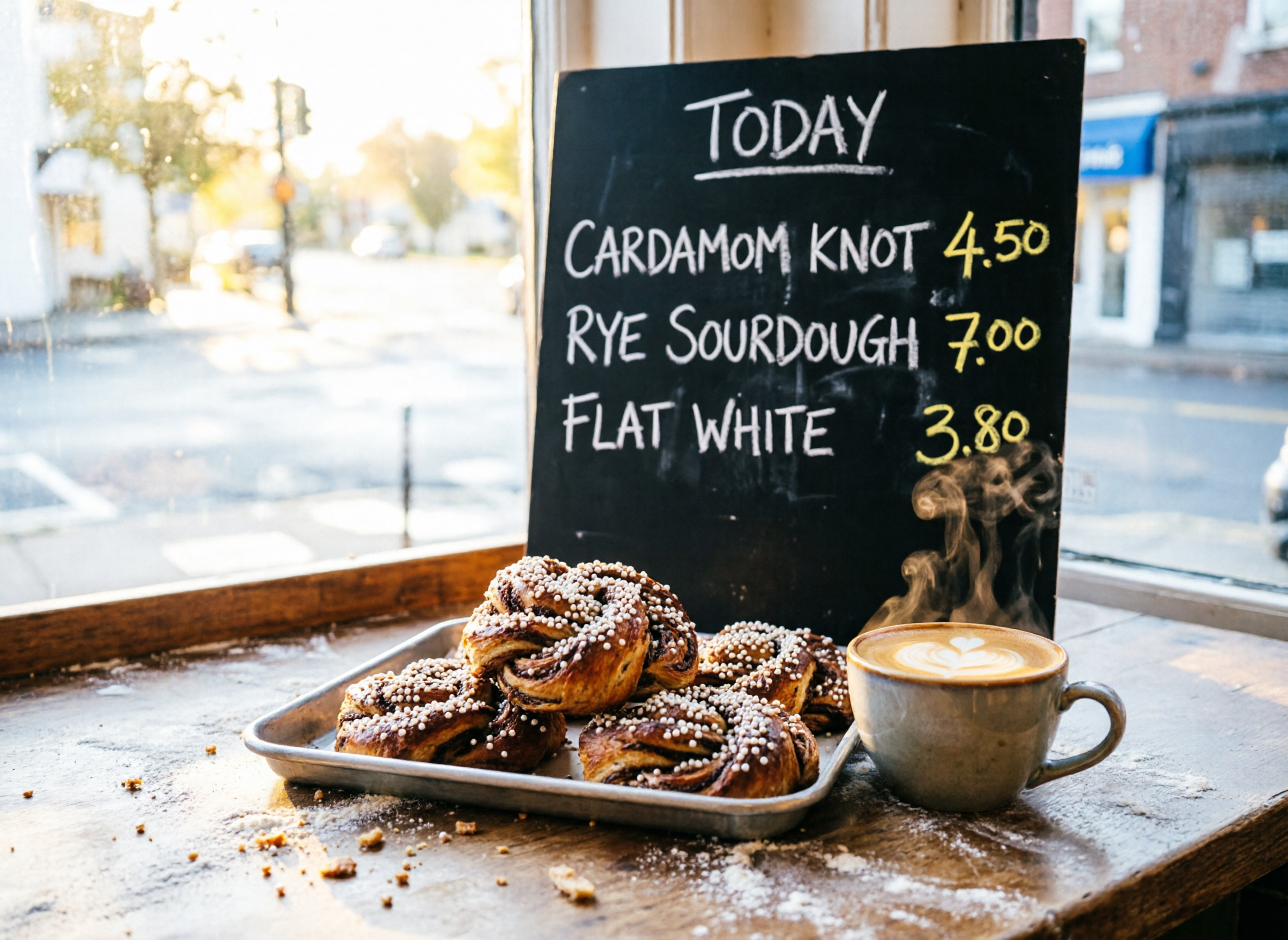
Food scene with a chalk menu, the standard model at 2368 x 1728. Every item and price on the chalkboard prints exactly, next to pearl sugar knots, a flat white with a heart in the foam and low sunrise light. Change the items and prices for your own menu board.
Photoreal morning scene inside a small corner bakery on a 35mm lens: in the foreground a tray of fresh cardamom knots glazed with pearl sugar and a ceramic cup of flat white with steam curling up, behind them a black chalkboard hand lettered in white and yellow chalk reading "TODAY" at the top, then "CARDAMOM KNOT 4.50", "RYE SOURDOUGH 7.00" and "FLAT WHITE 3.80" in neat rows, low golden sunrise light raking through the window across flour dusted wooden counters, crumbs and sugar crystals in sharp detail. The chalk lettering must be exact.
How to get exact text from Qwen Image 2.0
Deck ready slides and a finished comic page, straight from one prompt each. The same slide prompt on both tiers prints the title, chart values, axis label, bullets and page number exactly, so choose the tier by the look you want, then borrow the prompt habits below.
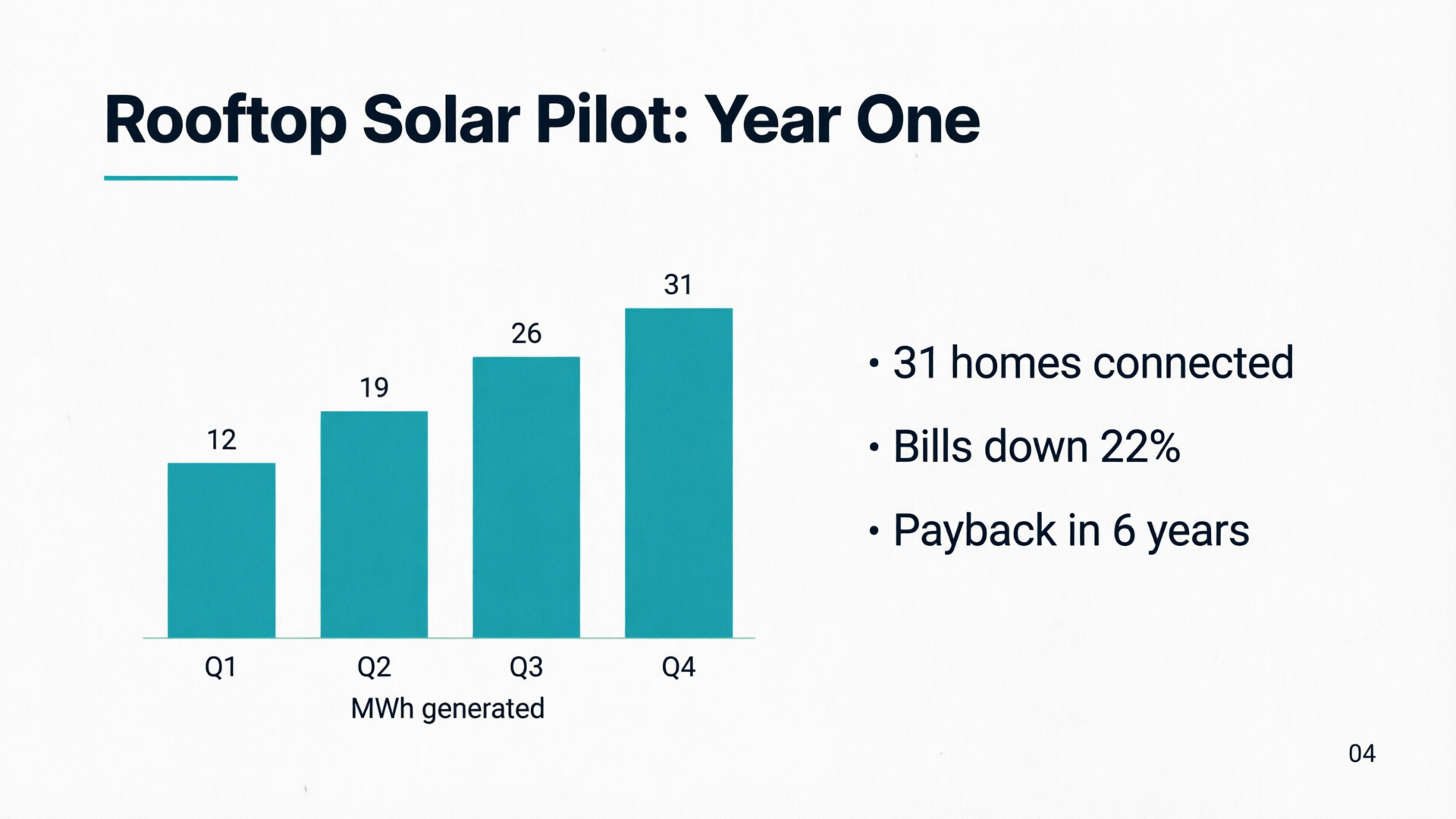
Qwen Image 2.0 at 1920 x 1080. Title, bar values, axis label, three bullets and the page number all print exactly, in a clean flat vector style ready for a deck.
A crisp 16:9 presentation slide on a white background: the title "Rooftop Solar Pilot: Year One" in bold navy sans serif at the top left with a thin teal rule beneath it, a clean bar chart on the left with four teal bars labeled "Q1", "Q2", "Q3" and "Q4" with the values "12", "19", "26" and "31" printed above them and the axis title "MWh generated", a right column with three short bullet points: "31 homes connected", "Bills down 22%", "Payback in 6 years", and a small page number "04" in the bottom right corner. Flat vector style, generous margins, the text must be exact.
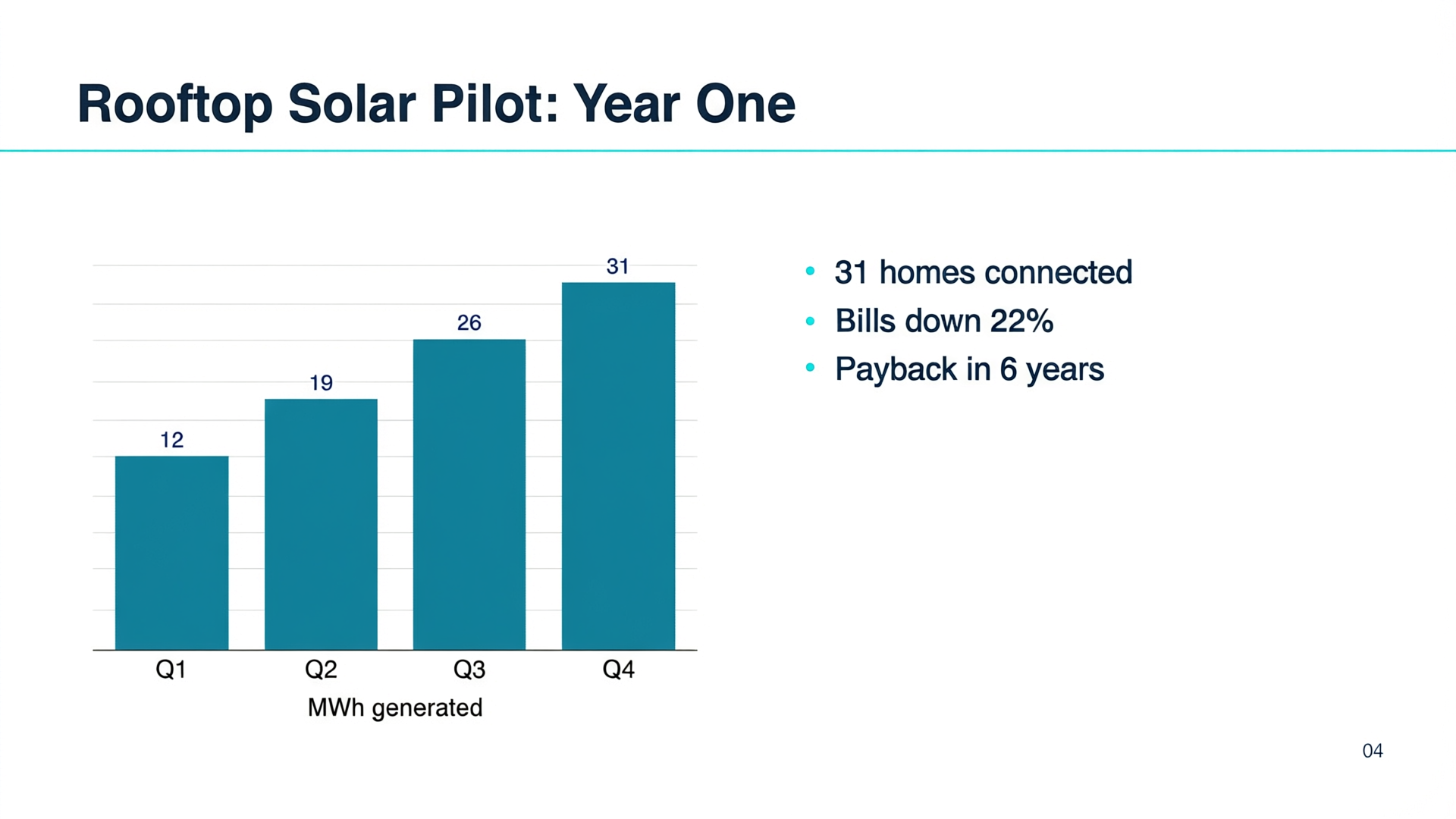
Qwen Image 2.0 Pro at 1920 x 1080. The same slide with every string exact, a full width teal rule under the title and light gridlines behind the bars.
A crisp 16:9 presentation slide on a white background: the title "Rooftop Solar Pilot: Year One" in bold navy sans serif at the top left with a thin teal rule beneath it, a clean bar chart on the left with four teal bars labeled "Q1", "Q2", "Q3" and "Q4" with the values "12", "19", "26" and "31" printed above them and the axis title "MWh generated", a right column with three short bullet points: "31 homes connected", "Bills down 22%", "Payback in 6 years", and a small page number "04" in the bottom right corner. Flat vector style, generous margins, the text must be exact.
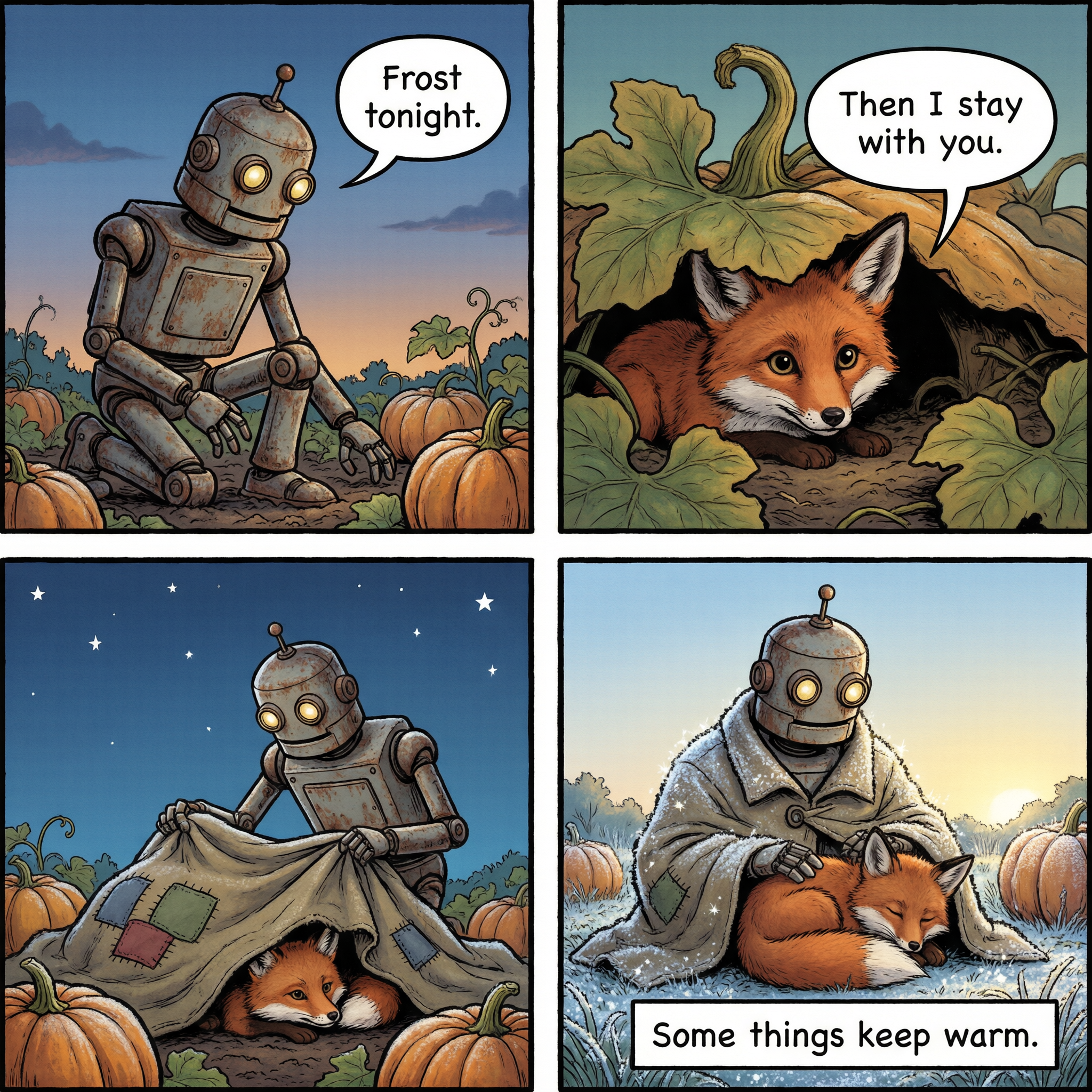
Qwen Image 2.0 Pro on the comic at 2048 x 2048. Exact lettering in every balloon and caption box, with richer inking and a frost dusted final panel.
A four panel comic page in a clean ligne claire style with flat colors and bold ink outlines, a two by two grid with white gutters. Panel 1: a rusty old garden robot with one round lamp eye kneels beside a pumpkin patch at dusk, speech bubble "Frost tonight." Panel 2: a small red fox peeks out from under a pumpkin leaf, speech bubble "Then I stay with you." Panel 3: the robot drapes its patched canvas coat over the pumpkins and the fox beneath the first stars, no dialogue. Panel 4: morning light, frost sparkling on everything except the coat, the fox asleep in the robot lap, caption box "Some things keep warm." The lettering must be exact.
- Put every word that must print in double quotes and end the prompt with a line like "The text must be exact." Every text prompt on this page does both.
- Give each line a role and a type style, like a headline in towering deco capitals and a footer in a narrow sans serif. Our poster set each line in the style we named.
- Describe text in reading order, headline first and footer last. Qwen Image 2.0 kept that order on the poster, label, menu and slides above.
- Use the standard model for layouts, comics and slides at 0.5 credits, and Pro at 1.5 credits when photographic light and texture matter most.
- Pick the size for the job. There are 21 sizes, from 1344 x 576 up to about 4 megapixels, and the price per image stays the same at every size.
- Write photo prompts like a shot list: lens, subject, one action, light and texture. The jar and portrait prompts above follow that order, so start from either one.
Qwen Image 2.0 vs Qwen Image Max on a labeled field guide
We sent the same watercolor field guide prompt, with a title and five cloud labels in quotes, to the standard Qwen Image 2.0 and to Qwen Image Max, the previous Qwen flagship. Qwen Image 2.0 spelled all five cloud names exactly and drew five distinct cloud types, for 0.5 credits against 2 credits.
Same prompt: Vintage field guide infographic poster printed on cream paper: the title "FIVE CLOUDS TO KNOW" in bold slab serif at the top, below it five numbered watercolor cloud illustrations stacked from top to bottom, each with a thin leader line to its label: "1 CIRRUS / HIGH / ICE CRYSTALS", "2 ALTOSTRATUS / MIDDLE / GREY SHEET", "3 CUMULUS / LOW / FAIR WEATHER", "4 STRATUS / LOW / FLAT FOG", "5 CUMULONIMBUS / ALL LEVELS / THUNDERSTORMS", a thin altitude scale running down the left edge, muted palette of sky blue, slate grey and ochre. The text must be exact.
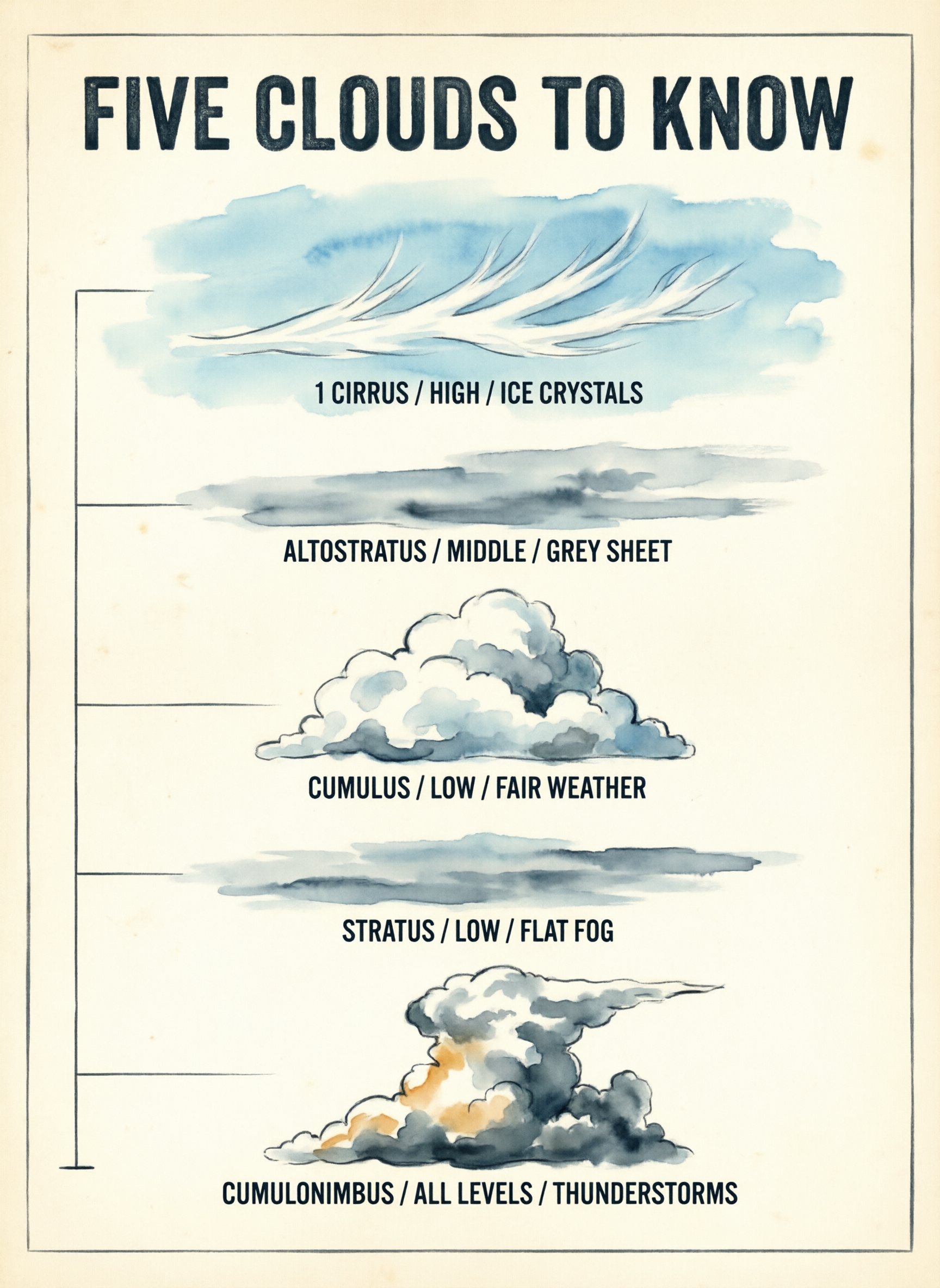 Qwen Image 2.0
Qwen Image 2.0 at 1728 x 2368. All five cloud names and their descriptions spelled exactly, from a feathery cirrus down to a towering cumulonimbus, in ink and watercolor on cream paper.
Vintage field guide infographic poster printed on cream paper: the title "FIVE CLOUDS TO KNOW" in bold slab serif at the top, below it five numbered watercolor cloud illustrations stacked from top to bottom, each with a thin leader line to its label: "1 CIRRUS / HIGH / ICE CRYSTALS", "2 ALTOSTRATUS / MIDDLE / GREY SHEET", "3 CUMULUS / LOW / FAIR WEATHER", "4 STRATUS / LOW / FLAT FOG", "5 CUMULONIMBUS / ALL LEVELS / THUNDERSTORMS", a thin altitude scale running down the left edge, muted palette of sky blue, slate grey and ochre. The text must be exact.
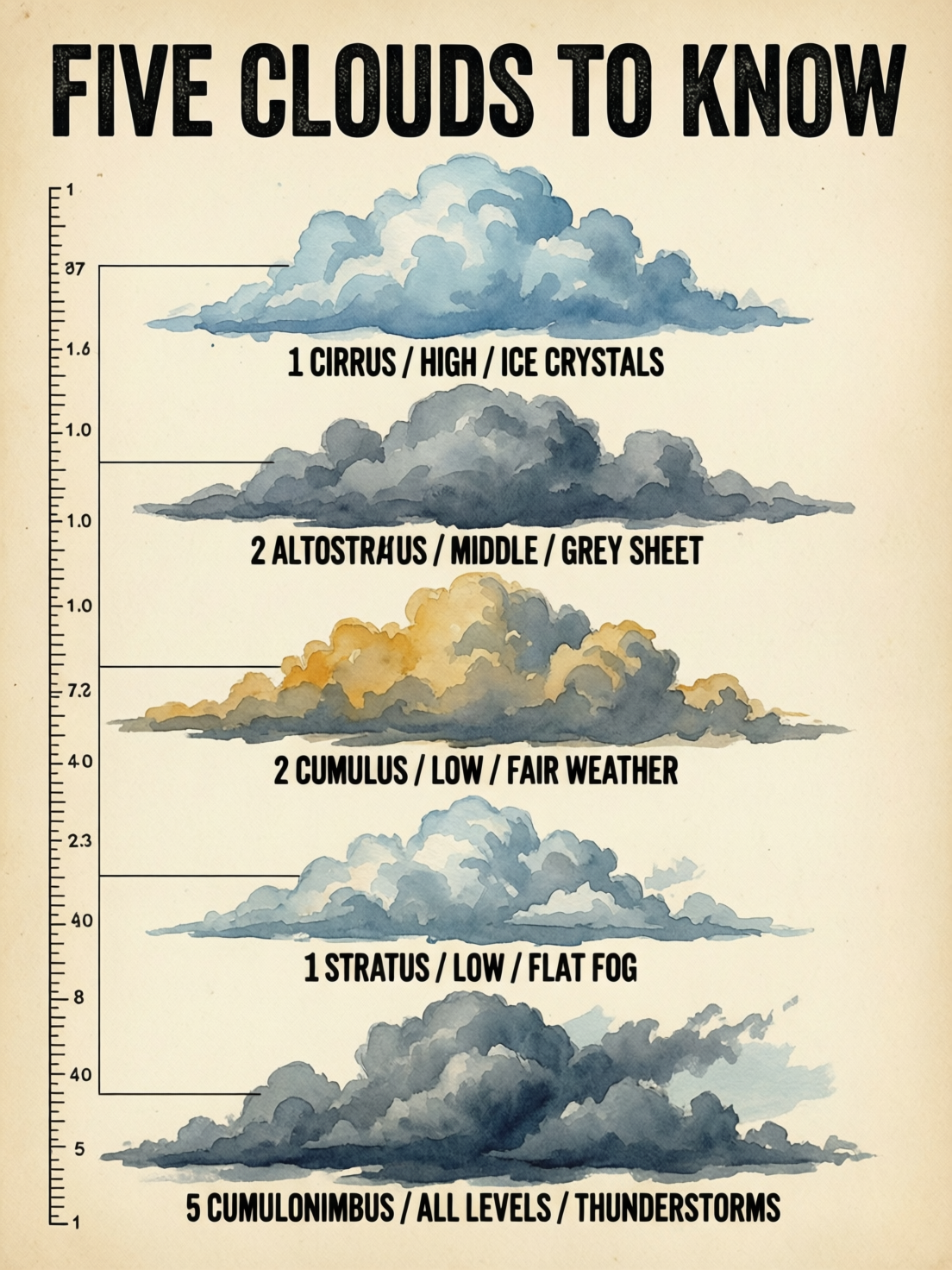 Qwen Image Max
Qwen Image Max at 3:4. Soft, full watercolor clouds under a bold black title, with a ruled scale down the left edge.
Vintage field guide infographic poster printed on cream paper: the title "FIVE CLOUDS TO KNOW" in bold slab serif at the top, below it five numbered watercolor cloud illustrations stacked from top to bottom, each with a thin leader line to its label: "1 CIRRUS / HIGH / ICE CRYSTALS", "2 ALTOSTRATUS / MIDDLE / GREY SHEET", "3 CUMULUS / LOW / FAIR WEATHER", "4 STRATUS / LOW / FLAT FOG", "5 CUMULONIMBUS / ALL LEVELS / THUNDERSTORMS", a thin altitude scale running down the left edge, muted palette of sky blue, slate grey and ochre. The text must be exact.
| Qwen Image 2.0 | Qwen Image Max | |
|---|---|---|
| Credits for this image | 0.5 | 2 |
| Labels | All five cloud names spelled exactly | Heavy black poster lettering |
| Cloud shapes | Five distinct types, from feathery cirrus to a towering thunderhead | Full, rounded watercolor clouds |
| Look | Crisp ink outlines with light washes | Soft, full watercolor washes |
What to make with Qwen Image 2.0
Posters and event flyers
Headline, tagline and footer print exactly as quoted, each in the type style you name. Our ORVANE poster sets a towering deco headline over a clean sans serif footer.
Packaging and product labels
Brand name, flavor line and net weight land on the label letter for letter, with real glass, oil and light in the shot around it.
Menus, signs and chalkboards
Items and prices print in neat rows, like the bakery chalkboard above. Change the words and prices to mock up your own board.
Comics and storyboards
Speech balloons and caption boxes print exactly across a four panel page, and the characters stay recognizable from panel to panel.
Slides and simple charts
Titles, bar values, axis labels, bullets and page numbers print exactly on a 16:9 slide, ready to drop into a deck.
Portraits and product photos on Pro
Pro renders pores, fine lines and ruby light through glass, for campaign images that hold up at full size.
Edits from your own images
Attach 1 to 3 reference images and describe the change, on either tier, at the same price per image as a new image.
Qwen Image 2.0 pricing: included in every plan
Qwen Image 2.0 is included in every Pixel Dojo plan, from $10/month, and credits roll over while you are subscribed. The standard Qwen Image 2.0 is 0.5 credits per image and Qwen Image 2.0 Pro is 1.5 credits per image, at any of the 21 sizes.
Editing with reference images costs the same per image as generating, and every extra image in a request costs the same too.
Qwen Image 2.0 questions
What is Qwen Image 2.0?
Qwen Image 2.0 is Alibaba's image generation model, known for printing exact text inside images. On Pixel Dojo it comes in two tiers on one tool page, the standard model and Qwen Image 2.0 Pro, plus an edit mode for your own reference images.
Is Qwen Image 2.0 good at text in images?
Yes, it is its standout strength. Every quoted line on our travel poster, jar label, four panel comic, chalkboard menu and presentation slide printed exactly, on both tiers. Put each string in double quotes, name its type style and end the prompt with "The text must be exact."
Can I use Qwen Image 2.0 images commercially?
Yes. You own what you make, on every plan.
Is Qwen Image 2.0 free?
A free account gets 3 free effects every day to try Pixel Dojo. Qwen Image 2.0 is included in every plan from $10/month, and credits roll over while you are subscribed. The standard model is 0.5 credits per image and Pro is 1.5 credits, at any size.
What is the difference between Qwen Image 2.0 and Qwen Image 2.0 Pro?
They share one tool, the same 21 sizes and the same prompt format. Pro, at 1.5 credits per image, brings richer photographic light and texture to product shots, portraits and posters. The standard model, at 0.5 credits, spells text just as well and is the everyday pick for layouts, comics and slides.
What resolution does Qwen Image 2.0 make?
Pixel Dojo offers 21 sizes, from 1344 x 576 up to about 4 megapixels, like 2048 x 2048, 2368 x 1728 and 2688 x 1536. The price is the same at every size.
Can Qwen Image 2.0 edit images?
Yes. The Qwen Image 2.0 tool has an edit mode: attach 1 to 3 reference images and describe the change, on either tier, at the same price per image.
Make your first Qwen Image 2.0 image
Write a prompt above or start from any example on this page. One plan covers every top model, six studios and Sensei, and your credits roll over.
Start with Qwen Image 2.0