PixelDojo vs Krea
PixelDojo vs Krea: one brand, from product still to animated shots
Pixel Dojo is the pick when you want every price shown first, a real refund window and tools that carry a whole project to the finish.
We read Krea's pricing page, home page and Trustpilot reviews on October 16, 2026. Then we did what a small brand does: one product still, animated, then a second shot, then the extras. Here is how the two compare.
30 credits ($1.88) per 5 s clip at 720p with audio. Included in every plan, from $10/month.
Already a member? Sign in
By Brian Lovett · Updated
The rest of the tea brand, made on Pixel Dojo
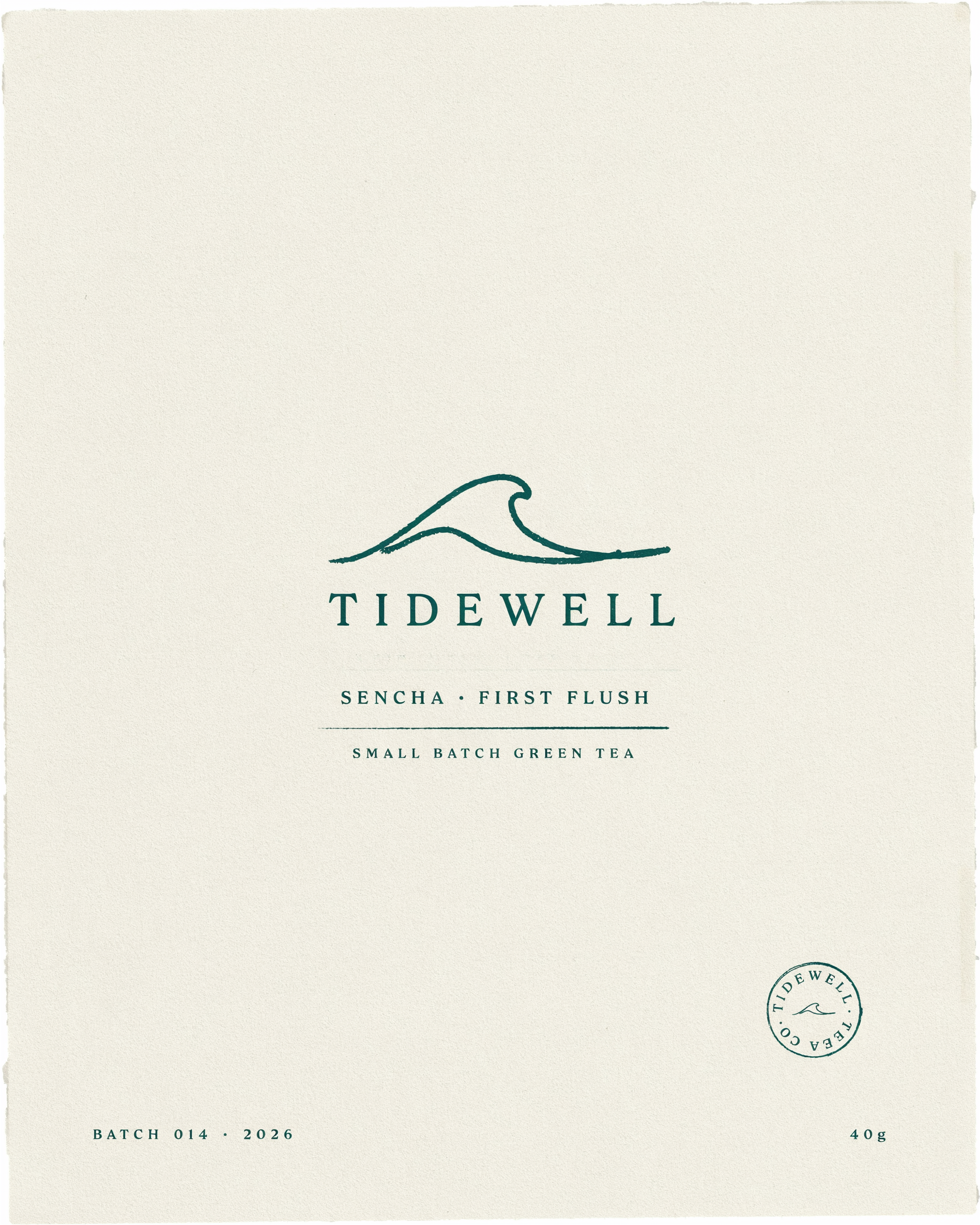
The brand name and flavor line came out spelled as typed on Ideogram 4.5. Small print on the label is decoration, so we never rely on it.
Packaging label for a small batch green tea brand named "TIDEWELL", a simple hand drawn wave above the name, the words "SENCHA, FIRST FLUSH" underneath, cream paper with deep teal ink, minimal flat front view.

A documentary style origin story image on FLUX 3 Image, the kind of shot a brand site opens with.
Photograph of terraced tea bushes on a misty hillside at sunrise, a woman in her thirties in a straw hat picking leaves in the foreground, soft golden light through haze, 50mm lens, documentary feel.

GPT Image 2.5 laid out the title, four numbered steps and a small illustration for each.
Clean editorial infographic poster titled "HOW TO STEEP SENCHA" with four numbered steps: HEAT, MEASURE, STEEP, SIP, each with a simple flat illustration and one short caption, sage green and cream palette, generous white space.
A 4 second macro pour on Veo 3.1 Fast with the sound of the pour. Good for a product page loop.
Close macro shot of steam curling off a freshly poured cup of green tea on a wooden table, a stream of tea settling into the cup, soft side light, a quiet pour and a faint kitchen hum.
The common take on Krea, and where we disagree
The common take is that Krea is the creative tool for people who want to play: sketch on a realtime canvas, wire a node editor, train a LoRA. Krea's home page lists an Agent, Moodboards, Train LoRA, a Node Editor, Realtime, Edit, an Enhancer, an API and apps.
Our take is different. Most people who pay for a generator are not exploring, they are finishing something: a brand, an ad, a short film. For that job the useful questions are plainer. What will this generation cost? What happens if I change my mind? How many tools do I need to open to get from one picture to a finished set?
Krea plans vs Pixel Dojo
Krea figures from its pricing page and home page, read October 16, 2026, at monthly billing.
| At a glance | Krea | Pixel Dojo |
|---|---|---|
| Paid plans | Basic $9, Pro $35, Max $105, Business $200 a month | Lite $10, Pro $25, Pro Max $50 a month |
| How usage is counted | Compute units; the pricing page shows two different counts for the same plan (Nano Banana 2 on Basic: 64 on the plan card, about 112 in the comparison table) | Credits, with the price of every model shown on its page before you generate |
| Unused allowance | Basic, Pro and Max units do not roll over; compute packs are valid 90 days | Your credits never expire as long as you have a subscription |
| Refund policy | No refund policy on the pricing page | 7 days on a first purchase, in full if under 20% of the credits are used and pro-rated after that |
| Free use | Free plan with 100 compute units a day | 3 one click video effects a day with no plan, watermarked |
| AI agent | Krea Agent | Sensei plans a project, prices it and waits for your approval of the budget |
| Custom training | LoRA training on every plan, 50 images up to Pro and 2,000 on Max | LoRA trainers for FLUX, Qwen, WAN and Z-Image |
| API | API listed on the home page | Public API with docs generated from each model, credit packs from $5 |
| Whole film editing | Not in Krea's navigation | Film Studio: script, cast, storyboard, clips and a whole film editor pass |
| Product ad videos | Not in Krea's navigation | Marketing Studio: store URL or product photos in, video ad with voiceover out |
One small tea brand, from product still to two animated shots
We invented a tea brand and built its launch kit. Step one: a product still on Nano Banana 2.1. Step two: animate it with Seedance 2.5, using the still as the first frame. Step three: ask for the same tin in a new kitchen scene, then animate that too.

Product photograph of a matte sage green ceramic tea tin with a bamboo lid and a plain unmarked body, standing on a pale oak table beside a small white cup of steaming green tea and two loose tea leaves, soft window light from the left, shallow depth of field, clean commercial still.
Slow push in on the sage green tea tin as a hand lifts the bamboo lid and a curl of steam rises from the cup beside it, soft window light shifts across the oak table, a gentle lid click and a quiet room tone.

Use the reference image as the product reference: keep the same matte sage green ceramic tin with the bamboo lid. Now it sits on a floating oak shelf in a bright kitchen beside a small potted fern and a stack of white bowls, morning light, clean commercial still, plain unmarked tin.
Slow dolly toward the green tin on the shelf as morning light brightens, the fern leaves sway gently in a breeze from the open window, a faint rustle of leaves and a soft bird call outside.
- The tin kept its sage green body, bamboo lid and plain surface from the first still to the second scene, with no training step in between.
- Seedance 2.5 started from the still exactly as framed, then added the hand, the lid lift and the steam, with the sound of the lid in the track.
- The second shot moved gently: a slow push in with the fern leaves swaying and a soft bird call, easy to cut after the first.
- The still cost 1.5 credits and each 5 second clip 30 credits, and those prices were on the model pages before we pressed generate.
What a Pixel Dojo plan carries to the finish
Sensei, the AI director
Describe a project and Sensei plans it, prices it, waits for your approval and reviews every take inside the budget you approved.
Six studios
Film Studio with a whole film editor cut, Marketing Studio for product video ads, Video Studio to change or extend a clip, Character Studio with @mentions in any prompt, Faceless Studio for narrated videos and Prompt Studio to shape a prompt before you spend.
300+ video effects, 45+ photo effects, 35 one job tools
One click looks and quick fixes, with 3 free every day.
LoRA training
Train your own FLUX, Qwen, WAN or Z-Image LoRA and use it next to every other model.
API and MCP
A public API with docs generated from each model, credit packs from $5, and a hosted MCP server for AI assistants.
Credits that keep
Your credits never expire as long as you have a subscription.
Unlimited Relax mode
Subscribers get unlimited Relax runs on Qwen Image 2.1, FLUX 3 Image Klein, MiniMax H3 Turbo and every video and photo effect, with no credits.
Genre presets
Start Film Studio, Faceless Studio or Sensei from a genre, such as a micro drama, a movie trailer or an explainer, and the format, look and pacing are set for you.
Character Swap
Upload a short clip, pick a saved character or a photo, and Character Swap puts your star in the lead while the scene, camera moves and sound stay the same.
What reviewers on Trustpilot say about Krea
On October 16, 2026 Krea showed a TrustScore of 3.6 from 167 reviews on Trustpilot: 49% gave five stars and 33% gave one star.
Reviewers in the one and two star group describe a few recurring problems: difficulty finding how to cancel, charges after cancelling, sign up offers that change, and compute units spent on failed retries. These are reviewers' claims, and we cannot verify any single account. We mention them because they are the questions to ask before paying anywhere: how do I cancel, what can I get back, and what does one generation cost.
What Pixel Dojo costs and what you can get back
Plans are Lite $10 a month for 160 credits, Pro $25 for 500 credits, Pro Max $50 for 1,100 credits. Commercial use is included on every plan.
Under our refund policy, a first purchase can be refunded within 7 days, in full if under 20% of the credits are used and pro-rated after that.
Your credits never expire as long as you have a subscription, and every model page shows its credit price before you generate.
Krea questions
Is PixelDojo better than Krea?
Yes, for finished projects: every price is shown before you generate, a first purchase has a 7 day pro-rated refund window, and Film Studio, Marketing Studio, Character Studio and Sensei carry a project end to end.
How does Krea pricing work?
Krea sells compute units: Basic $9 for 5,000, Pro $35 for 20,000, Max $105 for 60,000 and Business $200 for 80,000 a month, plus a free plan with 100 a day. Its pricing page gives two different image counts for the same plan, so check what a generation costs before relying on a number.
Does Krea have a refund policy?
Krea's pricing page does not list a refund policy. Pixel Dojo refunds a first purchase within 7 days, in full if under 20% of the credits are used and pro-rated after that.
Does Krea have an agent, LoRA training and an API?
Yes. Krea lists an Agent, LoRA training on every plan and an API. Pixel Dojo has Sensei, LoRA trainers for FLUX, Qwen, WAN and Z-Image, and a public API with credit packs from $5.
What do Krea reviewers say?
Krea showed 3.6 on Trustpilot from 167 reviews on October 16, 2026. Reviewers who gave one or two stars describe trouble cancelling, charges after cancelling and compute units used by failed retries.
Video Effects New
Your first video is free. One photo, one click.
310 ready-made effects, from AI Hug and Earth Zoom In to product spins and listing walkthroughs. Upload a photo and press Generate. No prompt to write, and a free account gets 3 a day.






Switch from Krea to Pixel Dojo today
Write a prompt above or start from any example on this page. One plan covers every top model, six studios and Sensei, and your credits roll over.
Start with Seedance 2.5Sources
Facts about Krea come from these public pages, checked on Oct 16, 2026. Prices and plans change; check the source before you buy.