AI video effect · Transform
Old Photo Animation: bring an old photo to life
Upload a photo, press Generate, and post it anywhere.
3 free every day. No card needed.
What Old Photo Animation does
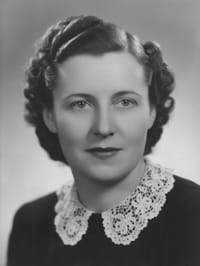
The portrait stays exactly as it was printed, grain and tone included, while the person in it comes to life. They close their eyes in a slow blink, then their expression warms into a soft smile as the clip ends.
Bring an old photo to life
Old portraits come alive with a gentle smile, a blink and a turn of the head, keeping the original look of the photo. Scanned or phone-captured prints both work.
Still looks like you
The video opens on your exact photo, so the face, hair, outfit and surroundings carry through the whole effect.
A full transformation in one shot
The change happens on camera in one continuous take, so viewers see the before and the after in the same clip.
How to make an Old Photo Animation video
- Upload a photo, or pick one from your library.
- Press Generate. There is no prompt to write; the effect is already set up.
- Your 5 second HD video plays right on the page. Save it to your library or download it.
Tips for the best photo
- Scan the print flat or photograph it straight on so the face is not distorted.
- Crop out the frame, album page or tape so only the portrait remains.
- Close up portraits of one adult give the most natural blink and smile.
Ideas for using it
- Families bringing a grandparent's portrait to life for a memorial or birthday.
- Genealogy hobbyists adding motion to a family tree presentation.
- Local history groups sharing animated portraits from their archives.
More effects

Go further
Old Photo Animation FAQ
Will it add color to my black and white photo?
No. The effect keeps the original tone and grain, so a black and white print stays black and white.
Can I use a damaged or faded photo?
Yes. Small scratches and fading are fine, and the cleanest copy you have gives the smoothest motion.
Do I need to write a prompt for Old Photo Animation?
No. Old Photo Animation is a ready-made effect: upload a photo and press Generate. The directions for the motion, camera and lighting are already built in.
How long is the Old Photo Animation video?
Every effect makes a 5 second HD video that matches the shape of your photo, portrait or landscape, ready to post anywhere.
Does the video have sound?
Yes. Each clip comes with matching ambient sound effects. It does not add music, so you can lay your own track over it in any editor.
Can I use a photo of someone else?
Only photos of adults, of yourself or of people who agreed to it. Every upload goes through the same safety checks as the rest of PixelDojo.