Kling 4.0 プロンプトガイド

Kling 4.0に指示する
ショットリストのように

Kling 4.0 プロンプトガイド。指示書に忠実なKling 4.0なら、最大30秒の時間指定、セリフ、読める看板、サウンドトラックまで、1回で生成できます。その指示書の書き方を、実際に稼働中のモデルで生成した作例とともに解説します。

概要

プロンプトは1行でも機能します。Kling 4.0がショットも音も補います。細かな指示書を渡せば、そのとおりに再現します。ここが、このモデルの強みです。時間範囲、カメラ指示、引用符で囲んだセリフ、音声セクションを読み取り、カットが変わってもキャラクター、商品、看板の一貫性を保ちます。

最大30秒

1回の生成で、シーン全体を作れます。時間指定のショットリストでハードカットを入れることも、途切れないワンカットにすることもできます。

9言語のセリフに対応

引用符で囲んだセリフは、指定したアクセントと話し方で、一語一句そのまま読み上げられます。

読みやすさを保つ文字

看板、ラベル、タイトルは表記を保ち、カメラが動いても配置された面に固定されます。

役割を持たせた入力素材

開始・終了フレーム、最大10枚の参照画像、参照動画、または編集する既存のクリップを使えます。

プロンプトの構成

3つのパートを順番に書きます。設定では変わらない要素を固定し、ビートでは各アクションのタイミングを指定し、音声セクションでは音声トラックを説明します。

1. 設定

場所、時間帯、光の方向、表面の質感、色。形容詞は、カメラに映る具体的な要素に置き換えます。「上質」なら、光や素材でどう表すかまで指定します。

2. 時間ごとの展開

「3-7 s」のように秒数で区切り、各区間に収まる動作を1つずつ指定します。カメラの動き、高さ、速度と、最後に収める構図も記述します。

3. 音声

音声のオン・オフ切り替えはないため、環境音、効果音、声など、入れたい音を記述します。BGMや字幕が不要なら、入れないことを明記します。

試行は低コストで

シード値はありません。生成のたびに新しいテイクになります。720pで試し、採用するテイクを1080pで仕上げます。

指示書テンプレート

設定、時間ごとの動き、音声。時間範囲の合計を動画の長さに合わせます。

[Location, time of day, light, color, what stays constant.] 0-[a] s: [framing] [one action], camera [move, height, speed]. [a]-[b] s: [framing] [one action]. [b]-[end] s: [framing] [one action], ending on [what to hold]. Audio: [ambience], [effects], [voices], no background music, no subtitles.

生成した動画

以下のクリップはすべて、掲載したプロンプトからPixel Dojoで生成した最初のテイクです。音声をオンにして再生してください。

3ショットのCM

設定、時間付きショット、サウンドトラックの順に

10 s · 1080p · 16:9

Sunrise on a rocky mountain ridge, natural color, low warm side light, light mist in the valley below. Shot 1, 0-3 s: ground-level close-up as a trail shoe lands on wet granite and kicks up droplets. Shot 2, 3-7 s: the camera tracks alongside a runner in a red windbreaker climbing the ridge at shoulder height, matching her pace. Shot 3, 7-10 s: wide shot from behind as she reaches the summit and stops, mist rolling below. Hard cuts between shots. Same runner, same red windbreaker in every shot. Audio: shoes crunching on gravel, steady breathing, light wind, no dialogue, no background music, no subtitles.

時間範囲の合計を動画全体の長さに合わせ、各ショットには動作を1つと、そのショット専用の構図を指定します。最後の行で、残す音と入れない音を明記します。
セリフを1行

セリフは引用符で囲み、声も指定

10 s · 1080p · 16:9

A small cafe at night, rain streaking the front window, warm tungsten pendant lights, empty tables. 0-4 s: slow push in on a barista in her thirties with a short dark bob and a green apron, wiping down the espresso machine. 4-10 s: she looks up toward the door, smiles, and says in warm, relaxed American English: "Last order of the night. What can I get you?" Audio: rain on the glass, a low espresso machine hiss, her clear close voice, no background music, no subtitles.

引用符で囲んだ言葉が、そのままセリフになります。セリフ専用の時間枠を設け、同じ文の中で話し方も指定します。

ワンカット

時間範囲はカットではなくカメラ位置で指定

10 s · 1080p · 16:9

One continuous gimbal shot with no cuts, walking pace, through a Victorian glass greenhouse in the morning. 0-3 s: the camera passes through an open iron door into humid air and hanging ferns. 3-7 s: it glides down a brick path between giant lily pads in a central pool, light rays cutting through the condensation. 7-10 s: it rises slowly and settles on a single white orchid in sharp focus, background soft. Audio: dripping water, distant birds, soft footsteps on brick, no music, no subtitles.

複数ショットは初期設定でオンです。「ワンカット、カット切り替えなし」と指定するとオフになり、各時間帯の指示は、その時点のカメラ位置を示すものになります。

動かないテキスト

表記を正確に指定し、面に固定

10 s · 1080p · 16:9

A wet alley in Tokyo at night. A pink neon sign on a brick wall reads exactly "OPEN ALL NIGHT" in bold block letters. The camera dollies slowly right past puddles reflecting the sign, and the lettering stays fixed to the wall and fully legible the whole time. A cook in a white cap steps out of a side door and lights a paper lantern. Audio: buzzing neon, rain dripping from gutters, distant traffic, no music, no subtitles.

テキストは短く、引用符で囲み、表示位置と、カメラが動いても固定することを指定します。長いコピーは後から編集で加えます。

2人が交互に話す

声は1人ずつ、それぞれ明確に

10 s · 1080p · 16:9

Two old friends sit facing each other on a night train, city lights streaking past the window. Medium two-shot, steady camera. They take turns, only one person speaks at a time, and each voice is distinct. 0-4 s: the man on the left, sixties, grey beard, says in a low, dry British voice: "You kept the ticket. After all these years." 4-9 s: the woman on the right, sixties, silver curls, laughs softly and answers in a bright American voice: "Of course I did. You still owe me the trip." Audio: rhythmic train wheels, their two voices, no music, no subtitles.

各話者の位置を決め、セリフごとに発話する時間帯を割り当て、交互に話すことを明記します。声の重なりや混同を防げます。

縦型トーク広告

9:16 with a spoken pitch

10 s · 1080p · 9:16

Vertical selfie video. A woman in her late twenties with curly auburn hair holds her phone at arm's length in a bright packing studio, shelves of small amber glass bottles behind her. She holds up one bottle to the lens and says in warm, natural American English at a relaxed pace: "We pack every order by hand. This one is going to Portland." She smiles at the end. Audio: her clear close voice, quiet room tone, no music, no subtitles.

短い文なら、2文で8-10秒に無理なく収まります。長い台本では、同じクリップに言葉を詰め込まず、動画の長さを延ばしてください。

参照写真からキャストを指定

人物ごとにポートレートを1枚、画像ごとに役割を1つ

5 s · 1080p · 参照画像3枚
@Image1
@Image1
@Image2
@Image2
@Image3
@Image3

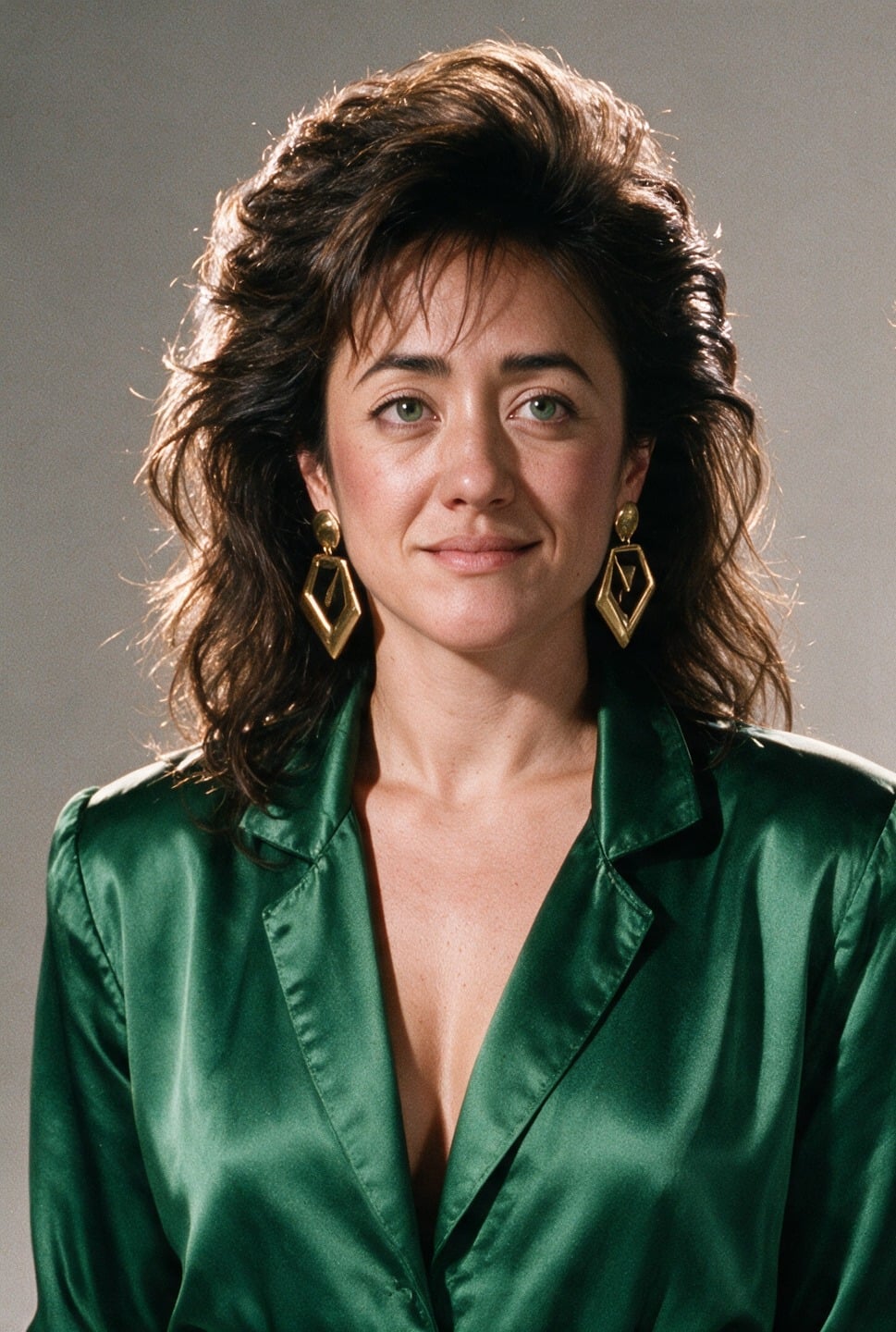
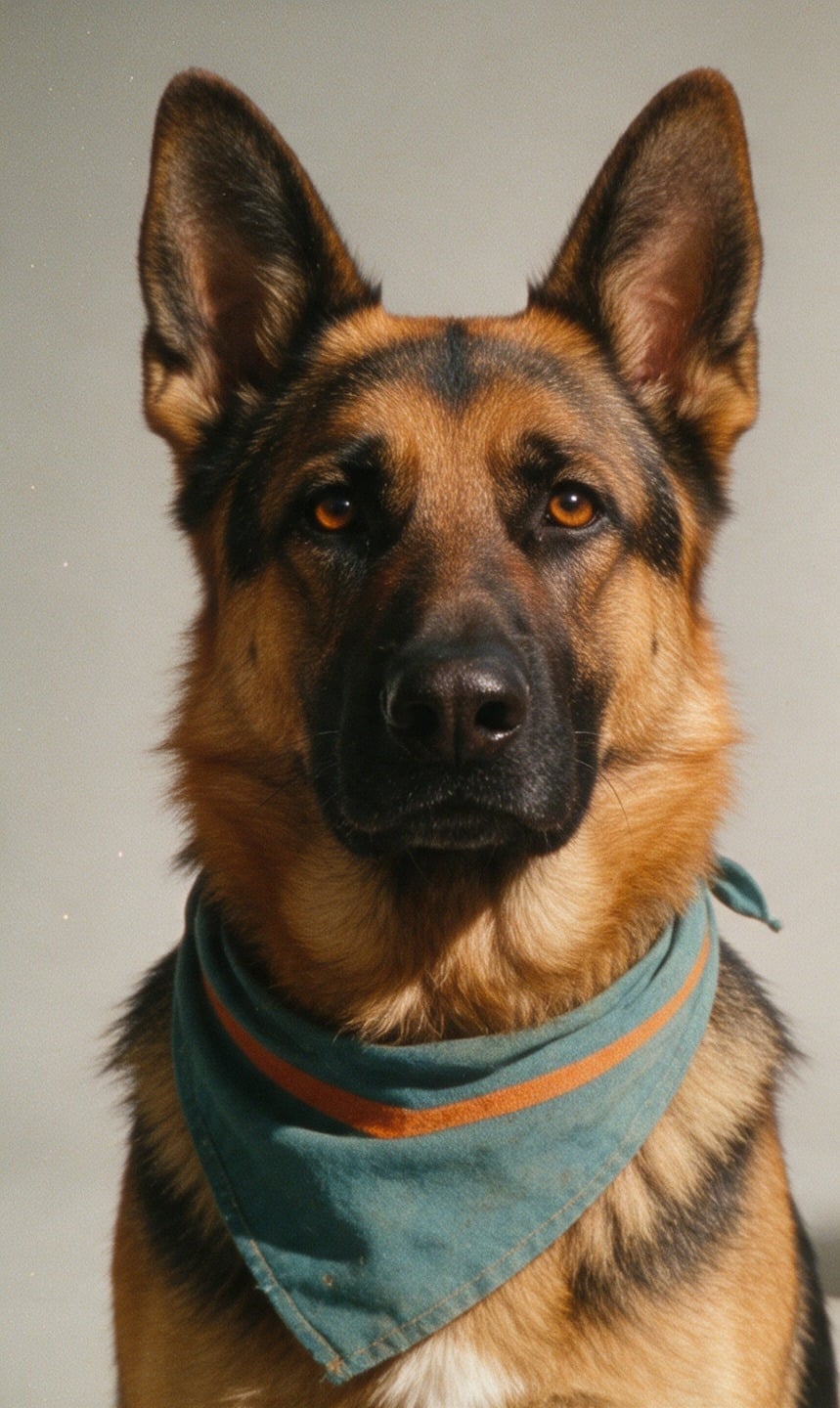
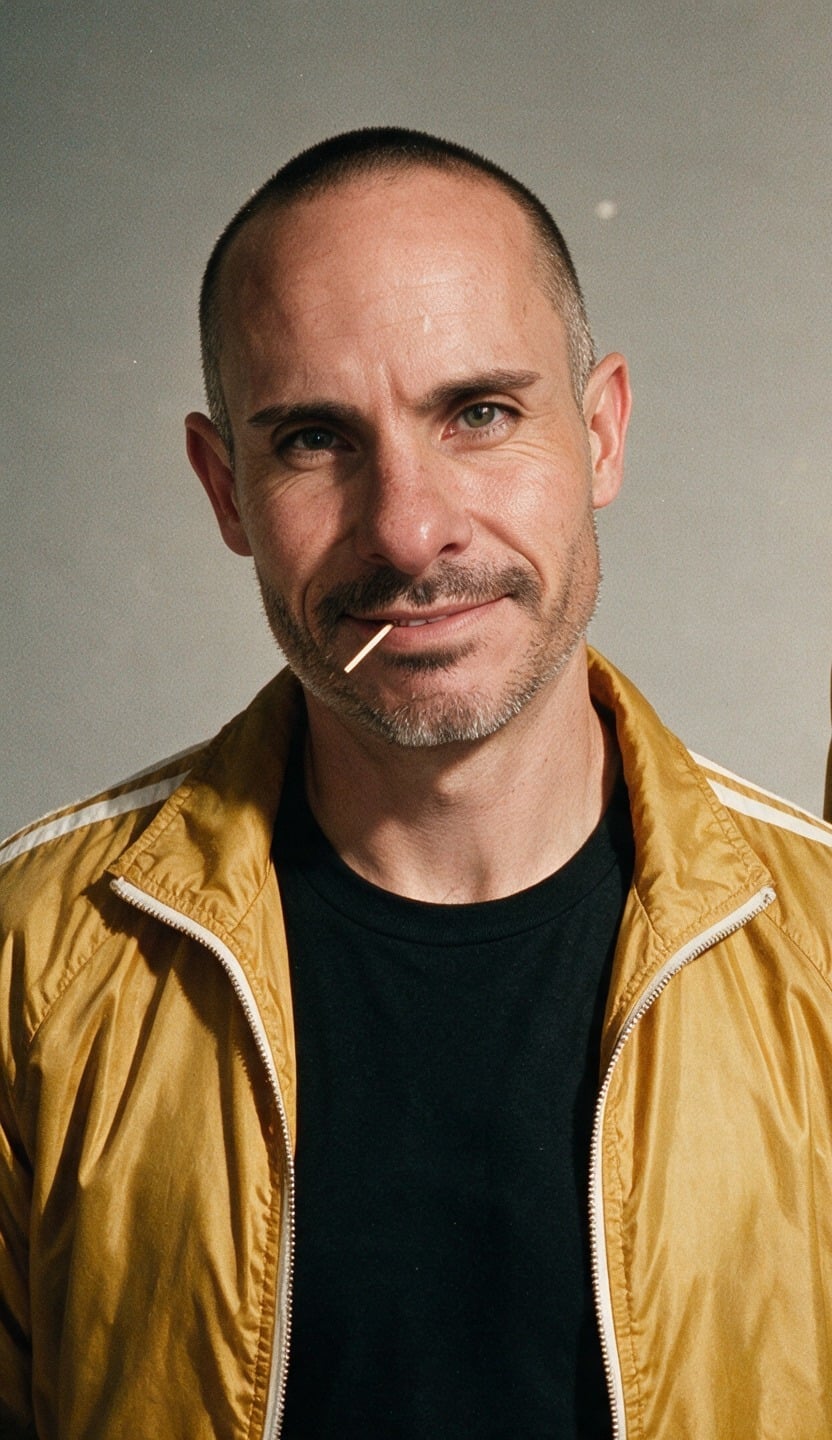
@Image1 is Brian: keep his face, shaved head, toothpick and mustard-yellow racing jacket over a black tee. @Image2 is Pamela: keep her face, dark curly hair and emerald-green jumpsuit. @Image3 is Circe, the German Shepherd: keep her markings. Sunny 1980s seaside boardwalk, 16:9 widescreen, warm saturated film look with light grain. Brian and Pamela walk toward the camera side by side with Circe trotting between them; behind them a giant three-headed blue inflatable dragon looms over the pier and puffs orange smoke. Slow backward tracking shot at chest height. Same faces in every frame. Audio: gulls, boardwalk crowd, no music, no subtitles.

参照画像ごとに、誰なのか、何を維持するのかを1文で記述します。Pixel Dojoでは、@Image1がモデル専用の画像タグに自動変換されます。

ショットリストと長回し

ショットに番号を振る

「ショット1、0-5 s:マクロのクローズアップで…」のように指定します。各ショットの動作は1つに絞り、構図も変えて、カットごとに新しい画を見せます。

最後まで尺を埋める

時間指定が動画の最後まで届いていないと、空いた尺に指定していないショットが追加されます。

ショットのつなぎ方を指定

「ハードカット」と書けばカットが入ります。「ワンカット、カットなし」と書けば入りません。

変えない要素を明記

最後に「全ショットで同じランナー、同じジャケット」と添えます。別々に生成する場合は、参照素材で統一します。

セリフと画面内テキスト

セリフは引用符で正確に

話者を役割や位置で指定し、次にセリフを引用符で囲み、最後に年齢、声のトーン、話す速さ、アクセントを記述します。

セリフを尺に合わせる

8秒のクリップに入るのは、短いセリフで1〜2文です。長いクリップに短いセリフを指定すると、勝手な言葉で尺が埋められます。

発話は1人ずつ

話者が2人いる場合は、各セリフに時間枠を設け、交互に話すことと、声を明確に区別することを指定します。

文字は正確に指定

表示する文字を引用符で囲み、配置場所を指定します。カメラが動く場合は、その面に固定するよう伝えます。文字は短くまとめます。

セリフ用テンプレート

話者は1人、セリフは1行。話し方も同じ文で指定します。

[Setting and light.] [Framing] of [speaker: age, look]. 0-[a] s: [action before the line]. [a]-[end] s: [speaker] says in [language, accent, tone, pace]: "[line]" Audio: [ambience], their clear voice, no background music, no subtitles.

フレームと参照素材

開始フレーム、終了フレーム、参照画像を合わせて最大10枚です。@Image1、@Image2のように指定します。番号はフレームが先、参照画像が後で、それぞれ追加した順に割り当てられます。

開始・終了フレーム

開始フレームで冒頭の画像とアスペクト比を決めます。終了フレームも追加し、そこへ至るまでにシーンがどう変化するかを記述します。

参照素材ごとに役割を指定

画像ごとに1文で、誰・何が写っているかと、維持したい要素を指定します。顔、服装、ラベル、レイアウトなどです。役割を指定しない画像は、モデルが推測して使います。

シンプルな参照素材

背景はシンプルに、光は均一に。人物は1人につき1枚のポートレートを用意し、顔を一貫させるよう指定します。

参照動画

最大5本のクリップ、合計30 sを使い、一連の動作、カメラの移動経路、広告の構成を、新しい人物や場所に引き継げます。動画入力の料金で課金されます。

クリップの編集

Clipタイルにクリップをドロップすると、ショットを維持したまま、プロンプトで映像内の要素を変更できます。出力のアスペクト比と長さは元のクリップと同じです。

冒頭に「Edit @Video1」

この指定で元の映像を維持します。続けて変更点を1つ示し、維持する要素を列挙します。「ほかはすべてそのまま」だけでは、要素を1つずつ挙げるより指示が弱くなります。

商品を差し替える

差し替える新しい商品を参照画像として添付し、何と置き換えるかを指定します。手の動きとタイミングは元動画を引き継ぎます。

被写体を追加・削除

画面内の何に対してどこに配置するかを指定します。削除する場合は、その背後の空間を何で埋めるかも記述します。

スタイルを変更

目指す見た目を具体的に記述します。元動画が実写ならフォトリアルな表現を除外し、被写体の動きとカメラワークは変えないよう指定します。

編集用テンプレート

映像はそのまま、変更は1つ。維持する要素も指定します。

Edit @Video1: replace [what] with [new thing, or @Image1]. Keep [the person, their hands, the camera move, the lighting, the background] unchanged. Audio: keep the original room tone.

パラメータ

設定項目値補足
長さ3-30 s整数秒単位です。編集するクリップがある場合は、そのクリップの長さになります。
解像度720p, 1080p720pで試し、1080pで仕上げます。
アスペクト比16:9, 9:16, 1:1, 21:9テキストのみで生成するクリップに適用されます。フレームやクリップを使う場合は、素材のアスペクト比が適用されます。
画像最大10開始フレーム、終了フレーム、参照素材を組み合わせます。
動画最大5本、合計30 s編集するクリップと参照動画。
音声常にオンプロンプトで指定します。

よくある質問

3秒から30秒まで、整数の秒数で指定できます。解像度は720pまたは1080pです。長いクリップは、ワンカットを指定しない限り、自動で複数のショットに分割されます。