EaseMate AI 替代方案
EaseMate AI 替代方案:影片、圖片各有最佳選擇
Pixel Dojo 集結 Seedance 2.5、Kling 3.0、Veo 3.1、WAN 3.0 與頂尖圖片模型,生成前就看得到每筆點數費用,第一段影片完成後,後續創作工具也都備齊。
正在找 EaseMate AI 替代方案?EaseMate AI 將聊天、學習工具、PDF 與影音生成包在同一份訂閱裡。如果你主要用來製作影音,這份清單就是為你準備的:我們用同一份需求實測四款影片引擎,再依任務挑出表現最好的模型。
36 credits ($2.25) 所有方案皆包含,每月 US$10 起。
已經是會員? 登入
作者 Brian Lovett · 更新於
為什麼先看影片,不先列功能
EaseMate AI 列出的許多影片引擎,我們也有提供,包括 Seedance 2.5、Kling 3.0、Veo 3.1、WAN 3.0 與 MiniMax H3。但光看模型名稱,無法知道該用哪一款,所以我們拿同一份需求,實測其中四款。
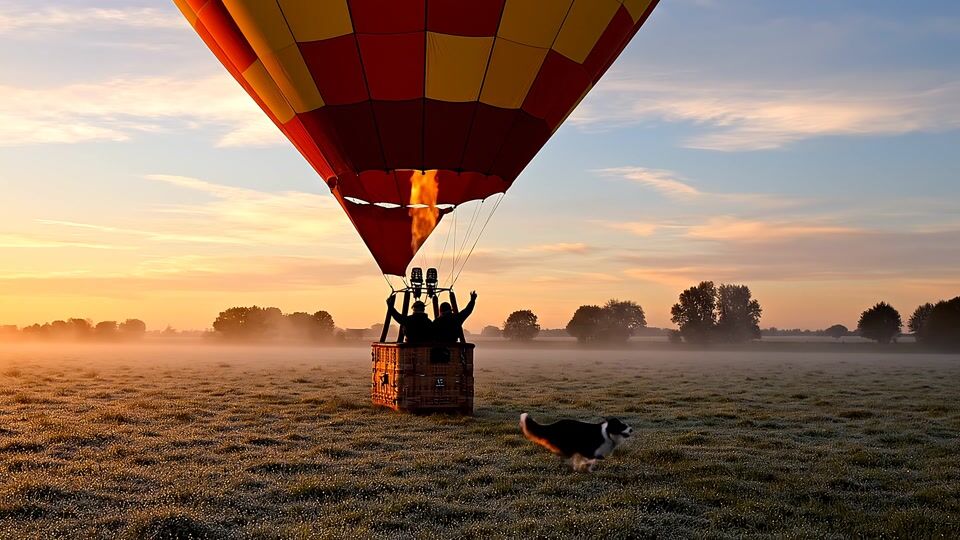
這份需求集結了影片模型容易失手的挑戰:大型物體升空、燃燒器火焰、人物揮手、狗奔跑、薄霧、日出光線,還有聲音。
用這裡的工具製作學習與解說素材
以下每張圖片、每段影片,都是在 Pixel Dojo 使用畫面所示的提示詞製作。點選任一作品,就能從它開始創作。
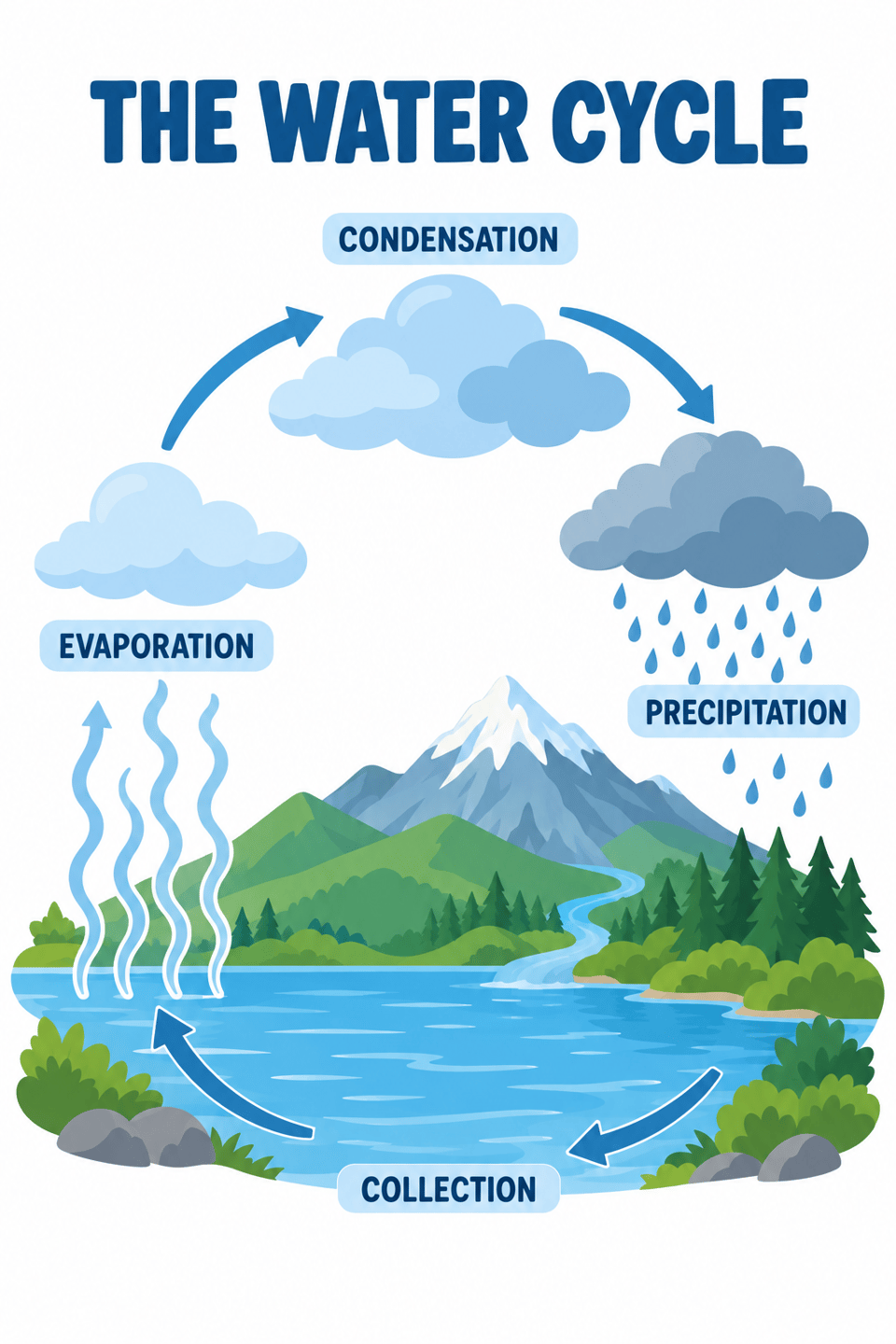
GPT Image 2.5 正確拼出標題,以及 EVAPORATION、CONDENSATION、PRECIPITATION、COLLECTION 四個標籤。
Clean educational poster titled "THE WATER CYCLE" showing a mountain, a lake, clouds and rain with curved arrows and four labels: EVAPORATION, CONDENSATION, PRECIPITATION, COLLECTION, flat illustration, soft blue and green palette, white background.
用 MiniMax H3 製作科學縮時影片,豆子在五秒內裂開、長成幼苗。
Macro time lapse of a bean seed sprouting in a glass jar of damp cotton on a sunny windowsill, the root curling down and two green leaves unfolding upward, soft natural light, clean background.

用 Seedream 5 營造溫暖的讀書氛圍,花費 2.5 點數。
Cozy study nook at night: a wooden desk under a window with rain on the glass, an open notebook with handwritten notes, a desk lamp glowing amber, a mug of tea and a small potted fern, soft film photograph.

用 Kling Image 製作水粉風格平鋪圖,花費 1 點數,適合部落格頁首與學習指南。
Cozy illustrated flat lay of a student's desk seen from above: an open laptop, colored highlighters, a stack of sticky notes, a spiral notebook, a cup of coffee and a small houseplant, warm pastel palette, soft gouache texture, no text.
同一場熱氣球升空,四款影片引擎實測
相同提示詞,全部採用 16:9 並開啟聲音。Veo 3.1 Fast 生成 4 秒,其餘皆為 5 秒。每張卡片都列出設定與點數。
Wide shot of a red and yellow hot air balloon lifting off from a misty meadow at sunrise, the burner flaring, two passengers in the basket waving down, dew sparkling on the grass, a border collie running alongside. Sound: the roar of the burner, a dog barking and birdsong.
Wide shot of a red and yellow hot air balloon lifting off from a misty meadow at sunrise, the burner flaring, two passengers in the basket waving down, dew sparkling on the grass, a border collie running alongside. Sound: the roar of the burner, a dog barking and birdsong.
Wide shot of a red and yellow hot air balloon lifting off from a misty meadow at sunrise, the burner flaring, two passengers in the basket waving down, dew sparkling on the grass, a border collie running alongside. Sound: the roar of the burner, a dog barking and birdsong.
Wide shot of a red and yellow hot air balloon lifting off from a misty meadow at sunrise, the burner flaring, two passengers in the basket waving down, dew sparkling on the grass, a border collie running alongside. Sound: the roar of the burner, a dog barking and birdsong.
- Veo 3.1 Fast 在 4 秒內呈現最多需求細節:燃燒器火焰、乘客揮手、狗奔跑、薄霧,以及低角度的朝陽。
- WAN 3.0 讓所有元素都靠近鏡頭,花費 10 點數,是四款中最省的。
- Kling 3.0 的光線最有電影感,狗在畫面中奔躍,增添動感。
- Seedance 2.5 採用平靜的廣角構圖,熱氣球一開始就已在爬升。
七個推薦,各有主場
每個細節都要到位:Veo 3.1 Fast
它在 4 秒內呈現最多需求內容,還附帶聲音。我們用它製作解說影片開場與短廣告。
有限預算,多試幾版:WAN 3.0
我們的熱氣球影片含聲音花費 10 點數,讓你能先試做同一個點子的多個版本,再挑出最滿意的一版。
電影感光線與動態:Kling 3.0
四款中最有電影感的日出,搭配穿梭畫面的活潑動態。
帶文字的圖解或海報:GPT Image 2.5
水循環海報上的每個標籤,它都拼對了。適合製作學習單、簡報與資訊圖表。
讓科學過程動起來:MiniMax H3
它用五秒縮時畫面,讓一顆豆子長成幼苗。
旁白與字幕:文字轉語音、自動字幕
先將腳本轉成旁白,再把文字嵌入影片,關掉聲音也能看懂。
整個專案一次搞定:Sensei
描述你想做的影片,Sensei 就會規劃、估價,等你核准後執行,並檢視每次生成的成果。
EaseMate AI 與 Pixel Dojo 方案比較
EaseMate AI 欄位的所有資訊,皆取自其價格與影片生成器頁面,查閱日期為 2026 年 10 月 15 日。
| 方案內容 | EaseMate AI | Pixel Dojo |
|---|---|---|
| 月訂閱方案 | Lite 每月 $9.9,含 1,200 點數(首月 $8.9);Pro 每月 $24.9,含 3,000 點數(首月 $19.9) | Lite 每月 $10,含 160 點數;Pro 每月 $25,含 500 點數;Pro Max 每月 $50,含 1,100 點數 |
| 加購點數 | 單次購買點數包,從 $4.9 的 500 點數到 $104.9 的 15,000 點數,頁面標示永久有效 | API 點數包 $5 起 |
| 每支影片費用 | 影片生成器頁面未標示 | 每個模型頁面都會在生成前顯示 |
| 影片模型 | Seedance 2.5、Kling 3.0、Veo 3.1、Sora 2、Wan 3.0、Grok Imagine、MiniMax H3 與 Google Omni | Seedance 2.5、Kling 3.0、Veo 3.1、WAN 3.0、MiniMax H3,以及虛擬人像與影片編輯模型 |
| 方案還包含什麼 | AI 聊天模型、學習解題工具、寫作工具與 PDF 對話 | Sensei、Film Studio、Character Studio、LoRA 訓練工具、畫質放大工具、文字轉語音、文字生成音樂與自動字幕 |
| 開發者資源 | 未列出 | 公開 API,附依各模型規格產生的文件,以及託管式 MCP 伺服器 |
專為影音打造的工作室,更懂你的創作
如果製作影片與圖片就是你的工作,專為影音打造的工作室更合用:每筆費用清楚可見、下一步需要的工具一應俱全,還有 AI 代理與你一起規劃專案。
EaseMate AI 使用者為何轉用 Pixel Dojo
每個方案都能無限生成
所有付費方案都能透過 Relax 無限使用 Qwen Image 2.1、FLUX 3 Image Klein、MiniMax H3 Turbo,以及所有影片與照片特效,不消耗點數。
Sensei,你的 AI 導演
描述專案構想,Sensei 就會規劃、估價,等你核准後執行,並檢視每次生成的成果。
Video Studio
依鏡頭需求選用最適合的頂尖影片引擎,在同一處生成、編輯、延伸影片。
一鍵影片特效
300+ 款一鍵影片特效,從 AI Hug 到 AI Inflate,不用寫提示詞,就能把照片變成熱門風格短片,每天可免費使用 3 次。
Film Studio
從靈感到成片:劇本、選角、分鏡、片段生成,再由剪輯流程修整每個鏡頭,每一步執行前都先列出費用。
從類型開始
選擇 UGC 廣告、微短劇、電影預告或解說影片等形式,就會開啟對應工作室,預先填好設定與範例構想。
點數可累積遞延
只要持續訂閱,點數就能累積到下個月,月底不會讓你付費買的點數歸零。
頂尖模型全到位,還有 API
一個帳號就能使用超過 80 款圖片模型與 60 款影片模型,另提供公開 API 與代管 MCP 伺服器,串接你自己的應用程式與 AI 助理。
創作者與學生的 Pixel Dojo 方案價格
Lite 每月 $10,含 160 點數;Pro 每月 $25,含 500 點數;Pro Max 每月 $50,含 1,100 點數。所有方案都能使用全部模型,並包含商用授權。持續訂閱,點數就能跨月累積。
我們製作的四支氣球影片,每支花費 10 到 30 點數,各影片卡片都標有價格。
依照退款政策,首次購買可於 7 天內申請退款。點數使用未達 20% 可全額退款,超過則按比例退款。
EaseMate AI常見問題
製作影片有哪些好用的 EaseMate AI 替代方案?
Pixel Dojo 提供 Seedance 2.5、Kling 3.0、Veo 3.1、WAN 3.0 與 MiniMax H3,生成前先顯示所需點數,還有 Sensei、Film Studio、自動字幕與文字轉語音功能。
EaseMate AI 多少錢?
EaseMate AI 的 Lite 方案每月 $9.9,含 1,200 點數;Pro 方案每月 $24.9,含 3,000 點數,首月另有優惠價。也提供 $4.9 起的單次購買點數包。
哪個 AI 影片模型最能精準呈現提示詞?
在我們的氣球測試中,Veo 3.1 Fast 呈現了最多提示詞細節;WAN 3.0 則最便宜,生成一支 5 秒含聲音的影片只要 10 點數。
製作帶文字的圖解,哪個模型最好?
GPT Image 2.5。我們水循環海報上的每個文字標示,它都拼對了。
生成的影片可以商用嗎?
可以。Pixel Dojo 所有方案都包含商用授權。
今天就從 EaseMate AI 換到 Pixel Dojo
在上方輸入提示詞,或從本頁任何範例開始。一個方案就包含所有頂尖模型、六大工作室與 Sensei,點數還能累積。
從 Veo 3.1 Fast 開始資料來源
關於 EaseMate AI 的資訊來自以下公開頁面,查證日期為 2026年10月15日。價格與方案可能變動,購買前請確認來源。