VidMuse 替代方案
VidMuse 替代方案:每個鏡頭,都由你執導
VidMuse 會根據你上傳的歌曲規劃 MV。Pixel Dojo 這個 VidMuse 替代方案,連歌都能讓你自己寫,還能挑選歌手、製作對嘴演出、拍出每個 B-roll 輔助鏡頭,每一步都先看價格再執行。
VidMuse 會分析歌曲的節奏、氛圍與歌詞,再據此製作分鏡。我們想親手掌握整個流程,所以做了一支 30 秒的獨立流行 MV,場景就在午夜的自助洗衣店。
已經是會員? 登入
作者 Brian Lovett · 更新於
VidMuse 如何把你的歌變成 MV
VidMuse 接收音訊檔或 Suno 連結,分析節奏、氛圍與歌詞,再圍繞歌曲規劃 MV。官方指南將流程分成六個階段:上傳素材、創意簡報、參考圖、場景與鏡頭清單、分鏡,最後生成影片。
它提供重視品質與連貫性的 Studio 模式,以及更便宜、更快出草稿的 Lite 模式。FAQ 說明,草稿製作、規劃與提示詞修改免費,音訊分析、圖片、影片與最終算圖則會消耗點數。
換個曲風,MV 也換個樣
下方每支片段都用 Pixel Dojo 製作,使用的提示詞就在各自卡片上。
用 WAN 3.0 打造合成器流行樂風格,自帶復古節拍。
Music video shot for a synth pop track: a vintage convertible cruises along an empty coastal highway at night, a woman in her forties at the wheel with a silk scarf, tail lights streaking, palm silhouettes against a violet sky, the camera tracks alongside. Sound: a pulsing retro synth beat and the engine.
用 MiniMax H3 Turbo 呈現民謠風格,只要 7.5 點數。
Folk music video: a fiddler in his sixties with a grey beard plays on a hay bale inside a wooden barn at golden hour, dust floating in shafts of sunlight, couples in boots dancing a reel in soft focus behind him, slow push in.
用 Seedance 2.5 生成直式舞蹈鏡頭,隨時剪進你自己的歌曲。
Vertical dance video shot: a dancer in his twenties in an oversized white tee and cargo pants hits sharp, powerful moves on a gravel rooftop at sunset, city skyline behind, the camera circles him low and fast. Sound: sneakers scuffing gravel, his breathing and wind, no music.
用 Kling 3.0 Standard 打造手作布偶風格,自帶烏克麗麗配樂。
Stop motion felt puppet music video: a band of felt foxes plays a tiny wooden stage, the drummer fox bangs a thimble drum kit and the singer fox bobs at a microphone, paper confetti falls, warm stage light, handmade texture. Sound: an upbeat ukulele and kazoo tune.
AI MV 的四個關鍵層次
我們做過的每支 AI MV,都能拆成四層。第一是歌曲。第二是每個鏡頭都長得一樣的歌手。第三是嘴型與歌聲同步的演出鏡頭。第四是穿插在演出之間的 B-roll 輔助鏡頭。
一鍵工具把這些層次全藏了起來。親手做,多幾個決定,卻能自己選聲音、選臉孔、選場景,連每個鏡頭用哪個引擎都由你決定。哪個鏡頭沒到位,就只重做那一個。
以下逐層公開我們的製作流程,每張卡片都附上價格與設定。
洗衣店 MV,逐層拆解
先有歌,再做歌手定裝照,接著生成演唱片段與兩個 B-roll 輔助鏡頭。每張卡片都列出使用的提示詞、設定與點數。

Dreamy indie pop song, warm female lead vocal, jangly clean electric guitar, soft analog synth pads, steady brushed drums at 96 bpm, late night city mood, bittersweet and hopeful
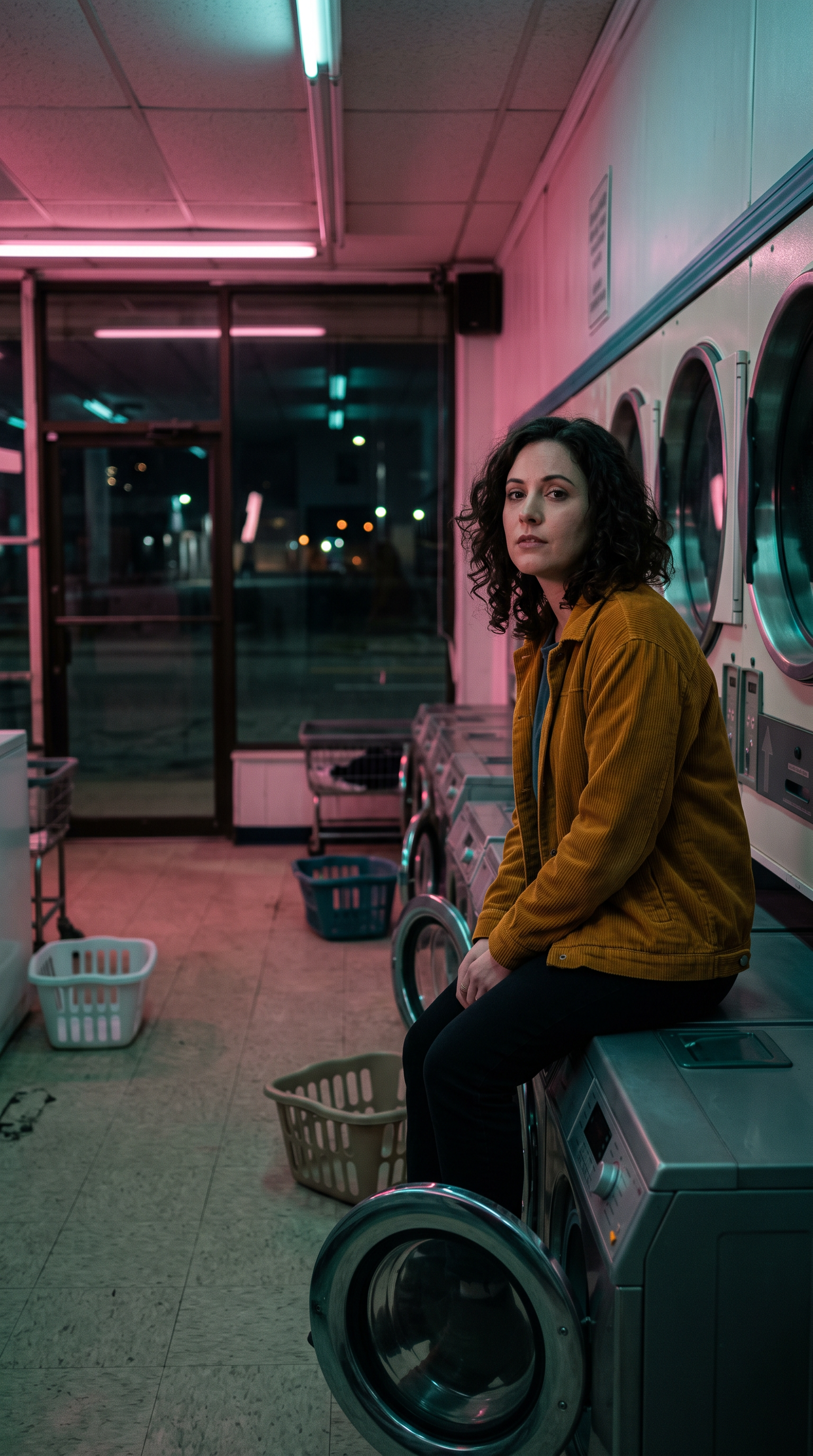
Vertical music video still: a singer in her early thirties with shoulder length dark curls and a mustard corduroy jacket sits on a row of washing machines in an empty 24 hour laundromat at night, looking into the lens, pink and teal fluorescent glow, round dryer doors behind her, 35mm film grain.
The singer sits on the washing machine and sings the song to the camera with feeling, gentle head sways, eyes closing on the long notes, her curls moving slightly, steady framing.
The singer slides down off the washing machine and walks slowly past the row of glowing dryers toward the camera, running her fingertips along the round doors, the fluorescent light flickers pink and teal. Sound: the hum of the dryers and her footsteps.
Music video b-roll: slow dolly along a row of round dryer windows at night in an empty laundromat, colorful clothes tumbling behind the glass, pink and teal fluorescent light flickering, dreamy and quiet. Sound: the low hum and soft thump of the dryers.
- 文字生成音樂根據我們的曲風提示詞與歌詞,產出完整 30 秒歌曲,花費 6 點數。
- Kling Avatar 在整段 30 秒演出中維持她的臉孔、捲髮與外套,讓嘴型跟上歌聲,花費 60 點數。
- Seedance 2.5 以同一張定裝照作為首幀,讓 B-roll 與演出鏡頭完全一致。
- Kling 3.0 Standard 只靠文字就生成烘衣機插入鏡頭,也呼應了場景中的粉紅與藍綠色燈光。
VidMuse 與 Pixel Dojo 方案比較
VidMuse 欄位的所有資訊,皆取自其價格頁、FAQ 與指南,查閱日期為 2026 年 10 月 15 日。
| 問題 | VidMuse | Pixel Dojo |
|---|---|---|
| 付費方案多少錢? | Pro 每月 $39,或年繳平均每月 $33,每月提供 4,000 點數 | Lite 每月 $10,提供 160 點數;Pro $25,提供 500 點數;Pro Max $50,提供 1,100 點數 |
| 點數能做多少? | VidMuse 表示,4,000 點數可製作 2 到 3 支精修的一分鐘影片 | 每個模型頁面都先列出價格;我們的 30 秒演出鏡頭花了 60 點數 |
| 歌曲從哪裡來? | 上傳音訊檔,或貼上 Suno 連結 | 自備歌曲,或用文字生成音樂,連歌詞一起寫 |
| 誰來規劃鏡頭? | VidMuse 根據歌曲建立創意簡報、鏡頭清單與分鏡 | 你自己來,或交給 Sensei 規劃專案、列出費用,等你核准後才生成 |
| 可以商用嗎? | Free 與 Pro 方案皆列有商用權限 | 所有方案皆可商用 |
為什麼 VidMuse 用戶改用 Pixel Dojo
所有方案都能無限用
每個付費方案都能透過 Relax 無限使用 Qwen Image 2.1、FLUX 3 Image Klein、MiniMax H3 Turbo,以及所有影片與照片特效,不花點數。
Sensei,你的 AI 導演
說出你的專案構想,Sensei 就會規劃流程、列出費用,等你核准,再逐一檢查每次生成的成果。
Film Studio
從靈感到完整影片:劇本、選角、分鏡、片段生成,再由剪輯流程逐鏡修剪,每一步都先報價再執行。
Character Studio
儲存一次臉孔,之後在任何提示詞用 @name 呼叫,同一個角色就能出現在每張圖片、每支片段中。
一鍵影片特效
300+ 款一鍵影片特效,從 AI Hug 到 AI Inflate,把照片變成潮流短片,不用寫提示詞,每天還能免費用 3 次。
從類型開始創作
選擇 UGC 廣告、微短劇、電影預告或解說影片等格式,就會開啟對應的工作室,預先填好設定與範例構想。
成為任何影片的主角
上傳一段短片,選擇已儲存的角色或一張照片,Character Swap 就能讓你的角色擔綱主角,場景、運鏡與聲音全部不變。
點數可累積
只要持續訂閱,點數就能累積到下個月,花錢買的點數不會在月底消失。
頂尖模型,加上 API
一個帳號就能使用超過 80 個圖片模型與 60 個影片模型,還有公開 API 與代管的 MCP 伺服器,串接你自己的應用程式與 AI 助理。
這支 MV 每一層花了多少
Lite 每月 $10,提供 160 點數;Pro 每月 $25,提供 500 點數;Pro Max 每月 $50,提供 1,100 點數。所有方案都能使用全部模型,並享有商用權限。持續訂閱,點數就能累積。
歌曲花費 6 點數,歌手定裝照 1.5,30 秒演出 60,走動鏡頭 30,烘衣機插入鏡頭 20。每張卡片都列有各自的價格。
依照退款政策,首次購買可在 7 天內申請退款。已使用點數低於 20% 可全額退款,超過後則按比例退款。
VidMuse常見問題
VidMuse 多少錢?
VidMuse 提供 Free 方案,含一次性 500 點數;Pro 方案每月 $39,或年繳平均每月 $33,每月提供 4,000 點數,支援 1080p 匯出且無浮水印。
VidMuse 哪些功能會用到點數?
VidMuse 的 FAQ 說明,草稿製作、規劃與提示詞修改免費,音訊分析、圖片生成、影片生成與最終算圖則會消耗點數。
AI 能讓歌手對嘴唱我的歌嗎?
可以。把人像照與音訊檔交給 Kling Avatar,它就會讓臉部隨歌聲動起來。上方那段 30 秒的洗衣店演出,就是這樣做出來的。
歌曲也能用 AI 做嗎?
可以。Pixel Dojo 的文字轉音樂可創作純音樂,也能唱出你提供的歌詞,長度從 30 秒到 5 分鐘。
有什麼好用的 VidMuse 替代方案?
想親自掌控歌曲、歌手、對嘴演出和每個 B-roll 鏡頭,就選 Pixel Dojo。方案每月 $10 起。
資料來源
關於 VidMuse 的資訊來自以下公開頁面,查證日期為 2026年10月15日。價格與方案可能變動,購買前請確認來源。