Animaker 替代方案
Animaker 替代方案:輸入主題,完成旁白解說影片
Animaker 靠角色與範本素材庫製作解說影片。想找 Animaker 替代方案,Pixel Dojo 的 Faceless Studio 直接幫你完成整支影片:輸入主題,就有腳本、AI 旁白、每個場景的圖片、字幕與配樂,視覺風格從頭到尾一致。
只需要單一鏡頭,也能描述場景,交給任一頂尖影片模型生成。我們寫了一段平面 2D 回收解說情節,拿四款模型實測。上方影片由 Kling 3.0 生成,從回收桶到新玻璃罐,完整演出整段故事。
27.5 credits ($1.72) 所有方案皆包含,每月 US$10 起。
已經是會員? 登入
作者 Brian Lovett · 更新於
同一個下午,我們還做了這些解說素材
以下每段影片與每張圖片,都在 Pixel Dojo 使用畫面所列的提示詞製作。
用 Seedance 2.5 製作的解說主持人,連開口說的台詞都一起生成。
Flat 2D animated explainer: a cartoon pharmacist in a white coat stands beside a giant pill bottle, points at its label and says to the camera, "Twice a day, always with food." Clean vector shapes, soft mint background, a friendly ding.
用 WAN 3.0 製作的等角透視動態圖像,花費 10 點數。很適合搭配旁白,作為穿插畫面。
Isometric animated illustration of a small pastel city where tiny delivery drones lift parcels from a central hub and fly them to rooftops, cars glide along the streets, clean flat shading, soft propeller buzz and a light marimba loop.
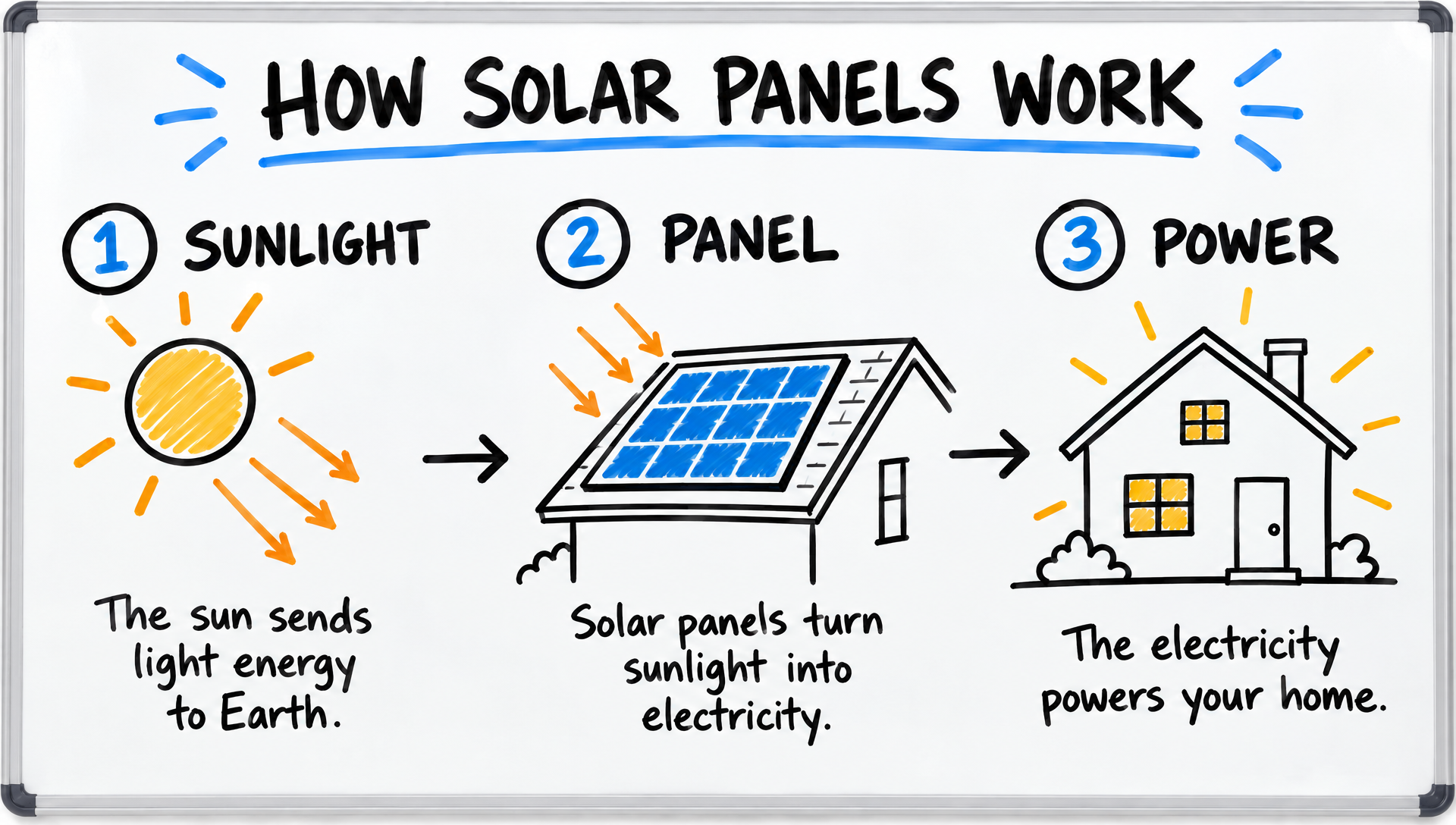
用 GPT Image 2.5 製作的白板解說畫面,每個標籤都拼寫正確。
Whiteboard sketch explainer frame titled "HOW SOLAR PANELS WORK" with three numbered hand drawn panels: SUNLIGHT, PANEL, POWER, simple black marker drawings of a sun, a rooftop panel and a glowing house, one short caption under each, a few blue and orange marker accents on a clean white board.
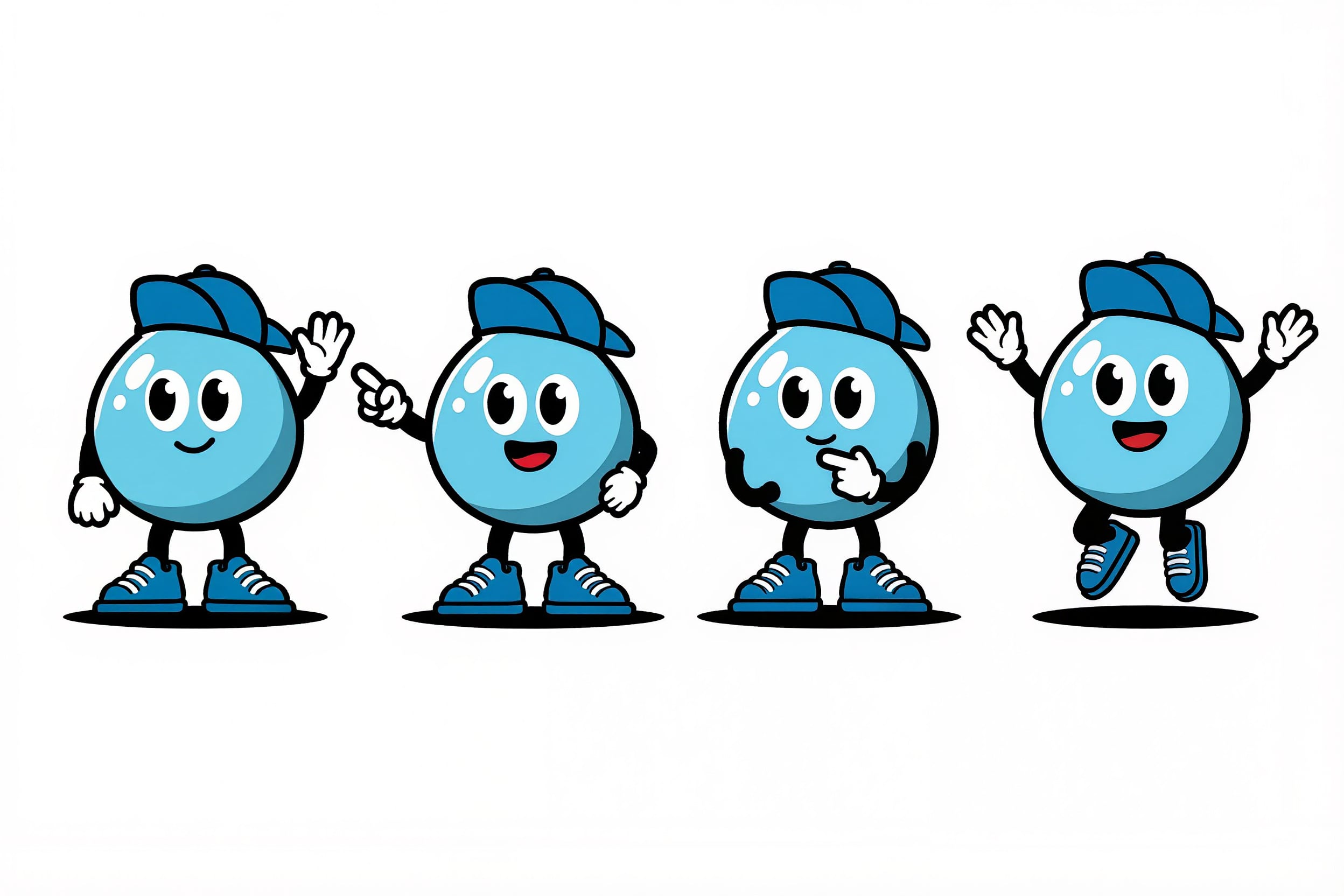
用 Kling Image 製作的吉祥物設定圖,一次生成四種姿勢,隨時可跨場景重複使用。
Flat vector character design sheet of an original mascot: a cheerful round water droplet with tiny arms, sneakers and a blue cap, shown in four poses (waving, pointing, thinking, jumping) on a clean white background, bold outlines, consistent proportions.
常見做法:從範本素材庫組出解說影片
多年來,製作解說影片的穩妥選擇,就是自己動手操作動畫軟體。挑範本、拖入現成角色、設定動作,再配合旁白調整時間。Animaker 正是這類工具中最知名的選擇之一。
我們認為,想做出貼合故事的專屬畫面,這已經不是最快的方式。現在,只要兩句描述,影片模型就能生成整個鏡頭,連動作與聲音一起完成。
於是,我們用解說影片團隊都熟悉的需求來實測:一個瓶子丟進回收桶,最後變成新的玻璃罐。
Faceless Studio:一個主題,完成整支解說影片
一句話生成腳本
輸入主題,Faceless Studio 就會撰寫腳本並拆分場景。開始生成前,每句旁白、每個視覺提示詞都能修改。
AI 旁白、字幕、配樂
選好 AI 旁白,整份腳本一次配音完成。場景依實際旁白剪接,字幕直接嵌入畫面,還能選擇加入背景配樂。
每個場景,同一種風格
每集只要選一次視覺風格,所有場景就會保持一致,從開場到結尾都對得上,做到 Animaker 透過範本達成的風格統一。
橫式、直式都能做
匯出一支 MP4,可選 YouTube 適用的 16:9,或 TikTok 與 Shorts 適用的 9:16。規劃與匯出免費,場景、語音與配樂使用方案點數,每項費用都會事先顯示。
同一段回收解說,四款影片模型實測
將同一組平面 2D 提示詞交給 Kling 3.0、Veo 3.1 Fast、Seedance 2.5 與 WAN 3.0。每張卡片都列出設定與實際花費的點數。
Flat 2D cartoon explainer animation: a cheerful character in a green sweater drops a glass bottle into a blue recycling bin, the bottle zips along a dotted line into a small factory and pops out as a shiny new jar, clean vector shapes on a pastel background, a pop, a whoosh and a bright chime.
Flat 2D cartoon explainer animation: a cheerful character in a green sweater drops a glass bottle into a blue recycling bin, the bottle zips along a dotted line into a small factory and pops out as a shiny new jar, clean vector shapes on a pastel background, a pop, a whoosh and a bright chime.
Flat 2D cartoon explainer animation: a cheerful character in a green sweater drops a glass bottle into a blue recycling bin, the bottle zips along a dotted line into a small factory and pops out as a shiny new jar, clean vector shapes on a pastel background, a pop, a whoosh and a bright chime.
Flat 2D cartoon explainer animation: a cheerful character in a green sweater drops a glass bottle into a blue recycling bin, the bottle zips along a dotted line into a small factory and pops out as a shiny new jar, clean vector shapes on a pastel background, a pop, a whoosh and a bright chime.
- Kling 3.0 一氣呵成演完整段故事:瓶子離開男子的手,沿著虛線前進,抵達工廠時變成玻璃罐。
- Veo 3.1 Fast 將所有內容保留在同一個平面畫面中,最接近傳統投影片,新玻璃罐就出現在男子身旁。
- WAN 3.0 的場景最豐富,有公園、冒著蒸氣的工廠,以及貼上回收標籤的玻璃罐,花費 10 點數。
- Seedance 2.5 的粉彩風格最柔和。
製作解說影片,Animaker 與 Pixel Dojo 方案比較
Animaker 資料取自其價格頁面與方案比較表,查閱日期為 2026 年 10 月 15 日。
| 快速比較 | Animaker | Pixel Dojo |
|---|---|---|
| 付費方案 | Basic 年繳每月 $15;Starter 月繳每月 $45,年繳每月 $25;Pro 月繳每月 $79,年繳每月 $43 | Lite 每月 $10,含 160 點數;Pro 每月 $25,含 500 點數;Pro Max 每月 $50,含 1,100 點數 |
| 生成式影片 | Starter 每月 90 秒,Pro 每月 180 秒 | 所有方案皆可使用 Kling 3.0、Veo 3.1、Seedance 2.5 與 WAN 3.0,每段影片生成前都會顯示費用 |
| 角色 | Starter 可建立 15 個自訂角色,Pro 可建立 30 個 | Character Studio 可儲存角色,透過 @name 呼叫,另提供 LoRA 訓練工具 |
| 語音與字幕 | AI 文字轉語音與自動字幕,每月有分鐘數上限 | 文字轉語音、自動字幕,以及可直接在影片內生成語音的模型 |
Animaker 使用者為什麼轉用 Pixel Dojo
每個方案,都能無限用
所有付費方案都能透過 Relax,無限使用 Qwen Image 2.1、FLUX 3 Image Klein、MiniMax H3 Turbo,以及所有影片與照片特效,不消耗點數。
Sensei,你的 AI 導演
描述專案,Sensei 就會規劃流程、計算費用,等你核准後再執行,並檢視每次生成的成果。
Faceless Studio
輸入主題,就有完整旁白影片:腳本、AI 旁白、每個場景的圖片、字幕與配樂,支援 16:9 或 9:16。
Film Studio
把點子做成完整影片:腳本、角色陣容、分鏡、片段,再由剪輯流程修剪每個鏡頭,每個步驟執行前都會顯示費用。
一鍵影片特效
300+ 款一鍵影片特效,從 AI Hug 到 AI Inflate,把照片變成潮流短片,不用寫提示詞,每天還有 3 次免費使用。
從影片類型開始
選擇 UGC 廣告、微短劇、電影預告或解說影片等形式,對應的工作室就會開啟,並預先填好設定與範例點子。
點數可累積
只要持續訂閱,點數就能累積到下個月,付費買下的點數不會在月底消失。
頂尖模型全到位,還有 API
一個帳號就能使用超過 80 款圖片模型與 60 款影片模型,並提供公開 API 與代管的 MCP 伺服器,串接你自己的應用程式與 AI 助理。
在 Pixel Dojo 製作解說片段要多少點數?
Lite 每月 $10,含 160 點數;Pro 每月 $25,含 500 點數;Pro Max 每月 $50,含 1,100 點數。所有方案皆包含全部模型與商業使用權。持續訂閱,點數就能累積。
這次實測的四段解說影片,每段花費 10 到 30 點數,每張卡片都標示各自的費用。
依退款政策,首次購買可在 7 天內申請退款。點數使用量低於 20% 可全額退款,超過後則按比例退款。
Animaker常見問題
Pixel Dojo 能像 Animaker 一樣,製作完整的旁白解說影片嗎?
可以。Faceless Studio 根據主題撰寫腳本,由 AI 旁白配音,以一致風格生成每個場景的圖片,依語音對齊字幕,並可選擇加入配樂,最後匯出一支 16:9 或 9:16 的 MP4。
有什麼好用的 Animaker 替代方案?
要做完整的旁白解說影片,Pixel Dojo 的 Faceless Studio 能將一個主題變成有腳本、配音、字幕與配樂的影片。只需要單一動畫鏡頭,則可在 Pixel Dojo 描述場景,使用 Kling 3.0、Veo 3.1、Seedance 2.5 或 WAN 3.0 生成含聲音的影片,點數費用也會事先顯示。
Animaker 費用是多少?
Animaker 定價頁列出的方案包括:Basic 每月 $15,按年計費;Starter 每月 $45,或按年計費每月 $25;Pro 每月 $79,或按年計費每月 $43。另外也有免費方案,以及客製報價的 Enterprise 方案。
Animaker 包含多少生成式影片額度?
Animaker 的方案比較表列出,Starter 每月提供 90 秒生成式影片,Pro 則提供 180 秒。
Pixel Dojo 可以製作白板風格的解說影片嗎?
可以。上方的太陽能板白板畫面就是我們用 GPT Image 2.5 製作的。任何圖片都能作為 Seedance 2.5、Kling 3.0 或 Veo 3.1 影片的起始畫面。
哪個模型最適合製作 2D 卡通解說影片?
在我們的測試中,Kling 3.0 最能完整呈現故事,WAN 3.0 只需 10 點數,成本最低,Veo 3.1 Fast 則做出了最乾淨俐落的簡報風格畫面。
資料來源
關於 Animaker 的資訊來自以下公開頁面,查證日期為 2026年10月15日。價格與方案可能變動,購買前請確認來源。