BasedLabs 替代方案
每天發文的創作者,就選這套 BasedLabs 替代方案
Pixel Dojo 這套 BasedLabs 替代方案,讓同一位虛擬創作者在照片與 Reels 中維持一致,做出文字清楚的縮圖,每個模型的點數費用也在點擊前就看得到,一個方案全部搞定。
BasedLabs 以 AI 網紅、迷因和快速製作社群影片受到歡迎。我們做出了多數使用者真正想要的成果:一位原創角色,每篇貼文看起來都是同一個人,也整理了其他適合在這裡完成的創作任務。
30 credits ($1.88) 所有方案皆包含,每月 US$10 起。
已經是會員? 登入
作者 Brian Lovett · 更新於
BasedLabs 使用者常做的六件事,在這裡怎麼完成
1. 每次出場都是同一位虛擬創作者
先生成一張人像,之後每次換場景,都交給 Nano Banana 2.1 或 GPT Image 2.5 作為參考。將她存進 Character Studio,就能在任何提示詞中用 @name 叫她出場。
2. 把得意照片變成 Reels
在 Seedance 2.5、Kling 3.0 或 Veo 3.1 中,以照片作為起始影格,再描述一個動作與聲音。上方的花市 Reels 就是這樣做出來的。
3. 標題清楚好讀的縮圖
Ideogram 4.5 和 GPT Image 2.5 都能處理簡短醒目的標題。在提示詞中,用引號框住你要呈現的完整文字。
4. UGC 風格產品短片
Kling 3.0 和 Veo 3.1 能讓角色對著鏡頭說出台詞,自拍風格的開箱心得,不用演員也不用手機。
5. 個人頭像與虛擬分身
FLUX 3 Image 和 Seedream 5 涵蓋 3D 黏土、動漫與照片風格,只要一兩點數。
6. 不露臉頻道
用我們的不露臉影片生成器、自動字幕和文字轉語音,把一個主題變成附字幕的直式影片。
同一個版面,更多貼文靈感
以下作品都由我們在 Pixel Dojo 使用畫面上的提示詞製作。點選任一作品,就能以它為起點開始創作。
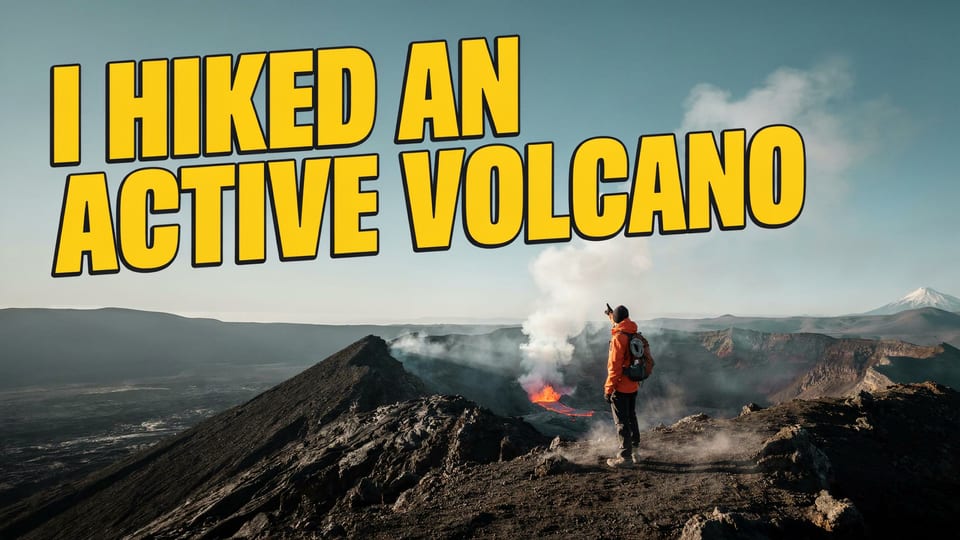
Ideogram 4.5 只用 2 點數,就把標題排得清楚俐落。
Video thumbnail: a hiker in an orange jacket stands on the rim of a steaming volcanic crater, bold yellow headline "I HIKED AN ACTIVE VOLCANO" with a black outline, high contrast, punchy saturated colors.
用 Kling 3.0 製作 UGC 風格口播短片,讓她直接說出台詞。
Handheld selfie style video of a woman in her thirties in a bright bathroom holding up a small round tin of hand balm with a plain kraft label. She says, "One tin lasted me all winter. My hands say thanks." Natural window light, casual and friendly.

用 Kling Image 製作旅遊貼文,只要 1 點數。
Overhead flat lay for a travel post: a worn paper map of the Alps, a vintage film camera, a croissant, a cappuccino and a pair of sunglasses on a white marble cafe table, soft morning light, crisp shadows.

用 FLUX 3 Image 製作個人頭像,只要 1 點數。
Profile picture avatar in soft 3D clay style: a round faced otter in a tiny yellow raincoat holding a paper coffee cup, centered on a pastel blue circle background, soft studio lighting.
一位虛擬創作者,三篇貼文加一支 Reels
我們先用 Nano Banana 2.1 打造一位原創角色,再以這張照片作為唯一參考,透過兩個不同模型生成兩個新場景,最後用 Seedance 2.5 讓其中一張動起來。每張作品卡都列出設定與點數用量。

Lifestyle portrait of an original virtual creator: a woman in her late twenties with a short platinum bob, freckles and round tortoiseshell glasses, wearing an oversized sage green knit sweater and wide leg jeans, sitting by a sunny window with a vintage film camera in her hands, natural light, shallow depth of field.

The same woman from the reference image, same face, freckles, platinum bob and round tortoiseshell glasses, now browsing a street flower market stall at golden hour, holding a paper wrapped bunch of peach ranunculus, wearing a cream trench coat, candid street photo, 35mm look.
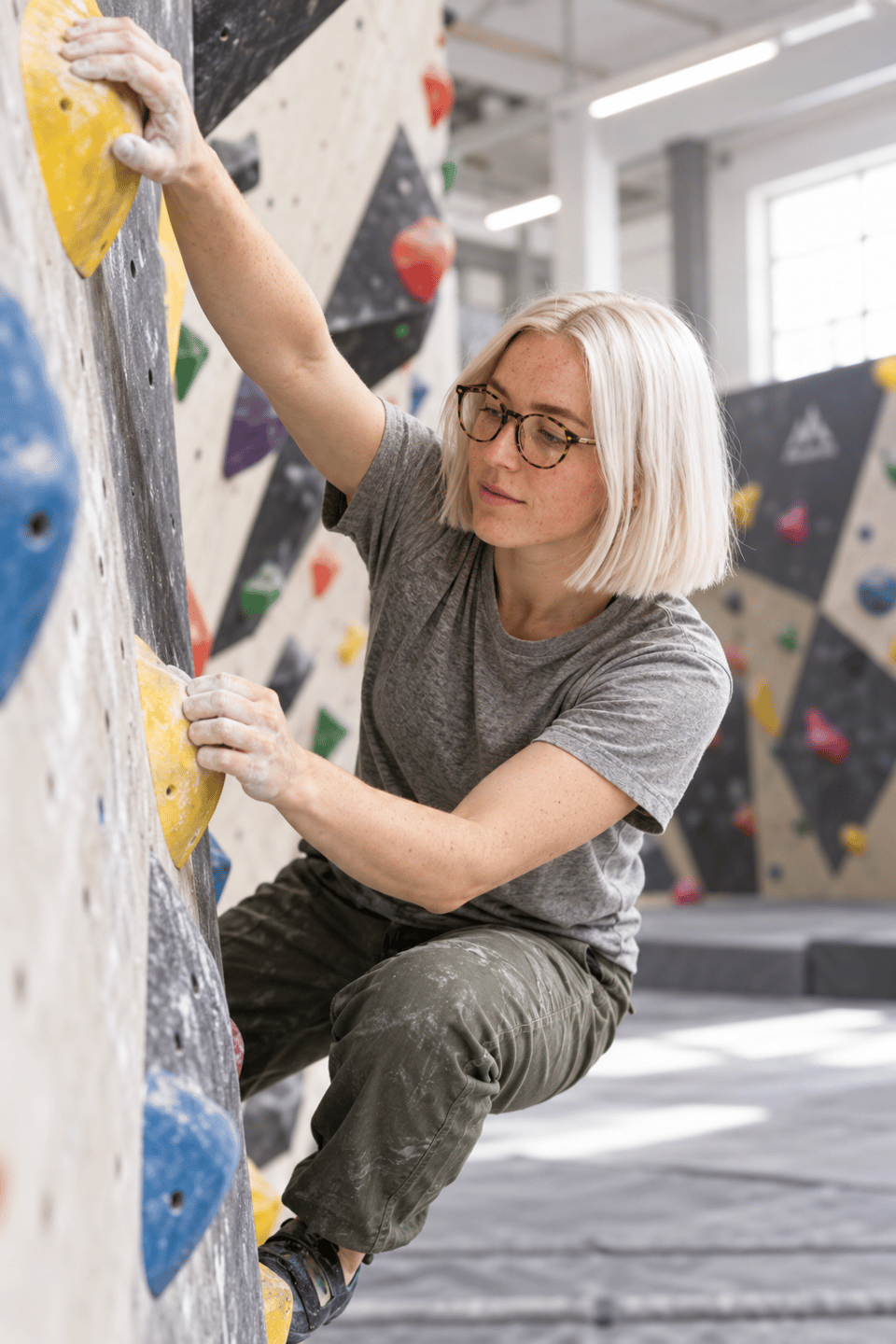
The same woman from the reference image, same face, freckles, platinum bob and round tortoiseshell glasses, on an indoor bouldering wall reaching for a yellow hold, chalk on her hands, a grey t-shirt and climbing pants, bright gym light, action photo.
She lifts the bunch of ranunculus to smell it, laughs and glances up at the camera, shoppers drift past the flower stalls behind her in warm low sun. Sound: market chatter, rustling paper and a distant bicycle bell.
- 只用一張參考照片,不必訓練,兩個模型都保留了她的臉孔、白金色鮑伯頭與玳瑁眼鏡。
- Nano Banana 2.1 和 GPT Image 2.5 依照指令更換服裝與場景,逛花市穿風衣,到攀岩館換上攀岩服。
- Seedance 2.5 讓她在整支 Reels 中維持相同樣貌,連聲音都內建。
- 長期經營帳號,只要在 Character Studio 儲存她一次,之後每個提示詞都能直接用名字叫她出場。
BasedLabs 與 Pixel Dojo 方案比較
BasedLabs 數據取自其定價頁與首頁,查閱日期為 2026 年 10 月 15 日。定價頁寫著訂閱可取得每月點數,但只列出加購點數包。
| 快速比較 | BasedLabs | Pixel Dojo |
|---|---|---|
| 方案 | 定價頁未列出訂閱級距 | Lite 每月 $10,160 點數;Pro 每月 $25,500 點數;Pro Max 每月 $50,1,100 點數 |
| 加購點數 | 點數包從 $10 購買 300 點數,到 $499 購買 16,500 點數,可用加密貨幣或 Telegram Stars 付款 | API 點數包 $5 起 |
| 圖片價格 | FLUX Pro Ultra 8 點數、Imagen 4 5 點數、Nano Banana Pro 16 點數 | 每個模型頁面都會在生成前顯示點數費用 |
| 影片價格 | 每秒:Veo 3.1 42 點數、Kling 2.6 Pro 15 點數、Seedance 1.5 7 點數 | Seedance 2.5、Kling 3.0、Veo 3.1 與 WAN 3.0,各自在模型頁面標示價格 |
| 商業使用 | 包含商業使用權 | 所有方案皆可商用 |
| 開發者 | API 存取需洽業務 | 公開 API,各模型規格頁附文件,並提供託管式 MCP 伺服器 |
為什麼每天發文更適合用 Pixel Dojo
每天都要發文,Pixel Dojo 就是更好的創作基地:角色樣貌一致、最新影片模型,還有點擊前就看得到的價格。
為什麼 BasedLabs 使用者改用 Pixel Dojo
每個方案都能無限生成
每個付費方案都能透過 Relax 無限使用 Qwen Image 2.1、FLUX 3 Image Klein、MiniMax H3 Turbo,以及所有影片與照片特效,不消耗點數。
Sensei,你的 AI 導演
描述專案,Sensei 就會規劃流程、列出費用,等你核准後執行,並檢視每一次拍攝成果。
Character Studio
臉孔存一次,就能在任何提示詞中用 @name 叫出角色,讓每張圖片、每段影片都是同一個人。
Film Studio
從點子到完成影片:劇本、選角、分鏡、片段生成,再由剪輯流程修整每個鏡頭,每一步都在執行前列出費用。
一鍵影片特效
300+ 種一鍵影片特效,從 AI Hug 到 AI Inflate,把照片變成潮流短片,不用寫提示詞,每天還有 3 次免費使用。
任何影片,你來當主角
上傳短片,選擇已儲存的角色或一張照片,Character Swap 就會讓你的角色擔綱主角,場景、運鏡與聲音全部維持不變。
點數用不完,繼續累積
只要持續訂閱,點數就會累積保留,花錢買的點數不會到了月底就消失。
頂尖模型全到齊,還有 API
一個帳號,使用超過 80 個圖片模型與 60 個影片模型,還有公開 API 與託管式 MCP 伺服器,可串接自己的應用程式與 AI 助理。
這次創作者實測,在 Pixel Dojo 要花多少
Lite 每月 $10,160 點數;Pro 每月 $25,500 點數;Pro Max 每月 $50,1,100 點數。每個方案都能使用所有模型,並包含商業使用權。只要持續訂閱,點數就會累積保留。
三張照片分別花費 1.5、1.5 和 2.5 點數,短影片則花費 30 點數。每張作品卡片都標有各自的價格。
依照退款政策,首次購買可於 7 天內申請退款。已用點數未滿 20% 可全額退款,超過後則按比例退款。
BasedLabs常見問題
BasedLabs 替代方案哪個好?
BasedLabs 替代方案 Pixel Dojo,整合頂尖圖片與影片模型,打造角色一致的 AI 創作者、短影音、縮圖與 UGC 風格短片,並提供 Character Studio、各模型頁面的點數標價,以及公開 API。
BasedLabs 費用多少?
BasedLabs 的定價頁列有點數加值包,從 300 點數 $10 到 16,500 點數 $499,未列出訂閱方案。
如何讓 AI 網紅維持一致的形象?
從一張清晰的人像照開始,像本頁示範一樣,每次建立新場景都用它當參考圖。也可以將角色儲存在 Character Studio,並在提示詞中輸入 @name。
AI 能做出文字清楚可讀的縮圖嗎?
可以。將要呈現的標題完整放進引號裡。我們用 Ideogram 4.5 製作的火山縮圖,每個字都正確無誤。
今天就從 BasedLabs 換到 Pixel Dojo
在上方輸入提示詞,或從本頁任何範例開始。一個方案就包含所有頂尖模型、六大工作室與 Sensei,點數還能累積。
從 Seedance 2.5 開始資料來源
關於 BasedLabs 的資訊來自以下公開頁面,查證日期為 2026年10月15日。價格與方案可能變動,購買前請確認來源。