Remaker AI 替代方案
Remaker AI 替代方案:換臉、修圖、動態化,一站搞定
作為 Remaker AI 替代方案,Pixel Dojo 用各項任務適合的影像模型,搞定大家打開 Remaker AI 想做的事:換臉、專業形象照、移除物件、快速設計,還能接著把照片變成影片。
Remaker AI 集合多款快速修圖工具,最廣為人知的就是換臉。我們用自己生成的臉孔,在這裡實測相同任務。換臉只該使用自己生成的臉孔,或經本人同意的臉孔。
30 credits ($1.88) 所有方案皆包含,每月 US$10 起。
已經是會員? 登入
作者 Brian Lovett · 更新於
Remaker AI 的六大任務,在這裡怎麼做
1. 照片換臉
給 Nano Banana 2.1 或 GPT Image 2 Edit 兩張圖片,說清楚要把誰的臉換到哪裡。兩款模型都會理解整個場景,讓新臉孔的光線與室內環境一致。我們只使用自己生成的臉孔換臉,你也該如此:使用自己生成的臉孔,或經本人同意的臉孔。
2. 影片換臉
WAN Video Character Swap 能把圖片中的臉孔換進現有影片。也可以先替照片換臉,再讓照片動起來,上方影片就是我們用 Seedance 2.5 製作的成果。
3. AI 專業形象照
給 Nano Banana 2.1 一張清晰人像作為參考,再描述服裝與場景。下方的專業形象照,保留了原始棚拍照中的臉孔、鬍鬚與髮際線。
4. 智慧消除
告訴 Qwen Image 2 Edit 要移除什麼,它就會清除物件並補上空缺。我們移除了麵包店檯面上的罐子和袋子,其他地方完全沒動。
5. 刺青與藝術設計
Seedream 5 能畫出線條俐落鮮明的刺青圖稿。我們這張包含六款設計的圖稿,花費 2.5 點數。
6. 儲存臉孔,下次直接用
在 Character Studio 儲存角色,就能在任何模型的提示詞中用 @name 呼叫,不必每次重新換臉。
其他工具,這裡也能做
以下每張圖片與每支影片,都使用各卡片顯示的提示詞,在 Pixel Dojo 製作。
以 Nano Banana 2.1 換臉成果作為 Seedance 2.5 的首幀,生成自帶音效的影片。
The baker slides the tray of braided loaves fully out of the oven, sets it on the counter, looks up toward the window and smiles as flour drifts through the warm light, slow push in. Sound: the oven door creak, a tray landing on wood and a quiet bakery hum.

只用一張參考照片,以 Nano Banana 2.1 生成的 AI 專業形象照。
Use the reference image as the identity reference: keep the same man, his close cropped curly black hair greying at the temples, short salt and pepper beard and hazel eyes. Professional corporate headshot of him in a navy blazer over a white open collar shirt, standing in a bright glass walled office with soft bokeh behind him, warm confident smile, natural window light, 85mm lens.
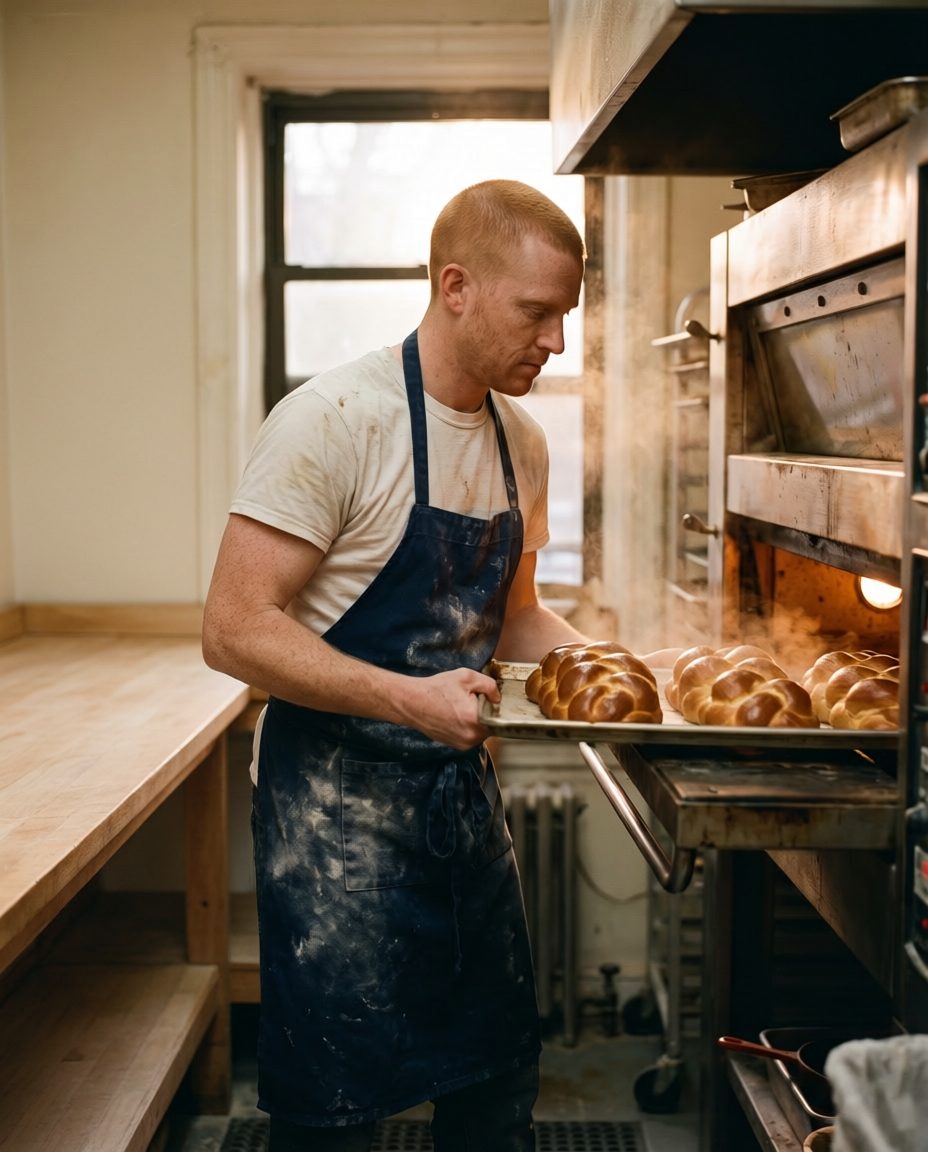
使用 Qwen Image 2 Edit 進行智慧消除。麵包師傅、麵包與烤箱都原封不動。
Erase all the jars, paper bags and clutter from the wooden counter and the shelf on the left so the counter is clear and clean. Keep the baker, his pose, the tray of braided loaves, the oven, the window and the light exactly the same.
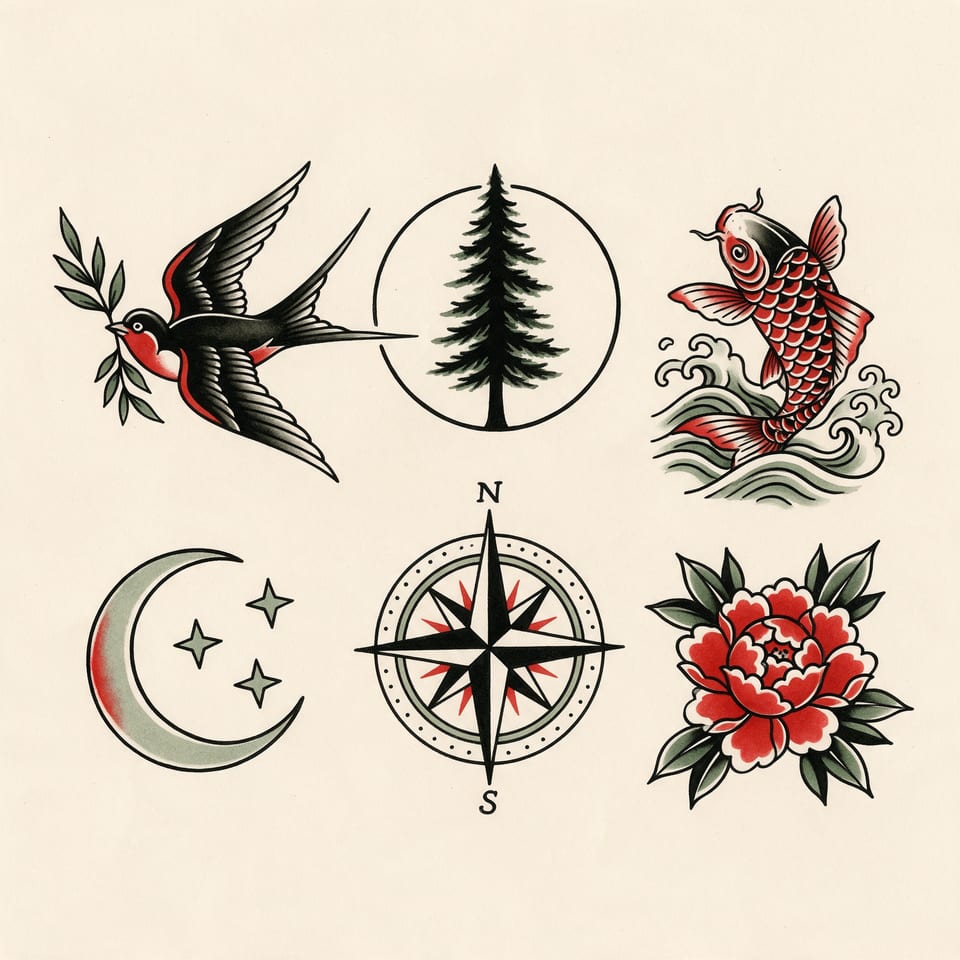
以 Seedream 5 製作的刺青設計稿。
Tattoo flash sheet of six original designs on cream paper: a swallow carrying a sprig of olive, a pine tree inside a circle, a koi fish in waves, a crescent moon with three stars, a compass rose and a peony, bold black linework with red and sage fills, evenly spaced, crisp scan of real ink.
一張生成臉孔、一張麵包店照片,實測兩款換臉模型
下方兩位人物都由 Nano Banana 2.1 生成,現實中並不存在。我們請兩款模型將第一位男子的臉孔換到麵包師傅身上,其餘維持不變。每張卡片都列出使用的提示詞、設定與點數。
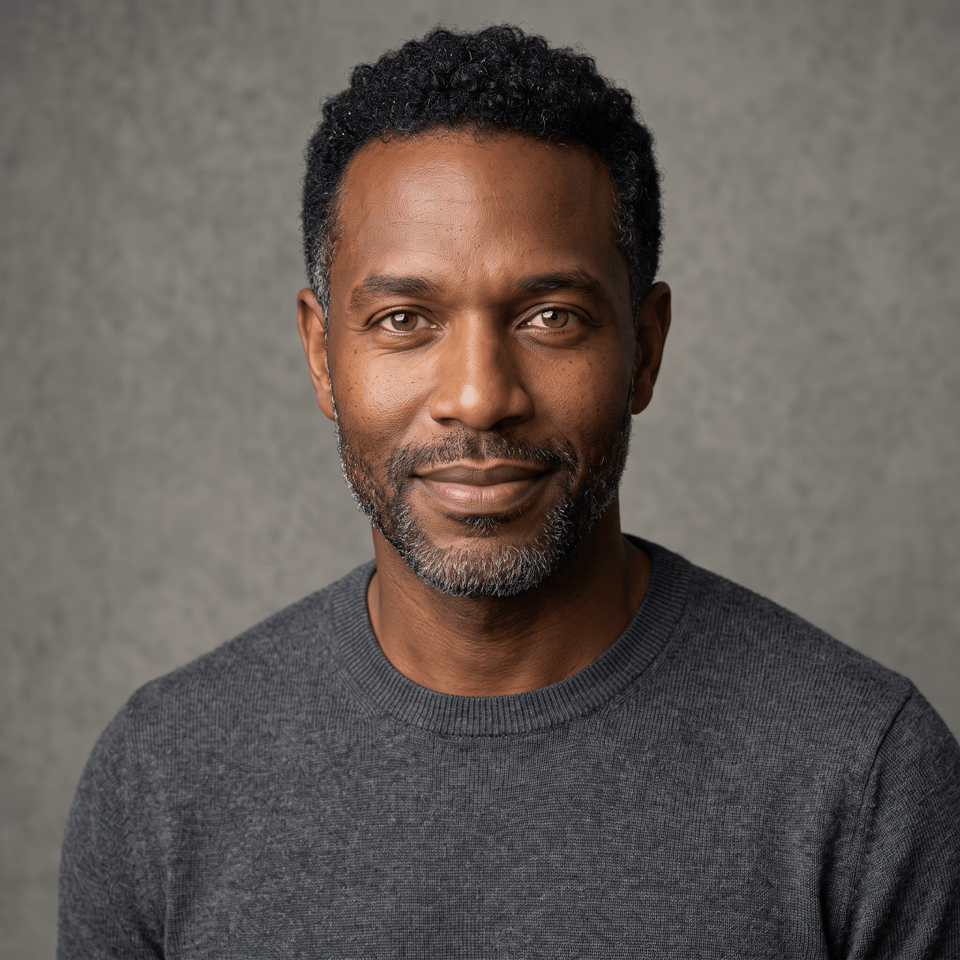
Studio headshot of a fictional man in his forties with close cropped curly black hair greying at the temples, a short salt and pepper beard, deep brown skin and hazel eyes, wearing a charcoal crew neck sweater, facing the camera with a relaxed closed mouth smile, plain stone grey backdrop, soft key light, sharp detail.
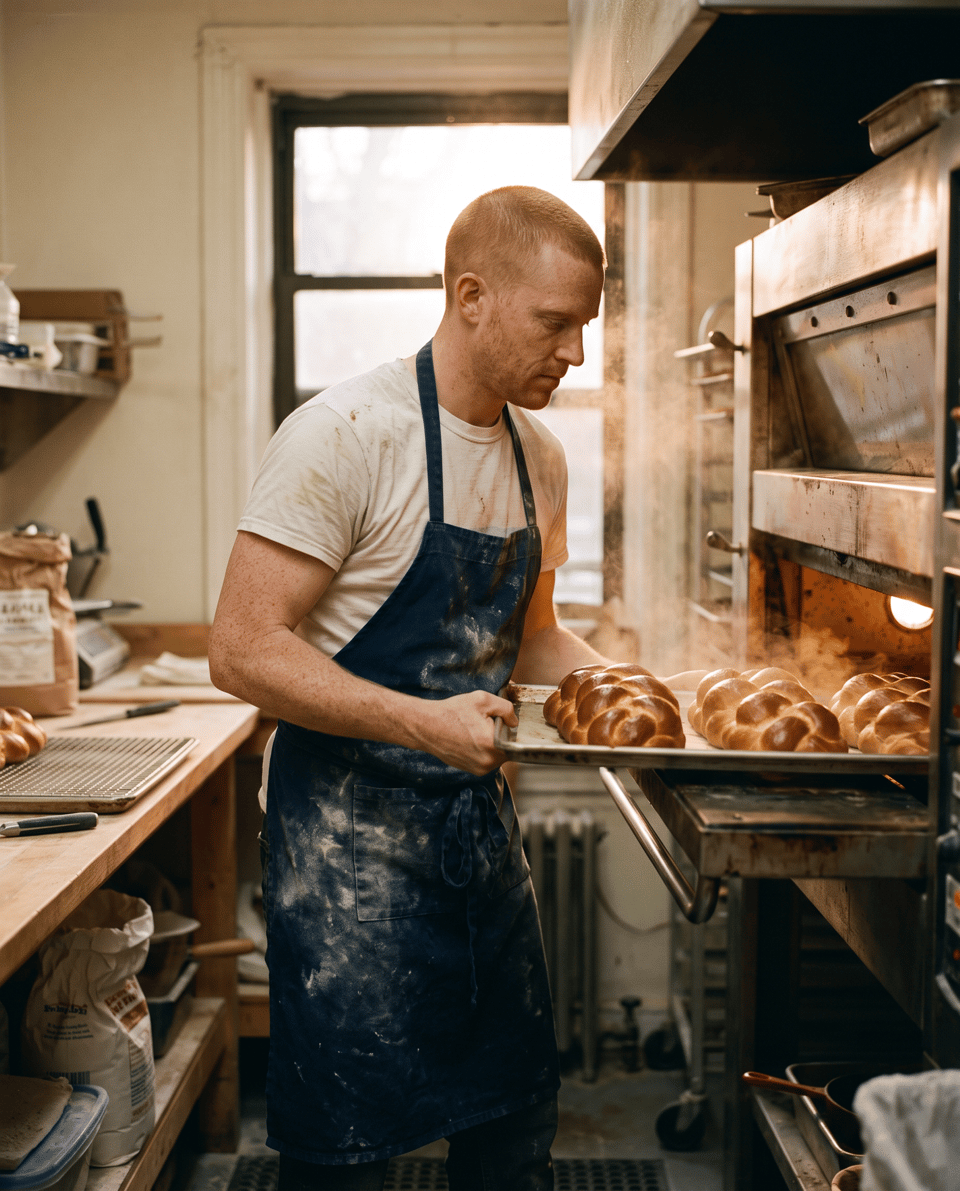
Candid photograph of a fictional baker in his thirties with a red buzz cut and pale skin, a flour dusted navy apron over a white tee, lifting a tray of braided loaves out of a deck oven in a small bakery at dawn, warm oven glow, flour hanging in the air, 35mm film look.
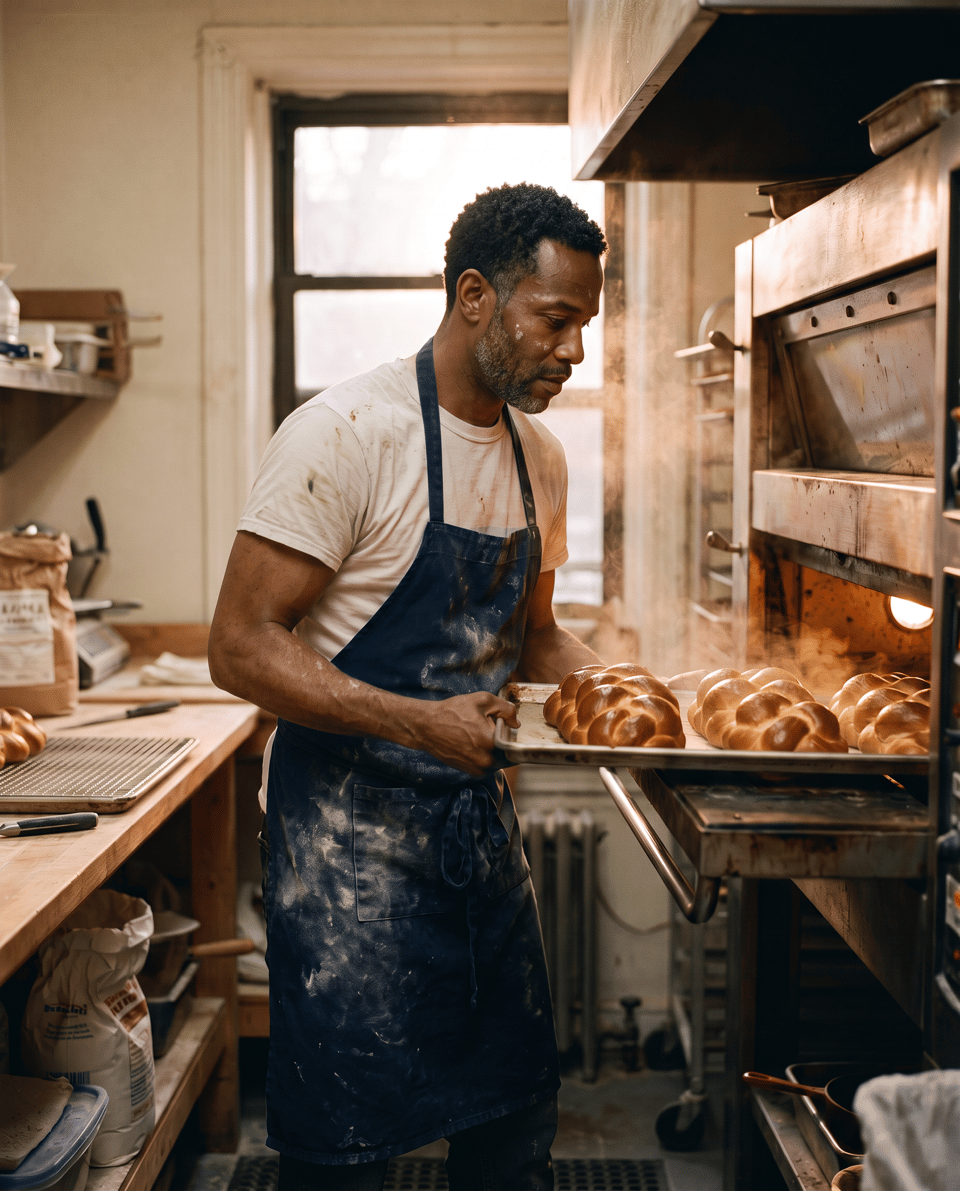
Face swap between two generated photos: put the face, close cropped curly black hair and short salt and pepper beard of the man in the second image onto the baker in the first image. Keep everything else from the first image exactly: his pose, the flour dusted navy apron and white tee, the tray of braided loaves, the oven glow, the bakery and the framing.
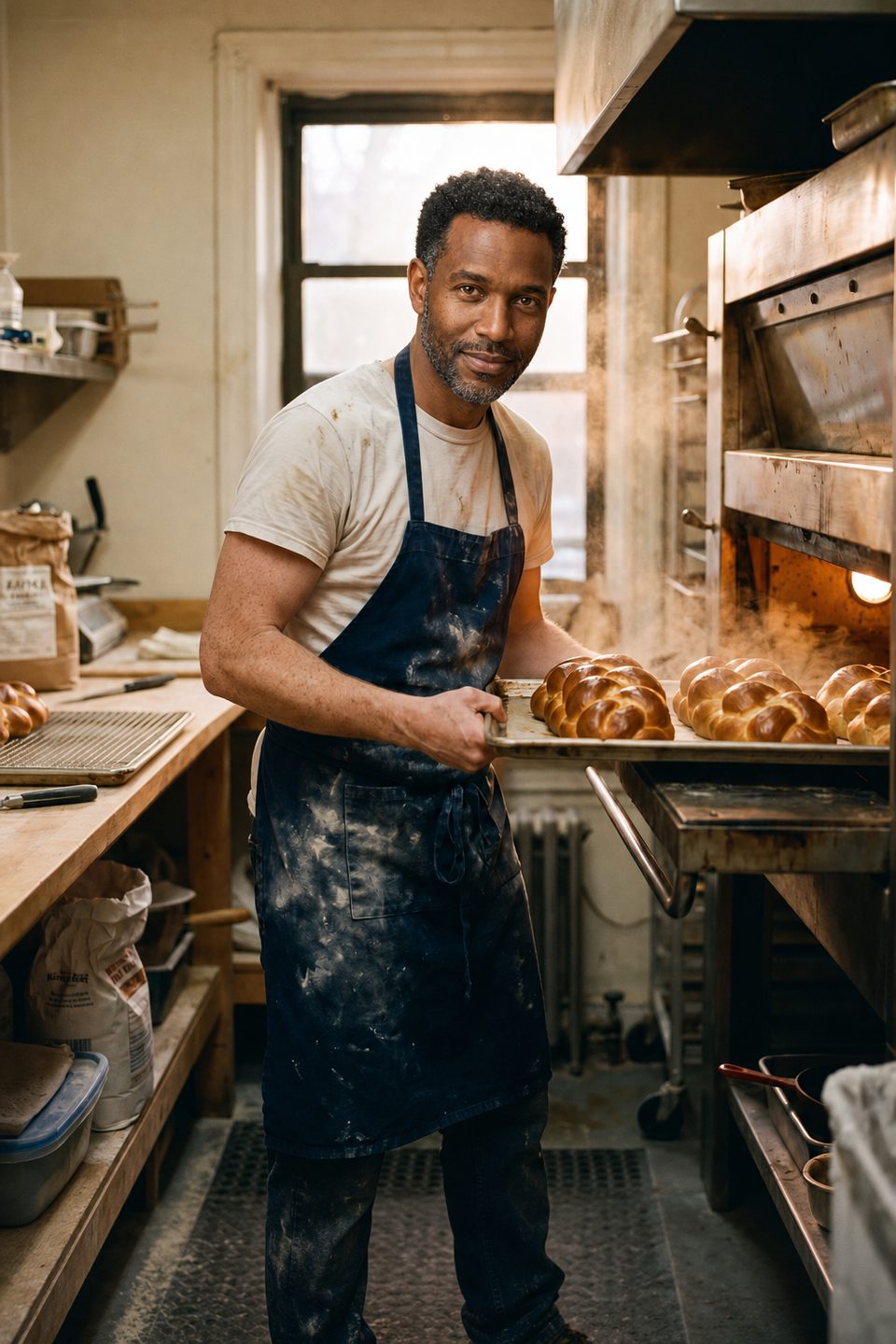
Face swap between two generated photos: put the face, close cropped curly black hair and short salt and pepper beard of the man in the second image onto the baker in the first image. Keep everything else from the first image exactly: his pose, the flour dusted navy apron and white tee, the tray of braided loaves, the oven glow, the bakery and the framing.
- 兩款模型都帶入了臉孔、泛灰捲髮與鬍鬚,也保留了圍裙、麵包和烤箱的暖光。
- Nano Banana 2.1 完整保留原本姿勢,視線向下看著烤盤,正是換臉通常需要的效果。花費 1.5 點數。
- GPT Image 2 Edit 讓人物轉頭朝鏡頭微笑,畫面更親切。花費 5 點數。
- 接著,我們將 Nano Banana 的換臉成果,做成一支 5 秒、帶音效的 Seedance 2.5 影片,同一方案再多做一步就完成。
Remaker AI 與 Pixel Dojo 方案比較
Remaker AI 欄位的所有資訊,皆取自其首頁與換臉功能頁,查閱日期為 2026 年 10 月 15 日。
| 問題 | Remaker AI | Pixel Dojo |
|---|---|---|
| 如何付費? | 單次購買點數包,從 $5.99 購買 200 點數,到 $299 購買 20,000 點數 | Lite 每月 $10,含 160 點數;Pro $25,含 500 點數;Pro Max $50,含 1,100 點數;另有 $5 起的 API 點數包 |
| 支援團體照嗎? | 主要換臉功能適用於單人臉照片;多人換臉需使用另一項工具 | 在提示詞中描述每個人,影像模型就能處理整個場景 |
| 能製作影片嗎? | 提供影片換臉、GIF 換臉,以及 AI 影片生成工具 | Seedance 2.5、Kling 3.0、Veo 3.1、WAN 3.0,以及 WAN Video Character Swap |
| 還有哪些工具? | 照片編輯、放大、去背、智慧消除、人像、專業形象照與刺青生成工具 | 各大頂尖影像與影片模型、Character Studio、LoRA 訓練工具、放大工具及 Sensei |
每週都做圖、做影片,為什麼選 Pixel Dojo
如果你每週都要製作圖片與影片,一個方案就能使用這些工具背後的模型,能做的更多。換臉、專業形象照、修圖到影片,全在同一處完成,每次點擊生成前都看得到價格。
Remaker AI 使用者為什麼轉用 Pixel Dojo
每個方案都能無限用
每個付費方案都能透過 Relax,無限使用 Qwen Image 2.1、FLUX 3 Image Klein、MiniMax H3 Turbo,以及所有影片與照片特效,不消耗點數。
Sensei,你的 AI 導演
描述你的專案,Sensei 就會規劃流程、列出費用,等你核准後執行,並檢查每次生成的成果。
Character Studio
臉孔儲存一次,就能在任何提示詞中用 @name 呼叫,讓同一位角色出現在每張圖片與每支影片中。
照片特效
45+ 種照片特效,一鍵改造照片風格。從手繪動畫劇照、盒裝公仔到雜誌封面,每一種都從你上傳的照片開始。
單一任務 AI 工具
35 款專用工具,上傳圖片就能完成一項編輯:移除浮水印、物件或文字,修復老照片並上色、更換背景、人像修飾,或製作縮圖。
讓你的主角演出任何影片
上傳短片,選擇已儲存的角色或一張照片,Character Swap 就能讓你的主角上場,同時保留原本的場景、運鏡與聲音。
點數可累積
只要持續訂閱,點數就能累積到下個月,付費買的點數不會月底就消失。
頂尖模型,還有 API
一個帳號就能使用超過 80 款影像模型與 60 款影片模型,並提供公開 API 與代管 MCP 伺服器,串接你自己的應用程式與 AI 助理。
Remaker 各項任務,在這裡花多少
Lite 每月 $10,含 160 點數;Pro $25,含 500 點數;Pro Max $50,含 1,100 點數。每個方案皆包含商業使用權。持續訂閱期間,點數可累積。
Nano Banana 2.1 換臉、專業形象照與智慧消除編輯,各花費 1.5 點數;GPT Image 2 Edit 換臉花費 5 點數;麵包店影片花費 30 點數。每張卡片都列有個別價格。
依據退款政策,首次購買可在 7 天內申請退款。使用點數未達 20% 可全額退款,超過後則按比例退款。
Remaker AI常見問題
有什麼好用的 Remaker AI 替代方案?
Pixel Dojo 用一個方案整合換臉、專業形象照、物件移除與設計工具背後的影像及影片模型,每次生成前都會先顯示價格。
Remaker AI 多少錢?
Remaker AI 販售單次購買的點數包,從 $5.99 購買 200 點數,到 $299 購買 20,000 點數,並表示購買的點數永久有效。
Pixel Dojo 可以用 AI 換臉嗎?
可以,使用 AI 生成的臉孔,或經本人同意的臉孔即可。把兩張圖片交給 Nano Banana 2.1 或 GPT Image 2 Edit,描述想怎麼換臉;影片則可用 WAN Video Character Swap。
換臉照片可以變成影片嗎?
可以。把換臉後的照片設為 Seedance 2.5、Kling 3.0 或 Veo 3.1 的首幀,再描述動作,就像我們製作烘焙坊短片時一樣。
如何讓多張圖片維持同一張臉?
將臉孔儲存在 Character Studio,在任何提示詞中用 @name 呼叫。所有支援參考圖片的模型都能使用。
今天就從 Remaker AI 換到 Pixel Dojo
在上方輸入提示詞,或從本頁任何範例開始。一個方案就包含所有頂尖模型、六大工作室與 Sensei,點數還能累積。
從 Seedance 2.5 開始資料來源
關於 Remaker AI 的資訊來自以下公開頁面,查證日期為 2026年10月15日。價格與方案可能變動,購買前請確認來源。