Google Flowを知る
Google Flow AIとは?Googleの動画制作スタジオとPixel DojoのVeo 3.1
Google Flowは、Veo 3.1、Omni Flash、Nano Bananaを軸にしたGoogleの動画・画像制作AIスタジオです。Pixel DojoではVeo 3.1 Lite・Fast・Standardを動画1本単位で使えます。必要なクレジット数は生成ボタンで確認できます。
2026年11月20日にGoogle公式のFlowヘルプとプランページを確認しました。以下のFlowに関する情報には、すべて参照元へのリンクを付けています。さらに、同じ制作指示をVeo 3.1の3つのモデルで実行。生成した動画と、それぞれにかかったクレジット数を紹介します。
96 credits ($6.00) すべてのプランに含まれます。月額$10から。
すでに会員の方は ログイン
執筆 Brian Lovett · 更新日
5つの質問でわかるGoogle Flow
Google Flowとは?
Google Flowは、Googleの動画・画像制作AIスタジオです。公式ヘルプには、動画モデルとしてVeo 3.1 Lite、Veo 3.1 Fast、Veo 3.1 Quality、Omni Flash、画像モデルとしてNano Banana Pro、Nano Banana 2 Lite、Nano Banana 2.1が掲載されています。
Google Flowは無料で使えますか?
Google Flowでは、有料プラン未契約のユーザーに毎日50クレジットが付与されます。未使用のデイリークレジットは繰り越せません。またGoogleによると、混雑するUTCの2 PM〜5 PMごろは動画を生成できない場合があります。
Google FlowでVeo動画を作るには何クレジット必要ですか?
Google Flowでは、Ultra以外のユーザー向けにVeo 3.1 Liteが10クレジット、Veo 3.1 Fastが20クレジットと案内されています。Veo 3.1 Qualityは8秒の動画で100クレジットです。
Flowのクレジットが増えるGoogleのプランは?
Googleの案内では、Google AI Plusは毎月200クレジット、月額$19.99のGoogle AI Proは1,000クレジット、Google AI Ultraの2つのプランはそれぞれ10,000または25,000クレジットがFlow用に付与されます。未使用の月間クレジットは繰り越せません。
Google Flowを利用できるのは?
Google Flowは、対応地域に住む18歳以上のユーザーが利用できます。Googleによると、Google AI Proが販売されている国でも、Flowを利用できない国があります。
Pixel Dojoで制作したVeo 3.1動画をもっと見る
Veo 3.1 Liteで、さらに3つの制作指示を音声付きで映像化しました。各タイルにプロンプト、設定、クレジット数を掲載しています。
雲海の上を走るランナーをVeo 3.1 Liteで追跡。風の音と足音も入っています。
Drone shot following a trail runner in her thirties in a red windbreaker along a knife edge mountain ridge above a sea of clouds at sunrise, the camera rising to reveal the peaks behind her. Sound: wind rushing, her steady breathing, gravel under her shoes.
夜市の中華鍋をVeo 3.1 Liteで映像化。鍋から炎が上がり、背後にはネオンが輝きます。
Close-up at a night market stall: a cook in his fifties tosses rice and vegetables in a flaming wok, fire leaping up as he shakes the pan, steam and neon light swirling around him. Sound: the roar of the burner, sizzling oil, the clang of a ladle.
誰もいない舞踏室で踊るカップルを、Veo 3.1 Liteが滑らかに追います。
Wide shot of a couple in their seventies waltzing alone across an empty grand ballroom with a checkered marble floor, chandeliers glowing, afternoon light through tall windows, the camera gliding with them. Sound: a slow string waltz, their shoes on marble.
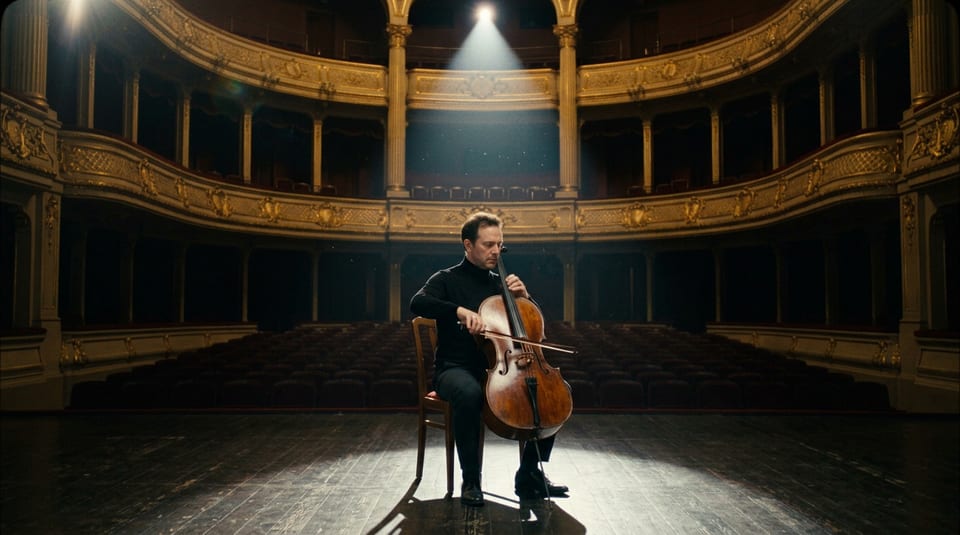
フレームから動画を作るテスト用に、Nano Banana 2.1で生成した開始画像。1Kで1クレジット。
Cinematic still of a cellist in his forties in a black turtleneck seated alone at center stage of an empty gilded opera house, a single spotlight from above, rows of red velvet seats fading into darkness, his bow resting on the strings, 35mm film look.
同じ制作指示でVeo 3.1 Lite・Fast・Standardを比較
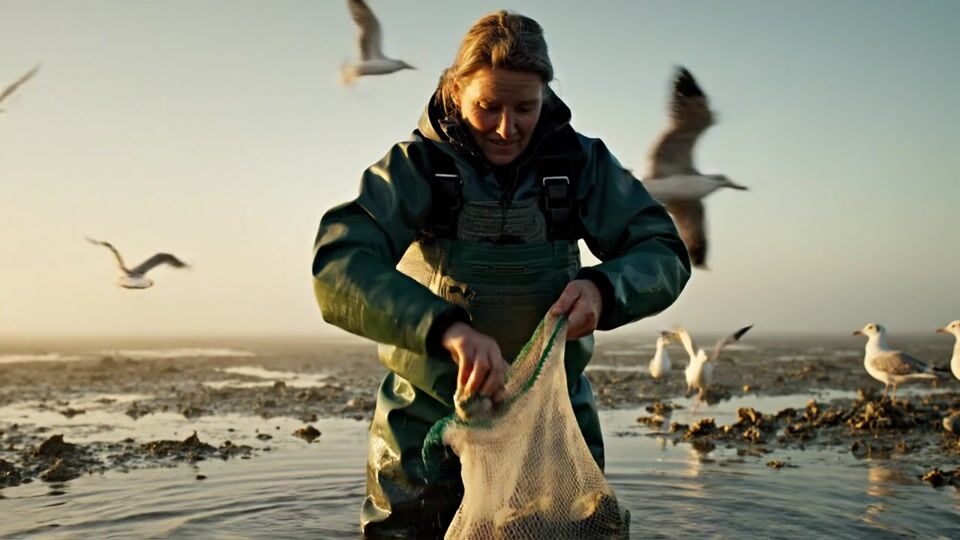
セリフ、自然な環境音、手元の細かな描写を盛り込んだ1つのショットを用意し、Veo 3.1の3つのモデルで生成しました。設定はすべて720p、4秒、音声ありです。
Veo 3.1 Lite、720p、4 s、音声あり。
Medium shot of an oyster farmer in her fifties in green waders standing knee deep in a misty tidal flat at golden hour, lifting a mesh bag of oysters out of the water, gulls wheeling behind her. She shucks one, holds it toward the camera and says, "Tastes like the tide." Sound: water dripping, gulls crying, the crack of the shell, her voice.
Veo 3.1 Fast、720p、4 s、音声あり。
Medium shot of an oyster farmer in her fifties in green waders standing knee deep in a misty tidal flat at golden hour, lifting a mesh bag of oysters out of the water, gulls wheeling behind her. She shucks one, holds it toward the camera and says, "Tastes like the tide." Sound: water dripping, gulls crying, the crack of the shell, her voice.
Veo 3.1 Standard、720p、4 s、音声あり。
Medium shot of an oyster farmer in her fifties in green waders standing knee deep in a misty tidal flat at golden hour, lifting a mesh bag of oysters out of the water, gulls wheeling behind her. She shucks one, holds it toward the camera and says, "Tastes like the tide." Sound: water dripping, gulls crying, the crack of the shell, her voice.
- 3つとも、最初から最後まで同じ養殖業者、ウェーダー、霧がかった干潟を維持。どの動画も、カメラに牡蠣を差し出すカットで締めくくられました。
- Veo 3.1 Standardは画面全体が生き生きとしています。彼女が袋を扱う手前を、カモメが飛び交います。
- Veo 3.1 Fastは最も近くまで寄り、牡蠣を見せる瞬間の笑顔も最も温かく仕上がりました。
- Veo 3.1 Liteは低い太陽を背に、最も広い構図で彼女を捉えました。6クレジットで見応えのある1本です。
フレームから動画へ:Nano Bananaの静止画をVeo 3.1 Fastで動かす
Google Flowでは、Nano Bananaの静止画とVeoのフレーム動画生成を組み合わせられます。ここでも同じ手順で、Nano Banana 2.1で静止画を作り、それを開始フレームとしてVeo 3.1 Fastで動画にしました。
Veo 3.1 Fast、720p、4 s。静止画を開始フレームに使用。
He draws the bow slowly across the strings and plays a mournful phrase with his eyes closed, dust drifting through the spotlight as the camera eases in. Sound: a rich solo cello echoing in the empty hall.
- Veo 3.1 Fastは、用意した静止画そのままの構図でスタート。金装飾のバルコニーも、スポットライトも、椅子も同じです。
- チェロ奏者は顔立ちを変えず、安定した弓の動きで動画全体を通して演奏しています。
- 生成された動画ファイルには音声も入り、タイルに表示された使用量は18クレジットでした。
Google FlowとPixel Dojoのプラン比較
Google Flowの情報は、2026年11月20日に確認したGoogle公式ヘルプとプランページに基づきます。Pixel Dojoの情報は、各モデルページとこのページのタイルに基づきます。
| 比較項目 | Google Flow | Pixel Dojo |
|---|---|---|
| 生成前のクレジット表示 | Flowヘルプセンターとプロンプト欄の設定にクレジット数を掲載 | すべてのモデルページとボタンに必要クレジット数を表示。このページの4秒・720pのVeo 3.1動画は6、18、48クレジット |
| 未使用クレジット | Flowのデイリー・月間クレジットは繰り越し不可 | 有料プランの継続中は繰り越し可能 |
| Veo 3.1のモデル | Lite・Fast・Quality。Googleによると、FastとQualityは2026年12月5日にFlowでの提供を終了 | Veo 3.1 Lite・Fast・Standardを全プランで利用可能 |
| その他の動画モデル | Omni Flash | 同じクレジットでSeedance 2.5、Kling 4.0、WAN 3.0、MiniMax H3などを利用可能 |
| 有料プラン | Google AI Plus、月額$19.99でFlow用1,000クレジットのGoogle AI Pro、月額$99.99で10,000クレジットのGoogle AI Ultra | Liteは月額$10で160クレジット、Proは$25で500クレジット、Pro Maxは$50で1,100クレジット |
| 登録できるユーザー | 対応地域に住む18歳以上のみ | アカウントがあれば誰でも利用可能。プラン未契約でも毎日3回、エフェクトを無料で利用可能 |
詳しく解説:Google Flowのクレジットの仕組み
Google Flowはクレジット制です。Google公式ヘルプによると、有料プラン未契約のユーザーには毎日50クレジットが付与され、最初に生成した日の翌日に次の50クレジットが届きます。有料プランでは請求サイクルごとに月間クレジットが更新されます。Googleによると、未使用の月間クレジットは繰り越せません。
Google FlowのVeo 3.1は、生成1回ごとにクレジットを消費します。Googleの案内では、Ultra以外のユーザーはLiteが10クレジット、Fastが20クレジットで、Ultraユーザーはその半分です。Qualityは8秒の動画で100クレジット。またGoogleによると、Veo Extendは2026年11月5日にFlowでの提供を終了しました。
Pixel DojoのVeo 3.1は秒単位の料金設定です。このページに掲載した4秒・720pの動画は、Liteが6クレジット、Fastが18クレジット、Standardが48クレジット。生成ボタンを押す前に、長さ、解像度、音声の有無を選べます。
Google FlowユーザーがPixel Dojoに乗り換える理由
全プランで使い放題
すべての有料プランでRelaxが利用できます。Qwen Image 2.1、FLUX 3 Image Klein、MiniMax H3 Turboに加え、すべての動画・写真エフェクトが、クレジット消費なしで使い放題です。
AIディレクター、Sensei
作りたいものを伝えると、Senseiが制作プランと必要クレジット数を提示。承認を受けてから進め、すべてのテイクをチェックします。
Video Studio
ショットに合ったトップクラスの動画エンジンを選び、生成から編集、延長まで1か所で完結。
ワンクリック動画エフェクト
AI HugからAI Inflateまで、300+の動画エフェクトで写真をトレンド動画に。プロンプト不要、ワンクリックで作れます。毎日3回は無料です。
Film Studio
アイデアを、完成した1本の映画へ。脚本、キャスト、絵コンテ、クリップ生成から、全ショットの尺を整える編集まで。各ステップの実行前に、必要な料金がわかります。
ジャンルから始める
UGC広告、マイクロドラマ、映画予告編、解説動画など、作りたい形式を選ぶだけ。対応するスタジオが開き、設定もアイデアのサンプルも入力済みです。
クレジットは繰り越しOK
サブスクリプションの継続中は、クレジットを翌月以降に繰り越せます。購入したクレジットが月末に消えることはありません。
主要モデルもAPIも、ひとつに
80を超える画像モデルと60を超える動画モデルを、ひとつのアカウントで。公開APIとホスト型MCPサーバーで、ご自身のアプリやAIアシスタントにも連携できます。
Pixel DojoでのVeo 3.1の料金
このページのVeo 3.1動画は、各タイルに必要なクレジット数を表示しています。音声付き・720p・4秒の場合、Liteは6、Fastは18、Standardは48クレジット。Nano Banana 2.1の静止画は1クレジットです。
Liteは月額$10で160クレジット、Proは月額$25で500クレジット、Pro Maxは月額$50で1,100クレジット。すべての有料プランで、MiniMax H3 Turboの動画、Qwen Image 2.1 TurboとFLUX 3 Image Kleinの1K画像、MiniMax H3 Imageの2K画像を、クレジット消費なしで無制限に生成できます。サブスクリプションの継続中は、クレジットを繰り越せます。
返金ポリシーに基づき、初回購入は7日以内であれば返金可能です。クレジットの使用率が20%未満なら全額、それ以降は使用分に応じた金額を返金します。
Google Flowについてのよくある質問
Google FlowとVeoは同じものですか?
いいえ。VeoはGoogleの動画モデルで、Google FlowはVeo 3.1に加えてOmni FlashやNano Bananaも使えるGoogleのスタジオアプリです。Pixel Dojoでは、Veo 3.1のページからVeo 3.1 Lite、Fast、Standardを直接使えます。
Google Flowの料金はいくらですか?
Google Flowは、サブスクリプションなしで毎日50クレジットを利用できます。Googleの掲載料金では、Google AI Proは月額$19.99でFlow用の1,000クレジット、Google AI Ultraは月額$99.99で10,000クレジットが含まれます。
Google FlowなしでVeo 3.1を使えますか?
はい。Pixel Dojoでは、Veo 3.1 Lite、Fast、Standardのすべてを、Webページまたは公開APIから利用できます。料金は動画ごとのクレジット制です。
自分の国でGoogle Flowが使えないのはなぜですか?
Google Flowは対応地域でのみ利用でき、GoogleはVPNを使っても利用できる地域は変わらないとしています。Pixel Dojoでは、どのプランでもVeo 3.1を使えます。
Google FlowでVeo 3.1 Fastは引き続き使えますか?
Googleは、2026年12月5日にFlowでのVeo 3.1 FastとVeo 3.1 Qualityの提供を終了するとしています。Pixel Dojoでは現在、Veo 3.1 Lite、Fast、Standardをすべて利用できます。
今すぐGoogle FlowからPixel Dojoへ
上にプロンプトを書くか、このページの例から始めましょう。ひとつのプランで主要モデル、6つのスタジオ、Senseiがすべて使え、クレジットは繰り越されます。
Veo 3.1で始める出典
Google Flowに関する情報は、2026年11月20日に確認した以下の公開ページによるものです。価格やプランは変わるため、購入前に出典をご確認ください。
- Google Flow Help: Get started with Google Flow (age, supported regions, no subscription access, Workspace plans), read 2026-11-20
- Google Flow Help: Manage your Google Flow credits (daily and monthly credits, credit cost per model, retirements), read 2026-11-20
- Google Flow Help: Learn about Google Flow models and supported features, read 2026-11-20
- Google One: Google AI plans (Pro and Ultra monthly prices, Flow credits, countries), read 2026-11-20