Google Flow, explained
Google Flow AI: Google's video studio, and Veo 3.1 on Pixel Dojo
Google Flow is Google's AI studio for video and images, built around Veo 3.1, Omni Flash and Nano Banana. On Pixel Dojo you run Veo 3.1 Lite, Fast and Standard by the clip, with the credit price on the button.
We read Google's own Flow help pages and plan page on November 20, 2026, and every Flow fact below links to one of them. Then we ran one brief on all three Veo 3.1 tiers here, so you can see the clips and what each cost.
96 credits ($6.00) per 8 s clip at 1080p with audio. Included in every plan, from $10/month.
Already a member? Sign in
By Brian Lovett · Updated
Google Flow in five answers
What is Google Flow?
Google Flow is Google's AI creative studio for video and images. Its help pages list Veo 3.1 Lite, Veo 3.1 Fast, Veo 3.1 Quality and Omni Flash for video, and Nano Banana Pro, Nano Banana 2 Lite and Nano Banana 2.1 for images.
Is Google Flow free?
Google Flow gives people without a subscription 50 credits a day. Unused daily credits do not roll over, and Google says videos may be unavailable at peak hours, roughly 2 PM to 5 PM UTC.
What does a Veo clip cost in Google Flow?
Google Flow lists Veo 3.1 Lite at 10 credits and Veo 3.1 Fast at 20 credits for non Ultra users, and Veo 3.1 Quality at 100 credits for an 8 second video.
Which Google plans include more Flow credits?
Google lists 200 monthly Flow credits on Google AI Plus, 1,000 on Google AI Pro at $19.99 a month, and 10,000 or 25,000 on the two Google AI Ultra tiers. Google says unused monthly credits do not roll over.
Who can use Google Flow?
Google Flow requires you to be 18 or older and in a supported region. Google says Flow is not available in every country where Google AI Pro is sold.
More Veo 3.1 clips we made on Pixel Dojo
Three more briefs on Veo 3.1 Lite with sound on. Prompt, settings and credits are on every tile.
Veo 3.1 Lite following a runner over a sea of clouds, with wind and footsteps in the sound track.
Drone shot following a trail runner in her thirties in a red windbreaker along a knife edge mountain ridge above a sea of clouds at sunrise, the camera rising to reveal the peaks behind her. Sound: wind rushing, her steady breathing, gravel under her shoes.
Veo 3.1 Lite on a night market wok, fire leaping off the pan and neon glowing behind.
Close-up at a night market stall: a cook in his fifties tosses rice and vegetables in a flaming wok, fire leaping up as he shakes the pan, steam and neon light swirling around him. Sound: the roar of the burner, sizzling oil, the clang of a ladle.
Veo 3.1 Lite gliding with a couple across an empty ballroom.
Wide shot of a couple in their seventies waltzing alone across an empty grand ballroom with a checkered marble floor, chandeliers glowing, afternoon light through tall windows, the camera gliding with them. Sound: a slow string waltz, their shoes on marble.
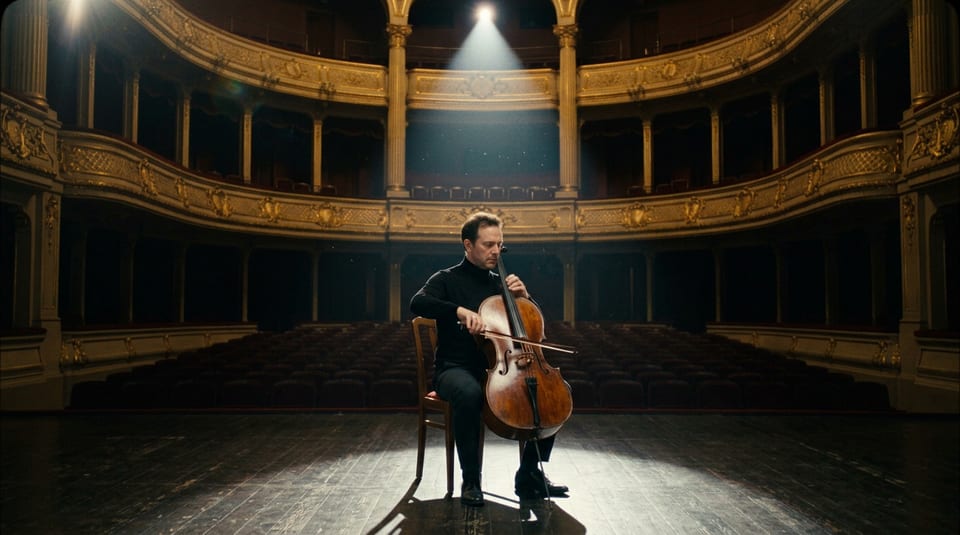
The Nano Banana 2.1 start frame for our frames to video test, 1 credit at 1K.
Cinematic still of a cellist in his forties in a black turtleneck seated alone at center stage of an empty gilded opera house, a single spotlight from above, rows of red velvet seats fading into darkness, his bow resting on the strings, 35mm film look.
One brief on Veo 3.1 Lite, Fast and Standard
We wrote one shot with a spoken line, natural sound and fine detail in the hands, and ran it on all three Veo 3.1 tiers at 720p, 4 seconds, sound on.
Veo 3.1 Lite, 720p, 4 s, with sound.
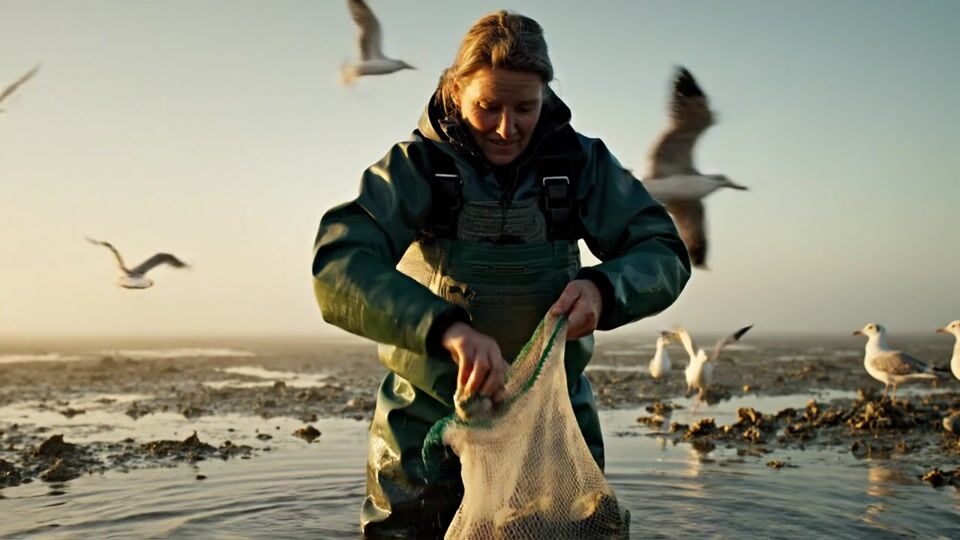
Medium shot of an oyster farmer in her fifties in green waders standing knee deep in a misty tidal flat at golden hour, lifting a mesh bag of oysters out of the water, gulls wheeling behind her. She shucks one, holds it toward the camera and says, "Tastes like the tide." Sound: water dripping, gulls crying, the crack of the shell, her voice.
Veo 3.1 Fast, 720p, 4 s, with sound.
Medium shot of an oyster farmer in her fifties in green waders standing knee deep in a misty tidal flat at golden hour, lifting a mesh bag of oysters out of the water, gulls wheeling behind her. She shucks one, holds it toward the camera and says, "Tastes like the tide." Sound: water dripping, gulls crying, the crack of the shell, her voice.
Veo 3.1 Standard, 720p, 4 s, with sound.
Medium shot of an oyster farmer in her fifties in green waders standing knee deep in a misty tidal flat at golden hour, lifting a mesh bag of oysters out of the water, gulls wheeling behind her. She shucks one, holds it toward the camera and says, "Tastes like the tide." Sound: water dripping, gulls crying, the crack of the shell, her voice.
- All three kept the same farmer, waders and misty tidal flat from the first frame to the last, and all three finished on the oyster held out to the camera.
- Veo 3.1 Standard filled the frame with life: gulls sweeping through the foreground while she works the bag.
- Veo 3.1 Fast moved in closest and gave her the warmest smile on the reveal.
- Veo 3.1 Lite framed her widest with the low sun behind, a strong clip at 6 credits.
Frames to video: a Nano Banana still, animated on Veo 3.1 Fast
Google Flow pairs Nano Banana stills with Veo frames to video. We did the same here: a still on Nano Banana 2.1, then Veo 3.1 Fast from that first frame.
Veo 3.1 Fast, 720p, 4 s, from the still as its first frame.
He draws the bow slowly across the strings and plays a mournful phrase with his eyes closed, dust drifting through the spotlight as the camera eases in. Sound: a rich solo cello echoing in the empty hall.
- Veo 3.1 Fast opened exactly on our still: the same gilded balconies, spotlight and chair.
- The cellist plays through the clip with steady bowing and his face unchanged.
- The clip came back with sound in the file, at 18 credits on the tile.
Google Flow plans vs Pixel Dojo
Google Flow facts from Google's help and plan pages, read November 20, 2026. Pixel Dojo facts from our model pages and the tiles on this page.
| Question | Google Flow | Pixel Dojo |
|---|---|---|
| Price of a clip shown before you make it | Credit costs are listed in the Flow help center and in the prompt box settings | Every model page and button shows the credit price; our 4 second 720p Veo 3.1 clips cost 6, 18 and 48 credits |
| Unused credits | Daily and monthly Flow credits do not roll over | Credits roll over while you stay subscribed |
| Veo 3.1 tiers | Lite, Fast and Quality; Google says Fast and Quality retire from Flow on December 5, 2026 | Veo 3.1 Lite, Fast and Standard, all on every plan |
| Other video models | Omni Flash | Seedance 2.5, Kling 4.0, WAN 3.0, MiniMax H3 and more on the same credits |
| Paid plans | Google AI Plus, Google AI Pro $19.99 a month with 1,000 Flow credits, Google AI Ultra $99.99 a month with 10,000 | Lite $10 a month for 160 credits, Pro $25 for 500 credits, Pro Max $50 for 1,100 credits |
| Who can sign up | Ages 18 and up in supported regions only | Anyone with an account; 3 free effects a day without a plan |
Deep dive: how Google Flow credits work
Google Flow runs on credits. Google's help page gives people without a subscription 50 credits a day, and the next 50 arrive the day after your first generation. Subscribers get a monthly pool that refreshes with the billing cycle, and Google says unused monthly credits do not roll over.
Google Flow prices Veo 3.1 per generation. Google lists Lite at 10 credits and Fast at 20 for non Ultra users, half that for Ultra subscribers, and Quality at 100 credits for an 8 second video. Google also says Veo Extend retired from Flow on November 5, 2026.
We price Veo 3.1 by the second instead. Our 4 second 720p clips on this page cost 6 credits on Lite, 18 on Fast and 48 on Standard, and you pick the length, the resolution and sound on or off before you press the button.
Why Google Flow users switch to Pixel Dojo
Unlimited on every plan
On every paid plan, Relax runs Qwen Image 2.1, FLUX 3 Image Klein and MiniMax H3 Turbo, plus every video and photo effect, unlimited with no credits spent.
Sensei, the AI director
Describe a project and Sensei plans it, prices it, waits for your approval and reviews every take.
Video Studio
Generate, edit and extend a clip in one place, on whichever top video engine suits the shot.
One click video effects
300+ one-click video effects turn a photo into a trend clip, from AI Hug to AI Inflate, with no prompt to write, and 3 are free every day.
Film Studio
An idea becomes a finished film: script, cast, storyboard, clips and an editor pass that trims every shot, with each step priced before it runs.
Start from a genre
Pick a format such as a UGC ad, a micro drama, a movie trailer or an explainer, and the matching studio opens with the settings and a sample idea filled in.
Credits that roll over
Your credits roll over while you stay subscribed, so nothing you pay for disappears at the end of the month.
Every top model, plus an API
More than 80 image and 60 video models in one account, with a public API and a hosted MCP server for your own apps and AI assistants.
What Veo 3.1 costs on Pixel Dojo
Every Veo 3.1 clip on this page shows its credits on the tile: 6 on Lite, 18 on Fast and 48 on Standard for 4 seconds at 720p with sound. The Nano Banana 2.1 still cost 1 credit.
Plans are Lite $10 a month for 160 credits, Pro $25 for 500 credits, Pro Max $50 for 1,100 credits. Every paid plan also includes unlimited MiniMax H3 Turbo video and images on Qwen Image 2.1 Turbo and FLUX 3 Image Klein at 1K, and MiniMax H3 Image at 2K, with no credits spent. Credits roll over while you stay subscribed.
Under our refund policy, a first purchase can be refunded within 7 days, in full if under 20% of the credits are used and pro-rated after that.
Google Flow questions
Is Google Flow the same as Veo?
No. Veo is Google's video model, and Google Flow is Google's studio app that runs Veo 3.1 alongside Omni Flash and Nano Banana. On Pixel Dojo you run Veo 3.1 Lite, Fast and Standard directly from the Veo 3.1 page.
How much does Google Flow cost?
Google Flow gives 50 credits a day without a subscription. Google lists Google AI Pro at $19.99 a month with 1,000 Flow credits and Google AI Ultra at $99.99 a month with 10,000.
Can I use Veo 3.1 without Google Flow?
Yes. Veo 3.1 Lite, Fast and Standard all run on Pixel Dojo, from the web page or the public API, priced in credits per clip.
Why is Google Flow not available in my country?
Google Flow only works in supported regions, and Google says a VPN does not change that. Pixel Dojo runs Veo 3.1 on any plan.
Does Google Flow keep Veo 3.1 Fast?
Google says Veo 3.1 Fast and Veo 3.1 Quality retire from Flow on December 5, 2026. On Pixel Dojo, Veo 3.1 Lite, Fast and Standard all run today.
Video Effects New
Your first video is free. One photo, one click.
310 ready-made effects, from AI Hug and Earth Zoom In to product spins and listing walkthroughs. Upload a photo and press Generate. No prompt to write, and a free account gets 3 a day.






Switch from Google Flow to Pixel Dojo today
Write a prompt above or start from any example on this page. One plan covers every top model, six studios and Sensei, and your credits roll over.
Start with Veo 3.1Sources
Facts about Google Flow come from these public pages, checked on Nov 20, 2026. Prices and plans change; check the source before you buy.
- Google Flow Help: Get started with Google Flow (age, supported regions, no subscription access, Workspace plans), read 2026-11-20
- Google Flow Help: Manage your Google Flow credits (daily and monthly credits, credit cost per model, retirements), read 2026-11-20
- Google Flow Help: Learn about Google Flow models and supported features, read 2026-11-20
- Google One: Google AI plans (Pro and Ultra monthly prices, Flow credits, countries), read 2026-11-20