VideoScribe 替代方案
VideoScribe 替代方案:AI 能畫出你的白板解說影片嗎?
想快速做出白板風格鏡頭,Veo 3.1 用一句提示詞就畫出逼真的麥克筆草圖。要製作完整旁白課程,就交給 Sensei 逐鏡規劃並估算費用。
VideoScribe 讓你從素材庫挑選手繪素材,放上時間軸,組成白板影片。提示詞能做到多接近的效果,能不能當作 VideoScribe 替代方案?我們請四款 AI 影片模型生成同一段白板場景,直接實測。
36 credits ($2.25) 所有方案皆包含,每月 US$10 起。
已經是會員? 登入
作者 Brian Lovett · 更新於
更多用這裡的工具製作的教學與解說素材
以下每張圖片與每段影片都在 Pixel Dojo 製作,使用的提示詞就在各自的卡片上。

用 GPT Image 2.5 製作的資安教育訓練海報,每個字都正確,只花 2 點。
Clean flat illustrated workplace training poster titled "THINK BEFORE YOU CLICK" with three numbered tips: "1 CHECK THE SENDER", "2 HOVER OVER LINKS", "3 REPORT IT", each with a simple icon of an envelope, a cursor and a flag, navy and coral palette, generous white space, crisp legible lettering.
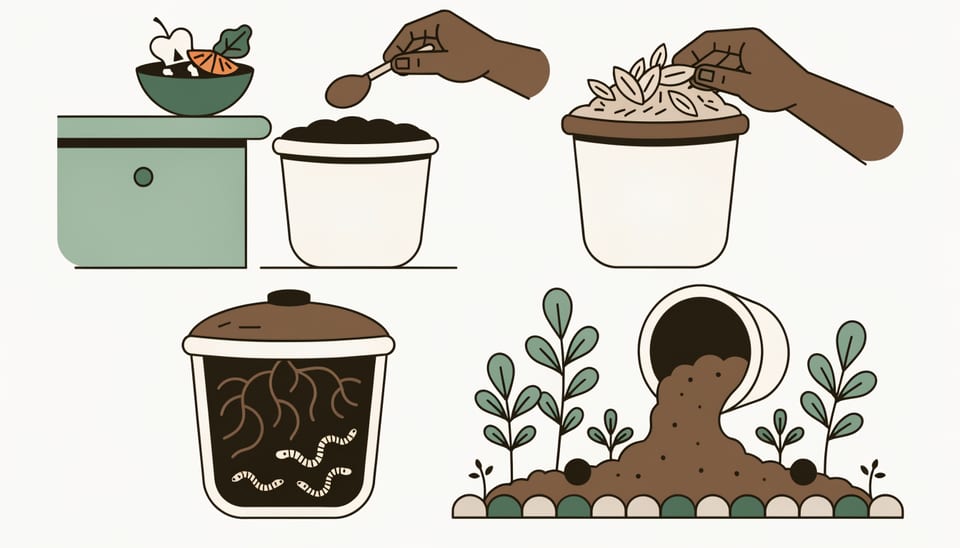
用 Recraft V4.1 製作的無文字流程插畫,只花 1 點,隨時能加上自己的標示。
Flat vector illustration in four panels showing how a home compost bin works: kitchen scraps go in, dry leaves are layered on top, worms break it down, rich soil comes out into a garden bed, friendly rounded shapes, earthy green and brown palette, no text.
將同一張插畫交給 WAN 2.7,轉成圖生影片,讓畫面活起來。
The flat illustration gently comes alive: a spoon of scraps drops into the bin, the worms wriggle in the dark soil, and rich soil pours out of the tipped pot into the garden bed as the little plants sway.
用 Seedance 2 Mini 製作剪紙動畫,呈現另一種經典解說影片風格。
Paper cutout stop motion animation: a small orange paper fox trots through a forest of layered paper pine trees, the layers slide past in parallax, a paper moon rises behind the hills, handmade texture, gentle frame by frame movement.
痛點:做解說影片,光排素材就要好幾個小時
VideoScribe 專為學習發展、人資與行銷團隊打造。從素材庫挑選手繪圖片、設定繪圖手勢、在時間軸安排場景、加入旁白,再匯出寬螢幕、正方形或直式影片。
每個細節都能精準掌控,但也代表每個場景都得親手搭建。我們想知道,能不能只用一句提示詞,在大約一分鐘內生成可用的白板鏡頭,連手、麥克筆和逐步畫出的過程都到位。
同一個鎖頭與鑰匙白板場景,四款模型實測
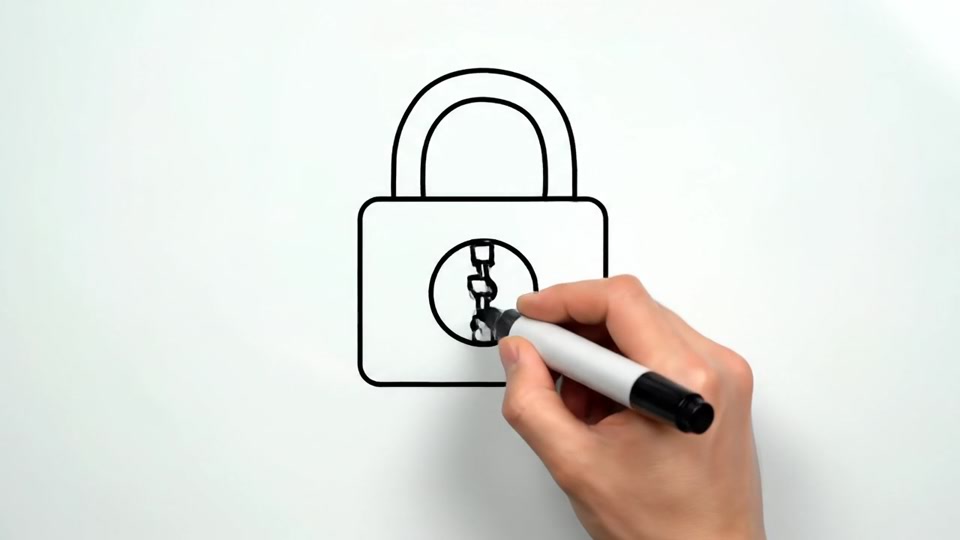
我們請每款模型呈現同一個場景:一隻手畫出彈子鎖,鑰匙將鎖銷頂成一直線,接著鎖芯轉動。全程使用黑色線稿,不加文字。每張卡片都列出使用的設定與點數。
Whiteboard explainer animation, top down locked camera over a clean white board: a hand holding a black marker draws a simple pin tumbler lock, then a key slides into it and lifts the small pins into a straight line, and the cylinder turns. Simple black line art with a few blue accents, no words or letters. Sound: marker squeak and a soft click.
Whiteboard explainer animation, top down locked camera over a clean white board: a hand holding a black marker draws a simple pin tumbler lock, then a key slides into it and lifts the small pins into a straight line, and the cylinder turns. Simple black line art with a few blue accents, no words or letters. Sound: marker squeak and a soft click.
Whiteboard explainer animation, top down locked camera over a clean white board: a hand holding a black marker draws a simple pin tumbler lock, then a key slides into it and lifts the small pins into a straight line, and the cylinder turns. Simple black line art with a few blue accents, no words or letters. Sound: marker squeak and a soft click.
Whiteboard explainer animation, top down locked camera over a clean white board: a hand holding a black marker draws a simple pin tumbler lock, then a key slides into it and lifts the small pins into a straight line, and the cylinder turns. Simple black line art with a few blue accents, no words or letters. Sound: marker squeak and a soft click.
- Veo 3.1 Fast 最像真正的白板影片:真人的手、黑色麥克筆,掛鎖與鑰匙隨著筆畫逐線成形。
- Seedance 2.5 連手都畫成線稿,比起實拍白板,更像平面動畫解說。
- Kling 3.0 把兩種風格混在一起:先畫出鎖頭,再由真人手拿著真實鑰匙入鏡。
- WAN 3.0 的結尾畫面最細緻,以帶有明暗層次的鉛筆素描收尾,花費 10 點。
實測結論
一句提示詞,一步就能生成逼真的白板鏡頭。這次實測中,Veo 3.1 Fast 最接近 VideoScribe 招牌的手繪風格;WAN 3.0 則以最低價格,交出最豐富的繪畫細節。
要製作完整的教育訓練單元,就用 Sensei 逐鏡規劃,再用同一方案加入文字轉語音與字幕。
VideoScribe 與 Pixel Dojo 方案比較
VideoScribe 欄位資料取自其定價頁面,查閱日期為 2026 年 10 月 15 日。價格皆以每份授權計算。
| 比較項目 | VideoScribe | Pixel Dojo |
|---|---|---|
| 入門方案多少錢? | Lite 每月 $12.50 或每年 $150,每月可下載 5 部影片,每部最長 5 分鐘 | Lite 每月 $10,含 160 點 |
| 進階方案多少錢? | Core 每月 $21.25 或每年 $255,含 30 次下載;Max 每月 $26.67 或每年 $320,下載次數無上限 | Pro $25,含 500 點;Pro Max $50,含 1,100 點 |
| 每月能生成幾張 AI 圖片? | Lite 20 張、Core 50 張、Max 100 張 | 依點數餘額使用,可選 FLUX 3、GPT Image 2.5、Recraft、Seedream 5 等模型 |
| 有 AI 旁白嗎? | Core 每月 75 分鐘,Max 每月 150 分鐘;Lite 不提供 | 所有方案皆提供文字轉語音,依每段音訊計費 |
| 影片可以商用嗎? | 所有方案皆含商用授權;將影片轉售給客戶需使用 Max | 所有方案皆可商用 |
VideoScribe 用戶為什麼改用 Pixel Dojo
所有方案都能無限用
所有付費方案都能透過 Relax,無限使用 Qwen Image 2.1、FLUX 3 Image Klein、MiniMax H3 Turbo,以及所有影片與照片特效,不扣點數。
Sensei,你的 AI 導演
描述專案需求,Sensei 就會規劃流程、估算費用,等你核准後才執行,並逐一檢查每次拍攝成果。
Faceless Studio
輸入主題,就能生成附旁白的節目:腳本、AI 旁白、每個場景的配圖、字幕與音樂一次備齊,支援 16:9 或 9:16。
Film Studio
從靈感到成片:腳本、角色陣容、分鏡、影片片段,再經過剪輯流程逐一修剪鏡頭。每個步驟都在執行前列出費用。
一鍵影片特效
300+ 款一鍵影片特效,從 AI Hug 到 AI Inflate,把照片變成潮流短片,不用寫提示詞,每天還有 3 款免費。
從影片類型開始
選擇 UGC 廣告、微短劇、電影預告或解說影片等格式,就會開啟對應的工作室,預先填好設定與示範點子。
點數可累積保留
只要持續訂閱,點數就能累積保留,你花錢買的點數不會在月底消失。
頂尖模型一次到位,還有 API
一個帳號就能使用超過 80 款圖片模型與 60 款影片模型,並提供公開 API 與託管式 MCP 伺服器,供你串接自己的應用程式與 AI 助理。
這次白板實測花了多少點數
Lite 每月 $10,含 160 點;Pro $25,含 500 點;Pro Max $50,含 1,100 點。所有方案皆可使用全部模型,並包含商用授權。持續訂閱,點數就能累積保留。
四段白板影片的花費分別為:Veo 3.1 Fast 生成 6 秒花 27 點;Kling 3.0 花 20 點、Seedance 2.5 花 30 點、WAN 3.0 花 10 點,後三段各為 5 秒。海報花 2 點,插畫花 1 點。
依退款政策,首次購買可於 7 天內申請退款;點數使用未達 20% 可全額退款,超過後則按比例退款。
VideoScribe常見問題
AI 能用提示詞製作白板動畫嗎?
可以,適合單一鏡頭。這次實測中,Veo 3.1 Fast 只用一句提示詞,就生成真人手持麥克筆畫出掛鎖與鑰匙的畫面。
VideoScribe 多少錢?
VideoScribe 公告的每份授權價格為:Lite 每月 $12.50 或每年 $150、Core 每月 $21.25 或每年 $255、Max 每月 $26.67 或每年 $320。
VideoScribe 會加浮水印嗎?
根據 VideoScribe 說明,試用版影片會有浮水印,Lite 只在進階圖片上加浮水印,Core 與 Max 則沒有浮水印。
有什麼好用的 VideoScribe 替代方案?
想用提示詞製作解說素材,Pixel Dojo 提供 Veo 3.1、Kling 3.0、Seedance 2.5 與 WAN 3.0 生成影片,也能用 GPT Image 2.5 與 Recraft 製作海報和插畫,同一方案還包含文字轉語音與自動字幕。
資料來源
關於 VideoScribe 的資訊來自以下公開頁面,查證日期為 2026年10月15日。價格與方案可能變動,購買前請確認來源。