imagine ai AI Generator

Imagine turning your wildest ideas into stunning visuals in seconds. With PixelDojo's Imagine AI, you can create professional-grade images that captivate audiences, enhance your marketing, or bring personal projects to life. Whether you're a marketer crafting eye-catching ads, a blogger illustrating stories, or an artist exploring new concepts, our AI tools empower you to achieve remarkable results without needing expensive software or advanced skills. Experience the freedom to imagine and create effortlessly, saving hours of work while producing high-quality outputs that stand out.

AI Generated
Get Started TodayResults in seconds50+ AI models

Join over 50,000 creators who have generated millions of images with PixelDojo. Rated 4.9/5 on Trustpilot from 2,500+ reviews. Featured in TechCrunch for innovative AI generation.

Why Choose Pixel Dojo for imagine ai

Professional-quality results with cutting-edge AI technology

Unleash Unlimited Creativity

Break free from creative blocks by generating endless variations of images from simple text prompts, allowing you to explore ideas quickly and iterate on designs that perfectly match your vision.

Save Time and Effort

Produce polished, professional images in minutes instead of hours, streamlining your workflow so you can focus on what matters most—growing your business or honing your craft.

Achieve High-Quality Results

Create sharp, detailed visuals ready for print, web, or social media, ensuring your projects look stunning and professional without hiring designers or learning complex tools.

How It Works

Creating images with Imagine AI on PixelDojo is simple and intuitive. Follow these steps to turn your concepts into reality using our advanced tools.

1

Step 1: Choose Your Tool

Select from powerful options like Flux, Seedream 4, or ImagineArt 1.0 in the Create Images section. These tools are designed for high-fidelity generation, helping you start with the best foundation for your idea.

2

Step 2: Enter Your Prompt

Type a descriptive text prompt detailing your desired image. Refine it with specifics like style, mood, or elements to guide the AI toward your exact vision, leveraging models like Grok 2 Image or SDXL for precise results.

3

Step 3: Customize & Download

Use editing tools such as Style Transfer or Creative Upscaler to fine-tune your image. Adjust angles, lighting, or upscale for higher resolution, then download your masterpiece ready for use.

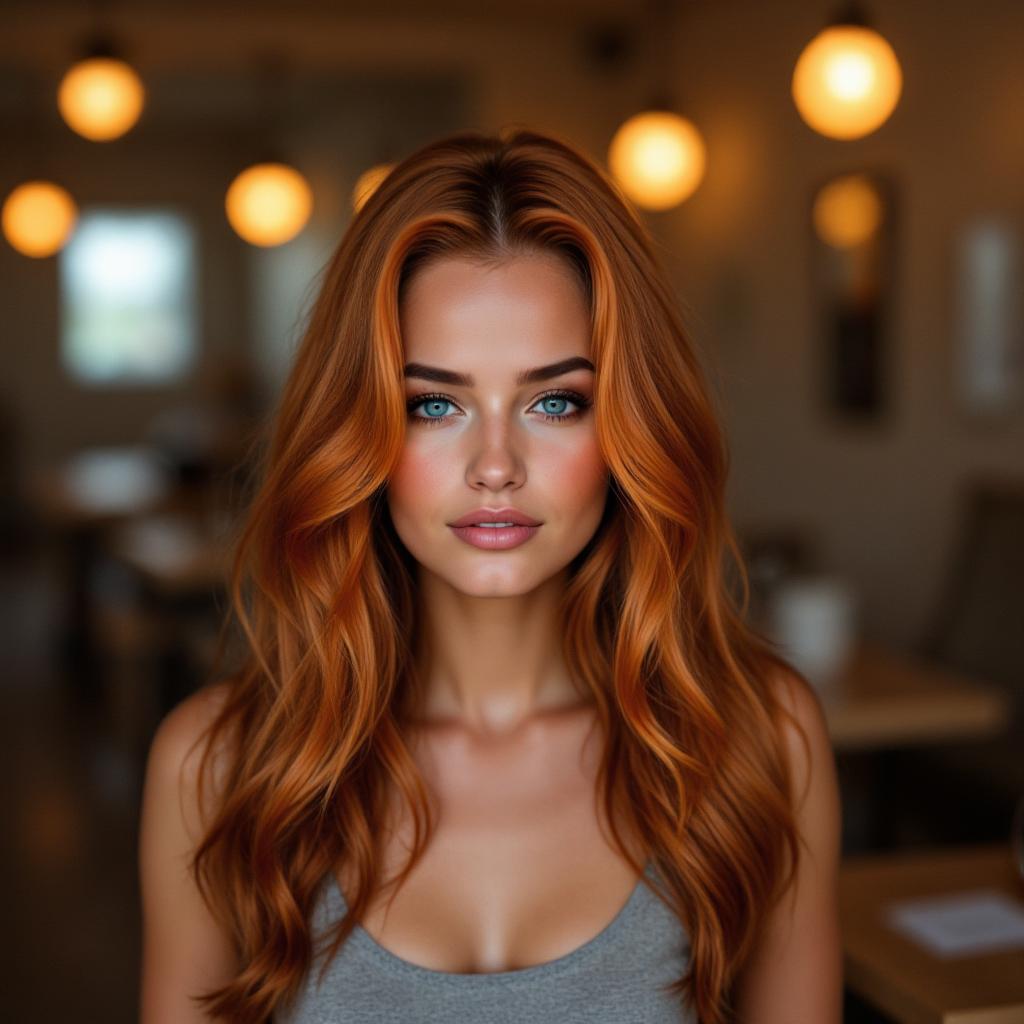
Community imagine ai Gallery

Real examples created by our community

Loading video...
Loading video...
A highly detailed photorealistic digital portrait of a beautiful young elf woman with pointed ears, adorned in a vibrant multicolored knit beanie featuring horizontal stripes in deep purple, emerald green, sunny yellow, fiery orange, and crimson red, with intricate braided patterns and a relaxed, slouchy fit; her long, wavy dreadlocks cascade down in a rainbow of colors including purple, teal, pink, and blonde, intertwined with wooden beads, colorful threads, and small charms; she has tan skin with scattered freckles across her nose and cheeks, flushed rosy blush, full parted lips with a subtle sheen, and large, mesmerizing emerald green eyes gazing thoughtfully to the side; intricate gold piercings on her elf ears, including a dangling ornate spherical earring with intricate gold filigree and colorful enamel designs; she wears a textured green off-shoulder top with subtle embroidered patterns and fringe details; set against a lush, enchanted forest background with soft bokeh lights, autumnal foliage in shades of gold and green, misty atmosphere, and dappled sunlight filtering through trees; in a hyper-realistic fantasy art style inspired by artists like Alphonse Mucha and modern digital illustrators, with high dynamic range, sharp focus on facial details, intricate textures on fabrics and hair, warm color palette emphasizing vibrant hues against natural earth tones, ultra-high resolution, cinematic lighting with gentle glows and depth of field.
she is eating an apple (edited with OpenAI Image 1)
The movie logo design reads "Echoes of the Horizon" with the tagline "When the past calls, will you answer?", include actors as "Sarah Bernhardt, Edwin Booth:", and the release date is "March 15, 2025:", kodachrome, contrast, color balance, faded colors, cinematic lighting, Captain Elias Thorn, 58-year-old male, steel blue eyes, slicked-back silver hair, wearing a tattered naval coat, brass-button vest, leather gloves, wool trousers, cracked monocle, compass necklace, Nyra the Cat, 5-year-old female mystical black cat with silver streaks and glowing green eyes, charm collar with ancient symbols, front view, close up shot, epic background, --chaos 25 --ar 2:3 --raw --profile dnko82x --stylize 750
Brazen looking curvaceous african american vampire. Straight waist length heavy and sleek black hair, bright blood red lipstick and heavy makeup. Tight shiny black latex corset top showcasing her ample cleavage. Knee length black latex pencil skirt. Holding a heavy book and standing in dimly lit library
{
  "SHOT COMPOSITION": "A long full body shot framing a confident curvaceous African American woman standing boldly, captured with a 50mm lens on a Canon 5D camera for sharp focus and natural perspective, employing a shallow depth of field to isolate her against a softly blurred background, emphasizing her commanding presence in the frame.",
  "SUBJECT & WARDROBE": "She exudes confidence as a curvaceous African American woman with a brazen, intense expression and striking amber eyes peering from behind slim mirrored aviator sunglasses, her shiny black hair cascading down her back in glossy waves, dressed in a luxurious thick white fur coat draped over a skintight shiny pink minidress that accentuates her curvaceous figure, standing with poised grace. Blood red lips, her throat, wrists decorated with gold and ruby jewelry. Large gold hoops dangle from her ears. Her lips, fingernails and toenails are painted in a bright crimson color
  "SCENE SETTING": "The scene unfolds in an upscale nightclub, shifting club light casting dramatic shadows and highlighting her silhouette against the background creating a luxurious and empowering atmosphere with subtle neon accents from nearby buildings adding a vibrant, modern tone.",
  "VISUAL STYLE": "Rendered in a high-fashion editorial style with a cinematic gloss, featuring rich color grading for deep contrasts and vibrant highlights, subtle film grain for a premium texture, evoking the allure of a luxury magazine cover shoot with realistic yet polished details."
}
paparazzi photo, action, documentary style 1930s \(style\), Fill Lighting, Ilford HP5 Plus, realist detail, ue5, detailed character expressions, amazing quality, wallpaper, analog film grain, Establishing shot, Practical Lighting, Photoshop, analog film photo cinematic film still, shallow depth of field, vignette, highly detailed, high budget Hollywood film, bokeh, cinemascope, moody, epic, gorgeous, film grain, faded film, desaturated, 35mm photo, grainy, vintage, Kodachrome, Lomography, stained, found footage, elegant woman, 20 years old, posing , ballroom
Loading video...
(Weird Tales 1930s pulp magazine cover, wordless, speechless, art only:1.3), cinematic illustration, (femme fatale lounge singer:1.4), art deco nightclub, (dramatic noir lighting:1.3),  
(sultry gaze, bold red lipstick, voluminous 1930s diva gown with sequins:1.4), emerging from (swirling shadows:1.2), jazz band silhouettes, old microphone,  
(retro neon signs:1.2), (art deco patterns:1.3), (vintage pulp art style:1.3), muted blues and deep crimson palette, stark chiaroscuro, textured ink scratches,  
(intricate linework:1.2), (grainy paper overlay:1.1), timeless pulp cover
Tall, valkyrie buxom blonde, hair deep honey gold blonde color, hanging in long thick heavy waves down her back, she is dressed in a skintight shiny latex French maid's uniform. Stands in an elegant parlour. Her makeup is elegant and heavy with blood red full lips, legs clad in fishnets and high heels
A poised 60-year-old Hindu woman with dark skin and 40FF breasts stands elegantly in an opulent hotel ballroom, her thick waist black hair cascading straight down her back. She wears a shimmering emerald green sequined evening gown slit to the hip, revealing her beautiful legs, paired with shiny emerald green patent leather stiletto heels featuring crimson soles, and adorned with gold and emerald jewelry on her neck, wrists, and ears, while holding a champagne flute; a red bindi graces her forehead. Captured in a highly detailed DSLR photograph with cinematic chandelier lighting, shallow depth of field, and 8K resolution.
Mid 20s, big blue eyes, shiny black hair Thick and heavy hanging down over one shoulder in gentle waves. 44DD breasts. Wearing a sleek and shiny white latex blouse with a plunging neckline revealing her ample cleavage, a shiny black latex pleated plaid miniskirt. goth style torn stockings and 6 inch high ballet stiletto heels. Standing in an elegant Victorian-style parlour. An elegant metal collar circles her throat. The picture is a full body shot. Her makeup is heavy and dark a bold statement of her goth style, shiny black lipstick.
Loading video...
Loading video...
Chrome-armoured biker leaning into a drift down a holographic Tokyo alley, electric signage flickering teal and magenta, sparks trailing from cyber wheels.
{
  "SHOT COMPOSITION": "Medium shot framing Angelina Jolie as the vampire queen from the waist up, captured with a Canon 5D camera using an 85mm portrait lens for a shallow depth of field that softly blurs the background while keeping her sharp and commanding presence in focus.",
  "SUBJECT & WARDROBE": "Angelina Jolie embodies a seductive vampire queen with striking 60EE breasts, dressed in a shiny black latex Victorian-era corseted dress that hugs her curves dramatically, paired with shiny black latex fingerless gloves; her black hair flows in a high and thick ponytail reaching down to her knees, complemented by bold gothic makeup featuring shiny black lips and claw-length shiny black nails, as she stands with a regal, piercing gaze and a subtle, enigmatic smile.",
  "SCENE SETTING": "The scene unfolds in an opulent Victorian-style parlour filled with antique velvet furniture, ornate wooden panels, and flickering candlelight casting dramatic shadows, set during the late evening with a moody, dim atmosphere that enhances the eerie and luxurious tone.",
  "VISUAL STYLE": "Cinematic gothic aesthetic with a dark, high-contrast color grading, subtle film grain for a vintage horror film feel, evoking a blend of real-life intensity and fantastical drama."
}
Create a full body portrait of a woman in the Japanese retro anime style of the 80s and 90s. The scene features a top model with wild hair, exuding confidence and allure. She stands in a dynamic pose that highlights her form and curves, set against a soft pink and yellow palette. The lighting reflections and shadows add depth and intensity to the scene. Her gaze is evocative and intense, aware of her own beauty and playing it up for the photoshoot. She is dressed in stylish, minimalist clothing that accentuates her form, with bold lipstick and eyeliner highlighting her sharp facial features. The background is minimalist, ensuring all attention is on her captivating presence. Emphasize her confident pose, wild hair, and the dramatic interplay of light and shadow, creating a nostalgic yet striking visual in the retro anime style.
.. easynegative, sinozick style, flat color, dark theme, g4n1m3

Start Creating Imagine AI Images Today

40+ cutting edge AI tools, loved by thousands of creators worldwide, cancel anytime, try it today

The Pixel Dojo Advantage

Why PixelDojo outperforms other options for imagine AI image generation

OthersPixel Dojo
Traditional image creationSkip the need for manual drawing or photography; generate complex scenes instantly, saving you time and resources while achieving consistent quality.
Generic AI toolsAccess specialized models like Flux and ImagineArt 1.0 tailored for diverse styles, ensuring more accurate and creative outputs than basic generators.
Manual photo editingAutomate edits with tools like Inpainting and Background Remover, delivering professional results faster without learning advanced software skills.

Loved by Creators

See what our community says about imagine ai

"PixelDojo's Imagine AI transformed my blog visuals overnight. I generate custom images that perfectly fit my stories, saving me hours of searching stock photos."

Sarah Chen

Content Creator

"As a marketer, I love how quickly I can create campaign assets with Imagine AI. The quality is incredible, and it's boosted our engagement rates significantly."

Mike Rodriguez

Digital Marketer

Common Questions

Everything you need to know about imagine ai AI generation

What is Imagine AI image generation and how does it work?

Imagine AI image generation lets you create visuals from text descriptions using advanced AI. On PixelDojo, tools like Flux and Seedream 4 analyze your prompt to produce detailed images, helping you achieve outcomes like custom artwork or product mockups without artistic skills. Recent trends include faster generation with models like Grok 2 Image, enabling real-time creativity for projects.

Can I use Imagine AI for free on PixelDojo?

Yes, PixelDojo offers a free tier to start with Imagine AI, including access to tools like ImagineArt 1.0 and SDXL. Upgrade for unlimited generations and premium features like Creative Upscaler, ensuring you can scale your creative output as needed without upfront costs.

How to generate realistic images with Imagine AI?

For realistic images, use PixelDojo's REVE Image or Imagen 4 tools. Enter detailed prompts focusing on lighting, textures, and perspectives. Latest techniques involve prompt engineering for photorealism, allowing you to create lifelike scenes that enhance your professional or personal projects effortlessly.

What are the latest trends in Imagine AI image generation?

Current trends include multimodal integration and ethical AI, with advancements in diffusion models for higher resolution. PixelDojo incorporates these via tools like Runway Gen-4 Image and PonyXL, helping you stay ahead by generating trending styles like hyper-realistic or abstract art that captivate audiences.

How can I edit AI-generated images on PixelDojo?

PixelDojo's editing suite, including Image to Image, Inpainting, and Outpainting, lets you refine Imagine AI outputs. For example, change camera angles or apply Magic Lighting to perfect your image, turning initial generations into polished finals that meet your exact needs.

Is Imagine AI suitable for beginners?

Absolutely, PixelDojo makes Imagine AI accessible with intuitive interfaces and tools like ChatGPT Image 1. Beginners can start with simple prompts and use features like Background Remover to create professional results, building confidence and skills while achieving impressive outcomes right away.

Ready to create amazing Imagine AI images?

Ready to Create Amazing imagine ai Images?

Join thousands of creators using AI to bring their ideas to life

Help & Support

AI Online

How can we help?

Ask about features, troubleshooting, or get support. Check Discord for service announcements first.

✨ Features🛠️ Troubleshooting👤 Account
🚀

Quick Start

Popular features

📚

Learn More

Advanced tips

💡

Best Practices

Get better results