PixelDojo vs OpenArt 比較
PixelDojo vs OpenArt 比較:兩套工作室、一個角色、三段影片
PixelDojo vs OpenArt 比較,Pixel Dojo 多了每日免費一鍵特效體驗、LoRA 訓練工具、附各模型文件的公開 API,以及訂閱期間永不過期的點數。
OpenArt 現在也推出導演工具、角色建立工具和 MCP 伺服器,與我們打造的功能有不少重疊。所以這次不看銷售頁,直接做作品:一個原創角色、三個場景、三段有聲影片。
30 credits ($1.88) 所有方案皆包含,每月 US$10 起。
已經是會員? 登入
作者 Brian Lovett · 更新於
兩款產品,哪裡相同、哪裡不同
OpenArt 列出的功能包括內建 Short Film 與 Music Video 範本的 Director、Character Builder、One-Click Story、超過 100 個模型,以及供 Claude、ChatGPT 和 Cursor 使用的 MCP 與 CLI。
Pixel Dojo 用不同工具涵蓋同樣的創作需求:Film Studio、Character Studio、Marketing Studio、Sensei、託管式 MCP 伺服器與公開 API。接下來逐項比較功能,再看實測。
產品影像與聲音,同一間工作室搞定
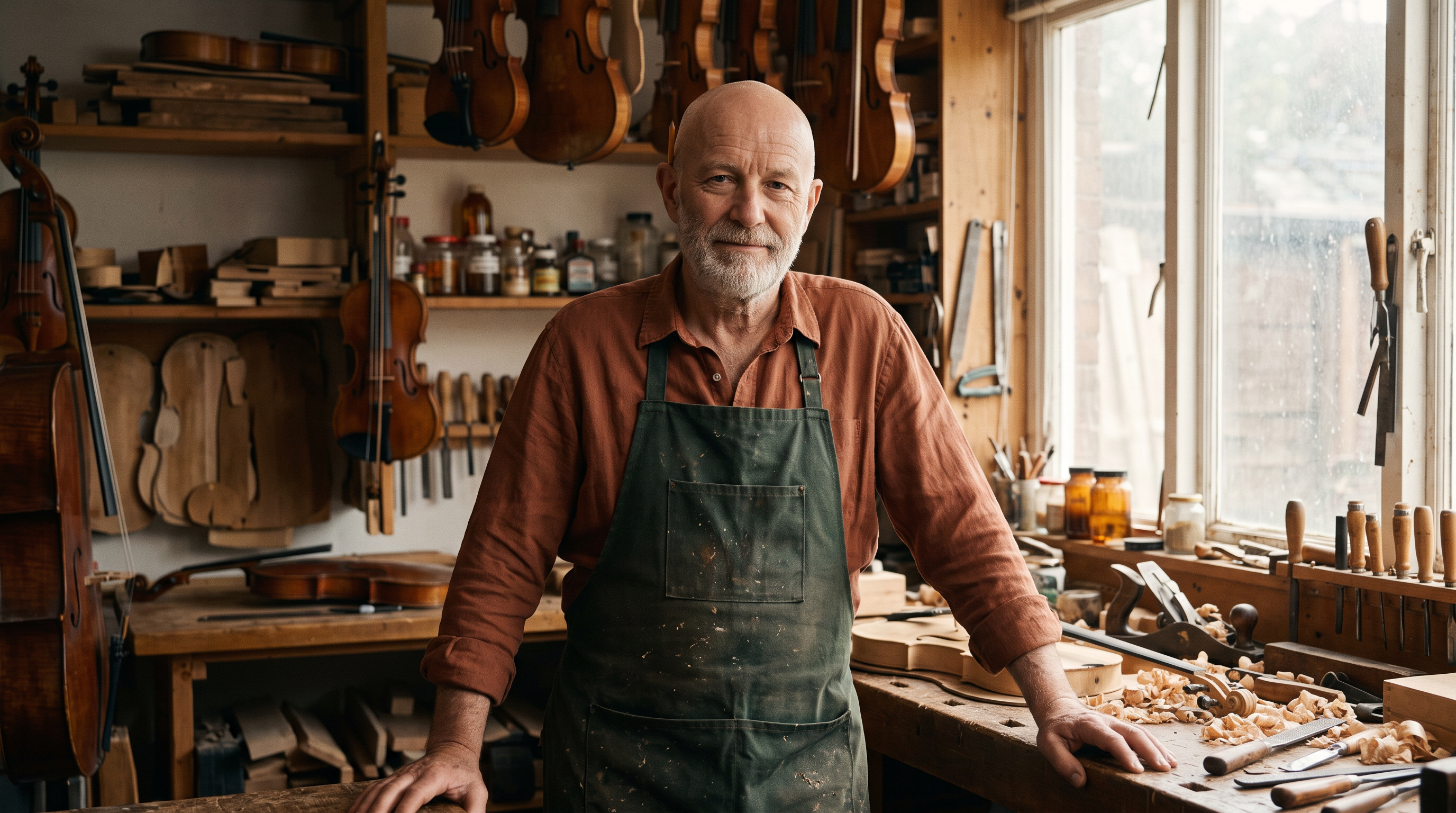
三個場景都從這張肖像延伸,以 Nano Banana 2.1 製作。
Cinematic portrait of an original character: a luthier in his sixties with a silver beard, a shaved head, a green waxed apron over a rust linen shirt and a pencil behind his ear, standing in a warm violin workshop, wood shavings on the bench, looking at the camera with a quiet half smile, soft window light, 35mm.

以 Seedream 5 製作的俐落商品照,也是旁邊廣告影片的起始畫面。
Product photograph of a hammered copper gooseneck pour-over kettle with a walnut handle on a pale terrazzo counter, one soft window light from the left, a folded linen cloth beside it, clean negative space, 85mm lens.
用 Kling 3.0 讓商品照動起來,配上輕柔的注水聲。
Steam curls from the copper kettle as a thin stream pours from the gooseneck spout, light flickering across the hammered metal, the camera slowly dollies in. Sound: a gentle pour and a soft kitchen hum.
以 Seedance 2.5 製作微距鏡頭,連刻片機的低鳴聲也一起呈現。
Close macro shot of a lathe cutting a glossy black record, a fine curl of lacquer spiralling off the stylus, red studio light glowing on the grooves, the camera slowly pushes in. Sound: a low electrical hum and the soft hiss of the stylus.
依雙方官方頁面,逐項比功能
OpenArt 資訊取自其首頁與價格頁,查閱日期為 2026 年 10 月 16 日。
| 功能 | OpenArt | Pixel Dojo |
|---|---|---|
| 影片製作 | Director 內建 Short Film 與 Music Video 範本,另有 One-Click Story | Film Studio:從劇本、選角、分鏡到片段,再由整片剪輯流程統整,可選擇套用或略過 |
| 角色重複使用 | Character Builder,數量依方案而定 | Character Studio:儲存一次,就能在任何工具的提示詞、Sensei,以及 API 和 MCP 中輸入 @Name 呼叫角色 |
| 廣告影片 | 首頁與價格頁未列出 | Marketing Studio:加入商店連結或產品照片,選好風格,就能生成附旁白的廣告 |
| 一鍵特效 | 首頁與價格頁未列出 | 283 種特效,每天可免費試用 3 次,訂閱者無浮水印 |
| 自訂訓練 | 個人化模型,數量依方案而定 | 支援 FLUX、Qwen、WAN 與 Z-Image 的 LoRA 訓練工具 |
| API | 首頁與價格頁未列出公開 REST API | 公開 REST API,每個模型都有文件,點數包 $5 起 |
| MCP | 所有方案皆有 OpenArt MCP & CLI | 託管式 MCP 伺服器:pixeldojo.ai/mcp |
| 免費方案 | 價格頁未列出 | 每天可免費試用 3 次一鍵特效 |
| 商業使用 | Plus 方案起提供 | 所有方案皆包含 |
存下一張臉,走進三個場景、三段影片
我們先創作了一位原創製琴師,上方圖庫就是他的肖像,再為他寫出三個場景:工作坊、街角與屋頂。每個場景都以他的肖像為基礎,用 Nano Banana 2.1 生成靜態圖,再交給 Seedance 2.5 製成有聲影片。
The luthier lifts a half carved violin scroll, blows the wood dust off it and smiles at the camera, shavings drifting in the window light. Sound: a plane shaving wood, soft room tone and a distant violin.
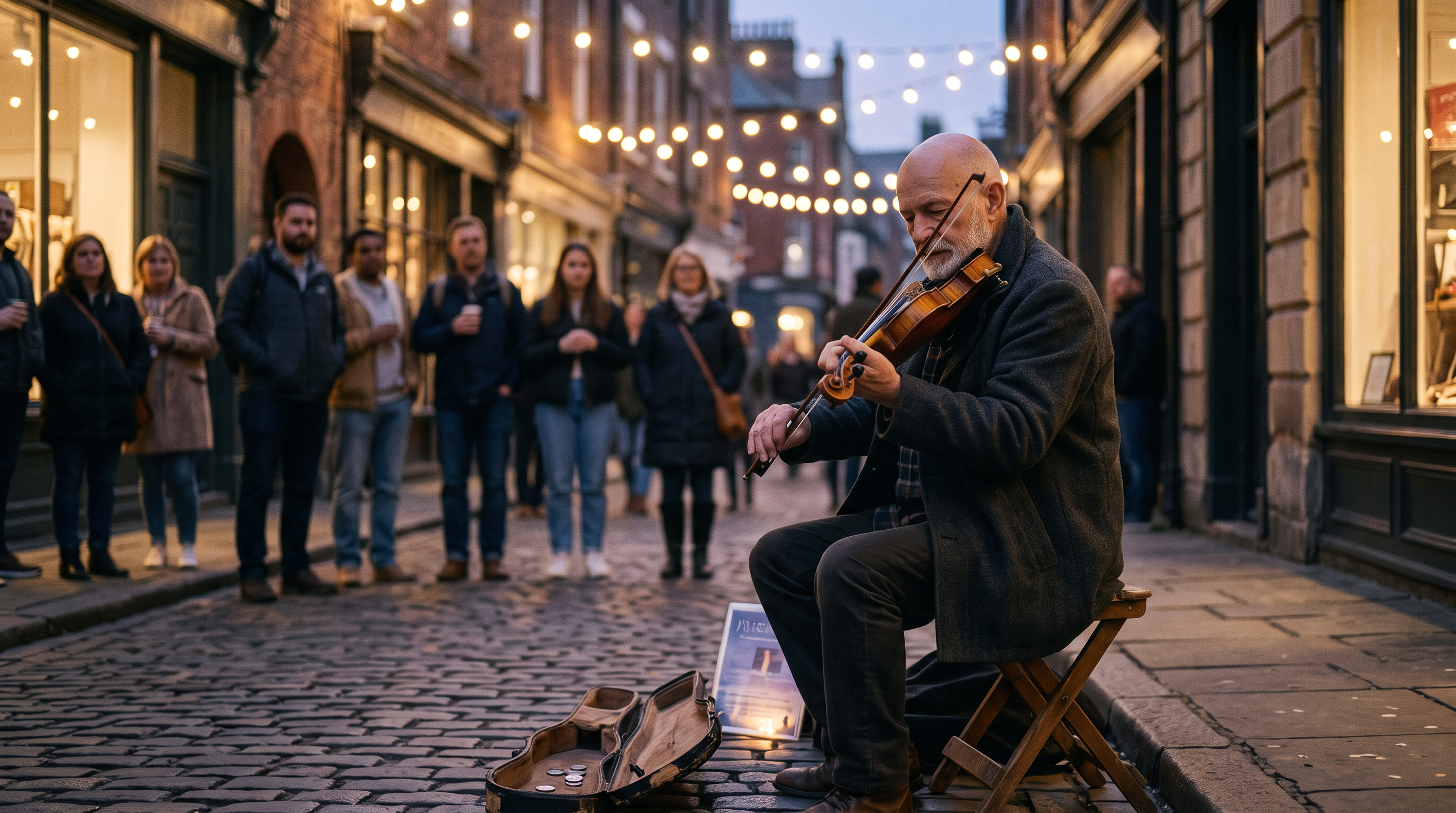
Use the luthier from the reference photo, same face, silver beard and shaved head. He sits on a folding stool on a cobbled street corner at dusk playing a fiddle he built, a small crowd of listeners blurred behind him, strings of bulb lights overhead, wearing a charcoal wool coat, cinematic 35mm photograph.
The luthier draws the bow across the fiddle in a slow phrase, his shoulders swaying, the bulb lights glimmer and the crowd nods along behind him. Sound: a warm folk fiddle melody, soft street ambience and light applause.
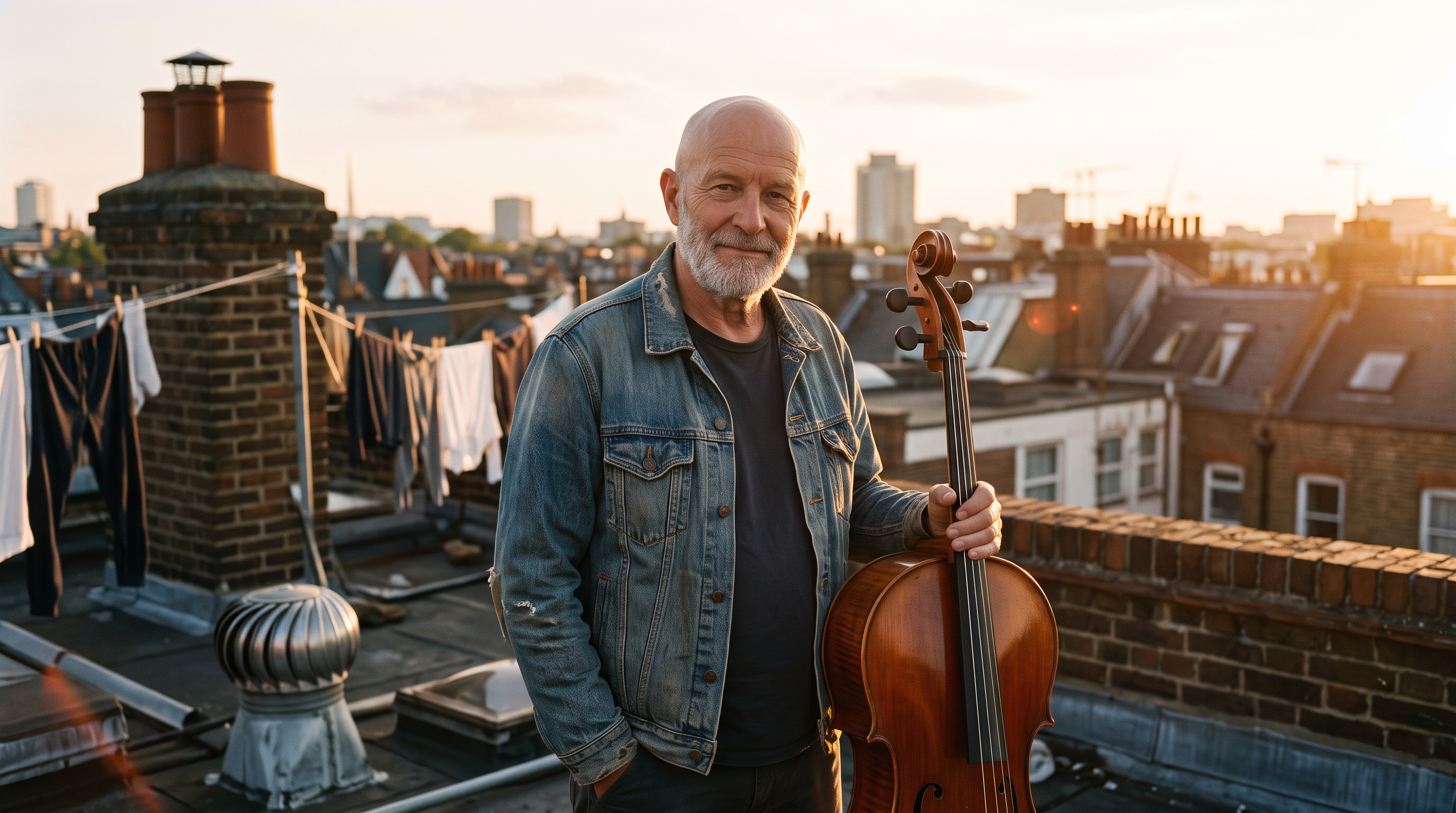
Use the luthier from the reference photo, same face, silver beard and shaved head. He stands on a city rooftop at golden hour holding a finished cello by its neck, laundry lines and chimneys behind him, wearing a denim jacket, warm backlight, cinematic 35mm photograph.
The luthier turns the cello upright, rests his bow on the strings and plays one low sustained note as the sun flares behind the chimneys and laundry sways. Sound: a deep cello note, rooftop wind and distant traffic.
- 從工作坊到街頭再到屋頂,銀鬍、光頭與飽經風霜的臉都維持一致,只用一張肖像,不必訓練。
- 服裝、光線與場景自由切換:從圍裙、炭灰色外套到牛仔外套,搭配暮色與黃金時刻的光線。
- 角色動起來後,Seedance 2.5 依然維持臉部一致,每段影片也都自帶聲音。
- 儲存在 Character Studio 的角色,只要用名字就能呼叫:輸入 @Name,任何工具都能帶出同一張臉。
Pixel Dojo 方案內容,與 OpenArt 並排看
Sensei,AI 導演
描述你的專案,Sensei 就會規劃流程、計算費用,等你核准後,在核定預算內逐一檢視每次生成的鏡頭。
六大工作室
Film Studio 提供整片剪輯;Marketing Studio 製作產品影片廣告;Video Studio 修改或延長片段;Character Studio 可在任何提示詞中用 @ 提及角色;Faceless Studio 製作旁白影片;Prompt Studio 則讓你在花點數前先打磨提示詞。
300+ 種影片特效、45+ 種照片特效、35 款單項工具
一鍵套用風格、快速修整,每天可免費體驗 3 次。
LoRA 訓練
訓練自己的 FLUX、Qwen、WAN 或 Z-Image LoRA,與其他模型搭配使用。
API 與 MCP
公開 API 提供依各模型產生的文件,點數包 $5 起,另有供 AI 助理使用的託管式 MCP 伺服器。
點數持續有效
只要維持訂閱,點數就永不過期。
無限 Relax 模式
訂閱者可無限次以 Relax 模式使用 Qwen Image 2.1、FLUX 3 Image Klein、MiniMax H3 Turbo,以及所有影片與照片特效,不扣點數。
類型預設
在 Film Studio、Faceless Studio 或 Sensei 中,從微短劇、電影預告或解說影片等類型開始,格式、視覺與節奏都已幫你設定好。
角色替換
上傳一段短片,選擇已儲存的角色或一張照片,角色替換功能就會讓你的主角上場,場景、運鏡與聲音則維持不變。
方案比較:OpenArt vs Pixel Dojo
OpenArt 價格頁列出的月費為 Starter $14、Plus $34、Pro $56、Wonder $240,Plus 起提供商用權。Pixel Dojo 的月費方案為 Lite $10,含 160 點數;Pro $25,含 500 點數;Pro Max $50,含 1,100 點數,所有方案都可商用。
只要維持訂閱,點數就永不過期。依退款政策,首次購買可在 7 天內申請退款;已使用點數低於 20% 可全額退款,超過後則按比例退款。
兩站的點數單位不同,直接比較你要做的影片要花多少錢。Pixel Dojo 每個模型頁面都會在生成前列出所需點數。
OpenArt常見問題
PixelDojo 比 OpenArt 更好嗎?
是。Pixel Dojo 多了 Sensei、Film Studio 的剪輯精修功能、Marketing Studio、283 種一鍵特效、LoRA 訓練工具,以及提供各模型文件的公開 API。
OpenArt 有免費方案嗎?
OpenArt 的價格頁列出 Starter、Plus、Pro 和 Wonder,沒有免費方案。Pixel Dojo 讓所有人每天免費試用 3 次一鍵特效,成品會附上浮水印。
OpenArt 有 API 和 MCP 嗎?
OpenArt 列有供 Claude、ChatGPT 和 Cursor 使用的 MCP 與 CLI。我們在它的首頁與價格頁都沒有找到公開的 REST API。Pixel Dojo 提供公開 API、每個模型的使用文件、$5 起的點數包,以及代管的 MCP 伺服器。
可以讓同一個角色出現在多部影片中嗎?
可以。先在 Character Studio 儲存角色,接著在任何提示詞中輸入 @Name;也可以像上方測試一樣,用同一張人像作為每段影片的首幀。
可以在 Pixel Dojo 訓練自己的模型嗎?
可以。LoRA 訓練工具支援 FLUX、Qwen、WAN 和 Z-Image,每次訓練都會消耗點數。
資料來源
關於 OpenArt 的資訊來自以下公開頁面,查證日期為 2026年10月16日。價格與方案可能變動,購買前請確認來源。