AI video effect · Halloween
Werewolf: a full moon transformation
Upload a photo, press Generate, and post it anywhere.
3 free every day. No card needed.
What Werewolf does
A full moon hangs behind your subject as fur creeps across their face. Pointed ears rise, the eyes burn amber and the face stretches into a wolf's head. The clip ends on a big open-mouthed howl at the camera.
A full moon transformation
Under a full moon your subject sprouts fur and ears in a classic movie werewolf change, scary-fun, not gory. Portraits work best.
Still looks like you
The video opens on your exact photo, so the face, hair, outfit and surroundings carry through the whole effect.
Ready for spooky season
A costume-free Halloween look for posts, party invites and profile videos. Spooky and fun, never gory.
How to make a Werewolf video
- Upload a photo, or pick one from your library.
- Press Generate. There is no prompt to write; the effect is already set up.
- Your 5 second HD video plays right on the page. Save it to your library or download it.
Tips for the best photo
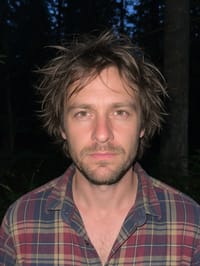
- Use a front-facing portrait so the face change happens in clear view.
- Night or dark photos match the moonlit look, though the effect adds the moon either way.
- Keep hair and hands away from the face so the fur spreads cleanly.
Ideas for using it
- A Halloween party invite from the host.
- A horror movie fan posting a reaction-style reel.
- A sports team with a wolf mascot hyping up a game night.
More effects





Go further
Werewolf FAQ
Is there blood or anything gory?
No. The change is fur, ears and glowing eyes, with no blood or injuries.
Do I keep my clothes?
Yes. In our test the plaid shirt stayed the same while the head became a wolf.
Do I need to write a prompt for Werewolf?
No. Werewolf is a ready-made effect: upload a photo and press Generate. The directions for the motion, camera and lighting are already built in.
How long is the Werewolf video?
Every effect makes a 5 second HD video that matches the shape of your photo, portrait or landscape, ready to post anywhere.
Does the video have sound?
Yes. Each clip comes with matching ambient sound effects. It does not add music, so you can lay your own track over it in any editor.
Can I use a photo of someone else?
Only photos of adults, of yourself or of people who agreed to it. Every upload goes through the same safety checks as the rest of PixelDojo.