Portraits
AI Clothes Changer: describe an outfit and try it on
Dresses the person in your photo in an outfit you describe, from a tailored suit to a summer dress, keeping their face, body, pose and background.
AI Clothes Changer puts the person in your photo in an outfit you describe in a sentence, like a navy blazer with jeans or a yellow raincoat and boots. Their face, hair, body shape, pose and background stay the same. Each image costs 0.5 credits on a paid PixelDojo plan.
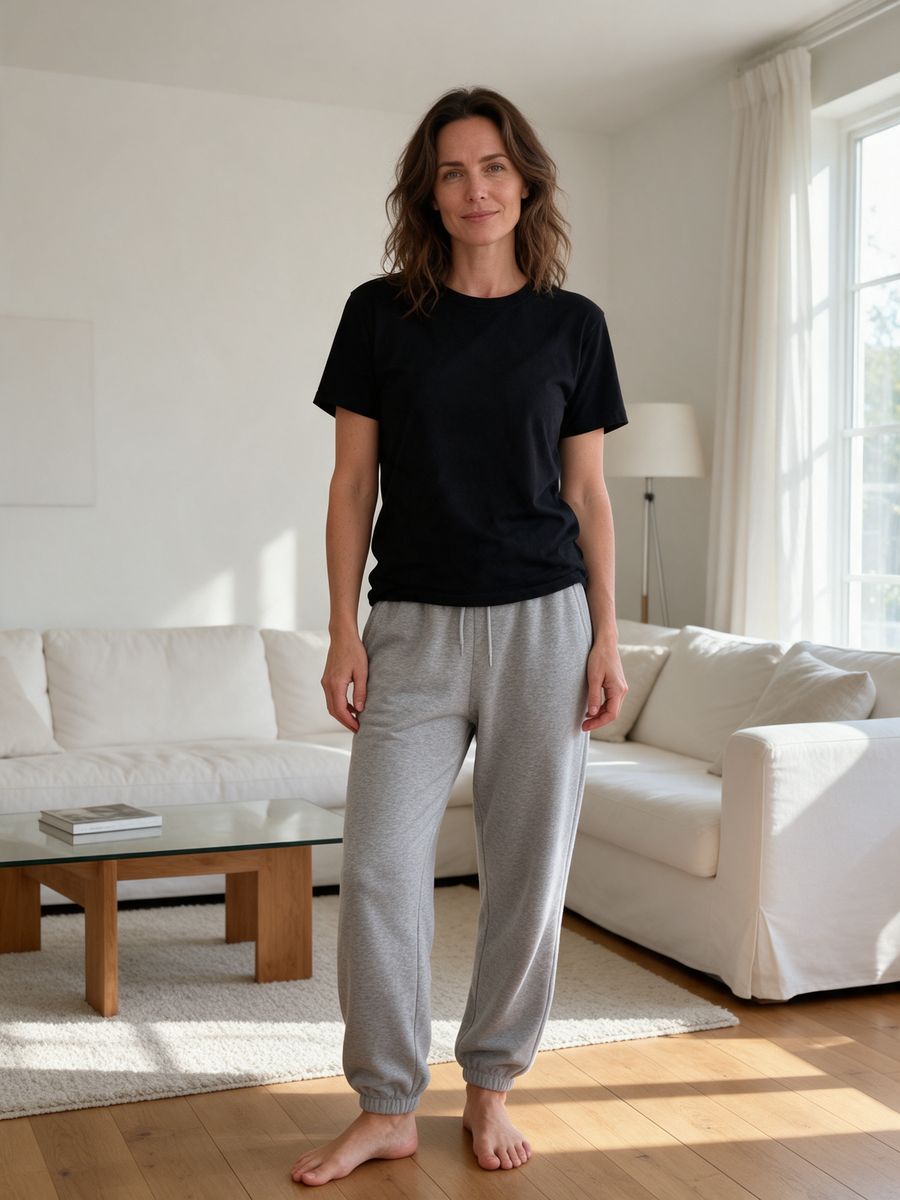
Before
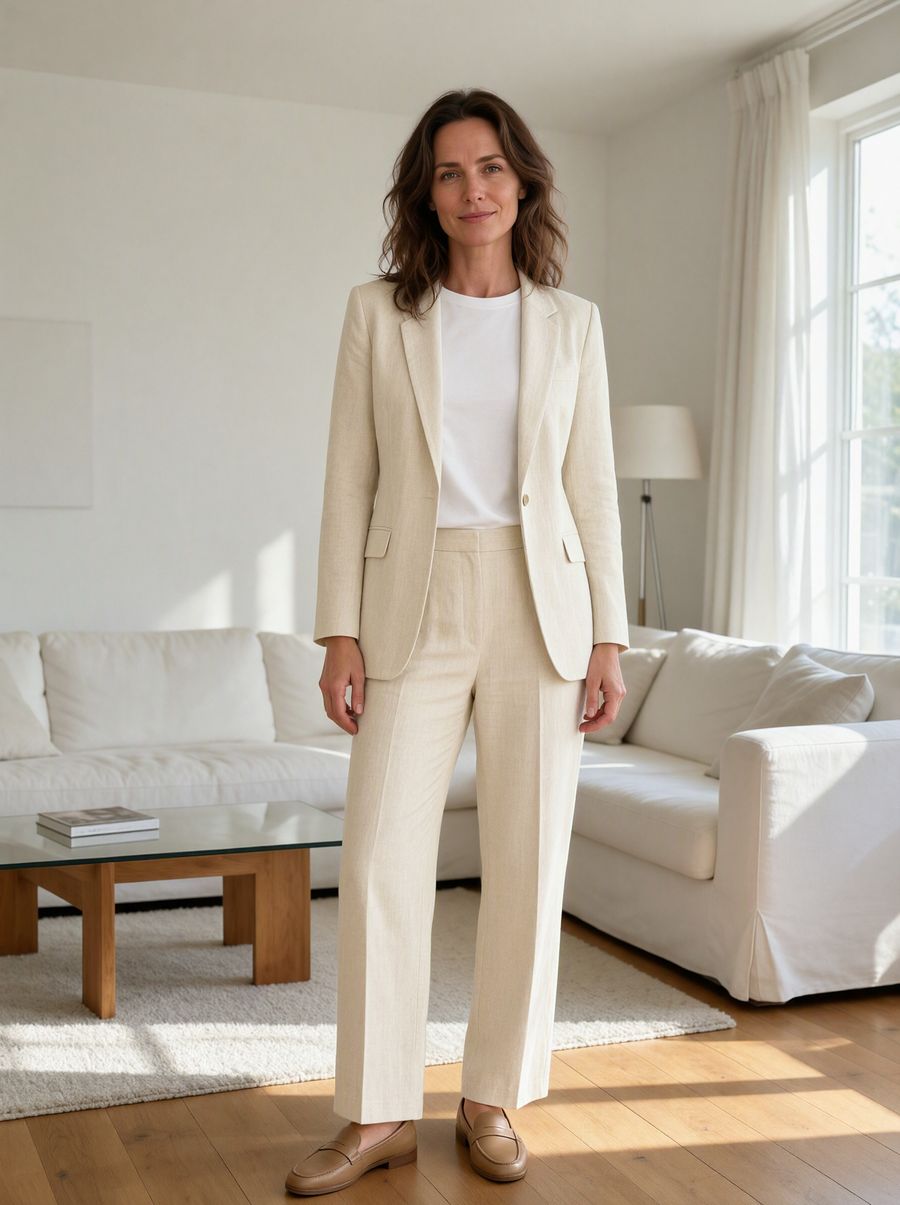
After, straight from our test, no retouching
Add a photo to start.
What AI Clothes Changer does
AI Clothes Changer dresses the person in your photo in an outfit you describe, keeping their face, body shape, pose and background.
How to use AI Clothes Changer
- Upload your photo, or pick it from your library.
- Fill in new outfit.
- Press Generate. The instructions for the job are already set up, so there is no prompt to write.
- Your image shows up right on the page. Save it to your library or download it.
How to describe an outfit
Name each piece from top to bottom: the top, the bottom and the shoes. Give each one a color. If it matters to you, add a fabric or a fit, like linen, denim, oversized or tailored.
The outfit box holds 200 characters, so describe one outfit at a time. The clearer you are, the closer you get to what you pictured:
- Vague: "something smart". Clear: "a navy blazer, a white shirt, gray trousers and brown leather shoes".
- Vague: "a nice dress". Clear: "a knee-length green wrap dress with long sleeves and tan ankle boots".
- Vague: "winter clothes". Clear: "a long camel wool coat, a cream scarf, dark jeans and black boots".
What stays the same and what changes
The tool is set up to keep the person as they are. That means the same face, hair, body shape and pose, with the same background and framing.
The outfit is what changes. It gets fitted to the pose in your photo.
Shoes only change when they're in the frame. Use a full-body photo if you want new shoes too.
Outfit ideas to try
Each of these fits in the outfit box as written. Swap the colors to suit you.
- Job interview: a charcoal suit, a light blue shirt and black leather shoes.
- Wedding guest: a long sage green dress with short sleeves and tan heels.
- Cold day: a long camel wool coat, a cream scarf, dark jeans and black boots.
- Game day: a red soccer jersey, white shorts and long red socks.
- Chef uniform mockup: a white double-breasted chef jacket, black trousers and a white apron.
- Nurse uniform mockup: navy blue scrubs and white sneakers.
- Halloween: a pirate costume with a white shirt, a red sash, black trousers and tall boots.
- Fall photo shoot: a cream knit sweater, blue jeans and brown boots. Run it on each person's photo to get matching outfits.
Tips for the best result
- Name the pieces and colors you want: top, bottom, shoes.
- Full-body photos let it change shoes too.
- Want new hair to go with the outfit? Try a new haircut on the same photo.
Ideas for using it
- Trying outfit ideas before an event.
- Dressing a model photo for different seasons.
- Quick costume or uniform mockups.
More tools


AI Headshot Generator
A professional headshot from one casual photo.
AI Photo Retouching
Natural skin retouching in one click.

AI Hairstyle Changer
Try a new haircut before the salon.
Tattoo Try-On
See the tattoo on your skin first.

Multi Face Swap
Swap every face in a group photo.


AI Travel Photo
A holiday snap at a famous landmark.
Want motion instead? Video Effects turn one photo into a 5 second clip.
Go further
AI Clothes Changer FAQ
What can I change with AI Clothes Changer?
The clothes. Describe the outfit in up to 200 characters, and it dresses the person in your photo in it, fitted to their pose. Their face, hair, body shape, pose and background stay the same.
Can I upload a photo of a real piece of clothing?
No, this tool works from a written description. Name each piece and its color, like a gray hoodie, black jeans and white sneakers.
Does my face or body shape change?
No. The tool is set up to keep the same face, hair, body shape, pose, background and framing. The outfit is what changes.
How much does AI Clothes Changer cost?
Each image costs 0.5 credits on any paid plan, and you'll see the price on the Generate button before you run it.
Can I use it on the free plan?
You can open the page and add a photo without an account, but you need a paid plan to generate. The free plan gives you 3 video or photo effects a day, and this tool isn't one of them.
What kind of photo works best?
A clear photo of one adult with the whole outfit in frame works best. If it's a full-body photo, it can change the shoes too.
Is AI Clothes Changer free?
AI Clothes Changer is included with every paid PixelDojo plan and costs a few credits per image, shown on the Generate button before you run it.
Who owns the result, and can I use it commercially?
We assign you whatever rights we hold in the result, so you can use it in your own projects, commercial ones included, as long as what you uploaded was yours to use. Unsaved results are deleted after 24 hours, so save the ones you want to keep.
Can I use a photo of someone else?
Only photos of adults, of yourself or of people who agreed to it, and only images you have the right to edit. Every upload goes through the same safety checks as the rest of PixelDojo.