AI video effect · Camera Moves
Eye Dive: the camera dives into your eye and into a galaxy
Upload a photo, press Generate, and post it anywhere.
3 free every day. No card needed.
What Eye Dive does
The camera starts on your face, then pushes steadily toward one eye until the iris fills the frame. It flies through the pupil into a glowing swirl of stars and colorful nebula clouds.
The camera dives into your eye and into a galaxy
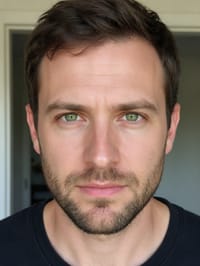
The camera pushes in close to your face and flies through your eye into a swirling starfield. Sharp, close front-facing portraits work best.
Still looks like you
The video opens on your exact photo, so the face, hair, outfit and surroundings carry through the whole effect.
A cinematic camera move from a still photo
The kind of shot that normally takes a drone, a gimbal or a crane, made from one photo. Great as an intro, a reveal or a transition between scenes.
How to make an Eye Dive video
- Upload a photo, or pick one from your library.
- Press Generate. There is no prompt to write; the effect is already set up.
- Your 5 second HD video plays right on the page. Save it to your library or download it.
Tips for the best photo
- Use a sharp, close front facing portrait with both eyes open.
- Pick even light so the iris color is clear.
- Skip glasses and heavy glare, which can block the eye.
Ideas for using it
- A sci fi or space themed channel intro.
- A music artist teaser that dives into a cosmic scene.
- A transition clip for a video editor to cut between two shots.
More effects



Go further
Eye Dive FAQ
Which eye does the camera enter?
It pushes into one eye, which then opens up to the galaxy.
Does the clip end inside the galaxy?
Yes, the final frames are a swirl of stars and nebula clouds.
Do I need to write a prompt for Eye Dive?
No. Eye Dive is a ready-made effect: upload a photo and press Generate. The directions for the motion, camera and lighting are already built in.
How long is the Eye Dive video?
Every effect makes a 5 second HD video that matches the shape of your photo, portrait or landscape, ready to post anywhere.
Does the video have sound?
Yes. Each clip comes with matching ambient sound effects. It does not add music, so you can lay your own track over it in any editor.
Can I use a photo of someone else?
Only photos of adults, of yourself or of people who agreed to it. Every upload goes through the same safety checks as the rest of PixelDojo.