AI video effect · Product
Floating Product: your product levitates in a glow
Upload a photo, press Generate, and post it anywhere.
3 free every day. No card needed.
What Floating Product does
Your product sits on the table in ordinary light, then lifts gently into the air as fine glowing particles start drifting around it. By the final seconds it hovers in a beam of light, turning slightly, with a haze of sparkles behind it.
Your product levitates in a glow
Your product lifts off the table and floats in a soft glow with drifting particles, a premium tech-ad look. Works with most products.
Your product, start to finish
The video opens on your exact photo, so the shape, colors and details of the product carry through the whole clip.
Product ads without a studio
Commercial-style product shots for stores, ads and launches, made from one product photo instead of a studio day.
How to make a Floating Product video
- Upload a photo, or pick one from your library.
- Press Generate. There is no prompt to write; the effect is already set up.
- Your 5 second HD video plays right on the page. Save it to your library or download it.
Tips for the best photo
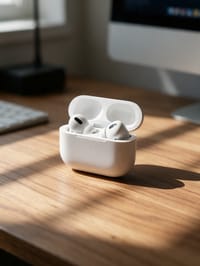
- Use a photo of the product resting on a surface so the lift-off has somewhere to start from.
- Small, compact items like earbuds, perfume or phones float more convincingly than large ones.
- Side light from a window gives the particles something to catch as they drift.
Ideas for using it
- A gadget reseller making a premium-feeling clip for a new listing.
- A tech reviewer opening a video with the product hovering on screen.
- A jewelry brand showing a ring box or watch case in a holiday ad.
More effects



Go further
Floating Product FAQ
Does the background stay the same as my photo?
In our test the clip began in the original desk scene and shifted to a darker, glowing look as the product rose.
Can I use it on furniture or large items?
It suits things you could hold in one hand, like earbuds, perfume or phones, which look best hovering in the light.
Do I need to write a prompt for Floating Product?
No. Floating Product is a ready-made effect: upload a photo and press Generate. The directions for the motion, camera and lighting are already built in.
How long is the Floating Product video?
Every effect makes a 5 second HD video that matches the shape of your photo, portrait or landscape, ready to post anywhere.
Does the video have sound?
Yes. Each clip comes with matching ambient sound effects. It does not add music, so you can lay your own track over it in any editor.
Can I use Floating Product on any product?
Most physical products work: bottles, cosmetics, shoes, gadgets, food and packaging. A clean, well-lit photo with the whole product in frame keeps the shape and label faithful.