AI video effect · Product
Light Sweep: a studio light glides across your product
Upload a photo, press Generate, and post it anywhere.
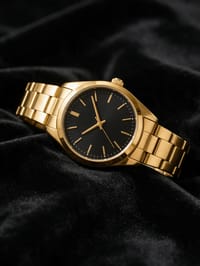
3 free every day. No card needed.
What Light Sweep does
The clip begins with your product barely visible in deep shadow. A narrow beam of light passes across it, making the edges and finish flash as it goes, and the product is fully lit and gleaming by the end.
A studio light glides across your product
A beam of studio light sweeps slowly across your product in the dark, revealing its shape and finish. Ideal for watches, jewelry, cars and tech.
Your product, start to finish
The video opens on your exact photo, so the shape, colors and details of the product carry through the whole clip.
Product ads without a studio
Commercial-style product shots for stores, ads and launches, made from one product photo instead of a studio day.
How to make a Light Sweep video
- Upload a photo, or pick one from your library.
- Press Generate. There is no prompt to write; the effect is already set up.
- Your 5 second HD video plays right on the page. Save it to your library or download it.
Tips for the best photo
- Shoot the product on a dark background like black fabric or slate so the sweep has contrast to work with.
- Shiny or metallic finishes, such as watches, rings or car paint, catch the beam best.
- Avoid photos with bright light already spilling everywhere, since the effect needs to start from darkness.
Ideas for using it
- A watchmaker posting a moody teaser before a new model goes on sale.
- A jeweler showing off the polish on a ring for an anniversary sale.
- A car detailer showing the finish on a freshly coated hood.
More effects

Miniature Crew
Tiny workers build your display.
Pedestal Reveal
Your product rises into the spotlight.

Floating Drink
Your drink, weightless and fizzing.
Holiday Ad
A cozy holiday ad for your product.
Neat Slices
Slice any object like a soft eggplant.
 2 photos
Product Unboxed by You
Your selfie plus your product: an unboxing ad.
Go further
Light Sweep FAQ
Why does the clip go almost completely dark at one point?
That is part of the effect. The product dips into shadow so the light passing over it has more impact.
Does it work on matte products?
Yes. Glossy and metal surfaces show the moving light most vividly, and matte products get a soft glow.
Do I need to write a prompt for Light Sweep?
No. Light Sweep is a ready-made effect: upload a photo and press Generate. The directions for the motion, camera and lighting are already built in.
How long is the Light Sweep video?
Every effect makes a 5 second HD video that matches the shape of your photo, portrait or landscape, ready to post anywhere.
Does the video have sound?
Yes. Each clip comes with matching ambient sound effects. It does not add music, so you can lay your own track over it in any editor.
Can I use Light Sweep on any product?
Most physical products work: bottles, cosmetics, shoes, gadgets, food and packaging. A clean, well-lit photo with the whole product in frame keeps the shape and label faithful.