AI video effect · Holidays
Snow Globe: shaken inside a snow globe
Upload a photo, press Generate, and post it anywhere.
3 free every day. No card needed.
What Snow Globe does
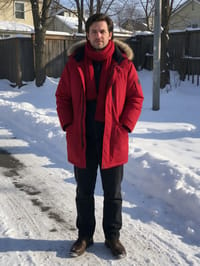
You begin in your outdoor scene, then curved glass appears around you as the camera pulls back. You are now a tiny figure in a snow globe on a mantel decorated with ornaments and candles, and a hand reaches in to shake it as snow swirls around you.
Shaken inside a snow globe
The camera pulls back to reveal your subject inside a snow globe as snow swirls around them. Works with people and pets.
Still looks like you
The video opens on your exact photo, so the face, hair, outfit and surroundings carry through the whole effect.
Made for holiday cards and posts
A festive five-second clip for greetings, family chats and seasonal posts, made from a photo you already have.
How to make a Snow Globe video
- Upload a photo, or pick one from your library.
- Press Generate. There is no prompt to write; the effect is already set up.
- Your 5 second HD video plays right on the page. Save it to your library or download it.
Tips for the best photo
- A full-body photo looks most natural as a tiny figure inside the globe.
- Bright clothing keeps you visible once you shrink down.
- Wintry or outdoor photos match the festive setting.
Ideas for using it
- A digital holiday card sent to family.
- A shop posting a festive season greeting.
- A pet's first Christmas clip for Instagram.
More effects





Go further
Snow Globe FAQ
Can I put a name on the base?
The globe comes with its own decorated base, and the effect does not add custom text.
Does it work with pets?
Yes. Snow Globe works with people and pets.
Do I need to write a prompt for Snow Globe?
No. Snow Globe is a ready-made effect: upload a photo and press Generate. The directions for the motion, camera and lighting are already built in.
How long is the Snow Globe video?
Every effect makes a 5 second HD video that matches the shape of your photo, portrait or landscape, ready to post anywhere.
Does the video have sound?
Yes. Each clip comes with matching ambient sound effects. It does not add music, so you can lay your own track over it in any editor.
Can I use a photo of someone else?
Only photos of adults, of yourself or of people who agreed to it. Every upload goes through the same safety checks as the rest of PixelDojo.