AI video effect · Viral
180 Turn: a slow turn to face the camera
Upload a photo, press Generate, and post it anywhere.
3 free every day. No card needed.
What 180 Turn does
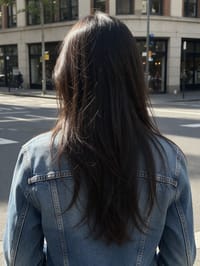
The clip opens on the back of your subject's head, hair hanging straight down. They swing around in one smooth motion, hair following the turn, and settle facing the lens with a warm smile.
A slow turn to face the camera
Your subject starts facing away, then turns around to face the camera with a smile, like a music video reveal. Photos from behind or in profile work best.
Still looks like you
The video opens on your exact photo, so the face, hair, outfit and surroundings carry through the whole effect.
Made for short-form video
Built for the clips people share on Reels, TikTok and Shorts: one clear moment in five seconds, framed to stop the scroll.
How to make a 180 Turn video
- Upload a photo, or pick one from your library.
- Press Generate. There is no prompt to write; the effect is already set up.
- Your 5 second HD video plays right on the page. Save it to your library or download it.
Tips for the best photo
- Use a photo taken from behind or a strong side profile so the turn has somewhere to go.
- Leave clear space around the shoulders and hair so the swing has room to move.
- Pick a plain or softly blurred street or wall behind them for a clean, smooth turn.
Ideas for using it
- A creator posts a reveal clip on a short video feed with a trending song laid over it.
- A musician uses it as a cover-art teaser before a single drops.
- A friend turns a holiday snap from behind into a surprise greeting for a birthday group chat.
More effects
Go further
180 Turn FAQ
Do I need a photo of my back?
A back or side view gives the most natural turn, and the reveal lands best from there.
Will my face look the same when they turn around?
In our test the face held steady and matched the person in the photo. A clear, well-lit shot of your hair and outfit helps the final frames stay consistent.
Do I need to write a prompt for 180 Turn?
No. 180 Turn is a ready-made effect: upload a photo and press Generate. The directions for the motion, camera and lighting are already built in.
How long is the 180 Turn video?
Every effect makes a 5 second HD video that matches the shape of your photo, portrait or landscape, ready to post anywhere.
Does the video have sound?
Yes. Each clip comes with matching ambient sound effects. It does not add music, so you can lay your own track over it in any editor.
Can I use a photo of someone else?
Only photos of adults, of yourself or of people who agreed to it. Every upload goes through the same safety checks as the rest of PixelDojo.