AI video effect · Product
Ingredient Burst: ingredients explode out around your product
Upload a photo, press Generate, and post it anywhere.
3 free every day. No card needed.
What Ingredient Burst does
The clip starts with your product alone on a simple surface, then fruit slices, leaves, powder and droplets burst out around it in slow motion. The pieces hang in the air on all sides by the end, framing the product like a still from a commercial.
Ingredients explode out around your product
The ingredients or materials behind your product burst out around it in slow motion. Great for food, drinks and skincare.
Your product, start to finish
The video opens on your exact photo, so the shape, colors and details of the product carry through the whole clip.
Product ads without a studio
Commercial-style product shots for stores, ads and launches, made from one product photo instead of a studio day.
How to make an Ingredient Burst video
- Upload a photo, or pick one from your library.
- Press Generate. There is no prompt to write; the effect is already set up.
- Your 5 second HD video plays right on the page. Save it to your library or download it.
Tips for the best photo
- Use a photo where the product sits on a clean, simple surface so the burst has open space to fill.
- Make sure the label faces the camera, since the product stays put while everything moves around it.
- Leave some empty background on all sides, as tightly cropped photos crowd the flying ingredients.
Ideas for using it
- A skincare brand showing the citrus and botanicals behind a moisturizer.
- A smoothie or juice bar announcing a new seasonal flavor.
- A snack company making an ingredients-first ad for a store display screen.
More effects
Go further
Ingredient Burst FAQ
Can I choose which ingredients fly out?
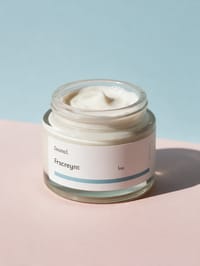
The effect picks ingredients that suit the product on its own. With our cream jar it chose oranges, leaves and powder.
Will my product change during the burst?
Your product stays centered and unchanged while the ingredients move around it, just like the jar in our latest run.
Do I need to write a prompt for Ingredient Burst?
No. Ingredient Burst is a ready-made effect: upload a photo and press Generate. The directions for the motion, camera and lighting are already built in.
How long is the Ingredient Burst video?
Every effect makes a 5 second HD video that matches the shape of your photo, portrait or landscape, ready to post anywhere.
Does the video have sound?
Yes. Each clip comes with matching ambient sound effects. It does not add music, so you can lay your own track over it in any editor.
Can I use Ingredient Burst on any product?
Most physical products work: bottles, cosmetics, shoes, gadgets, food and packaging. A clean, well-lit photo with the whole product in frame keeps the shape and label faithful.