Band Tour Poster Art
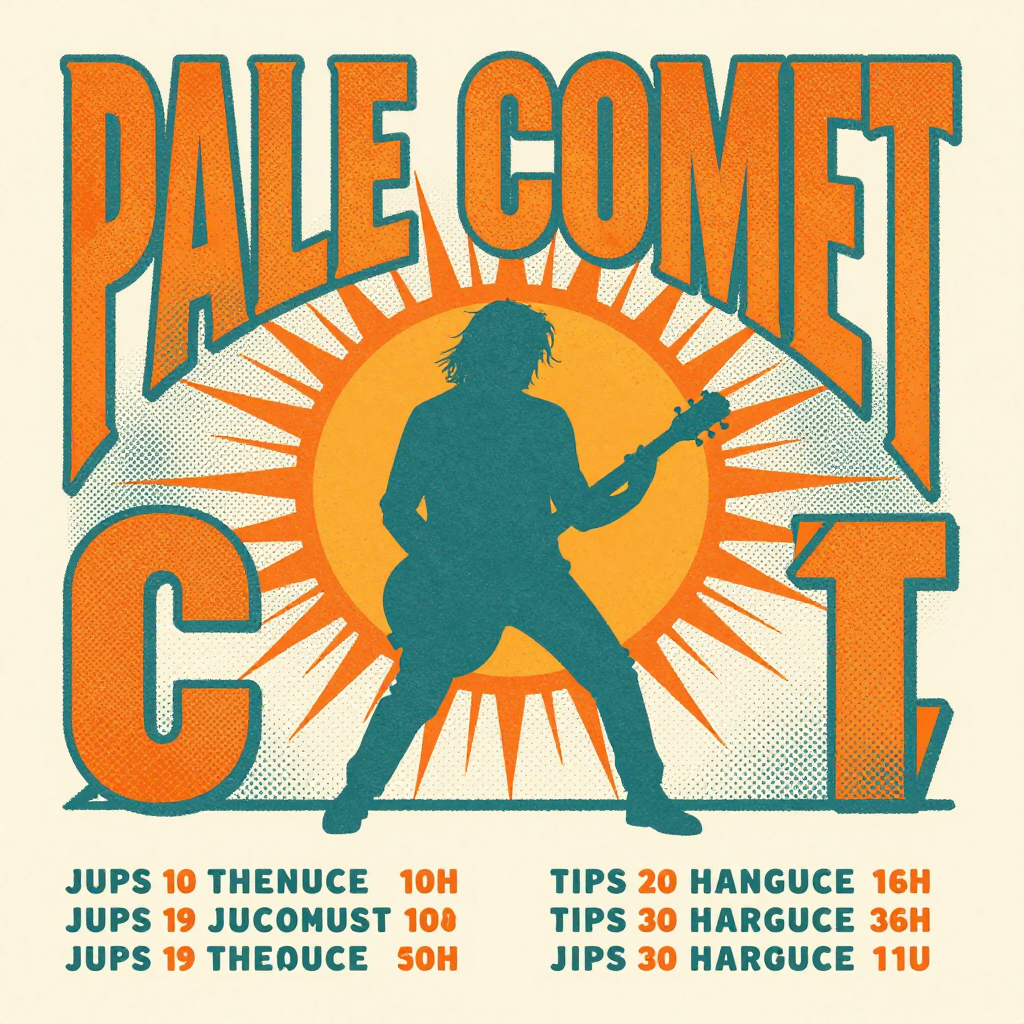
Generated on PixelDojo with Z-Image Turbo. Produced by PixelDojo's generation pipeline.
You can make a band tour poster with AI by describing the band name, the art style and a scene in one prompt, then adding the real tour dates yourself instead of trusting the model to letter a list of cities. We ran this on August 26, 2026 with Z-Image Turbo, 0.5 credit, about 17 seconds, and asked for a retro screen-print poster for a band called PALE COMET with a guitarist silhouette and a tour date list at the bottom. The band name came back spelled correctly in bold vintage lettering. The date list came back as nonsense words. This page covers what to run and what to fix afterward.
The 0.5 credit poster, band name correct, date list not
Every example below was produced on PixelDojo. Hover to see the prompt.
A retro concert tour poster design for a band called 'PALE COMET', bold vintage screen-print style lettering, a silhouette of a guitarist under a bursting sun, halftone texture, orange and teal color palette, tour dates listed at the bottom
Z-Image Turbo
One prompt, one poster, August 26, 2026: Z-Image Turbo, 0.5 credit, about 17 seconds, the band name kept, the date list thrown out.
Why Choose Pixel Dojo for Band Tour Poster Art
Professional-quality results with cutting-edge AI technology
0.5 credit per attempt
Cheap enough to try a few color palettes or compositions before settling on the one you send to print.
About 17 seconds, measured
Timed from request to finished file on August 26, 2026. No queue wait, no retry needed to get a usable poster composition.
The band name and artwork render correctly
The headline lettering and the guitarist silhouette scene came back right on the first try. The only part that needed a fix was the multi-line date list, which is a job for the Image Editor, not the initial prompt.
How It Works
Three steps from blank prompt to a poster ready to finish:
Name the band, the style and the scene, not a full date list
Our prompt asked for a retro concert tour poster for a band called 'PALE COMET', a vintage screen-print style, a guitarist silhouette under a bursting sun, halftone texture, and an orange and teal palette, then also asked for tour dates at the bottom, which was the part that failed. Z-Image Turbo ran it for 0.5 credit and returned a 1024 by 1024 image in about 17 seconds. The band name set in bold, correctly spelled, arched lettering, and the guitarist silhouette and sunburst composition matched the brief closely. The requested date list came back as rows of similar-looking but nonsense text, plus a small stray letter cluster near the bottom of the design that is not part of any real word. Leave the date list out of the prompt entirely and describe only the empty space you want for it.
Add the real tour dates afterward
Send the finished poster to the Image Editor with a plain English instruction, such as adding a specific list of cities and dates in the empty space at the bottom in a matching font. Editing an existing image this way runs on Flux Edit for 1 credit, and it types the exact text you give it instead of guessing at a list.
Upscale before it goes to print
Our file came back at 1024 by 1024 pixels, fine for a social post but soft once a print shop enlarges it to poster size. Run the finished image through Creative Upscale for 0.5 credit before ordering prints.
Loved by creators on PixelDojo
Real feedback from people using PixelDojo, pulled from our in-product surveys.
Very fair and very broad in tools.
Accurate results
Great site and so much fun to use!
very useful set of tools for image creation, upscaling and enhancement
ease of use, variety of tools, high quality trainings, and a well-maintained discord channel
Ease of use, friendliness and support of the owner, continued innovation.
Explore more AI tools on PixelDojo
AI Tools
Compare & Switch
- Best AI Image Generators
- Best AI Video Generators
- Midjourney Alternatives
- Civitai Alternatives
- Runway Alternatives
- Leonardo Alternatives
- Pika Alternatives
- Luma Alternatives
- Magnific Alternatives
- Veo Alternatives
- Flux Alternatives
- Freepik Alternatives
- Seedance Alternatives
- Seedream Alternatives
- Pixverse Alternatives
- GPT Image Alternatives
- Synthesia Alternatives
- Playground Alternatives
- NightCafe Alternatives
- Canva AI Alternatives
- ElevenLabs Alternatives
- ComfyUI Alternatives
- Fal Alternatives
- Replicate Alternatives
Common Questions
Everything you need to know about Band Tour Poster Art
What does an AI band tour poster cost?
0.5 credit for the base artwork on Z-Image Turbo, the model we used. Add 1 credit to letter in a real tour date list with Flux Edit, and 0.5 credit to upscale before printing. A full three step run is 2 credits.
How fast does it come back?
About 17 seconds in our August 26, 2026 run, measured from the prompt to the finished 1024 by 1024 file.
Can the AI write a real list of tour dates and cities directly on the poster?
Not reliably from a text prompt. We asked for a date list and the model returned rows of nonsense text plus a small stray letter cluster elsewhere in the design. Leave the date list out of the generation prompt and add it afterward with the Image Editor, which types exactly what you give it.
Will the band name itself spell correctly?
In our run, yes. PALE COMET came back correctly spelled in bold vintage lettering. A single short name is a much easier text task than a multi-line list of cities and dates.
Will the poster look good printed at full size?
Our base file came back at 1024 by 1024 pixels, which reads fine online but softens once enlarged to poster size. Run it through Creative Upscale first, for 0.5 credit, before you order prints.
Can I generate a batch of these for different tours or color schemes?
Yes. Every model here runs at POST /api/v1/models/z-image-turbo/run with the same API key, so you can call it repeatedly with a new band name or palette and pick the version you like best before spending the edit and upscale credits.