ByteDance Seedream 5 Pro, Lite and Flash
Seedream 5 AI Image Generator: Exact Text, Sharp 2K
Print the words you put in quotes letter for letter, from poster headlines to shop signs, in crisp 2K images.
Make typographic posters, editorial portraits, product shots, interiors, food photos and concept art with ByteDance's Seedream 5 (also listed as Seedream 5.0), then restyle your own photos with the same model. Pro, Lite and Flash share one tool on Pixel Dojo, and we made every image below there, each with the exact prompt behind it. Seedream 5 sits in one plan with every top image and video model, six studios and Sensei, the AI director. Credits roll over while you are subscribed, and commercial use is included on every plan.
2.5 credits ($0.16) per image at 2K. Included in every plan, from $10/month.
Already a member? Sign in
By Brian Lovett · Updated
Seedream 5 examples and prompts: what you can create
Seven images we made with Seedream 5 Pro at 2K, 2.5 credits each, including an edit of the ferry portrait. Each prompt reads like a shot list, so reuse it as is or swap in your own subject. Tap Use this prompt to start from any of them.
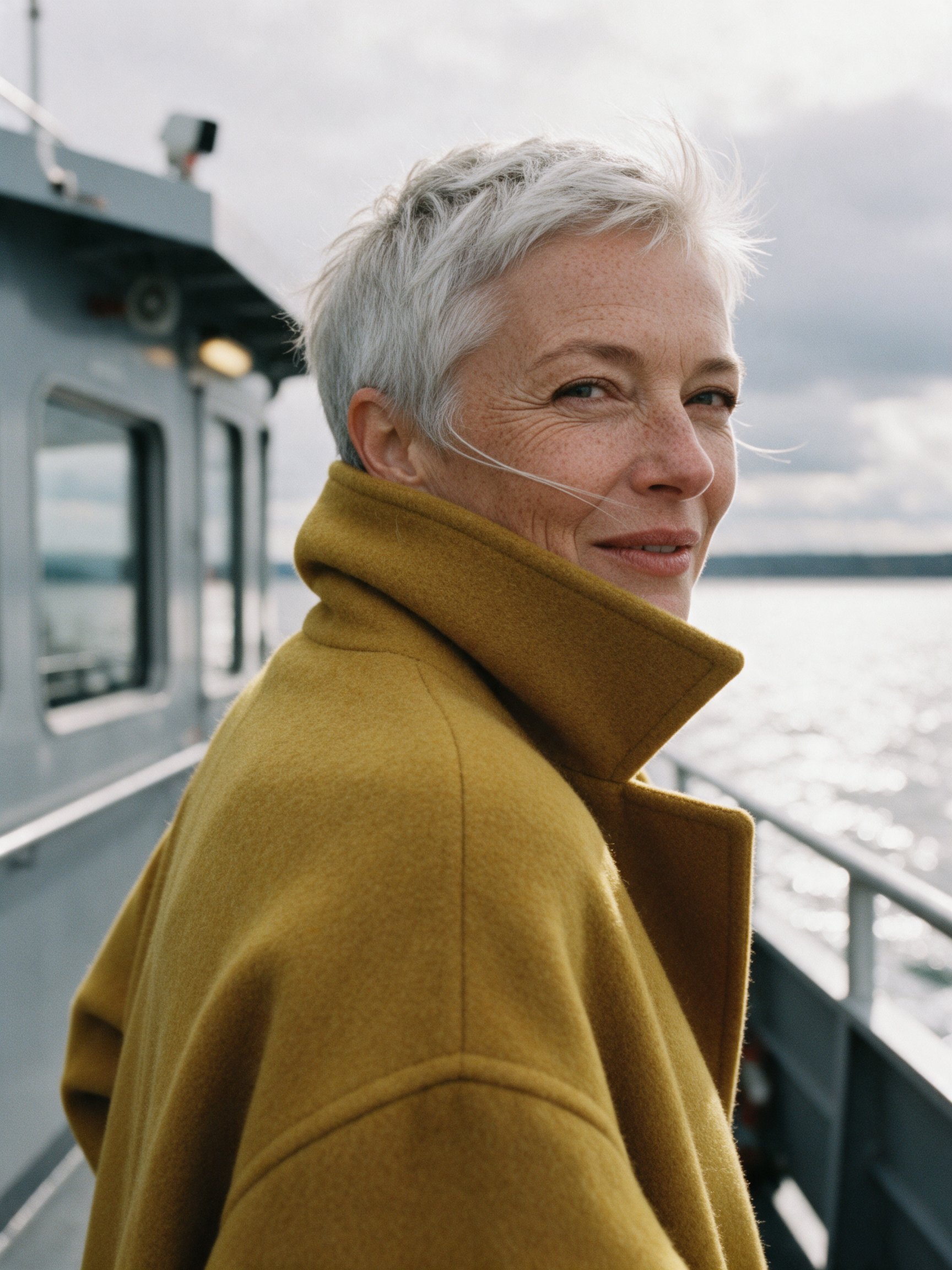
Editorial portrait at 3:4. Freckles, laugh lines and single wool fibers stay crisp at full size under soft silver light off the water. Start from this prompt for character and campaign portraits.
Tight editorial portrait on an 85mm lens at f/2: a woman in her sixties with cropped silver hair, freckles and laugh lines, wearing an oversized mustard wool coat with the collar turned up, turns into the wind on the deck of a grey ferry as a loose strand of hair crosses her cheek, overcast silver light with a soft bounce off the water, fine skin texture and individual wool fibers visible, warm color negative film grain.
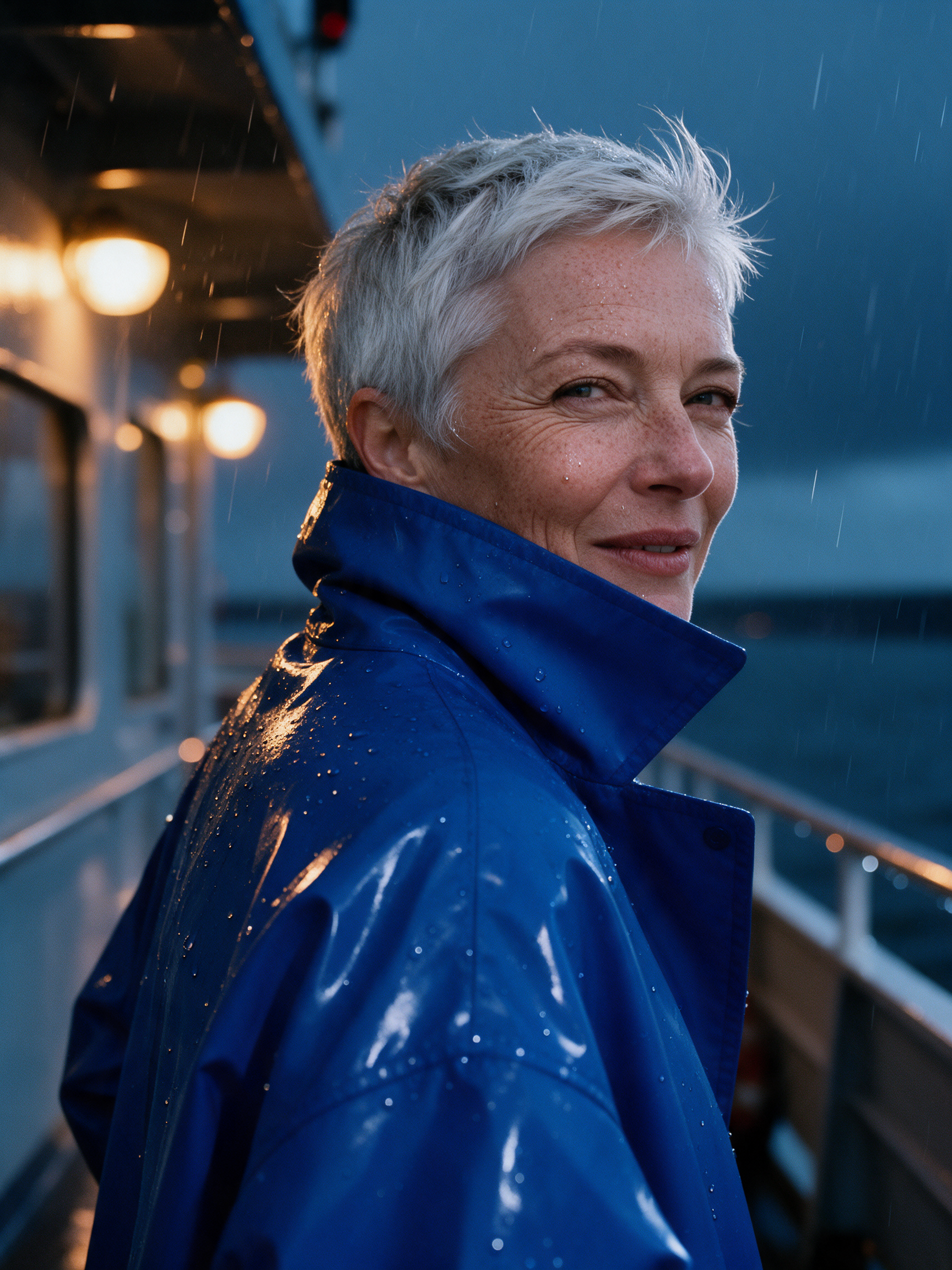
Photo edit of the portrait above. The same face, freckles, silver hair and pose, now on a rainy night deck in a glossy cobalt raincoat with amber lamps behind her. Use it to restage one subject across a whole series.
Edit this photo. Keep the same woman, her face, freckles, laugh lines, cropped silver hair, pose and the tight 85mm portrait framing unchanged. Change the scene to a rainy night on the same ferry deck: her mustard coat becomes a glossy cobalt blue raincoat with the collar turned up, fine rain streaks in the air and droplets beaded on her cheeks and shoulders, warm amber deck lamps glowing as soft bokeh behind her, cool blue night ambience, the same warm film grain.
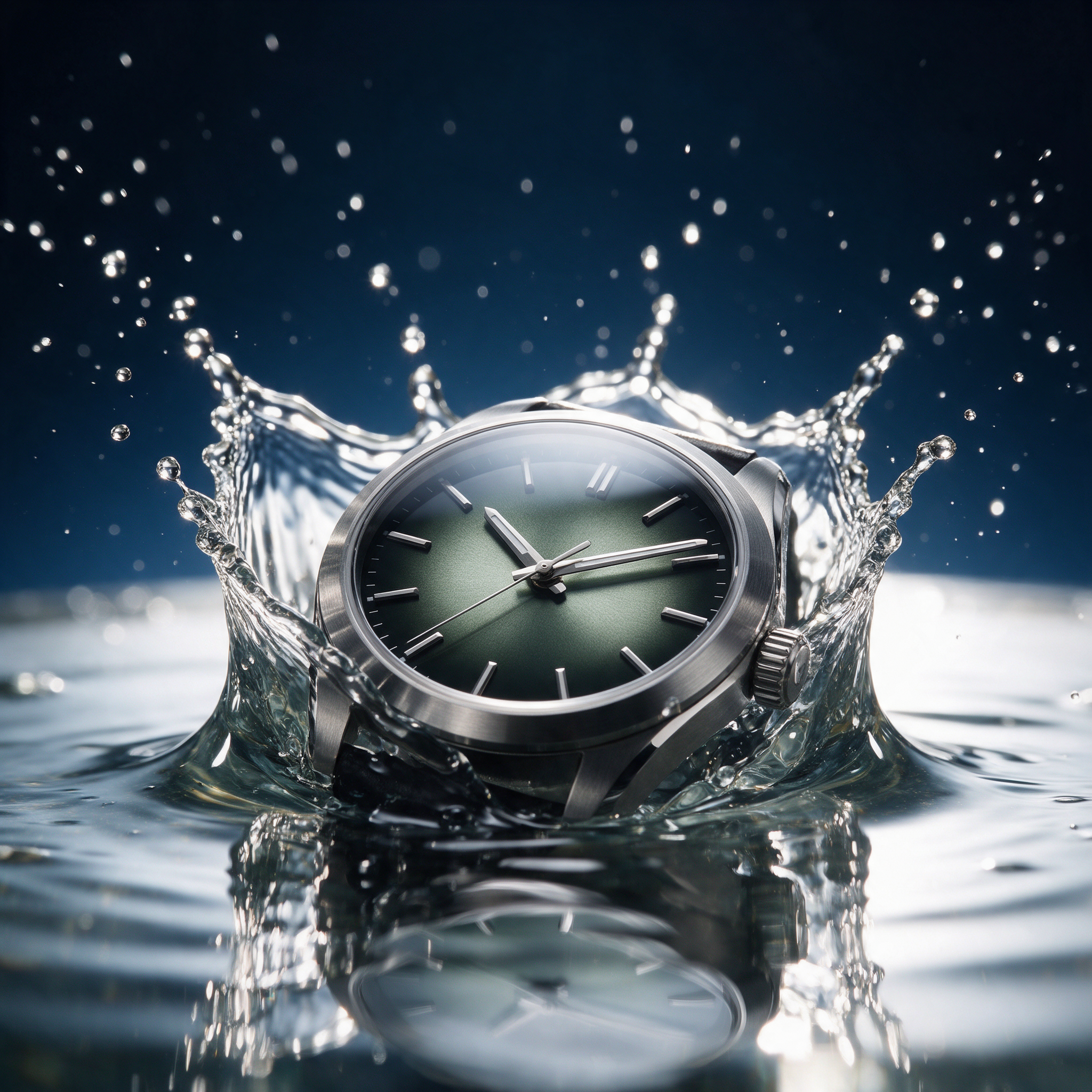
Product hero, square. A crown splash frozen mid air, droplets in sharp focus and clean reflections on the crystal over a smoked green dial. Start from this prompt for any hero shot.
Macro product hero shot of a brushed steel mechanical wristwatch with a smoked green dial and no logos, frozen at the instant it drops into a shallow pool of water, a crown shaped splash rising around the case with individual droplets in sharp focus, hard white rim light from behind, deep navy gradient background, crisp reflections on the sapphire crystal, high speed flash photography, no text anywhere.
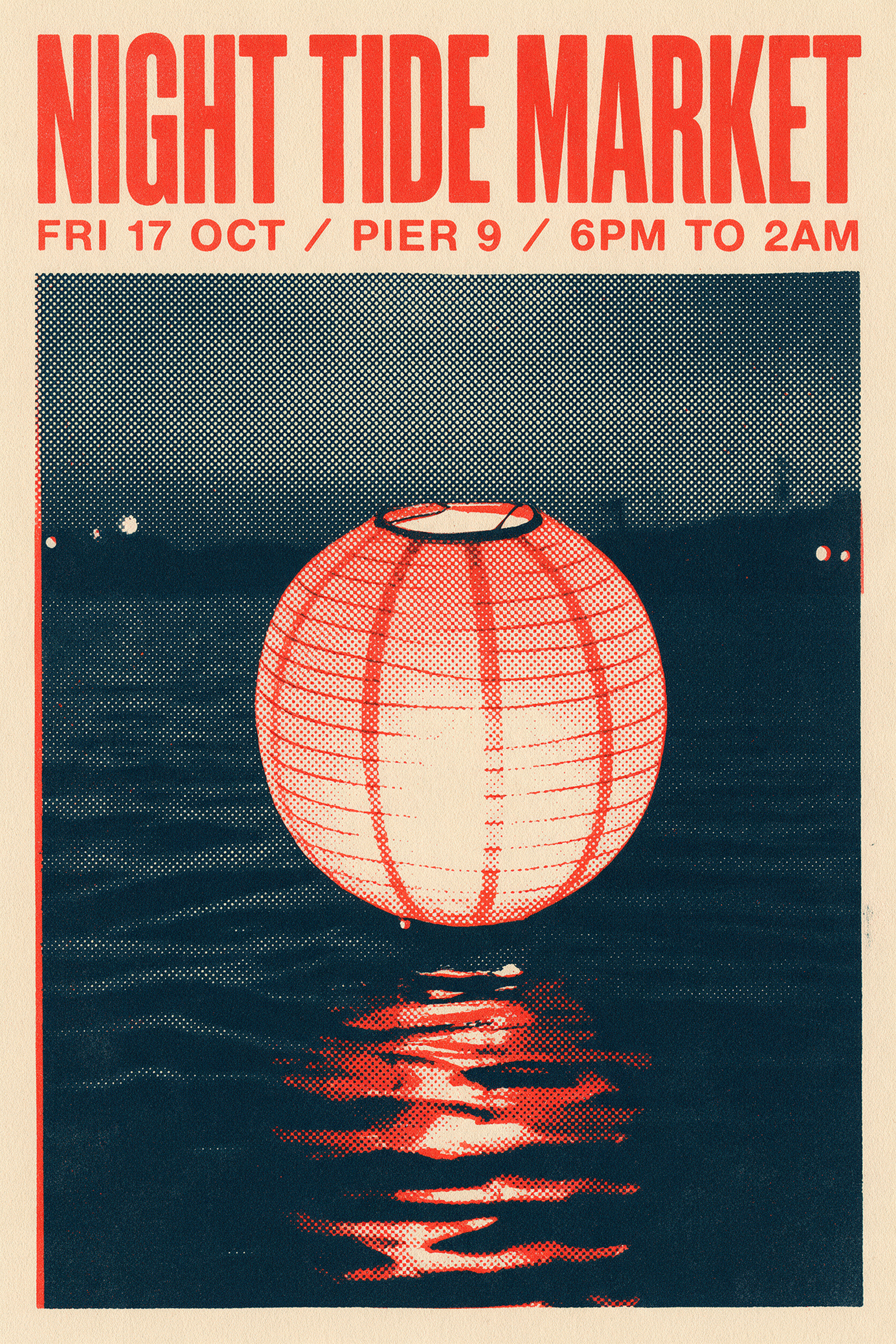
Typographic poster at 2:3. The headline and the full date line print letter for letter in three flat inks, with halftone dots and paper grain like a real screen print. Swap in your own event and date.
Screen printed gig poster in a bold Swiss style for a harbor night market: headline "NIGHT TIDE MARKET" in heavy condensed sans serif across the top, date line "FRI 17 OCT / PIER 9 / 6PM TO 2AM" underneath, a large halftone illustration of a single paper lantern drifting over dark water in the center, three flat inks only: vermilion, ink navy and warm cream, visible paper grain and slight ink misregistration, the text must be exact.
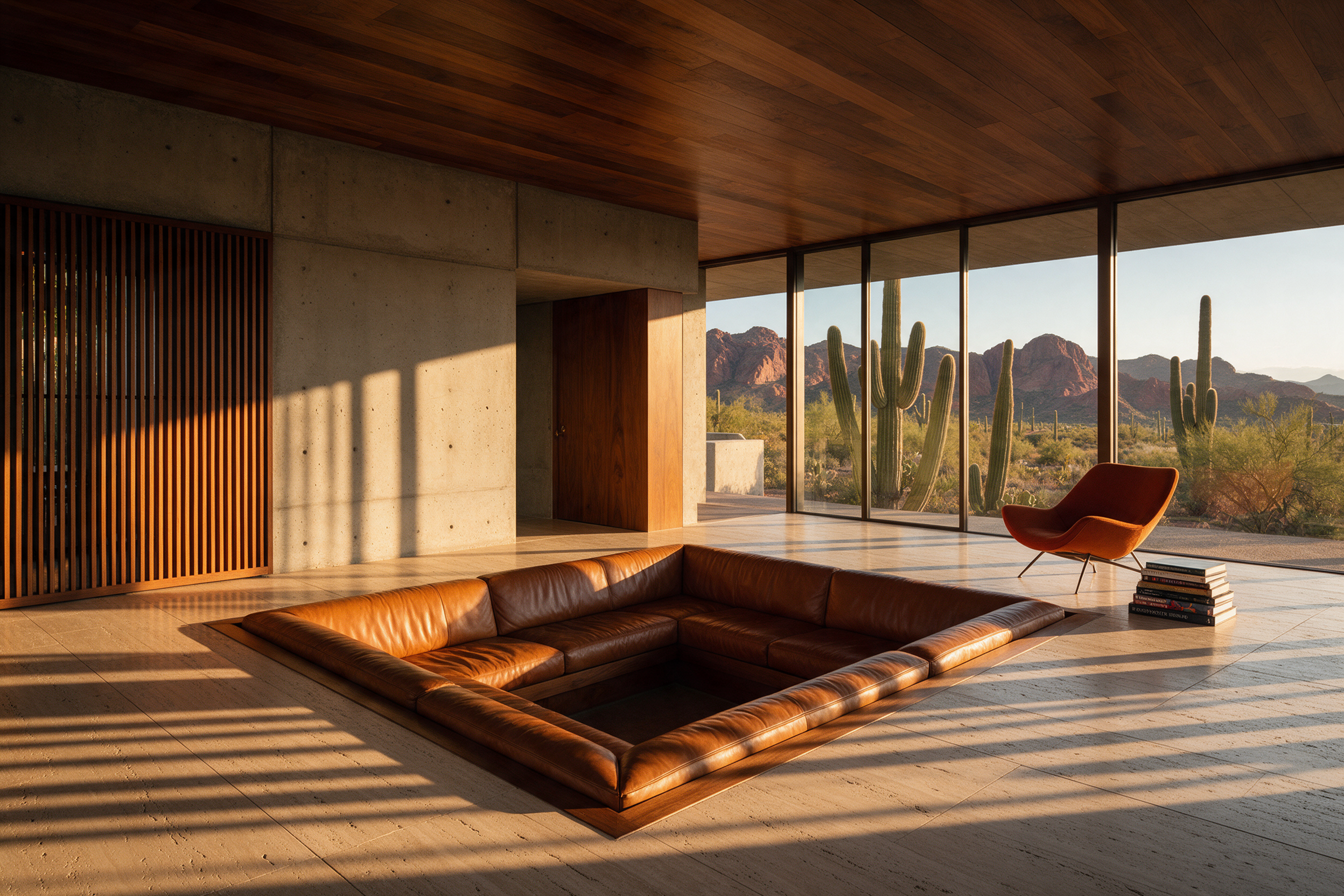
Architectural interior at 3:2. Straight verticals, golden hour light raking across travertine and saguaros framed in floor to ceiling glass, like a spread from a design magazine.
Wide architectural interior photograph on a tilt shift lens with perfectly straight verticals: a sunken conversation pit lined in cognac leather inside a concrete and walnut desert house at golden hour, low sun raking across a travertine floor, long striped shadows from a slatted wooden screen, a single burnt orange lounge chair and a stack of art books, floor to ceiling glass opening onto saguaro cactus and red mountains, calm editorial magazine look.
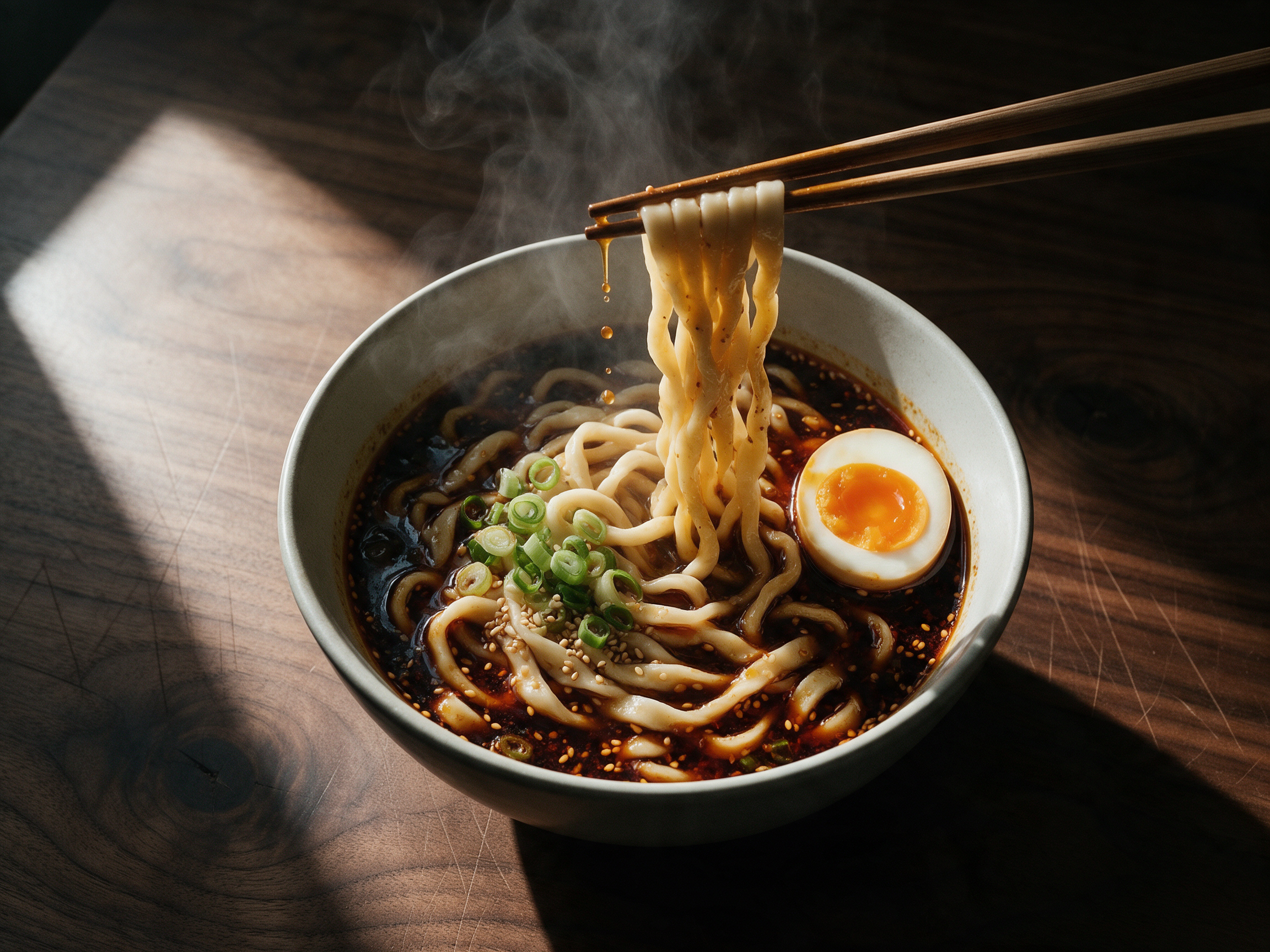
Food photo at 4:3. Steam curling through a slash of window light, chili broth dripping from lifted noodles and a jammy yolk. Start from this prompt for menus and food posts.
Overhead food photograph on a 50mm lens: a steaming bowl of hand pulled noodles in a glossy dark chili broth on a scarred walnut table, wooden chopsticks lifting a strand of noodles out of the bowl with broth dripping, a halved soft boiled egg with a jammy orange yolk, sliced scallions and toasted sesame, a hard shaft of window light from the left cutting through the steam, moody low key color grade, visible texture on every ingredient.
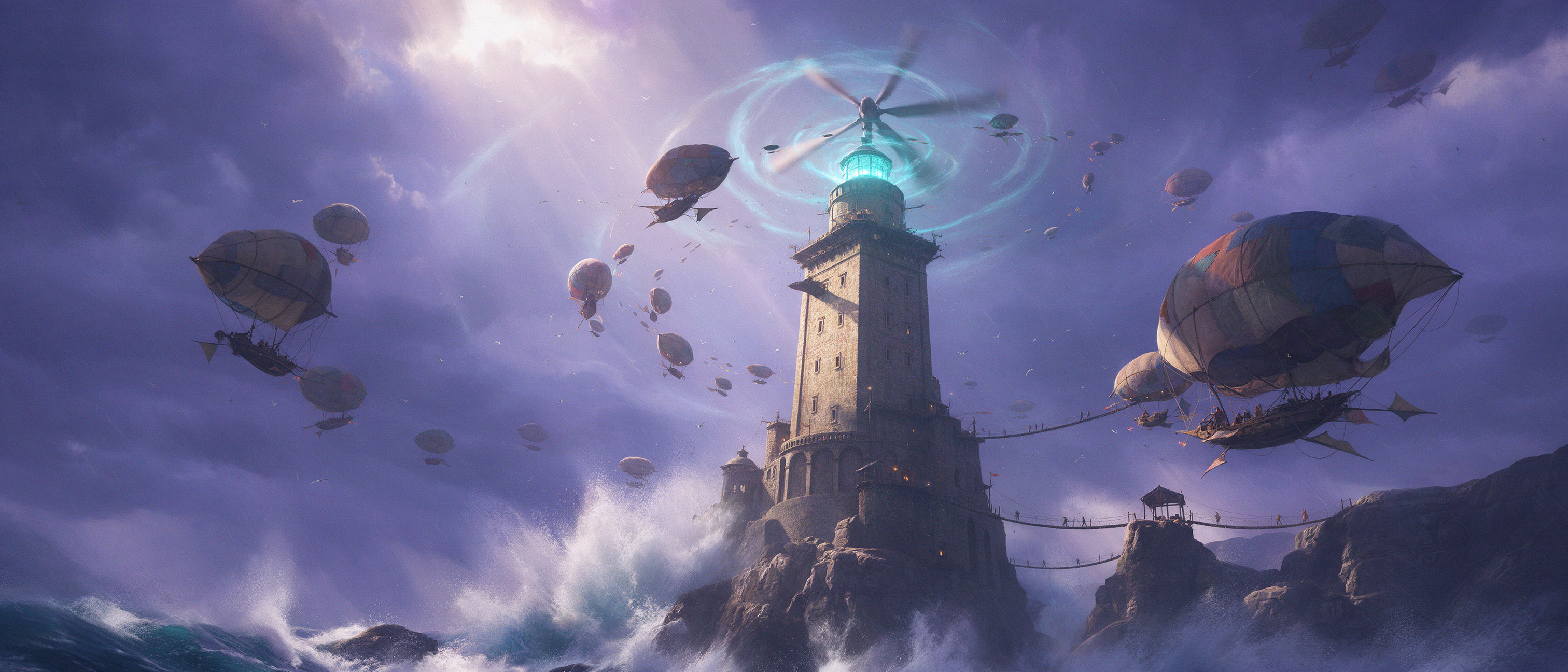
Concept art at 21:9. A storm lit lighthouse, a ring of patchwork airships and tiny figures on rope bridges for scale, painted in one ultra wide frame. Start from this prompt for game and film worlds.
Epic wide matte painting: a colossal ancient stone lighthouse carved into a sea cliff, its lamp replaced by a spinning turbine of cyan light, a spiral of airships with patched canvas sails circling it through a violet storm, tiny figures crossing rope bridges for scale, huge waves exploding against the rocks below, volumetric god rays through the clouds, painterly brushwork with razor sharp detail on the stone.
What Seedream 5 is great at
Seedream 5 reads a prompt like a creative brief. Put words in quotes and they print exactly: our Night Tide Market poster carries its headline and a full date line letter for letter, in three flat inks with real halftone texture.
It is just as strong on photographs. Pro at 2K holds the detail you look at up close: freckles and wool fibers in the ferry portrait, brushed steel and droplets in the watch splash, raking golden light in the desert house.
It also edits. We gave Pro the ferry portrait above and asked for a rainy night and a cobalt raincoat, and her face, freckles, hair and pose carried over. Editing costs the same 2.5 credits as generating, and Pro accepts up to 10 reference images.
One tool gives you three engines. Pro makes 2K images at 2.5 credits, or 1.25 credits for Auto 1K and smaller custom sizes. Lite, at 1 credit, spelled our shop sign exactly. Flash, at 0.5 credits, lets you explore ideas in volume.
How to get sharp text from Seedream 5
Quote the words, say where they go, and Seedream 5 letters them for you. This infographic prompt carries a title and four numbered steps, the gig poster prompt a headline and a full date line, and Pro spelled every word at 2K. The comparison below puts a gold leaf shop sign and a chalkboard side by side with Nano Banana Pro.
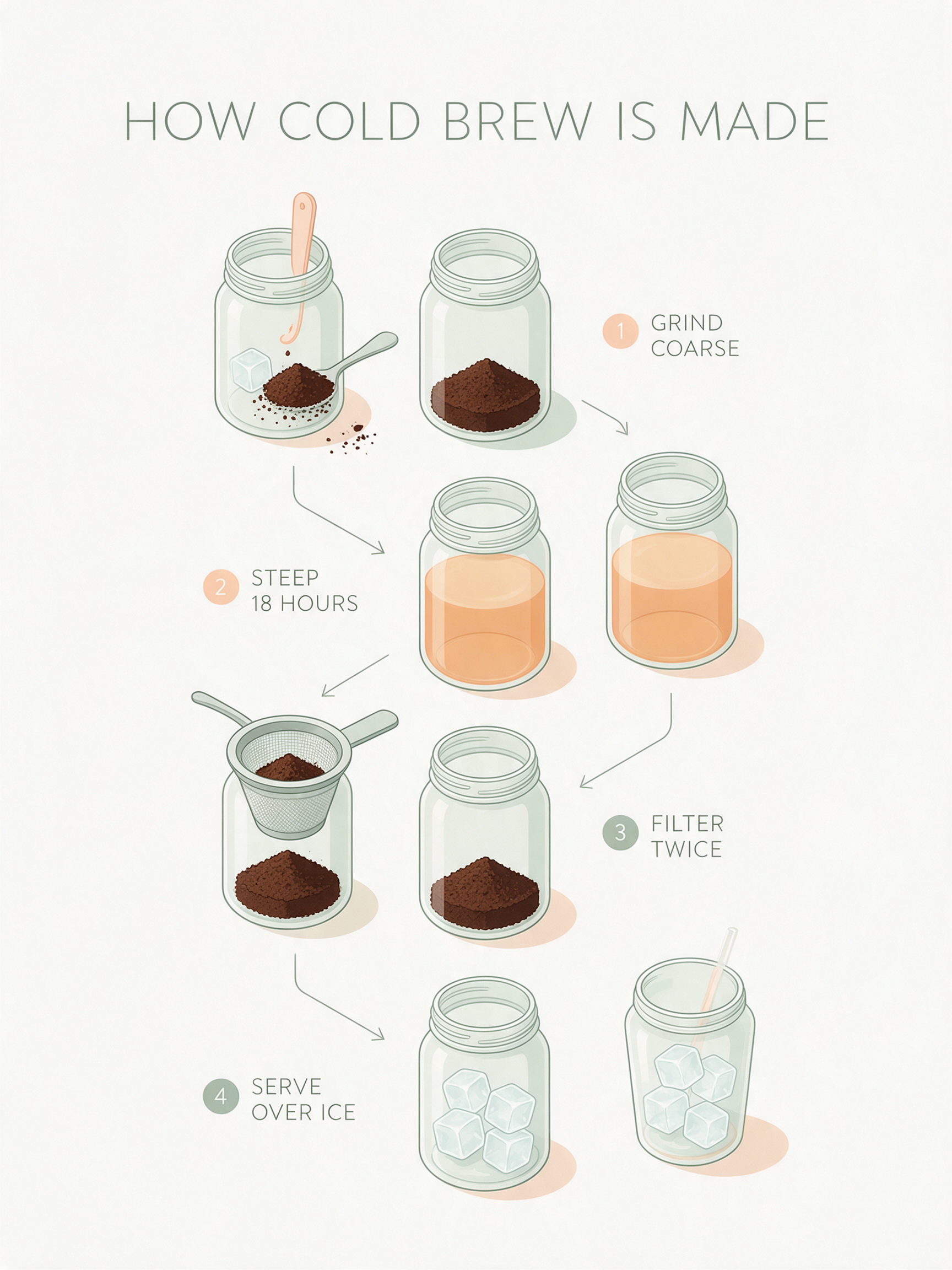
Infographic at 3:4. A title and four numbered steps, every word spelled exactly in a clean sans serif beside soft pastel jar drawings. Swap in your own recipe or process.
Clean isometric infographic poster titled "HOW COLD BREW IS MADE" with four numbered steps in a vertical flow: "1 GRIND COARSE", "2 STEEP 18 HOURS", "3 FILTER TWICE", "4 SERVE OVER ICE", each step with a small isometric illustration of a glass jar, coffee grounds and ice, soft pastel palette of sage, peach and cream on an off white background, thin line arrows between steps, labels in a clean geometric sans serif, the text must be exact.
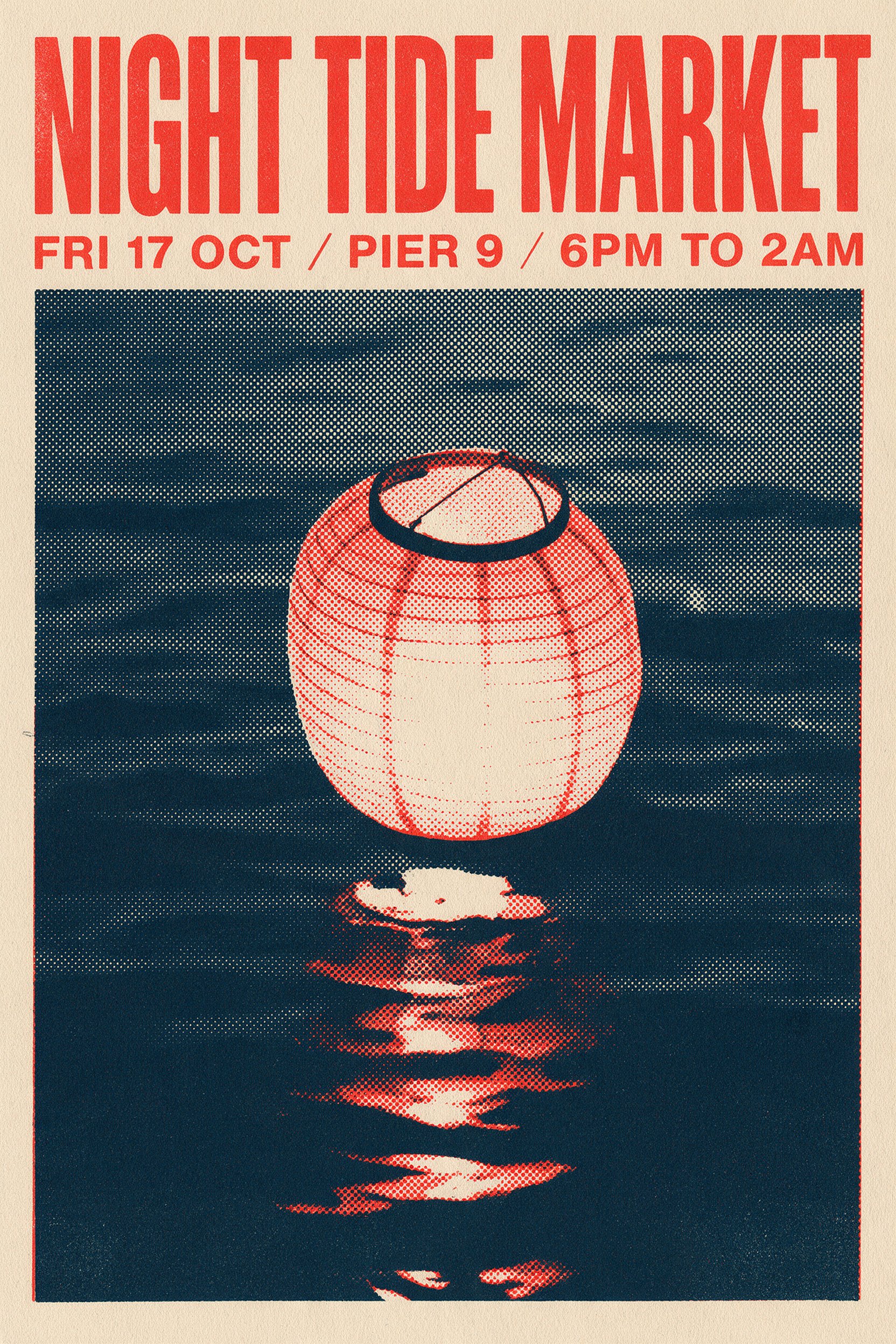
Gig poster at 2:3. The headline and the full date line print letter for letter, over a halftone lantern glowing on dark water. Start from this prompt for event posters and flyers.
Screen printed gig poster in a bold Swiss style for a harbor night market: headline "NIGHT TIDE MARKET" in heavy condensed sans serif across the top, date line "FRI 17 OCT / PIER 9 / 6PM TO 2AM" underneath, a large halftone illustration of a single paper lantern drifting over dark water in the center, three flat inks only: vermilion, ink navy and warm cream, visible paper grain and slight ink misregistration, the text must be exact.
- Quote every word that must print and end the prompt with "the text must be exact". Our infographic steps and poster date line came back letter for letter.
- Give each string a role and a style, like a headline in heavy condensed sans serif with a date line underneath. Seedream placed and sized our poster type from those words alone.
- Choose the engine by the job. Pro at 2K, for 2.5 credits, brings the finest surface detail to portraits and product shots, Pro at a custom size up to about 2.4 megapixels is 1.25 credits, and Lite at 1 credit handles lettering like our shop sign.
- Write the prompt like a shot list: lens and angle first, then the subject, one action, the light and the texture. Every prompt on this page follows that order, so start from any of them.
- Pick the shape first. Pro has presets from square to 21:9, which is how our lighthouse panorama fills a cinema wide frame.
- For edits, say what must stay the same. Our ferry edit prompt lists her face, freckles, hair, pose and framing before it describes the new scene.
Seedream 5 Pro vs Nano Banana Pro on a blue hour shop sign
Both models spelled the gold leaf window sign and the chalkboard exactly at 2K and 3:2. Seedream 5 Pro did it for 2.5 credits against 4.5 for Nano Banana Pro, with a warm tungsten workshop glowing against a deep blue street.
Same prompt: Photoreal storefront at blue hour on a 35mm lens: a tiny bookbinding workshop with a hand painted gold leaf window sign reading "MARLOW & DAUGHTERS BOOKBINDERS", a chalkboard easel on the wet sidewalk reading "REPAIRS WHILE YOU WAIT", warm tungsten light inside showing a grey haired binder stitching a book spine at a cluttered workbench, reflections of the sign on the rain soaked pavement, the text must be exact.
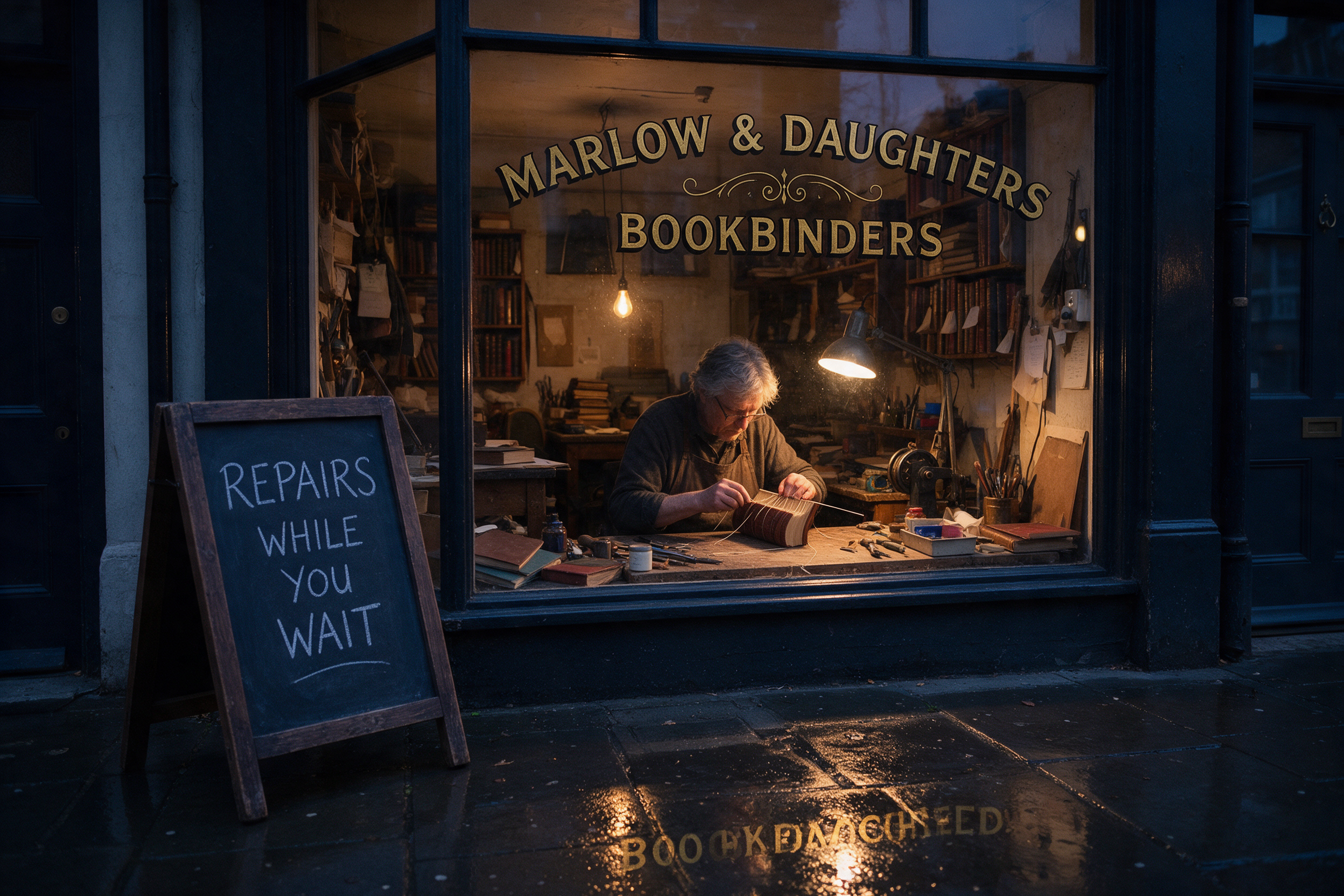 Seedream 5
Seedream 5 Pro, 2K at 3:2. A deep blue street, warm lamp light on the binder's hands and both signs spelled exactly.
Photoreal storefront at blue hour on a 35mm lens: a tiny bookbinding workshop with a hand painted gold leaf window sign reading "MARLOW & DAUGHTERS BOOKBINDERS", a chalkboard easel on the wet sidewalk reading "REPAIRS WHILE YOU WAIT", warm tungsten light inside showing a grey haired binder stitching a book spine at a cluttered workbench, reflections of the sign on the rain soaked pavement, the text must be exact.
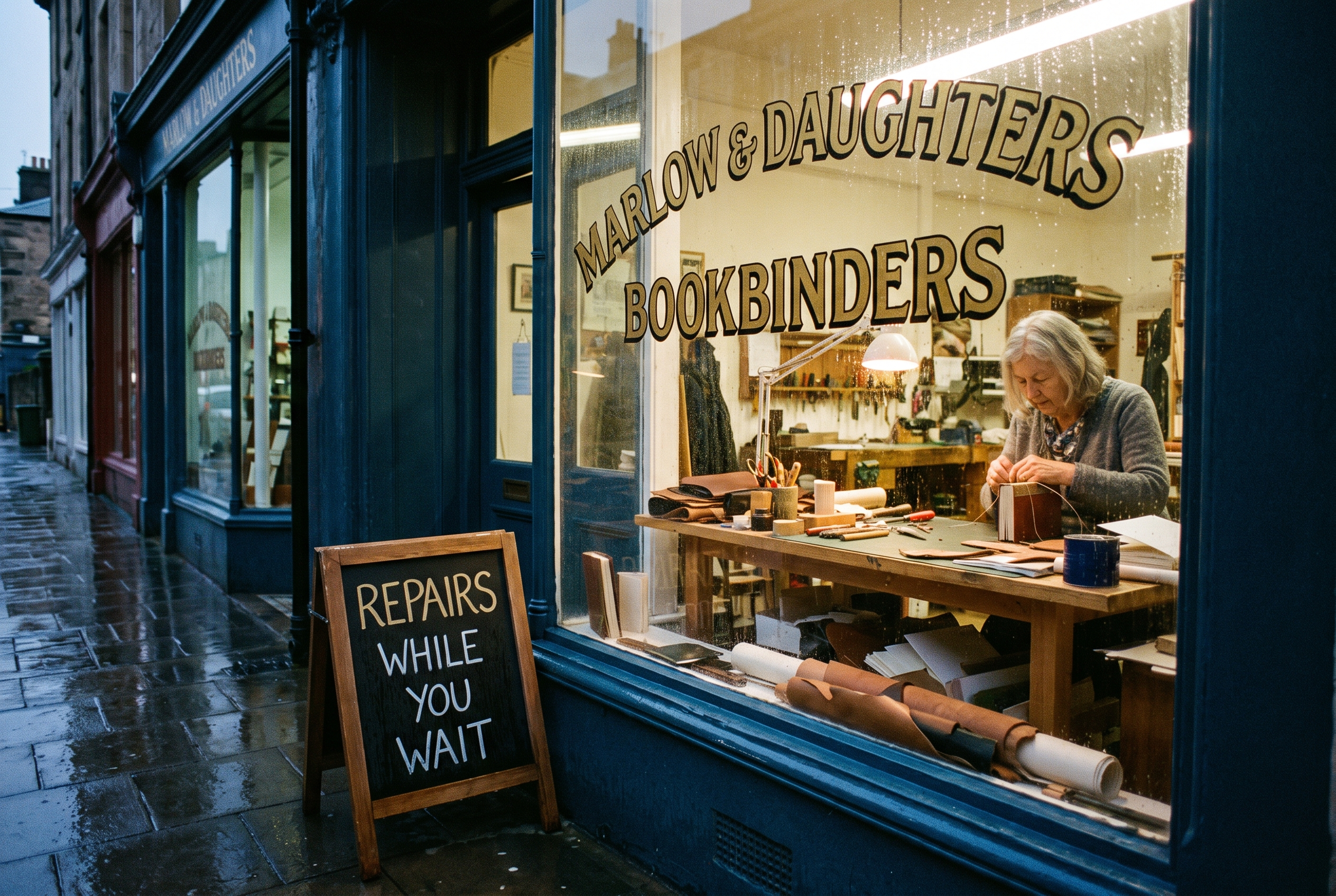 Nano Banana Pro
Nano Banana Pro, 2K at 3:2. Both signs exact, with a brighter street and cool white light inside the shop.
Photoreal storefront at blue hour on a 35mm lens: a tiny bookbinding workshop with a hand painted gold leaf window sign reading "MARLOW & DAUGHTERS BOOKBINDERS", a chalkboard easel on the wet sidewalk reading "REPAIRS WHILE YOU WAIT", warm tungsten light inside showing a grey haired binder stitching a book spine at a cluttered workbench, reflections of the sign on the rain soaked pavement, the text must be exact.
| Seedream 5 | Nano Banana Pro | |
|---|---|---|
| Credits for this image | 2.5 | 4.5 |
| Window sign and chalkboard | Both spelled exactly | Both spelled exactly |
| Light | Deep blue street, warm lamp lit workshop | Brighter dusk street, cool white workshop light |
| Framing | Straight on shopfront, binder centered at the bench | Angled view down a row of shops |
Seedream 5 pricing: included in every plan
Seedream 5 is included in every Pixel Dojo plan, from $10/month, and credits roll over while you are subscribed. Pro is 2.5 credits for a 2K image and 1.25 credits for Auto 1K or a custom size up to about 2.4 megapixels. Lite is 1 credit and Flash is 0.5 credits per image.
Editing a photo costs the same as generating one, so restaging a portrait on Pro is 2.5 credits at 2K. Each image in a multi image request is billed at the same rate.
Made with Seedream 5
All how-tosThe exact prompts and settings behind each one.
Seedream 5 questions
What is Seedream 5?
Seedream 5, also called Seedream 5.0, is ByteDance's flagship image generation and editing model. On Pixel Dojo it comes as three engines on one tool page, Pro, Lite and Flash: type a prompt or attach reference images, pick an engine and an image size, and generate. It is also available through the Pixel Dojo API.
Is Seedream 5 good at text in images?
Yes, it is one of its biggest strengths. Seedream 5 Pro spelled every quoted word in our text prompts, from a gig poster and a four step infographic to a gold leaf shop sign and a chalkboard, and Lite spelled the same sign exactly for 1 credit. Put each string in double quotes, say where it goes, and end the prompt with "the text must be exact".
Can I use Seedream 5 images commercially?
Yes. You own what you make, on every plan.
Is Seedream 5 free?
A free account gets 3 free effects every day to try Pixel Dojo. Seedream 5 is included in every plan from $10/month, and credits roll over while you are subscribed. Pro is 2.5 credits per 2K image, Lite is 1 credit and Flash is 0.5 credits.
What resolution does Seedream 5 Pro make?
Every Pro aspect preset renders at 2K class, for example 2560 x 1440 for 16:9, 2048 x 2048 for square and 3024 x 1296 for 21:9. Lite offers a 3K preset, and for 4K prints Seedream 4.5 has an Auto 4K size.
What is the difference between Seedream 5 Pro, Lite and Flash?
All three share the Seedream 5 tool page and its model picker. Pro is the flagship for finished 2K work and accepts up to 10 reference images. Lite takes up to 14 references and spelled our shop sign exactly in a full 2496 x 1664 image. Flash is the fastest, lowest cost engine at 0.5 credits per image. Through the API each has its own model id, seedream-5, seedream-5-lite and seedream-5-flash, called at /api/v1/models/{id}/run.
Can I edit my own photos with Seedream 5?
Yes. Seedream 5 Pro takes up to 10 reference images for edits and restyles, at the same credit price as generating. We gave Pro the ferry portrait on this page and asked for a rainy night and a cobalt raincoat, and her face, hair, pose and framing carried over. List what must stay the same, then describe the new scene.
Make your first Seedream 5 image
Write a prompt above or start from any example on this page. One plan covers every top model, six studios and Sensei, and your credits roll over.
Start with Seedream 5