Car Listing Photos
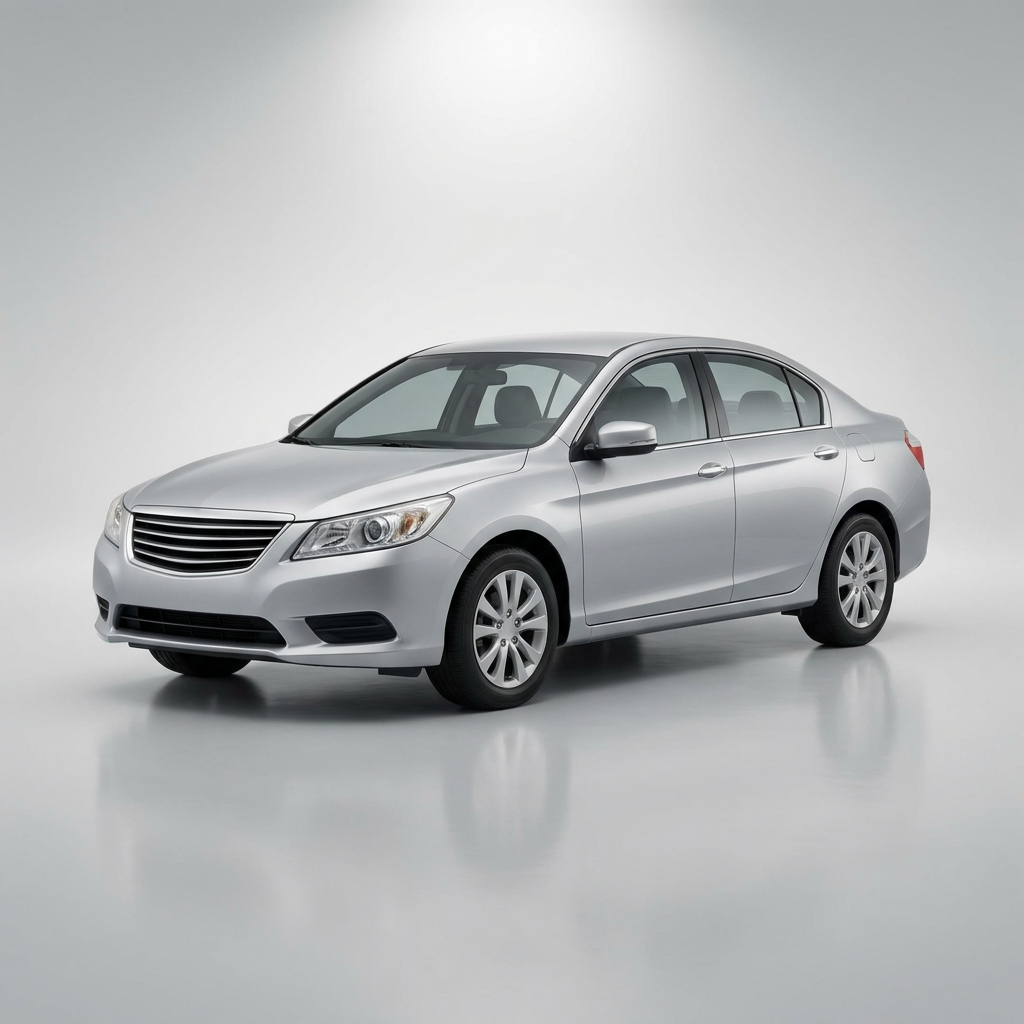
Generated on PixelDojo with nano-banana-pro. Produced by PixelDojo's generation pipeline.
You can improve a car listing photo with AI two ways: generate a clean studio shot from a written description, or edit an existing snapshot to fix the background and lighting, then upscale the result before it goes on a marketplace. We ran the first path on August 26, 2026, turning a written brief into a clean three-quarter studio shot for 3 credits in about 38 seconds, no camera, driveway or car wash involved. This page walks through both paths using the exact prompt and the real credit cost for each step.
The listing-ready shot from one written brief
Every example below was produced on PixelDojo. Hover to see the prompt.
Studio product photograph of a generic unbranded silver sedan with no visible logos or badges, parked at a three-quarter angle on a seamless light gray background, soft diffused lighting, subtle reflection under the car
nano-banana-pro
One written brief, one car photo, August 26, 2026: 3 credits on Nano Banana Pro, about 38 seconds, kept on the second attempt.
Why Choose Pixel Dojo for Car Listing Photos
Professional-quality results with cutting-edge AI technology
3 credits, one prompt
Nano Banana Pro priced the sedan shot at 3 credits, the same catalog price regardless of how much of the car and backdrop the prompt describes.
About 38 seconds end to end
Timed from request to finished file on August 26, 2026, no retouching pass needed on the kept result.
No car in hand required
The shot came from a written description alone. A dealer photographing a car that just arrived, or a private seller between wash and daylight, can generate a reference shot before touching a camera.
How It Works
Two starting points, three steps, one listing-ready photo:
Describe the car and the backdrop instead of shooting it
Our prompt named a generic unbranded silver sedan with no visible logos or badges, a three-quarter angle, a smooth light gray background, soft diffused lighting and a subtle reflection under the car. It ran on Nano Banana Pro for 3 credits and came back in about 38 seconds as a 1024 by 1024 image: clean overhead light, a faint floor reflection, and a market-neutral sedan silhouette with no readable badge. Our first attempt at the same prompt without the 'no visible logos or badges' line came back with a distinct grille badge that read as a real manufacturer's mark, so that instruction is doing real work, not padding.
If a real photo already exists, edit it instead of starting over
Most sellers already have a phone photo of the actual car, usually in a driveway or a garage with clutter behind it. Send that photo to Flux Edit (Kontext) with a plain English instruction to swap the background for a clean backdrop and even out the lighting, for 1 credit per edit, without changing the car itself.
Upscale before it goes on the marketplace
Buyers zoom on a listing photo before they call. A 1024 by 1024 file gets soft at full zoom, so run the finished image through Creative Upscale for 0.5 credit before uploading it, so the wheels and trim still hold detail up close.
Loved by creators on PixelDojo
Real feedback from people using PixelDojo, pulled from our in-product surveys.
Best AI tool availble the suite is rad
Versatility quality, value, ROI, innovation
variety of tools available and prompt tools
A "one-stop-shop" for creators! Thanks!!
Lots of different tools. It's easy to purchase more credits.
Amazing performance!
Explore more AI tools on PixelDojo
AI Tools
Compare & Switch
- Best AI Image Generators
- Best AI Video Generators
- Midjourney Alternatives
- Civitai Alternatives
- Runway Alternatives
- Leonardo Alternatives
- Pika Alternatives
- Luma Alternatives
- Magnific Alternatives
- Veo Alternatives
- Flux Alternatives
- Freepik Alternatives
- Seedance Alternatives
- Seedream Alternatives
- Pixverse Alternatives
- GPT Image Alternatives
- Synthesia Alternatives
- Playground Alternatives
- NightCafe Alternatives
- Canva AI Alternatives
- ElevenLabs Alternatives
- ComfyUI Alternatives
- Fal Alternatives
- Replicate Alternatives
Common Questions
Everything you need to know about Car Listing Photos
What does it cost to improve a car listing photo with AI?
3 credits for a generated studio shot on Nano Banana Pro. If you start from a real photo instead, add 1 credit to swap the background with Flux Edit (Kontext), and 0.5 credit to upscale the result before uploading. A full three step run is 4.5 credits.
How fast is it?
About 38 seconds for the base image, measured on August 26, 2026 from request to finished file. Real turnaround moves with queue load, so treat that as typical rather than guaranteed.
Do I need to already have a photo of the car?
No. Our shot was generated purely from a written description, no camera and no car in hand. If you do have a real photo, sending it to an edit tool to fix the background and lighting is usually the faster path since the car itself does not need to be recreated.
Will the AI put a fake badge or logo on the car?
It can if you do not rule it out. Our first attempt at this exact prompt, without a line ruling out badges, came back with a grille emblem that read as a real manufacturer's mark. Adding 'no visible logos or badges' to the prompt fixed it on the next attempt.
Will the photo hold up when a buyer zooms in?
Run it through Creative Upscale first, for 0.5 credit. Our base file came back at 1024 by 1024, fine for a listing thumbnail but soft at full zoom on the wheels and trim without the upscale pass.
Can this run over the API for a whole inventory?
Yes. Every model in this workflow sits behind POST /api/v1/models/{apiId}/run with the same API key, so a dealership feed can call the image model, then the edit model, then Creative Upscale, once per vehicle.