Event Poster Design
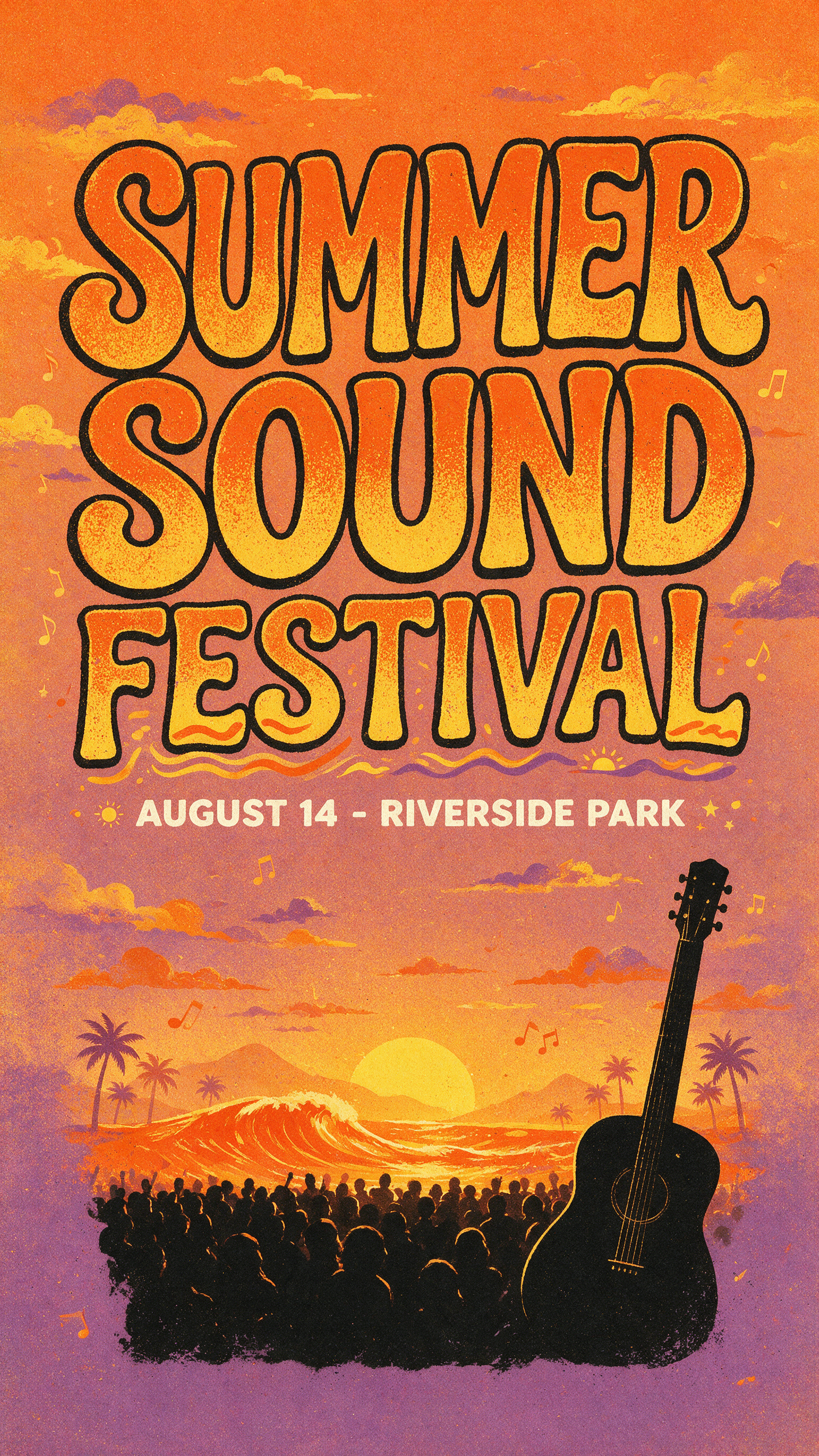
Generated on PixelDojo with Seedream 5. Produced by PixelDojo's generation pipeline.
You can design a full event poster, headline and date line included, with one Seedream 5 prompt. We ran it on August 26, 2026: it cost 2.5 credits and returned a finished 1584 by 2816 pixel poster in about 75 seconds, with both lines of text spelled correctly on the first try. This page walks through the prompt structure that kept the lettering legible and shows the exact result we kept.
The 2.5 credit poster, first result kept
Every example below was produced on PixelDojo. Hover to see the prompt.
Concert event poster design, bold hand-lettered headline reading 'SUMMER SOUND FESTIVAL', smaller line below reading 'AUGUST 14 - RIVERSIDE PARK', retro sunset gradient background in orange and purple, silhouette of a crowd and a guitar at the bottom, screen print poster style, high contrast colors, vertical layout
Seedream 5
One prompt, one generation, on August 26, 2026. 2.5 credits, about 75 seconds, headline and date line both spelled right on the first try.
Why Choose Pixel Dojo for Event Poster Design
Professional-quality results with cutting-edge AI technology
2.5 credits, one call
The default 2K-class size on Seedream 5. A cheaper 1K-class run is 1.25 credits if you do not need a large print file.
About 75 seconds, measured
Timed on August 26, 2026 from request to finished file, no retries.
Two lines of text, both correct
The festival name and the date and venue line both came back spelled right on the first generation.
How It Works
How we built it, so you can repeat it:
Write the headline as its own instruction
Put the exact words in quotes and name the lettering style. Ours asked for a bold hand-lettered headline reading 'SUMMER SOUND FESTIVAL'. Quoting the words is what keeps a text-capable model from paraphrasing them into something close but wrong.
Give the date and venue their own line
Ask for it explicitly instead of assuming the headline instruction covers it. Ours added a smaller line below reading 'AUGUST 14 - RIVERSIDE PARK', and it came back as its own clean row under the title instead of getting folded into the main lettering.
Describe the scene after the text, then generate
Retro sunset gradient, a crowd silhouette, a guitar shape, vertical layout. That is the rest of the prompt. Seedream 5 charges 2.5 credits at its default 2K-class size and returned ours at 1584 by 2816 pixels in about 75 seconds.
Loved by creators on PixelDojo
Real feedback from people using PixelDojo, pulled from our in-product surveys.
Ease of use, friendliness and support of the owner, continued innovation.
it is an amazing site to create a pics and vids for those who don't have the hardware themselves
good tools in one place
Prompt updates, strong features, and a community that is always willing to help and hear/act on professional feedback. I've never had a better experience.
user friendly all in one thing
I really like the schedule of AI work performed!
Explore more AI tools on PixelDojo
AI Tools
Compare & Switch
- Best AI Image Generators
- Best AI Video Generators
- Midjourney Alternatives
- Civitai Alternatives
- Runway Alternatives
- Leonardo Alternatives
- Pika Alternatives
- Luma Alternatives
- Magnific Alternatives
- Veo Alternatives
- Flux Alternatives
- Freepik Alternatives
- Seedance Alternatives
- Seedream Alternatives
- Pixverse Alternatives
- GPT Image Alternatives
- Synthesia Alternatives
- Playground Alternatives
- NightCafe Alternatives
- Canva AI Alternatives
- ElevenLabs Alternatives
- ComfyUI Alternatives
- Fal Alternatives
- Replicate Alternatives
Common Questions
Everything you need to know about Event Poster Design
What prompt actually produces readable text on an event poster?
Quote the exact headline in its own sentence, give the date and venue a separate line, then describe the scene last. Ours read: bold hand-lettered headline reading 'SUMMER SOUND FESTIVAL', smaller line below reading 'AUGUST 14 - RIVERSIDE PARK', retro sunset gradient background in orange and purple, silhouette of a crowd and a guitar at the bottom, screen print poster style, high contrast colors, vertical layout.
What does it cost to design an event poster with AI?
2.5 credits on Seedream 5 at its default 2K-class size. Switching to the 1K-class size preset drops it to 1.25 credits per image if you do not need the larger file.
What size does the poster come out at?
Ours returned at 1584 by 2816 pixels on the default auto_2K setting, a portrait shape ready for a vertical print or a social share. Seedream 5 also offers fixed aspect ratio presets and a custom width and height mode up to 4096 pixels on a side.
Which PixelDojo model did you use, and why?
Seedream 5, because it is built for accurate multi-line text rather than single-word labels. Seedream 5 Lite is a cheaper 1 credit sibling worth trying for a simpler poster with just one line of type.
Can I edit the poster afterward, like swapping the date?
Yes two ways. Send the poster back into Seedream 5 as a reference image, up to 10 references in one request, with a prompt describing the change. Or open it in the image editor for a manual touch up.
How do I call it from the API?
POST to /api/v1/models/seedream-5/run with your API key and a prompt. Add image_size if you want a specific aspect ratio instead of the automatic default.