Garden Design Concepts
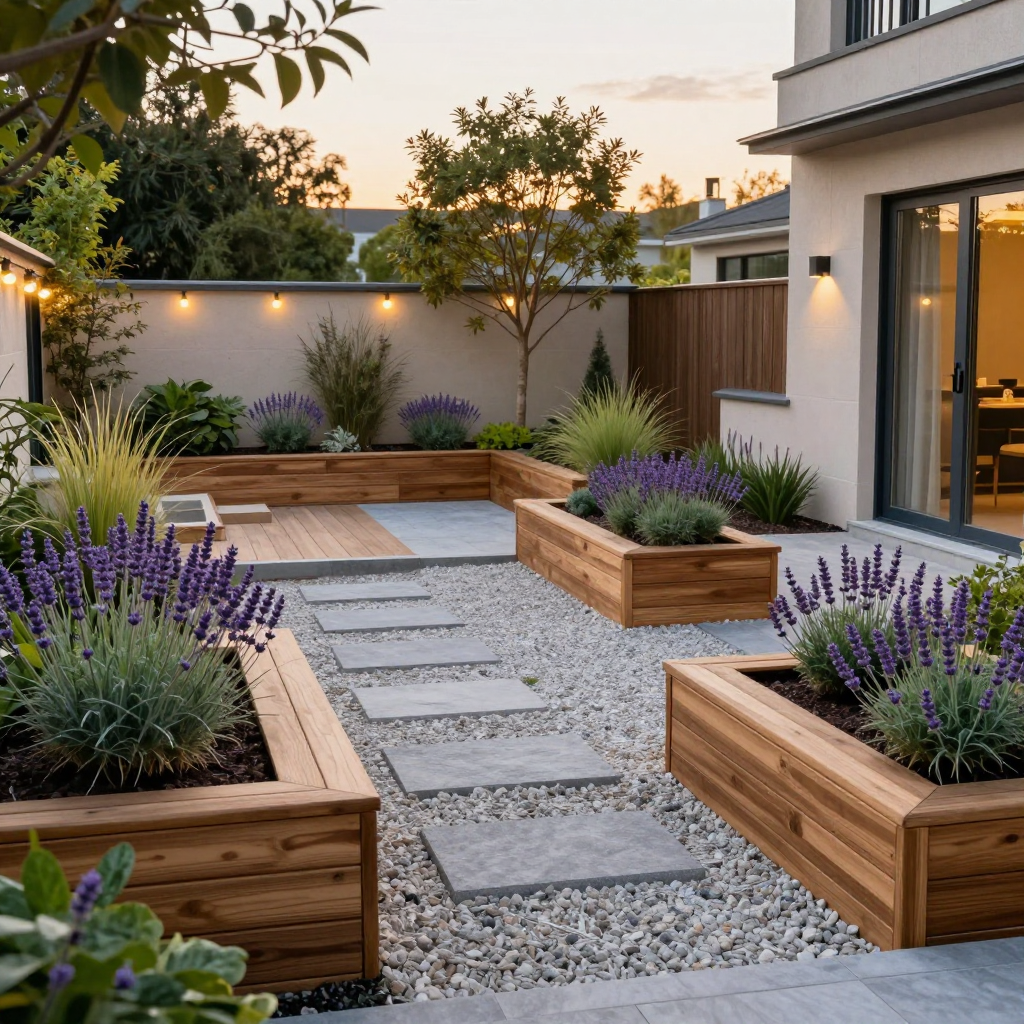
Generated on PixelDojo with z-image-turbo. Produced by PixelDojo's generation pipeline.
You can visualize a garden redesign with AI two ways: generate a concept from scratch to settle on a style, or send a photo of the actual yard to an editing model with the redesign described in plain English. We ran the concept step on August 26, 2026, generating a backyard with raised wooden planter beds, a gravel path and lavender for 0.5 credit in about 15 seconds. This page covers both routes and what each one costs.
The concept from step one
Every example below was produced on PixelDojo. Hover to see the prompt.
A photorealistic landscaped backyard garden redesign with raised wooden planter beds, a gravel path, lavender and ornamental grasses, a small patio with string lights, golden hour lighting, architectural landscape rendering style
z-image-turbo
One prompt, one concept, August 26, 2026: 0.5 credit on Z-Image Turbo, about 15 seconds, kept on the first result.
Why Choose Pixel Dojo for Garden Design Concepts
Professional-quality results with cutting-edge AI technology
0.5 credit for a concept
Z-Image Turbo priced the backyard concept at 0.5 credit, cheap enough to generate a few layout options before picking one.
About 15 seconds, measured
Timed from request to finished file on August 26, 2026, kept on the first result with no retries.
The real yard is one edit away
Once a concept is picked, the same materials described in plain English can be applied to an actual photo of the yard through the Image Editor instead of starting a new generation from scratch.
How It Works
Three steps, concept to a real yard, ready to show a homeowner:
Generate a concept to agree on a style first
Before touching a real yard photo, generate a few options to settle on materials and layout. Our prompt below described raised wooden planter beds, a gravel path with stepping pavers, lavender, ornamental grasses and string lights at golden hour, and ran on Z-Image Turbo for 0.5 credit. It came back in about 15 seconds with wood clad beds on both sides of the path, string lights along a perimeter wall and a house facade with a sliding glass door in the background.
Edit the actual yard once the style is picked
Send a real photo of the yard to the Image Editor with the same materials described, keep the fence and the tree, add raised wood beds and a gravel path where the lawn is now, and it edits the real photo in place at 1 credit on the Flux Edit model, instead of generating a fictional yard.
Compare before and after in one session
Keep the original photo and the edited version together in Canvas, so a client or a homeowner can see the same yard before committing to materials or a contractor quote.
Loved by creators on PixelDojo
Real feedback from people using PixelDojo, pulled from our in-product surveys.
It is a lot of fun to uae and easy too.
So many different models to try out
You keep adding to it to stay up to date and that is GOLD.
very easy to use and good support
Very easy to use
super easy to use
Explore more AI tools on PixelDojo
AI Tools
Compare & Switch
- Best AI Image Generators
- Best AI Video Generators
- Midjourney Alternatives
- Civitai Alternatives
- Runway Alternatives
- Leonardo Alternatives
- Pika Alternatives
- Luma Alternatives
- Magnific Alternatives
- Veo Alternatives
- Flux Alternatives
- Freepik Alternatives
- Seedance Alternatives
- Seedream Alternatives
- Pixverse Alternatives
- GPT Image Alternatives
- Synthesia Alternatives
- Playground Alternatives
- NightCafe Alternatives
- Canva AI Alternatives
- ElevenLabs Alternatives
- ComfyUI Alternatives
- Fal Alternatives
- Replicate Alternatives
Common Questions
Everything you need to know about Garden Design Concepts
What does an AI garden design concept cost?
0.5 credit for a concept image on Z-Image Turbo, the model we used. Editing an actual yard photo instead runs 1 credit on the Flux Edit model.
How fast is the first concept?
About 15 seconds in our August 26, 2026 run, measured from the prompt to the finished 1024 by 1024 file.
Can I redesign a photo of my actual yard, not a generic one?
Yes. Send the real photo to the Image Editor with the redesign described in plain English, keep the fence, add raised beds here, and it edits that photo in place at 1 credit rather than generating a new yard.
Should I generate a concept first or edit the real photo first?
Generate a concept first if the materials or layout are still undecided, since a few 0.5 credit concepts are cheaper than repeated 1 credit edits on the real photo while still deciding on a style.
How do I show a client the before and after?
Keep the original photo and the edited version together in a Canvas session, so both are visible side by side without downloading and re-uploading between tools.
Can I automate concepts for several yard layouts?
Yes. POST each layout description to /api/v1/models/z-image-turbo/run with your API key, using the same request shape for every concept.