ai hairstyle online free AI Generator
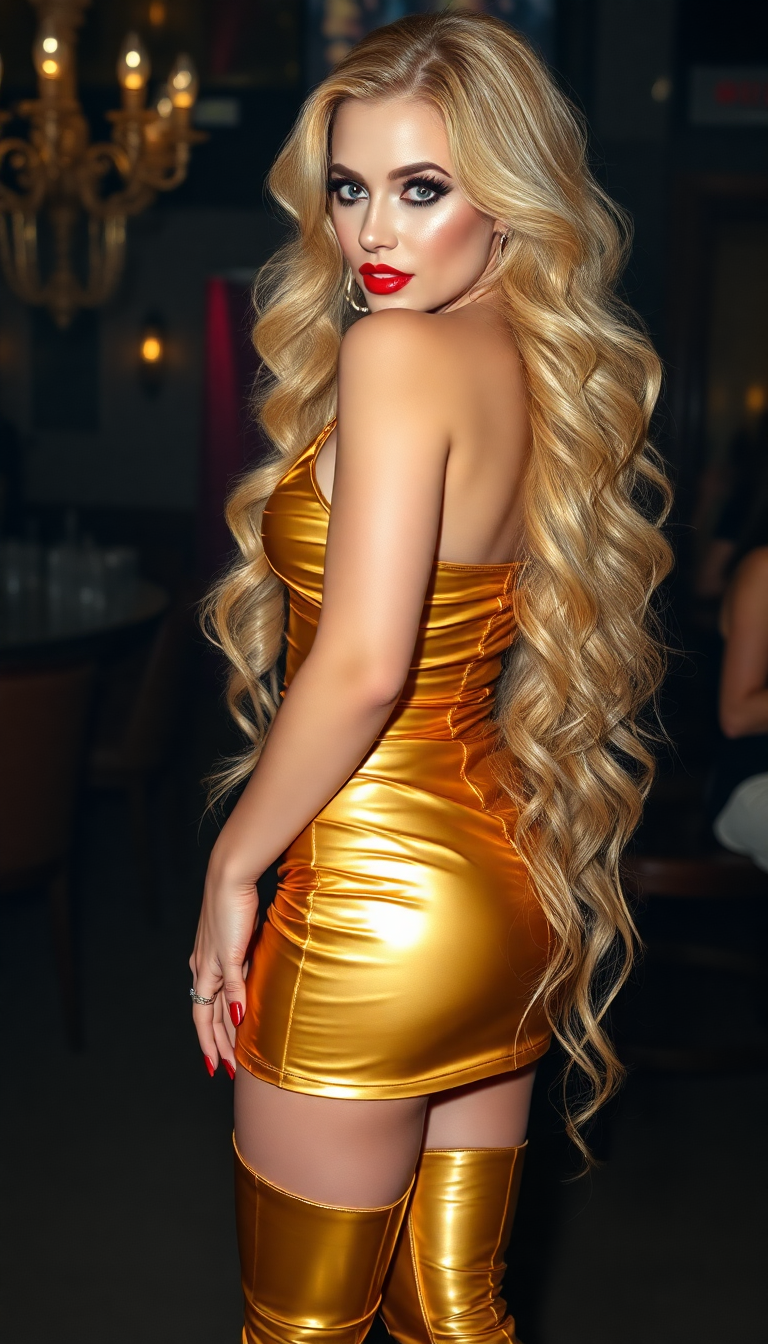
Discover the easiest way to experiment with any hairstyle or hair color before stepping into a salon. With PixelDojo's free AI hairstyle tools, you can upload your photo and instantly see realistic previews of bobs, pixies, layered cuts, bold colors, and the latest 2026 trends like Old Money Bobs or textured fades tailored perfectly to your face shape. Save time, avoid costly mistakes, and confidently choose the look that makes you feel amazing.
Over 75,000 creators have generated more than 2 million AI hairstyle previews on PixelDojo this year. Rated 4.9/5 by thousands of users who love the realistic results. Trusted by professional hairstylists and beauty influencers worldwide for accurate virtual try-ons.
Why Choose Pixel Dojo for ai hairstyle online free
Professional-quality results with cutting-edge AI technology
Risk-Free Style Exploration
Test dramatic changes like going from long layers to a short pixie cut or adding vibrant highlights without ever picking up scissors. See exactly how each style frames your face before making a real commitment.
Instant Confidence Boost
Preview how trending 2026 hairstyles like soft mullets, bottleneck bangs, or curtain bangs will look on you in seconds. Walk into your salon appointment knowing precisely what you want.
Personalized & Realistic Results
Our AI analyzes your unique features to deliver hyper-realistic previews that match your skin tone, face shape, and hair texture. Get results that feel like they're already your new look.
How It Works
Creating your perfect AI hairstyle preview takes just three simple steps using PixelDojo's specialized tools designed for virtual hair transformations.
Step 1: Choose Your Tool
Select Flux Pro Virtual Try-On or Virtual Try-On from the Characters & Faces section. These tools are specifically optimized for realistic hair changes on your uploaded photo.
Step 2: Enter Your Prompt or Upload Photo
Upload a clear selfie and describe your desired style, such as 'change to a textured wolf cut with caramel highlights' or use Image to Image for precise control. Tools like Ideogram 4 and Flux.2 Studio generate highly detailed hair textures.
Step 3: Customize & Download
Refine results using Inpainting to adjust specific hair sections, Style Transfer for new colors, or Character Stylist for consistent looks across multiple angles. Download your favorite previews in high resolution for free.



The Pixel Dojo Advantage
Why PixelDojo outperforms other options for free AI hairstyle image generation
| Others | Pixel Dojo |
|---|---|
| Traditional hairstyle try-on methods | Instant digital previews instead of waiting weeks for appointments or relying on static photos - experiment with unlimited styles in minutes from home. |
| Generic AI tools | Specialized Virtual Try-On and Flux Pro Virtual Try-On tools deliver superior hair realism and face-matching accuracy compared to general-purpose generators. |
| Manual photo editing | AI handles complex hair strands, lighting, and blending automatically - no hours spent learning Photoshop or dealing with unnatural results. |
Loved by creators on PixelDojo
Real feedback from people using PixelDojo, pulled from our in-product surveys.
It is a lot of fun to uae and easy too.
So many different models to try out
You keep adding to it to stay up to date and that is GOLD.
very easy to use and good support
Very easy to use
super easy to use
Explore more AI tools on PixelDojo
AI Tools
Compare & Switch
- Best AI Image Generators
- Best AI Video Generators
- Midjourney Alternatives
- Civitai Alternatives
- Runway Alternatives
- Leonardo Alternatives
- Pika Alternatives
- Luma Alternatives
- Magnific Alternatives
- Veo Alternatives
- Flux Alternatives
- Freepik Alternatives
- Seedance Alternatives
- Seedream Alternatives
- Pixverse Alternatives
- GPT Image Alternatives
- Synthesia Alternatives
- Playground Alternatives
- NightCafe Alternatives
- Canva AI Alternatives
- ElevenLabs Alternatives
- ComfyUI Alternatives
- Fal Alternatives
- Replicate Alternatives
Common Questions
Everything you need to know about ai hairstyle online free
How to try AI hairstyle online free with PixelDojo?
Simply visit PixelDojo.ai, choose Flux Pro Virtual Try-On or Virtual Try-On, upload your photo, and enter a prompt like 'short bob with bangs in natural brown'. Generate unlimited realistic previews at no cost with our free access options.
What are the best free AI hairstyle changer tools for 2026 trends?
PixelDojo's Virtual Try-On combined with Flux.2 Studio and Ideogram 4 lets you preview the hottest 2026 styles including Old Money Bobs, soft mullets, and bottleneck bangs with incredible detail and realism tailored to your face.
Can I change hair color with AI hairstyle generator online free?
Yes! Use Image to Image or Style Transfer tools to experiment with any color from subtle highlights to bold pastels. Flux Pro Virtual Try-On ensures the new color blends naturally with your skin tone and existing hair texture.
Is PixelDojo's AI hairstyle try-on accurate for different face shapes?
Absolutely. Our AI-powered tools like Character Stylist and Virtual Try-On analyze your facial features automatically to recommend and generate styles that flatter your unique shape, from round faces to strong jawlines.
How many free AI hairstyle generations can I create?
PixelDojo offers generous free daily generations across 40+ tools including Inpainting and Background Remover. Upgrade anytime for unlimited access, with the flexibility to cancel whenever you want.
Can I use AI hairstyle online free for professional portfolio or client previews?
Yes, many hairstylists and content creators use PixelDojo's high-quality outputs from tools like PonyXL and Recraft V4.1 to create realistic client previews and social media content that converts viewers into bookings.