Holiday Card Photos
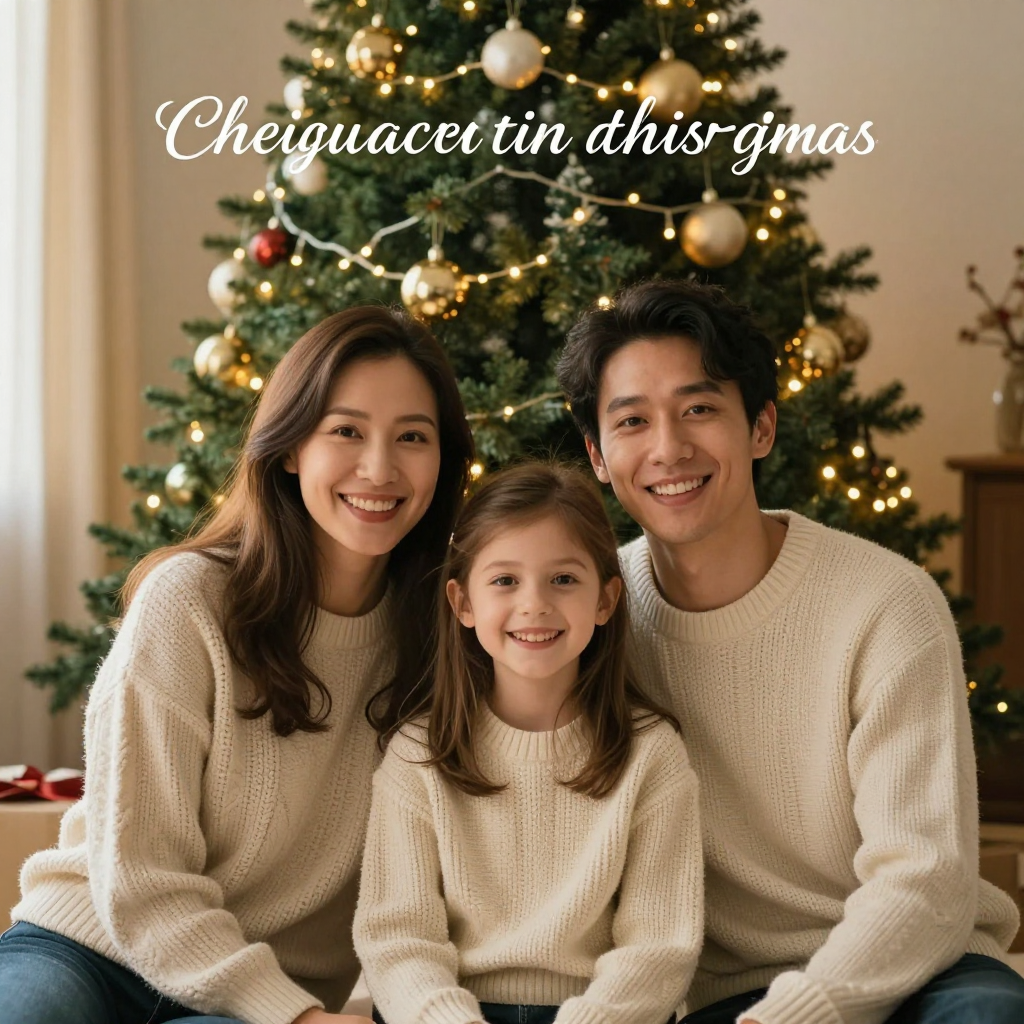
Generated on PixelDojo with z-image-turbo. Produced by PixelDojo's generation pipeline.
You can make holiday card photos with AI by describing the family, the outfits and the tree like a photographer's shot list, generating the scene with an image model, and then adding the greeting text yourself instead of trusting the model to letter it. We ran the first step on August 26, 2026, generating a family portrait in front of a decorated Christmas tree for 0.5 credit in about 13 seconds. The scene came out warm and convincing. The cursive greeting we asked for did not. This page walks through what to run, what to fix, and what it costs.
The 0.5 credit scene, greeting text and all
Every example below was produced on PixelDojo. Hover to see the prompt.
A joyful family of three in front of a decorated Christmas tree, warm string lights, matching cozy knit sweaters, golden hour indoor lighting, candid smiles, documentary photography style, holiday card composition with headroom at the top for a greeting
z-image-turbo
One prompt, one holiday photo, August 26, 2026: 0.5 credit on Z-Image Turbo, about 13 seconds, the scene kept on the first try, the lettering thrown out.
Why Choose Pixel Dojo for Holiday Card Photos
Professional-quality results with cutting-edge AI technology
0.5 credit per attempt
Cheap enough to try a few poses, sweater colors or backgrounds before you settle on the one you send to print.
About 13 seconds, measured
Timed from request to finished file on August 26, 2026. No queue wait, no retry needed to get a usable family scene.
The people and the tree render correctly
Faces, hands and knit texture came back right on the first try. The only part that needed a fix was lettering, which is a job for the Image Editor, not the prompt.
How It Works
Three steps from blank prompt to a card ready photo:
Describe the family scene, not a greeting
Our prompt named a family of three in matching cream knit sweaters, sitting in front of a decorated Christmas tree with warm string lights and gold and red ornaments, golden hour indoor lighting, candid smiles, documentary photography style. We also asked for headroom at the top for a greeting, which was a mistake. Z-Image Turbo ran it for 0.5 credit and returned a 1024 by 1024 image in about 13 seconds. Every face, hand and sweater texture came back clean, but the model filled that headroom with cursive lettering of its own. The letterforms loop and connect like handwriting from a distance, but they do not spell real words up close. Leave greeting text out of the prompt entirely and just describe the empty space you want, for example plain space above the subjects with soft, out of focus tree in that area.
Add the real greeting afterward
Send the finished photo to the Image Editor with a plain English instruction, such as adding the words Happy Holidays in a chosen font and color at the top of the frame. Editing an existing image this way runs on the Flux Edit model for 1 credit, and it types the exact text you give it instead of guessing at letterforms the way a from-scratch prompt does.
Upscale before you print
Our file came back at 1024 by 1024 pixels, which is fine for sharing online but soft once a print shop blows it up to a 5 by 7 or a full page card. Run the finished image through Creative Upscale for 0.5 credit before ordering prints, so the sweater texture and the string lights still hold up at card size.
Loved by creators on PixelDojo
Real feedback from people using PixelDojo, pulled from our in-product surveys.
Excellent website for creating all types of media
Very eay to use, works well to train SDXL loras.
The amazing tools
Top notch quality and strong prompt adherence.
A well resourced sunscription with attention to updates.
Easy to use and there's lots of options.
Explore more AI tools on PixelDojo
AI Tools
Compare & Switch
- Best AI Image Generators
- Best AI Video Generators
- Midjourney Alternatives
- Civitai Alternatives
- Runway Alternatives
- Leonardo Alternatives
- Pika Alternatives
- Luma Alternatives
- Magnific Alternatives
- Veo Alternatives
- Flux Alternatives
- Freepik Alternatives
- Seedance Alternatives
- Seedream Alternatives
- Pixverse Alternatives
- GPT Image Alternatives
- Synthesia Alternatives
- Playground Alternatives
- NightCafe Alternatives
- Canva AI Alternatives
- ElevenLabs Alternatives
- ComfyUI Alternatives
- Fal Alternatives
- Replicate Alternatives
Common Questions
Everything you need to know about Holiday Card Photos
What does an AI holiday card photo cost?
0.5 credit for the base scene on Z-Image Turbo, the model we used. Add 1 credit if you send it to the Image Editor to letter in a real greeting, and 0.5 credit to upscale before printing. A full three step run is 2 credits.
How fast does it come back?
About 13 seconds in our August 26, 2026 run, measured from the prompt to the finished 1024 by 1024 file.
Can the AI write Happy Holidays or a greeting directly on the photo?
Not reliably from a text prompt. We asked for headroom for a greeting and the model filled it with cursive shapes that read as handwriting from a distance but are not real words up close. Leave text out of the generation prompt and add it afterward with the Image Editor, which types exactly what you give it.
Do I need my own family photo to start?
No. Our photo was generated from a text description alone, no camera and no existing picture involved. If you already have a real family photo you like, send it to the Image Editor instead of writing a prompt from scratch, with an instruction to add a decorated tree background.
Will the photo look good as a printed card?
Our base file came back at 1024 by 1024 pixels, which reads fine on a screen but softens once a print shop enlarges it to card size. Run it through Creative Upscale first, for 0.5 credit, before you order prints.
Can I generate a batch of these for a family with multiple kids or pets to compare poses?
Yes. Every model here runs at POST /api/v1/models/z-image-turbo/run with the same API key, so you can call it repeatedly with small prompt changes, such as adding a second child or a dog, and pick the version you like best before spending the edit and upscale credits.