Jewelry Macro Shots AI Generator
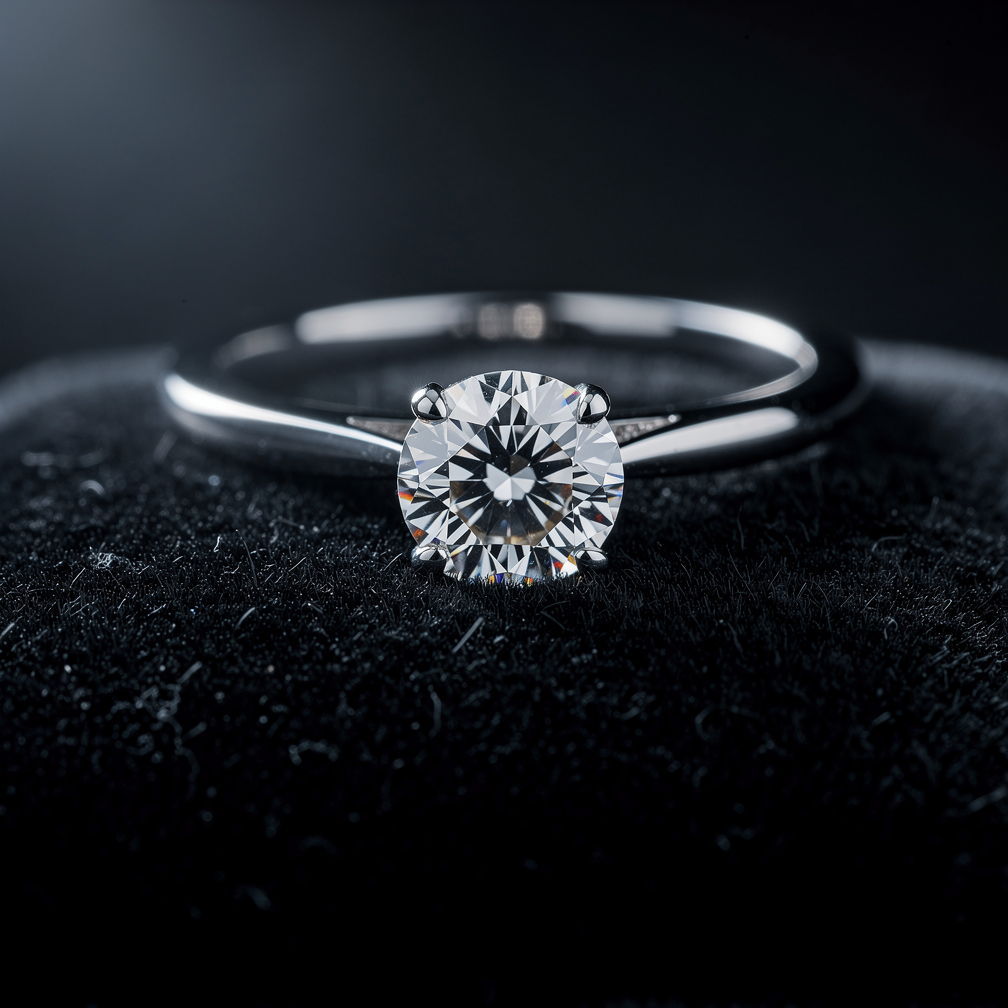
Generated on PixelDojo with Flux 2 Pro. Produced by PixelDojo's generation pipeline.
A jewelry macro shot needs three things named in the prompt: the exact piece, the surface it sits on, and the direction the light comes from. We ran this on August 26, 2026 with Flux 2 Pro, 1.5 credits, about 26 seconds, asking for a diamond ring on black velvet with rim lighting. The facets came back sharp with visible fire and sparkle, and the velvet held real fiber texture rather than reading as a flat gray backdrop. This page covers the prompt and what it costs to shoot a full catalog this way.
The 1.5 credit macro shot, first result kept
Every example below was produced on PixelDojo. Hover to see the prompt.
Extreme macro product photograph of a diamond engagement ring on a black velvet surface, dramatic rim lighting, sharp focus on the diamond facets, soft bokeh background, jewelry catalog photography style
Flux 2 Pro
One prompt, one macro shot, August 26, 2026: Flux 2 Pro, 1.5 credits, about 26 seconds, kept on the first attempt.
Why Choose Pixel Dojo for Jewelry Macro Shots
Professional-quality results with cutting-edge AI technology
1.5 credits, about 26 seconds
Timed from request to finished file on August 26, 2026, fast enough to try several surfaces or light angles before picking one.
The facets read sharp, not smeared
The hardest part of a macro jewelry shot is keeping cut facets crisp instead of blurring them into a generic sparkle. Ours held clean edges on the first try.
No physical piece or lightbox needed
The shot came from a written description alone, useful for a listing before a sample piece has shipped or when photographing a one-off custom design.
How It Works
How we ran the first macro shot, so you can build a full set:
Name the piece, the surface and the light direction
Our prompt read: extreme macro product photograph of a diamond engagement ring on a black velvet surface, dramatic rim lighting, sharp focus on the diamond facets, soft bokeh background, jewelry catalog photography style. Each of those four elements does real work in the result.
Generate the shot
We ran the prompt through Flux 2 Pro for 1.5 credits, and the ring came back in about 26 seconds with a four-prong setting, sharp diamond facets catching the rim light, and the band falling into soft focus toward the back of the frame.
Build out the rest of the catalog
Re-run the same prompt with a different piece, a different surface, or a different light angle for each additional shot a catalog needs. At 1.5 credits a shot, a twelve piece collection costs 18 credits.
Loved by creators on PixelDojo
Real feedback from people using PixelDojo, pulled from our in-product surveys.
Tons of variety. Ease of use. Tools for beginners and advance users.
easiest workflow to get best output image or video
awesome functionality, UX, constant flood of improvements, discord interactivity
Awesome site with so many features
Love how I can almost create anything
The Flux Pro Ultra is just amazing!
Explore more AI tools on PixelDojo
AI Tools
Compare & Switch
- Best AI Image Generators
- Best AI Video Generators
- Midjourney Alternatives
- Civitai Alternatives
- Runway Alternatives
- Leonardo Alternatives
- Pika Alternatives
- Luma Alternatives
- Magnific Alternatives
- Veo Alternatives
- Flux Alternatives
- Freepik Alternatives
- Seedance Alternatives
- Seedream Alternatives
- Pixverse Alternatives
- GPT Image Alternatives
- Synthesia Alternatives
- Playground Alternatives
- NightCafe Alternatives
- Canva AI Alternatives
- ElevenLabs Alternatives
- ComfyUI Alternatives
- Fal Alternatives
- Replicate Alternatives
Common Questions
Everything you need to know about Jewelry Macro Shots
What does a jewelry macro shot cost with AI?
1.5 credits on Flux 2 Pro, the model we used. A twelve piece catalog set is about 18 credits.
How fast is it?
About 26 seconds in our August 26, 2026 run, measured from submission to the finished file.
What should the prompt include?
The exact piece, the surface it rests on, and the light direction, the way a real macro photographer would set up a shot. See the exact prompt we used in the gallery caption above.
Can I photograph a real piece I already have, not one that's fully generated?
Yes. Send a photo of your actual piece to an image editing model along with a background or lighting instruction, and it replaces the surface and light while keeping the real object, rather than generating the jewelry from scratch.
How do I get different angles of the same piece?
Change the angle or surface detail in the prompt and generate again. Each variant is a new 1.5 credit run, so testing a few setups before picking one stays cheap.
Can I generate a whole catalog through the API?
Yes. POST to /api/v1/models/flux-2-pro/run with the same API key used for every model in the catalog, so looping over a jewelry inventory is one script.