Presentation Hero Images
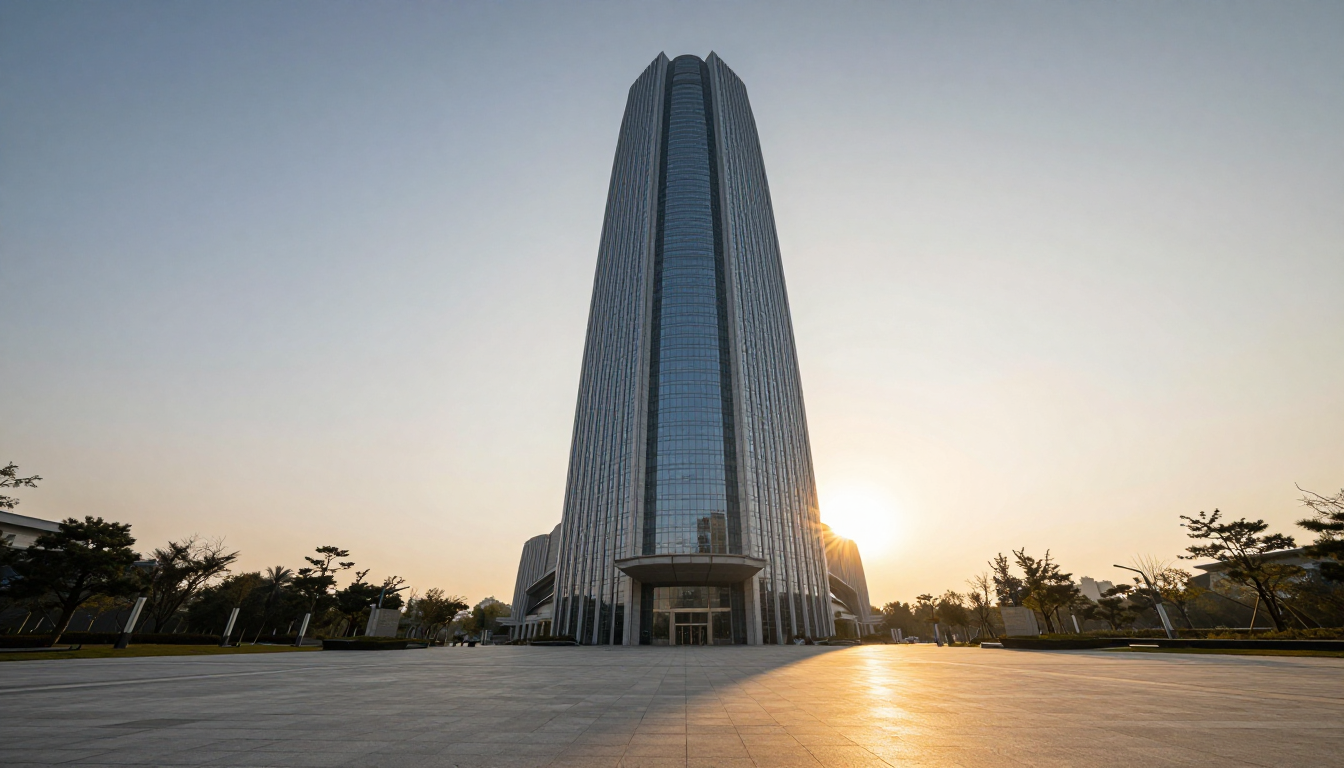
Generated on PixelDojo with Z-Image Turbo. Produced by PixelDojo's generation pipeline.
You can make a presentation hero image with AI by describing the scene like a photo brief and generating it with a fast image model. We ran a corporate hero shot on Z-Image Turbo on August 26, 2026 for 0.5 credit in about 13 seconds. This page walks through the exact prompt, what came back, and how to drop the result into a slide deck.
The hero image from the first result
Every example below was produced on PixelDojo. Hover to see the prompt.
A sleek glass and steel corporate tower rising against a golden hour sky, dramatic long shadows across a plaza in the foreground, wide symmetrical angle, epic scale, professional architectural photography style, clean open space at the top for text overlay
Z-Image Turbo
One prompt, one hero image, August 26, 2026: 0.5 credit on Z-Image Turbo, about 13 seconds, kept on the first result.
Why Choose Pixel Dojo for Presentation Hero Images
Professional-quality results with cutting-edge AI technology
0.5 credit per image
Z-Image Turbo prices every image the same regardless of aspect ratio, so a widescreen hero shot costs the same as a square one.
About 13 seconds, measured
Timed from request to finished file on August 26, 2026, with the first result kept and no retries.
Sized for a slide already
The 16:9 aspect ratio option outputs 1280 by 720 pixels, matching a standard widescreen presentation slide without cropping.
How It Works
Three steps from a blank slide to a finished hero banner:
Describe the shot like a stock photographer would
Skip vague words like corporate energy and name the actual scene instead. Our prompt asked for a glass and steel tower at golden hour, long shadows across an empty plaza, and open sky at the top of the frame. It ran on Z-Image Turbo for 0.5 credit and came back in about 13 seconds as a 1280 by 720 image, already sized for a 16:9 slide.
Leave room for the words you will add later
A hero image only earns its place on a slide if there is somewhere calm for a title to sit. We asked for open space at the top of the frame, and the result put the building low with a plain sky above it, right where a headline goes.
Drop it into the deck or touch it up first
The 1280 by 720 file matches a standard widescreen slide, so it can go straight in. If the color needs to match a brand palette or a logo needs a clean spot to sit, send it to the Image Editor with a plain English instruction before it goes on the slide.
Loved by creators on PixelDojo
Real feedback from people using PixelDojo, pulled from our in-product surveys.
A "one-stop-shop" for creators! Thanks!!
Lots of different tools. It's easy to purchase more credits.
Amazing performance!
Excellent website for creating all types of media
Very eay to use, works well to train SDXL loras.
The amazing tools
Explore more AI tools on PixelDojo
AI Tools
Compare & Switch
- Best AI Image Generators
- Best AI Video Generators
- Midjourney Alternatives
- Civitai Alternatives
- Runway Alternatives
- Leonardo Alternatives
- Pika Alternatives
- Luma Alternatives
- Magnific Alternatives
- Veo Alternatives
- Flux Alternatives
- Freepik Alternatives
- Seedance Alternatives
- Seedream Alternatives
- Pixverse Alternatives
- GPT Image Alternatives
- Synthesia Alternatives
- Playground Alternatives
- NightCafe Alternatives
- Canva AI Alternatives
- ElevenLabs Alternatives
- ComfyUI Alternatives
- Fal Alternatives
- Replicate Alternatives
Common Questions
Everything you need to know about Presentation Hero Images
What does an AI presentation hero image cost?
0.5 credit on Z-Image Turbo, the model we used for this run. The price is flat per image regardless of which aspect ratio you pick.
How fast is it?
About 13 seconds in our August 26, 2026 run, measured from the prompt to the finished 1280 by 720 file.
What aspect ratio should I generate for a slide deck?
Pick the 16:9 option. It outputs 1280 by 720 pixels, which matches a standard widescreen slide without cropping or stretching.
Can I get a consistent look across a whole deck?
Add a seed number to the request and reuse it with small prompt changes to keep the lighting and composition consistent across several slides.
How do I add my own headline text?
We left the top of the frame open in the prompt and added the title afterward in the slide software, which keeps the text sharp and editable rather than baked into the image.
Can I automate this for a whole presentation template?
Yes. POST the prompt to /api/v1/models/z-image-turbo/run with your API key and generate one hero image per section using the same request shape.