Science Explainer Visuals AI Generator
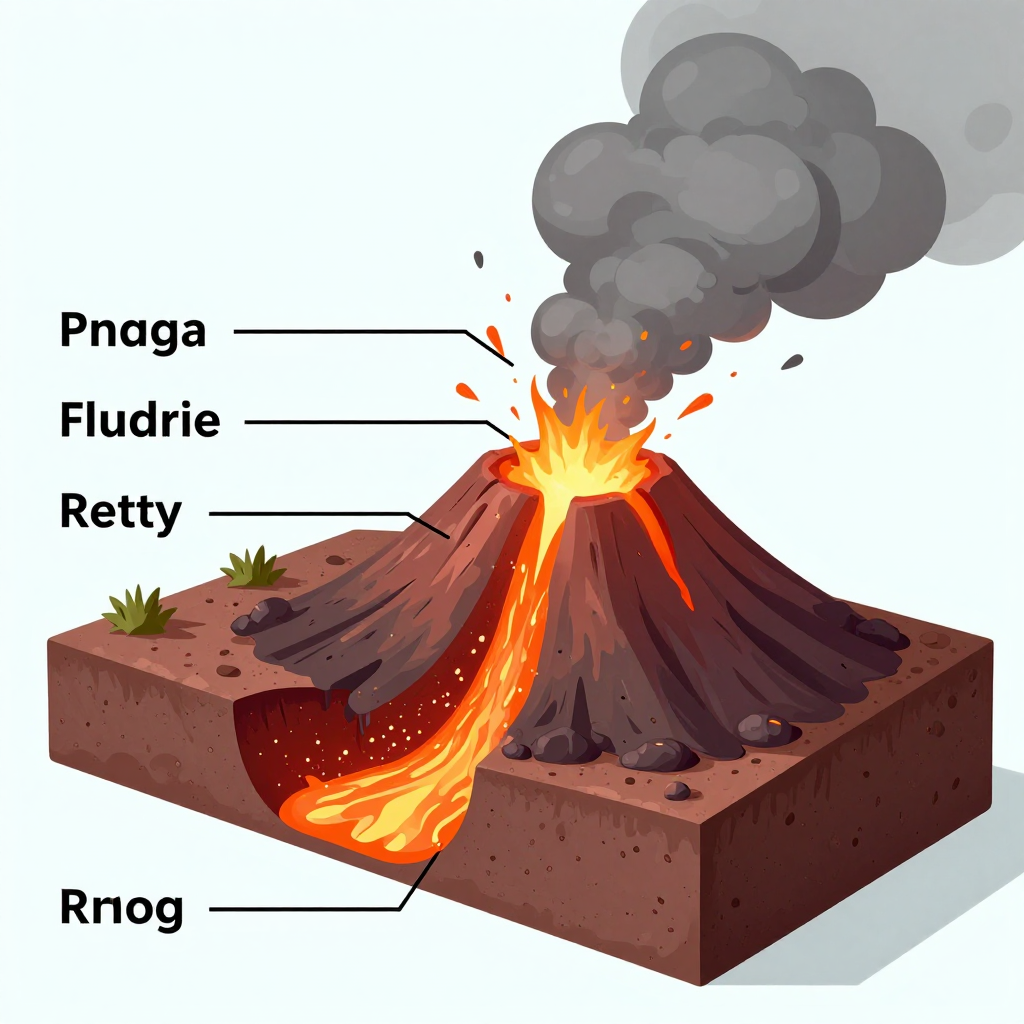
Generated on PixelDojo with z-image-turbo. Produced by PixelDojo's generation pipeline.
You can make a science explainer animation with AI by generating a clear diagram frame with an image model, correcting the label text, and then animating that finished frame into a short moving clip with an image to video model. We ran the first step on August 26, 2026, generating a volcano cross section diagram on Z-Image Turbo for 0.5 credit in about 14 seconds.
The 0.5 credit cutaway, shapes right, labels invented
Every example below was produced on PixelDojo. Hover to see the prompt.
A scientific cross section illustration of a volcano erupting, labeled magma chamber, rising lava and ash cloud, clean educational infographic style, vibrant colors, cutaway diagram suitable for a science explainer
z-image-turbo
One prompt, one diagram frame, August 26, 2026: 0.5 credit on Z-Image Turbo, about 14 seconds, the cutaway shapes right, the labels rewritten before anything gets animated.
Why Choose Pixel Dojo for Science Explainer Visuals
Professional-quality results with cutting-edge AI technology
0.5 credit for the frame
Cheap enough to try a few cutaway compositions before you settle on the one you correct and animate.
About 14 seconds, measured
Timed from request to finished file on August 26, 2026. Fast enough to regenerate the whole layout if the composition itself needs a change.
Pointer lines already in the right places
The label positions and the connecting lines came back correctly placed on the first try, which is most of the design work for a diagram like this.
How It Works
Three steps from a still diagram to a moving explainer clip:
Generate the diagram frame first
Our prompt asked for a scientific cross section illustration of a volcano erupting, labeled magma chamber, rising lava and ash cloud, clean educational infographic style, vibrant colors, cutaway diagram suitable for a science explainer. Z-Image Turbo ran it for 0.5 credit and returned the frame in about 14 seconds. The cutaway itself came back well composed: an isometric block showing the magma chamber inside the earth, a lava channel running down the side, and a rising ash cloud, with pointer lines already laid out toward four label positions. The words on those labels were not real terms. They read as invented strings like Pnaga and Fludrie rather than magma or ash. Keep the shapes and the pointer lines, and treat every label as a placeholder.
Replace the label text before animating
Send the diagram to the Image Editor with an instruction naming the real term for each existing pointer line, for example magma chamber at the interior label, ash cloud at the top label, and lava flow along the channel. Editing an existing image this way runs on the Flux Edit model for 1 credit, and it types the exact terms you give it rather than inventing new ones.
Animate the labeled frame into a clip
Send the corrected diagram to an image to video model to turn the static cutaway into motion, such as smoke drifting from the ash cloud or lava creeping down the channel. WAN 2.7 image to video runs from a single still for 2.5 credits. In our other measured runs on this model, a simple scene returned inside the API's 30 second sync window while a busier scene took 168 seconds at the same price, so turnaround on a diagram will depend on how much of the frame you ask it to move.
Loved by creators on PixelDojo
Real feedback from people using PixelDojo, pulled from our in-product surveys.
Because it is awesome
exceptional quality and great overall design of platform and interface. very intuative. love the creative freedom.
Qwen image 2 is amazing!!
Creative freedom, range of tools and options.
I love the training feature
the quality is the best
Explore more AI tools on PixelDojo
AI Tools
Compare & Switch
- Best AI Image Generators
- Best AI Video Generators
- Midjourney Alternatives
- Civitai Alternatives
- Runway Alternatives
- Leonardo Alternatives
- Pika Alternatives
- Luma Alternatives
- Magnific Alternatives
- Veo Alternatives
- Flux Alternatives
- Freepik Alternatives
- Seedance Alternatives
- Seedream Alternatives
- Pixverse Alternatives
- GPT Image Alternatives
- Synthesia Alternatives
- Playground Alternatives
- NightCafe Alternatives
- Canva AI Alternatives
- ElevenLabs Alternatives
- ComfyUI Alternatives
- Fal Alternatives
- Replicate Alternatives
Common Questions
Everything you need to know about Science Explainer Visuals
What does an AI science explainer animation cost?
0.5 credit for the diagram frame on Z-Image Turbo, the model we used. Add 1 credit to correct the labels in the Image Editor, and 2.5 credits to animate the frame on WAN 2.7 image to video. A full three step run is 4 credits.
How fast does the diagram come back?
About 14 seconds in our August 26, 2026 run, measured from the prompt to the finished frame. The later animation step runs on a different model with its own separate timing.
Can AI label a scientific diagram correctly on its own?
Not reliably. Our volcano cutaway came back with the correct shapes and pointer lines but invented label text, strings like Pnaga and Fludrie instead of magma or ash. Fix the wording in the Image Editor before you animate the frame.
How long does the animation step take?
WAN 2.7 image to video costs 2.5 credits from a single still either way. Across our measured runs on this model, a simple scene finished inside the 30 second sync window and a busier one took 168 seconds, so a diagram with more moving elements should be expected to run closer to the longer end.
Do I need existing illustration software to start?
No. The diagram frame is generated from a text description alone, and the labels and the animation are both handled inside PixelDojo afterward.
Can I make a series of these for a whole science unit?
Yes. The diagram model runs at POST /api/v1/models/z-image-turbo/run with the same API key each time, so you can call it for each topic in a unit and correct and animate the ones that work well.