Classroom Visuals AI Generator
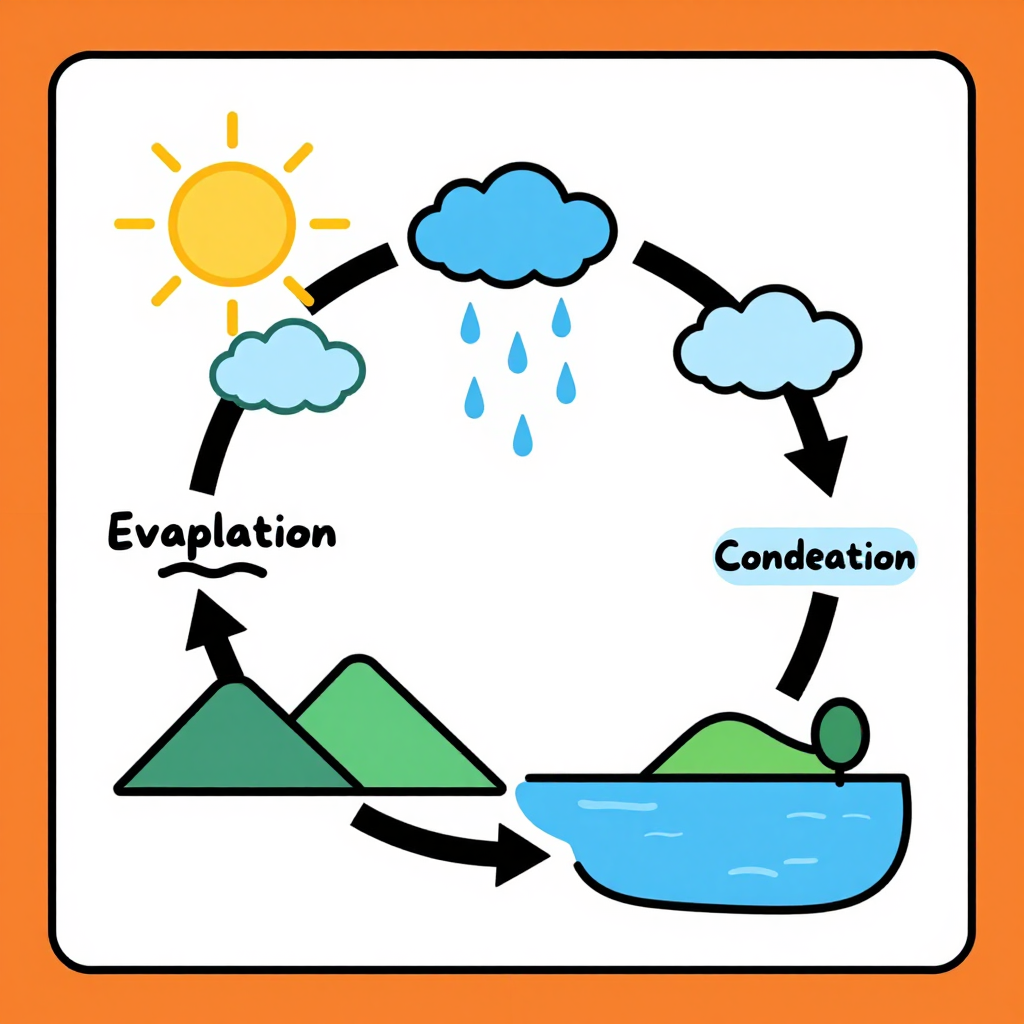
Generated on PixelDojo with z-image-turbo. Produced by PixelDojo's generation pipeline.
You can make classroom visuals with AI by generating a diagram or illustration for your lesson, then correcting the label text yourself because generated lettering on diagrams is not reliable, and exporting the fixed version for your slides or a printed handout. We ran the first step on August 26, 2026, generating a water cycle poster on Z-Image Turbo for 0.5 credit in about 14 seconds.
The 0.5 credit diagram, layout right, labels wrong
Every example below was produced on PixelDojo. Hover to see the prompt.
A flat illustration classroom poster of the water cycle, bold clean outlines, bright primary colors, labeled arrows showing evaporation condensation and precipitation over a sun, clouds, mountains and a lake, friendly educational diagram style
z-image-turbo
One prompt, one lesson diagram, August 26, 2026: 0.5 credit on Z-Image Turbo, about 14 seconds, the layout kept, the labels rewritten by hand afterward.
Why Choose Pixel Dojo for Classroom Visuals
Professional-quality results with cutting-edge AI technology
0.5 credit per attempt
Cheap enough to try a few layouts or color schemes for a lesson before you settle on one to correct and print.
About 14 seconds, measured
Timed from request to finished file on August 26, 2026. Fast enough to regenerate the whole diagram if the layout itself needs a change.
Strong shapes, arrows and color coding
The parts a diagram actually needs to teach the sequence, clear shapes, consistent color and connecting arrows, came back correct on the first try.
How It Works
Three steps from blank prompt to a lesson ready visual:
Describe the diagram's layout, not its labels
Our prompt asked for a flat illustration classroom poster of the water cycle, bold clean outlines, bright primary colors, labeled arrows showing evaporation condensation and precipitation over a sun, clouds, mountains and a lake, friendly educational diagram style. Z-Image Turbo ran it for 0.5 credit and returned the poster in about 14 seconds. The layout itself was exactly right: sun, a rising cloud, a rain cloud, mountains and a lake arranged in a clear circular flow with bold arrows connecting each stage. The label text was not right. One arrow read Evaplation instead of Evaporation, another read Condeation instead of Condensation, and the precipitation stage had no label at all. Treat the arrows and pointer lines as a layout you keep, and the words on them as placeholders you will replace.
Correct the labels with the Image Editor
Send the diagram to the Image Editor with a plain instruction naming the exact words and where each one belongs, for example replacing the first label with Evaporation, the second with Condensation, and adding Precipitation next to the rain cloud. Editing an existing image this way runs on the Flux Edit model for 1 credit, and it types the exact spelling you give it instead of guessing at letterforms during generation.
Upscale it for a printed handout
Our file came back at 1024 by 1024 pixels, which reads fine projected on a whiteboard but softens once a printer enlarges it to a full page handout. Run the corrected diagram through Creative Upscale for 0.5 credit before you print copies for the class.
Loved by creators on PixelDojo
Real feedback from people using PixelDojo, pulled from our in-product surveys.
easiest workflow to get best output image or video
awesome functionality, UX, constant flood of improvements, discord interactivity
Awesome site with so many features
Love how I can almost create anything
The Flux Pro Ultra is just amazing!
Very easy to use, and they have fast wan 2.2 video generation with custom loras available.
Explore more AI tools on PixelDojo
AI Tools
Compare & Switch
- Best AI Image Generators
- Best AI Video Generators
- Midjourney Alternatives
- Civitai Alternatives
- Runway Alternatives
- Leonardo Alternatives
- Pika Alternatives
- Luma Alternatives
- Magnific Alternatives
- Veo Alternatives
- Flux Alternatives
- Freepik Alternatives
- Seedance Alternatives
- Seedream Alternatives
- Pixverse Alternatives
- GPT Image Alternatives
- Synthesia Alternatives
- Playground Alternatives
- NightCafe Alternatives
- Canva AI Alternatives
- ElevenLabs Alternatives
- ComfyUI Alternatives
- Fal Alternatives
- Replicate Alternatives
Common Questions
Everything you need to know about Classroom Visuals
What does an AI classroom visual cost?
0.5 credit for the base diagram on Z-Image Turbo, the model we used. Add 1 credit if you send it to the Image Editor to correct the labels, and 0.5 credit to upscale before printing. A full three step run is 2 credits.
How fast does it come back?
About 14 seconds in our August 26, 2026 run, measured from the prompt to the finished 1024 by 1024 file.
Can AI spell the labels correctly on a diagram?
Not reliably. Our water cycle poster came back with Evaplation instead of Evaporation, Condeation instead of Condensation, and no label at all for precipitation, even though the arrows and layout were correct. Describe the shapes and let the Image Editor add the exact words afterward.
Do I need existing clip art to start?
No. Our diagram was generated from a text description alone. If you already have a diagram you like from a textbook style you cannot reuse, describe the same layout in your own words and generate a fresh version instead.
Will the poster print sharp for a handout?
Our base file came back at 1024 by 1024 pixels, which is fine for a projector but soft once printed at full page size. Run it through Creative Upscale first, for 0.5 credit, before making copies.
Can I generate a set of related diagrams for a whole unit?
Yes. The model runs at POST /api/v1/models/z-image-turbo/run with the same API key each time, so you can call it repeatedly with a matching style description for each lesson in a unit, then correct the labels on each one the same way.