Book Cover Models AI Generator
Generated on PixelDojo. Produced by PixelDojo's generation pipeline.
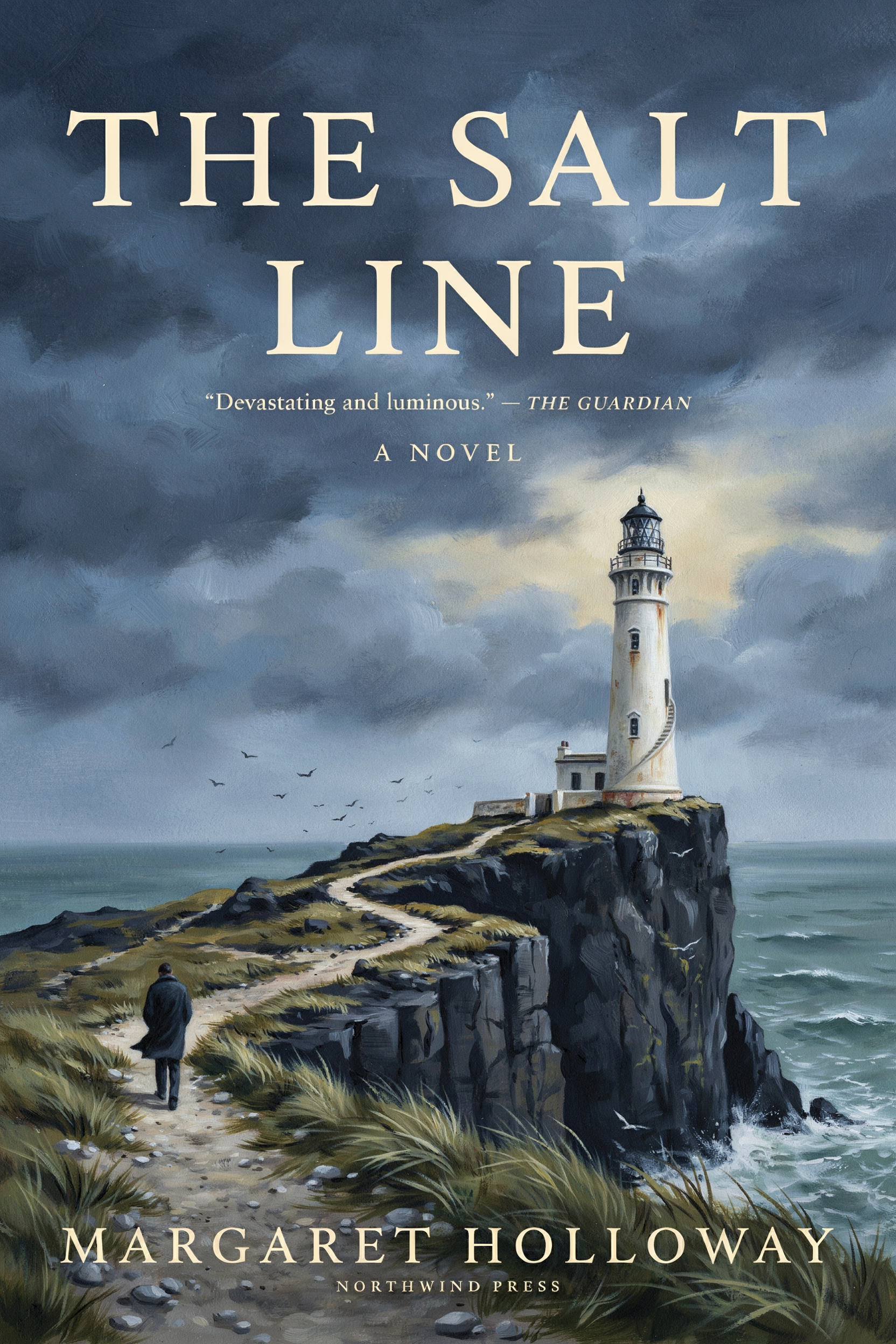
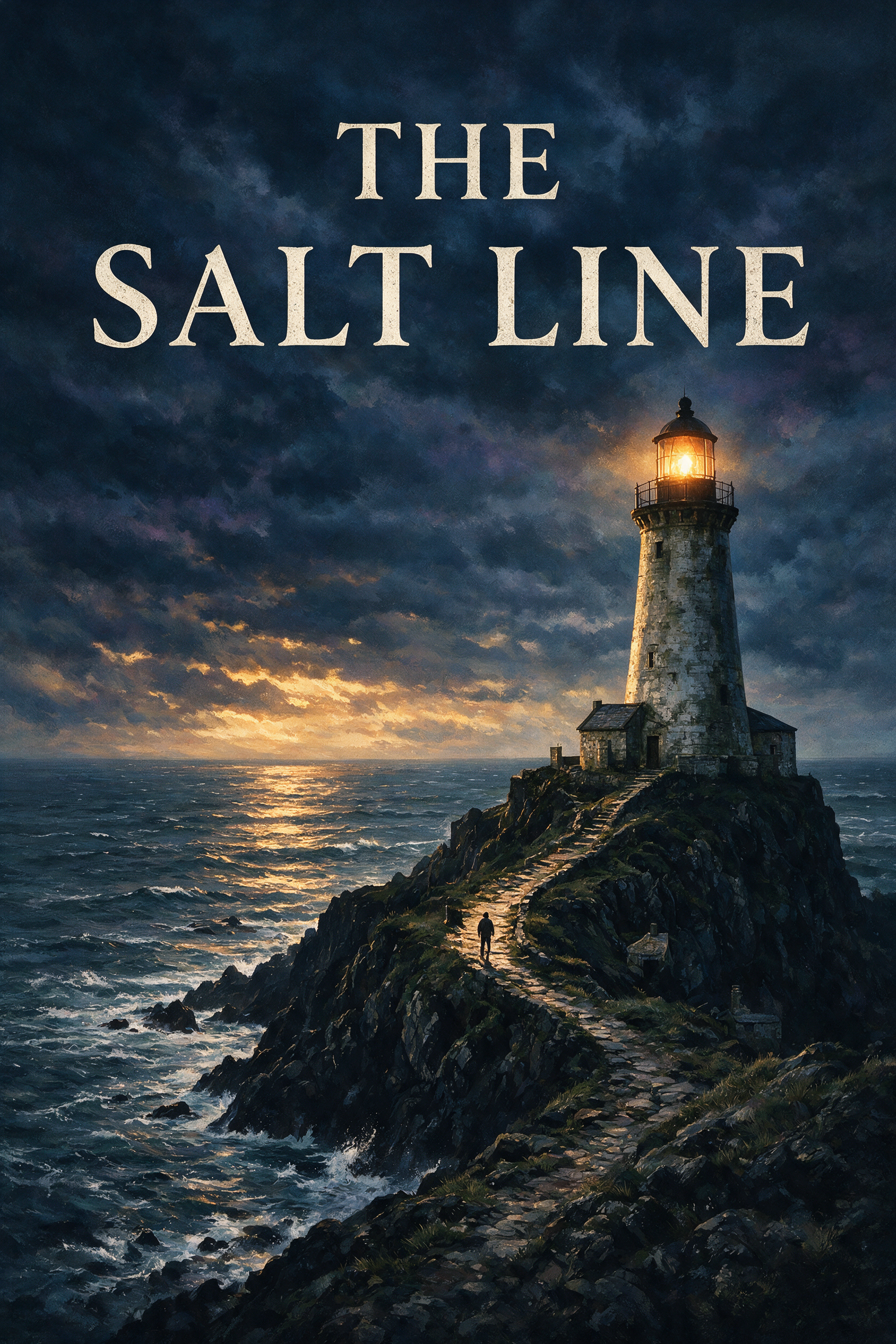
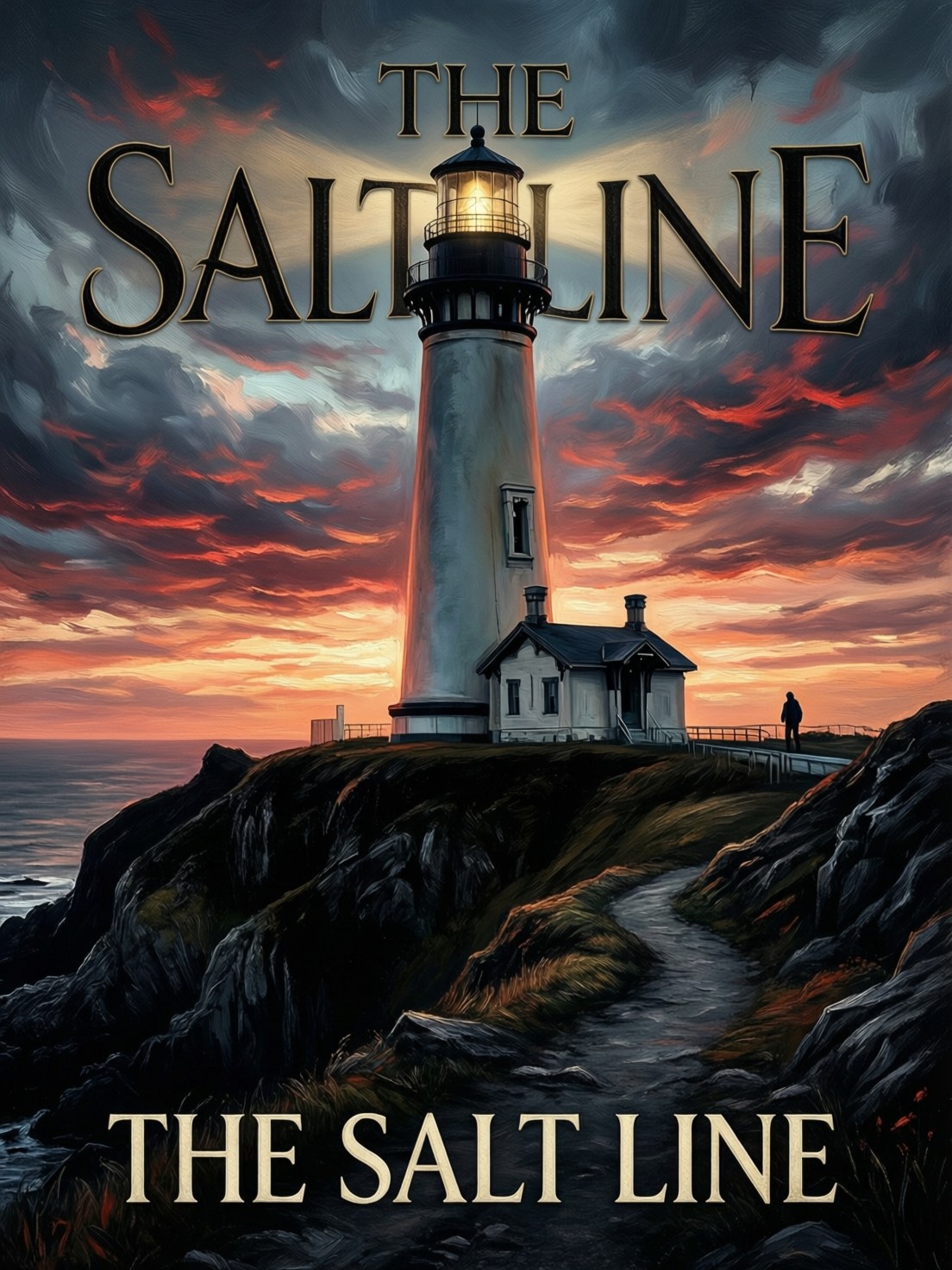
Ideogram v4 Turbo returned the most finished cover, for 1 credit in 39 seconds. We sent one thriller cover prompt to three models on August 26, 2026 at a 2:3 ratio and timed each run. Ideogram v4 Turbo set the title in clean serif caps, spelled correctly, above painted art, and added the rest of the cover furniture on its own. Seedream 5 cost 2.5 credits and took about 54 seconds, and it painted the best picture of the three with the title in two crisp lines and nothing else. QWEN Image Max cost 2 credits, finished fastest at 27 seconds, and printed the title twice. Type accuracy is what separates these models, not painting skill.
Side-by-side, same prompt
Every model below ran the identical prompt on PixelDojo so the outputs are directly comparable: “Book cover art for a literary thriller titled 'THE SALT LINE' in bold serif type, a lighthouse on a black cliff under a bruised sky, a small figure on the path, moody painted illustration”
Ideogram v4 Turbo
39sThe only run that returned a whole cover layout, title spelled right and clear of the art. 1 credit, 39 seconds, 1664 by 2496.
Seedream 5
54sBest painting by a wide margin, title only, nothing invented around it. 2.5 credits, about 54 seconds, 1664 by 2496.
QWEN Image Max
27sFastest at 27 seconds, but it set the title twice and ignored the 2:3 ratio. 2 credits, 1104 by 1472.
How we ranked them, and the reason to walk past each one
1. Ideogram v4 Turbo, 1 credit, 39 seconds
This was the only run that came back looking like a book. The title sits across the top in cream serif capitals over two lines, spelled correctly, on a painted storm sky that stays dark enough for the letters to hold. Below it a white lighthouse stands on a headland, gulls scatter over the water, and a small figure in a coat walks the path toward it, which is the whole prompt delivered. The model also filled in cover furniture we never asked for: a review line, the words A NOVEL, an author name and an imprint at the foot. All of that is invented, and the blurb is credited to a real newspaper, so it has to be replaced before anything goes near a store page. Treat the extra type as layout guides. At 1 credit and 39 seconds it is the cheapest way to see your title on artwork. Skip it if you want painting quality above all.
2. Seedream 5, 2.5 credits, about 54 seconds
Seedream 5 painted the picture the other two were reaching for. A stone lighthouse burns amber against a bank of night cloud, a cold sea catches the last light on the horizon, and a stepped path climbs the headland with a single figure halfway up it, lit from behind. Brushwork, depth and the balance of dark to light are all a step above the rest of the test. It set the title in two lines of cream serif at the top and added nothing else, which is what you want if a designer is doing the typography properly later. It cost 2.5 credits, the most in this test, and took about 54 seconds, the longest wait. Skip it if you need finished cover furniture in one shot, because author name, imprint and subtitle are all still your job.
3. QWEN Image Max, 2 credits, 27 seconds
QWEN Image Max was the quickest at 27 seconds and the least usable. It set the title twice, once in large letters across the sky where the lighthouse tower cuts straight through the middle word, and again in full at the bottom of the frame. Both are spelled right, which is the hard part, but a cover with its own title printed twice needs an edit pass before anyone sees it. It also returned 1104 by 1472, a 3:4 frame rather than the 2:3 we asked for, so the shape is wrong for a paperback as well. The art itself is strong, with a red and grey sunset over a real looking cliff path. Skip it for finished covers. It earns its place for fast concept passes, where you want six moods in a couple of minutes and expect to redo the type anyway.
One cover prompt, three models, same session. Prices ran from 1 to 2.5 credits. Measured turnaround ran from 27 to about 54 seconds.
Why Choose Pixel Dojo for Book Cover Models
Professional-quality results with cutting-edge AI technology
Type accuracy is the whole test
All three painted a competent lighthouse. Only the type separated them: one clean layout, one title only, one printed twice.
Check the print size before you celebrate
1664 by 2496 pixels is 5.5 by 8.3 inches at 300 dpi. That is just under a 6 by 9 paperback, so a print cover needs an upscale pass first.
Anything invented has to be replaced
A model that adds an author name, an imprint or a review quote is inventing them. Swap that text for your own before publishing.
How It Works
The method behind the ranking:
One brief with a real title in it
Every model got the same prompt, including the quoted title, at a 2:3 aspect ratio with all other settings default. First result kept in each case.
Timed each submission to file
A clock reading before the request and another when the image arrived gives 27 seconds, 39 seconds and about 54 seconds.
Read the type first, the art second
We opened the three files at full size and checked spelling, placement and duplication before judging the painting. Print size came from the pixel dimensions.
Loved by creators on PixelDojo
Real feedback from people using PixelDojo, pulled from our in-product surveys.
You guys, the LORA training is the BEST in the space right now, great job with that!
Tons of variety. Ease of use. Tools for beginners and advance users.
easiest workflow to get best output image or video
awesome functionality, UX, constant flood of improvements, discord interactivity
Awesome site with so many features
Love how I can almost create anything
Explore more AI tools on PixelDojo
AI Tools
Compare & Switch
- Best AI Image Generators
- Best AI Video Generators
- Midjourney Alternatives
- Civitai Alternatives
- Runway Alternatives
- Leonardo Alternatives
- Pika Alternatives
- Luma Alternatives
- Magnific Alternatives
- Veo Alternatives
- Flux Alternatives
- Freepik Alternatives
- Seedance Alternatives
- Seedream Alternatives
- Pixverse Alternatives
- GPT Image Alternatives
- Synthesia Alternatives
- Playground Alternatives
- NightCafe Alternatives
- Canva AI Alternatives
- ElevenLabs Alternatives
- ComfyUI Alternatives
- Fal Alternatives
- Replicate Alternatives
Common Questions
Everything you need to know about Book Cover Models
Which AI model is best for book cover art?
Ideogram v4 Turbo in this test. It returned a complete cover layout with the title spelled correctly for 1 credit in 39 seconds. Pick Seedream 5 when you want the strongest painting and will set the type yourself.
Can these models spell the title correctly?
All three spelled THE SALT LINE correctly. The difference was placement. Ideogram v4 Turbo set it cleanly above the art, Seedream 5 set it in two tidy lines, and QWEN Image Max set it twice with the tower cutting through the top version.
Is the output big enough for a printed cover?
Not quite. Two of the runs came back at 1664 by 2496, which is 5.5 by 8.3 inches at 300 dpi, a little under a 6 by 9 paperback. It is plenty for an ebook thumbnail, and a print file wants an upscale pass first.
How much does one cover cost?
1 credit on Ideogram v4 Turbo, 2 credits on QWEN Image Max and 2.5 credits on Seedream 5. Running all three on the same brief, which is what we did, cost 5.5 credits in total.
What about the author name and review quote it added?
Replace them. A model filling in an author name, an imprint or a review line is making them up, and ours credited its blurb to a real newspaper. Take the layout as a guide and set your own text over it.
Can I generate covers from an API?
Yes. POST to /api/v1/models/ideogram-v4-turbo/run, /api/v1/models/seedream-5/run or /api/v1/models/qwen-image-max/run with the same key and the same body, including your title in the prompt.