Charcoal Sketch Models AI Generator
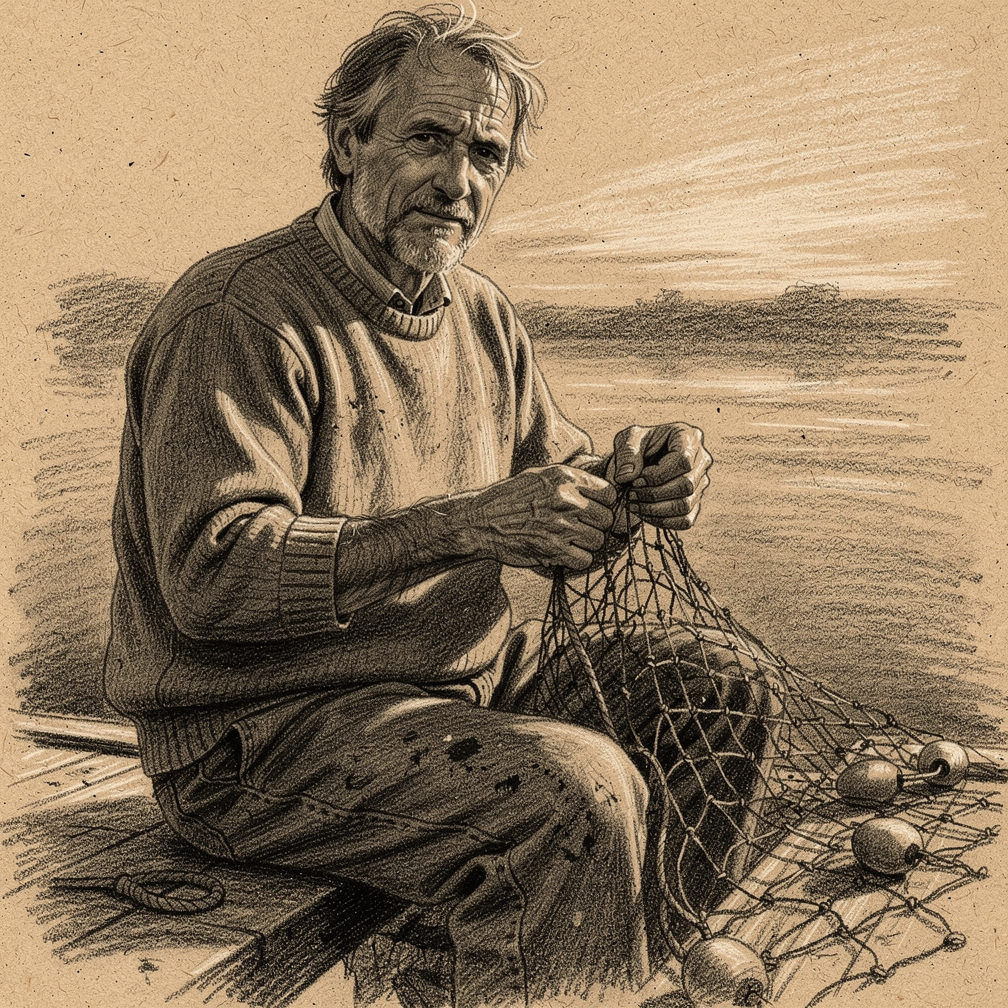
Generated on PixelDojo. Produced by PixelDojo's generation pipeline.
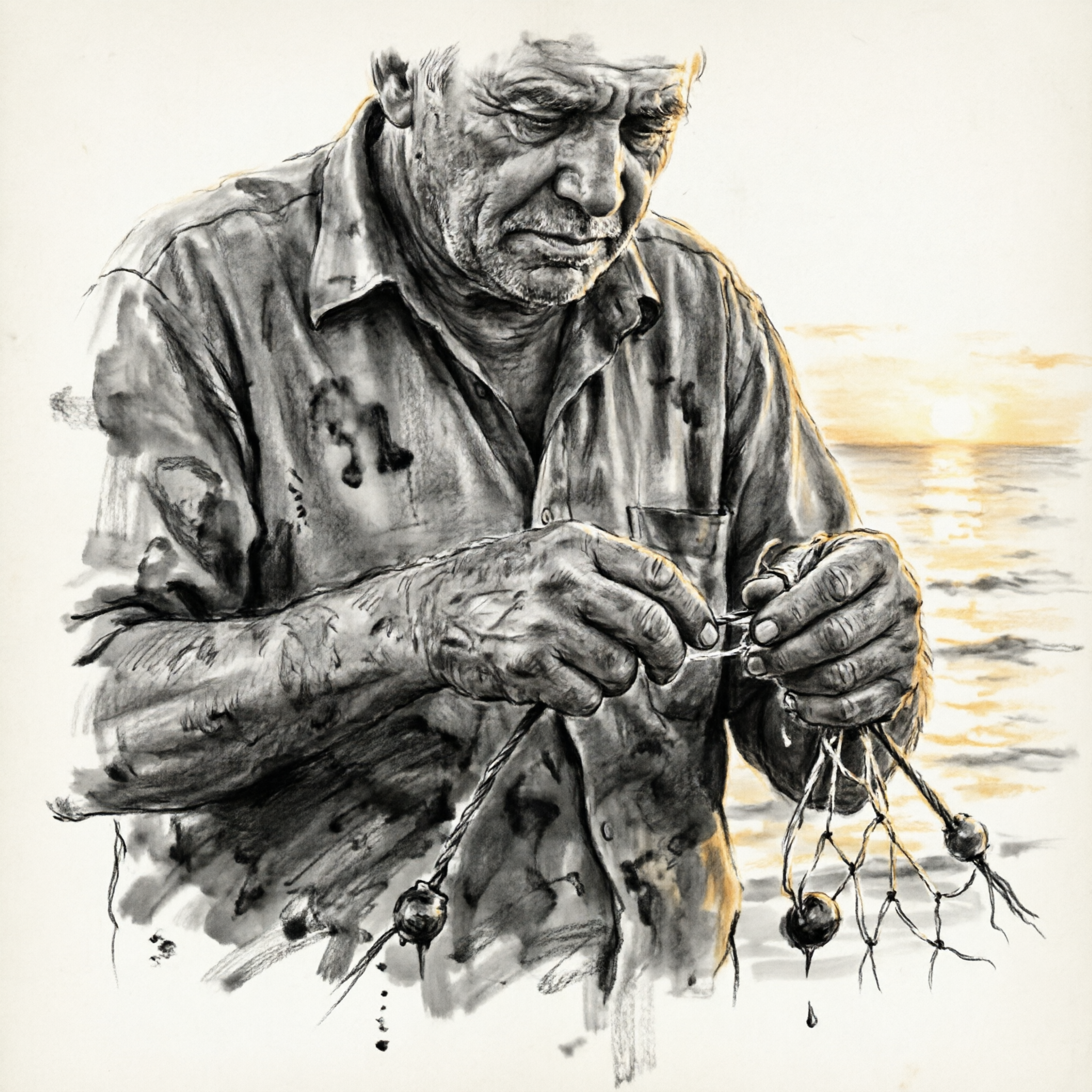
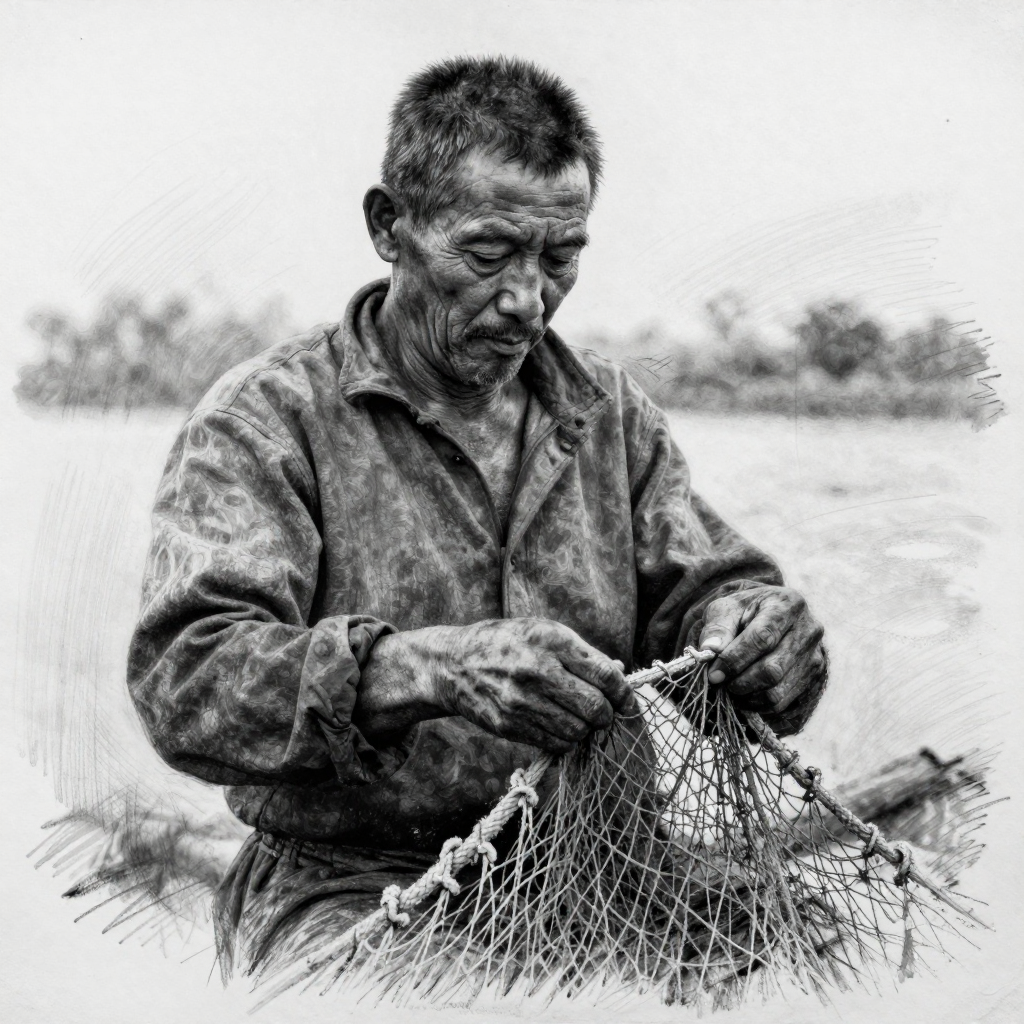
Flux 2 Pro gave us the only file that reads as an actual charcoal drawing. We sent one charcoal portrait prompt to three image models on August 26, 2026 and opened all three at full size. Flux 2 Pro cost 1.5 credits, took 24 seconds, and put the drawing on warm toned paper with broad stick strokes and white chalk highlights. QWEN Image 2.0 cost 1 credit and took 15 seconds, with the heaviest black masses and the largest file, but it added colour the prompt ruled out. Z Image Turbo cost 0.5 credits and finished in 11 seconds, and what came back is a photograph with a light sketch treatment over it.
Side-by-side, same prompt
Every model below ran the identical prompt on PixelDojo so the outputs are directly comparable: “Charcoal sketch portrait of a middle-aged fisherman mending a net at golden hour, weathered hands in focus, smudged charcoal shading and visible hatching strokes on textured paper, black and white”
Flux 2 Pro
24sToned paper, side of the stick strokes, white chalk highlights. 1.5 credits, 24 seconds, 1008 by 1008.
QWEN Image 2.0
15sHeaviest blacks and the biggest file at 2048 by 2048, but it added a golden sunset to a black and white brief. 1 credit, 15 seconds.
Z Image Turbo
11sCheapest and fastest at 0.5 credits in 11 seconds, but it returned a monochrome photograph with a sketch treatment on top.
Which file actually looked like it was drawn, in order
1. Flux 2 Pro, 1.5 credits, 24 seconds
We ranked on one question. Does the file look like it was made with a stick of charcoal, or like a photograph with a treatment over it. Flux 2 Pro is the only one that answered yes without qualification. Our drawing sits on warm tan paper with visible fibre flecks, and the sea and sky behind the figure are laid in with broad side of the stick strokes that run off the edge of the sheet. White chalk highlights sit on top of the mid tone the way they do on toned paper. The subject is a seated man in a heavy knit sweater working a net strung with round cork floats, and the whole sheet holds together as one drawing. Skip it if you asked for black and white and meant it. The paper is warm brown and the result is effectively sepia. The figure also sits at full length, which pushes the hands small in frame, and at 1008 by 1008 it returned the smallest file of the three.
2. QWEN Image 2.0, 1 credit, 15 seconds
The most dramatic draughtsmanship in the test and the largest file at 2048 by 2048. QWEN Image 2.0 built the portrait out of heavy compressed black masses pushed around with a stump, leaving the white of the ground showing through for the shirt highlights. It read the instruction about hands literally. They fill the lower third of the frame, with knuckles, tendons and nails all drawn rather than implied, and that is the one file here you could crop down to a hand study on its own. Two things went wrong. The prompt said black and white, and it added a golden sunset over water on the right plus warm rim light down the shoulders, so the file is not monochrome. At the left edge there is also a smudged extra forearm shape that never resolves into anything. Skip it if the brief is strict about colour, or if you need clean anatomy with no retouch pass afterwards.
3. Z Image Turbo, 0.5 credits, 11 seconds
Half a credit and 11 seconds, the cheapest and fastest run in the test by a wide margin. What comes back is a high contrast black and white photograph of a man mending a net with a light sketch treatment applied, plus a few loose pencil scribbles floating in the margins to suggest a drawing. The face, the shirt and the net are photographic. Skin pores, fabric weave and individual net cords are all resolved the way a camera resolves them, not the way charcoal does. There is no paper texture anywhere and no stroke direction to follow. Both hands came back correct, which is worth something on a portrait prompt. Skip it when the medium is the point of the brief. If you want a monochrome photo and you are using the word sketch loosely, this is the cheapest route to one, and 11 seconds means you can settle the composition here before spending more elsewhere.
One prompt, three models, one session. Prices ran 0.5 to 1.5 credits. Every file arrived inside 25 seconds. Only one of the three looked like paper.
Why Choose Pixel Dojo for Charcoal Sketch Models
Professional-quality results with cutting-edge AI technology
Charcoal is a medium, not a filter
Two of the three models treated it as a post effect on a photo. Judge the paper and the stroke direction, not the subject.
Half a credit to 1.5 credits
Z Image Turbo drew this for 0.5 credits, QWEN Image 2.0 for 1, Flux 2 Pro for 1.5. Nothing in this test cost more.
Every run finished inside 25 seconds
Measured 11, 15 and 24 seconds from submission to finished file, so a three way test costs you about a minute.
How It Works
The setup behind these three drawings:
One prompt, no settings touched
All three models got identical wording naming charcoal, smudged shading, visible hatching, textured paper and black and white. No negative prompts, no style presets, no retries, first result kept.
A clock bracket around every request
We took the time before submitting and the time the file arrived. That is where 11, 15 and 24 seconds come from.
All three opened at full size
We judged paper texture, stroke direction, tonal range and anatomy on the actual files. Medium fidelity set the order, with price and speed as the tiebreak.
Loved by creators on PixelDojo
Real feedback from people using PixelDojo, pulled from our in-product surveys.
super easy to use
it's very easy to use
Practically every Ai suite in one place? Who wouldn't?
versatile menu of tools
Best AI tool availble the suite is rad
Versatility quality, value, ROI, innovation
Explore more AI tools on PixelDojo
AI Tools
Compare & Switch
- Best AI Image Generators
- Best AI Video Generators
- Midjourney Alternatives
- Civitai Alternatives
- Runway Alternatives
- Leonardo Alternatives
- Pika Alternatives
- Luma Alternatives
- Magnific Alternatives
- Veo Alternatives
- Flux Alternatives
- Freepik Alternatives
- Seedance Alternatives
- Seedream Alternatives
- Pixverse Alternatives
- GPT Image Alternatives
- Synthesia Alternatives
- Playground Alternatives
- NightCafe Alternatives
- Canva AI Alternatives
- ElevenLabs Alternatives
- ComfyUI Alternatives
- Fal Alternatives
- Replicate Alternatives
Common Questions
Everything you need to know about Charcoal Sketch Models
Which AI model is best for charcoal sketch style?
Flux 2 Pro on this test. It was the only one of the three that returned a drawing on toned paper with real stroke direction, for 1.5 credits in 24 seconds. QWEN Image 2.0 is the pick if you want heavier blacks and a bigger file.
How much does one charcoal sketch cost?
0.5 credits on Z Image Turbo, 1 credit on QWEN Image 2.0 and 1.5 credits on Flux 2 Pro at the size it returned. Running all three on the same prompt cost 3 credits in total.
Which one was fastest?
Z Image Turbo at 11 seconds, then QWEN Image 2.0 at 15 and Flux 2 Pro at 24. Those are clock brackets around each request on August 26, 2026, so queue load will move them.
Why did a model add colour when the prompt said black and white?
It happened to us on one of the three runs, which put a golden sunset into a monochrome brief. Repeating the constraint in the prompt is not a reliable fix. Pick a model that held the line, or convert the file to greyscale afterwards.
How do I get real paper texture instead of a photo look?
Name the support and the tool rather than the effect. Our prompt asked for smudged shading and visible hatching strokes on textured paper, and the model that honoured it put down fibre flecks and stick strokes. The ones that ignored it returned clean photographic skin.
Can I call these models from an API?
Yes. POST to /api/v1/models/flux-2-pro/run, /api/v1/models/qwen-image-2.0/run or /api/v1/models/z-image-turbo/run with the same key and the same request shape.