Interior Design Concepts
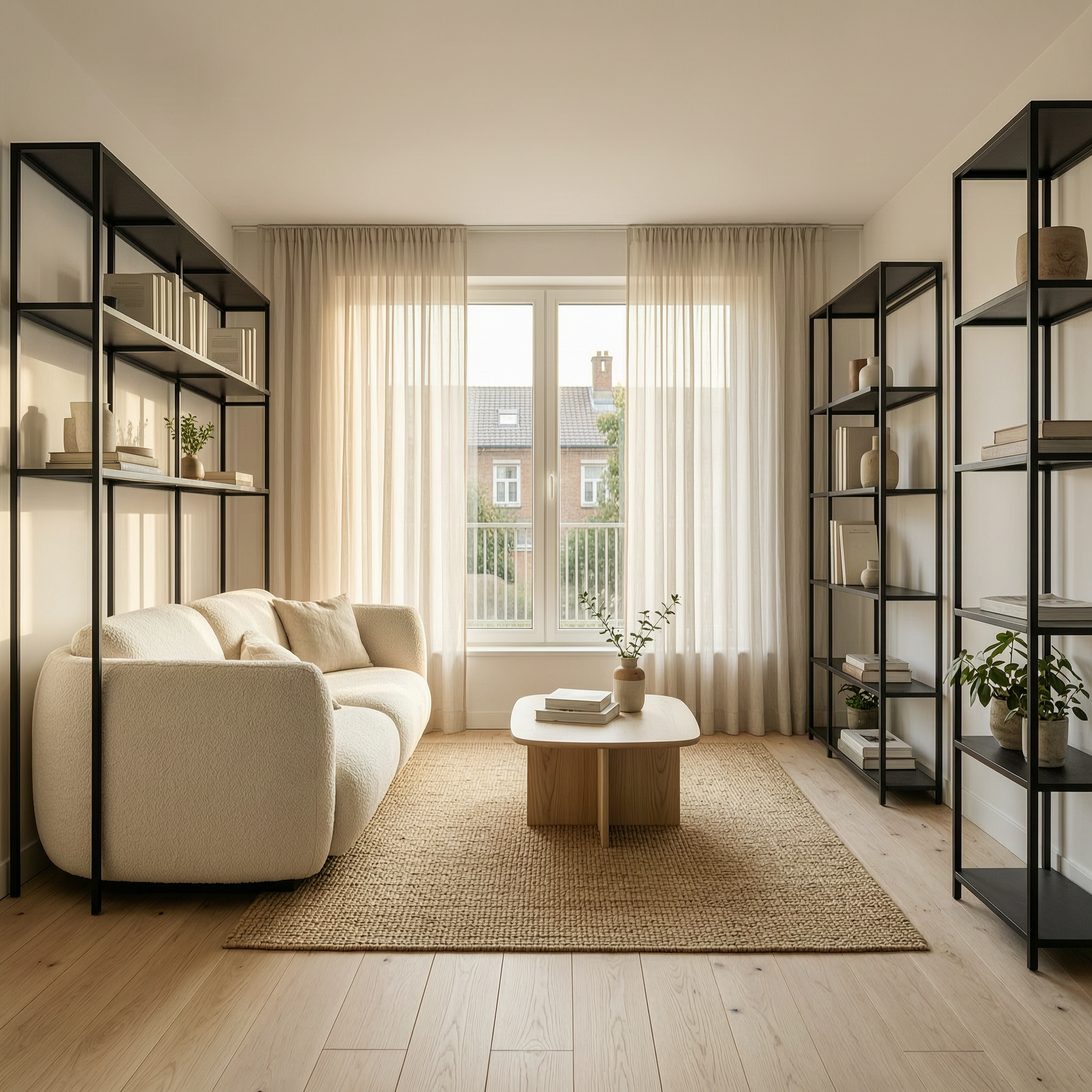
Generated on PixelDojo with WAN 2.7 Standard. Produced by PixelDojo's generation pipeline.
WAN 2.7 Standard is the best model for interior design concepts, and it is the cheapest of the three we tested at 1 credit. Concept work is a checklist job: the client named six things and all six have to be in the frame. We ran one Scandinavian living room brief through three models on August 26, 2026 and counted. WAN 2.7 Standard kept all six, built the most convincing room geometry, and returned 2048 by 2048 pixels. Nano Banana 2 Lite also kept all six and finished fastest at about 9 seconds. Flux 2 Max made the most beautiful room and quietly changed the furniture.
Side-by-side, same prompt
Every model below ran the identical prompt on PixelDojo so the outputs are directly comparable: “Interior design concept of a small Scandinavian living room, pale oak floor, boucle sofa, black steel shelving, large window with sheer curtains, soft afternoon light, architectural photography”
WAN 2.7 Standard
13sAll six specified elements, a proper one point perspective down the room, and warm afternoon light raking the wall. Cheapest and largest. 1 credit, about 13 seconds, 2048 by 2048 pixels.
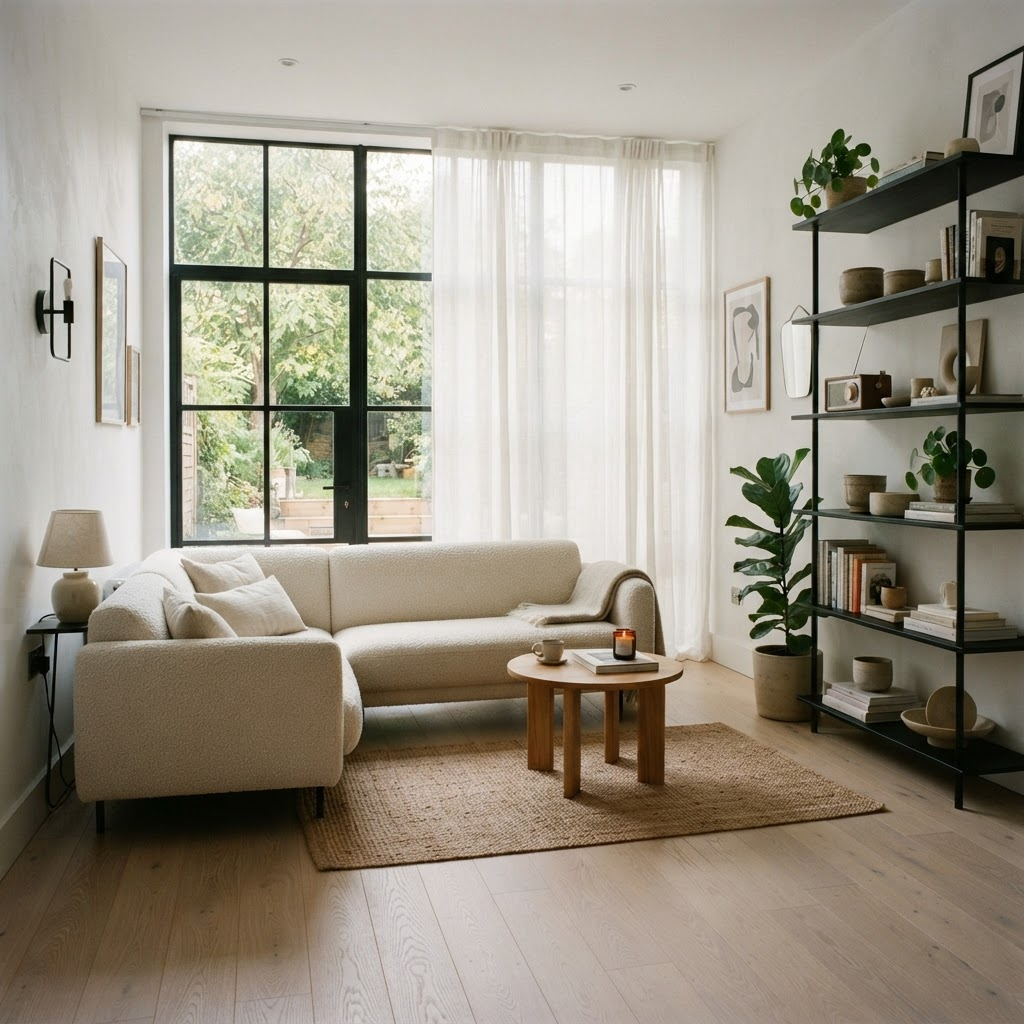
Nano Banana 2 Lite
9.0sAll six elements and the most photographic result, with a garden visible through black framed glazing. Fastest of the three. 2 credits, about 9 seconds.
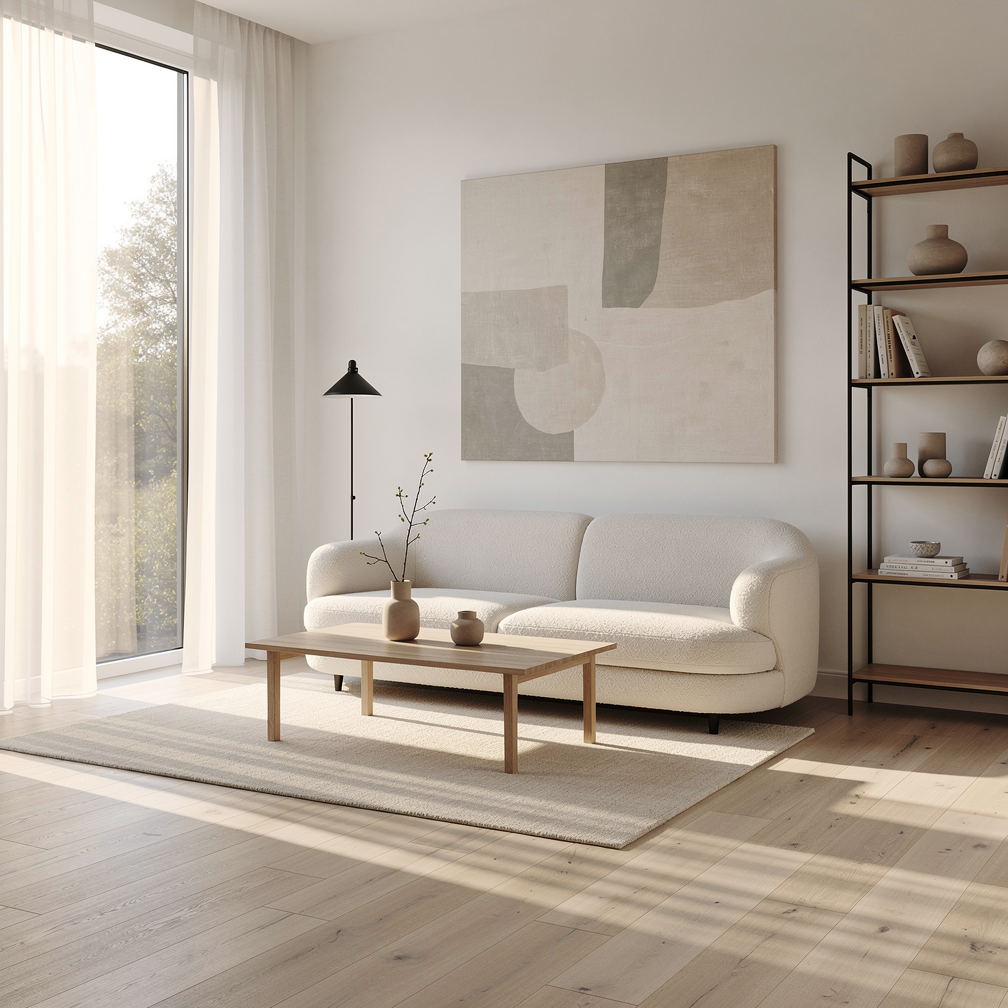
Flux 2 Max
34sThe best light in the set, with real cast shadows across the floor. But the shelving came back black steel with oak shelves, not the all steel unit we asked for. 2 credits, about 34 seconds.
Counting the brief, model by model
1. WAN 2.7 Standard, 1 credit, about 13 seconds
The cheapest model in the test also produced the most useful concept image. It framed the room as a symmetrical one point perspective looking straight down to the window, which is exactly how an interior concept board is normally drawn, and it is the framing that lets a client read the proportions of a space. Every named element is present: pale oak plank floor, a curved cream boucle sofa with the loop texture visible, black steel shelving, a large window with floor length sheer curtains, and warm afternoon sun raking across the left wall. It added a jute rug and an oak coffee table, both plausible. At 2048 by 2048 pixels it is the largest output of the three, for a fifth to a half of the others' price. The flaw is repetition: it drew three separate black shelving units and the two on the right overlap awkwardly at the corner, and the sofa is jammed against the left unit. Skip it if you want something that reads as a photograph, because this looks like a render, which is the point for concept work but wrong for a listing.
2. Nano Banana 2 Lite, 2 credits, about 9 seconds
The fastest run of the three by a clear margin and the most photographic result. It reads like an estate agent's photo: slightly soft, filmic colour, a real garden visible through the glazing, and small styling touches that a person would add, such as a lit candle, a coffee cup on the table, framed prints on the wall and a fiddle leaf fig in a concrete pot. All six brief items are there, including an L shaped boucle sectional and a tall black steel shelf on the right wall. Two things count against it. The window frame is black and the shelving is black, so the two dark elements compete for attention instead of the shelf reading as furniture. And the shelving unit runs off the right edge of the frame, so you cannot see the whole piece you are proposing. At 1024 by 1024 pixels it is also the smallest here. Skip it if the client needs to see the full extent of the joinery.
3. Flux 2 Max, 2 credits, about 34 seconds
The prettiest room and the slowest run. The light is in a different class: a floor to ceiling sheer curtain diffusing sun on the left, and hard shadow bars raking across the pale oak floor with genuine falloff. The styling is magazine grade, with a curved cream boucle sofa, a simple oak coffee table, a large abstract canvas above the sofa, and a black framed shelving unit at right. That last item is where it drifted. We asked for black steel shelving and it built a black frame with oak shelves, which is a different product and a different price point if a client is buying from the board. It also came back at 1008 by 1008 pixels, the smallest of the three, and it took about 34 seconds, after one attempt that timed out at our connector before we reran it. Skip it when the brief specifies materials exactly, and reach for it when you want mood rather than a spec.
Six specified elements, three models, same day. Charged 1 credit, 2 credits and 2 credits. Fastest run: about 9 seconds.
Why Choose Pixel Dojo for Interior Design Concepts
Professional-quality results with cutting-edge AI technology
Ranked by how much of the brief survived
Our prompt named six things: pale oak floor, boucle sofa, black steel shelving, large window, sheer curtains and soft afternoon light. Two models kept all six. One quietly changed the shelving.
The cheapest model won
WAN 2.7 Standard charged 1 credit and returned 2048 by 2048 pixels. The two models that charged 2 credits each returned 1024 and 1008 pixel squares.
Every run finished inside 35 seconds
Measured on August 26, 2026: about 13 seconds, about 9 seconds and about 34 seconds. A three option concept board is a few minutes of work, not an afternoon.
How It Works
How to repeat this comparison on your own brief:
Turn the brief into a checklist
Write the prompt as a list of specified materials and fittings, then close with a camera instruction such as architectural photography. Vague style words give you a pretty room that matches nothing on the spec sheet.
Run the same brief through two or three models
We used WAN 2.7 Standard, Nano Banana 2 Lite and Flux 2 Max at default settings and timed each request from submission to finished file.
Count the items before you judge the mood
Go through your list and tick off each element in the image. A room that looks better but swapped the shelving is a worse concept image, because the client will ask for the thing they can see.
Loved by creators on PixelDojo
Real feedback from people using PixelDojo, pulled from our in-product surveys.
Very fair and very broad in tools.
Accurate results
Great site and so much fun to use!
very useful set of tools for image creation, upscaling and enhancement
ease of use, variety of tools, high quality trainings, and a well-maintained discord channel
Ease of use, friendliness and support of the owner, continued innovation.
Explore more AI tools on PixelDojo
AI Tools
Compare & Switch
- Best AI Image Generators
- Best AI Video Generators
- Midjourney Alternatives
- Civitai Alternatives
- Runway Alternatives
- Leonardo Alternatives
- Pika Alternatives
- Luma Alternatives
- Magnific Alternatives
- Veo Alternatives
- Flux Alternatives
- Freepik Alternatives
- Seedance Alternatives
- Seedream Alternatives
- Pixverse Alternatives
- GPT Image Alternatives
- Synthesia Alternatives
- Playground Alternatives
- NightCafe Alternatives
- Canva AI Alternatives
- ElevenLabs Alternatives
- ComfyUI Alternatives
- Fal Alternatives
- Replicate Alternatives
Common Questions
Everything you need to know about Interior Design Concepts
Which AI model is best for interior design concepts?
WAN 2.7 Standard at 1 credit. In our August 26, 2026 test it kept all six specified elements, framed the room in a readable one point perspective, and returned the largest file at 2048 by 2048 pixels.
Which model is fastest for room visualisations?
Nano Banana 2 Lite, at about 9 seconds for 2 credits. It also produced the most photographic result of the three, with a garden visible through the window and realistic styling props.
Do these models respect specified materials and finishes?
Mostly. WAN 2.7 Standard and Nano Banana 2 Lite both produced the black steel shelving we asked for. Flux 2 Max returned a black frame with oak shelves instead, which is a different specification if a client is buying from the board.
Can I generate several layout options of the same room?
Yes, and cheaply. At 1 credit per image on WAN 2.7 Standard, five layout variations of one brief costs 5 credits. Rerun the same prompt and the model will recompose the furniture each time.
How should I write an interior brief prompt?
List the materials as a checklist rather than a description. Ours named the floor, the sofa fabric, the shelving material, the window treatment and the light quality, then closed with architectural photography to set the camera. Then count the items in the result.
How do I run these from the API?
POST to /api/v1/models/{apiId}/run with your API key. The ids used here are wan-2.7-image, nano-banana-2-lite and flux-2-max. Same key and same request shape across the catalog.