Line Art Models
Generated on PixelDojo. Produced by PixelDojo's generation pipeline.
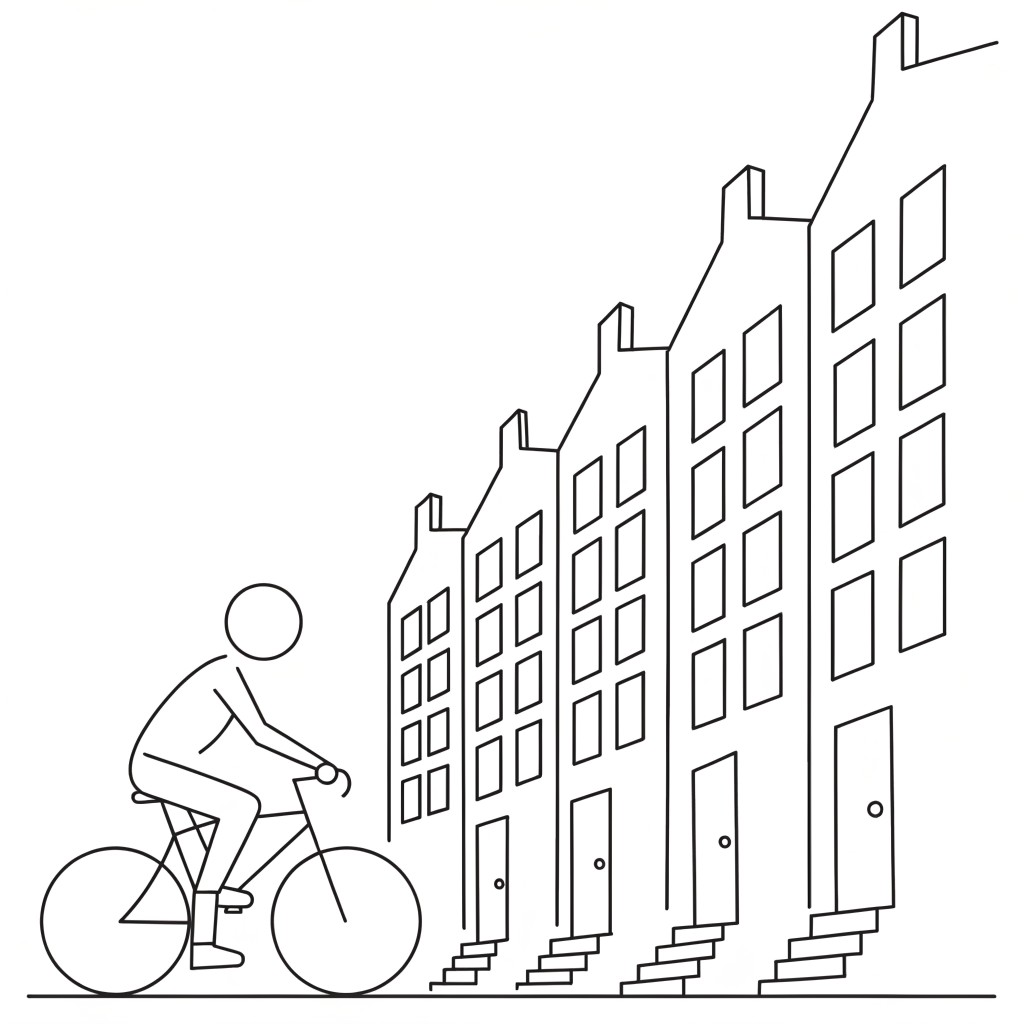
Recraft V4.1 was the only model that gave us real line art. We sent one cyclist prompt to three image models on August 26, 2026 asking for single weight black outlines, no shading and no colour, then opened all three files at full size. Recraft V4.1 cost 1 credit, took 16 seconds, and held one constant stroke width across the whole drawing with nothing filled in. Z Image Turbo cost 0.5 credits and finished in 15 seconds but used solid black fills. Ideogram 4 Turbo cost 1 credit, took about 30 seconds, and added hatching and stipple texture the prompt had ruled out.
Side-by-side, same prompt
Every model below ran the identical prompt on PixelDojo so the outputs are directly comparable: “A line art illustration of a cyclist riding past a row of tall townhouses, single weight black ink outlines on a plain white background, no shading, no color”
Recraft V4.1
16sOne stroke width everywhere, no fills, no shading. 1 credit, 16 seconds, 1024 by 1024.
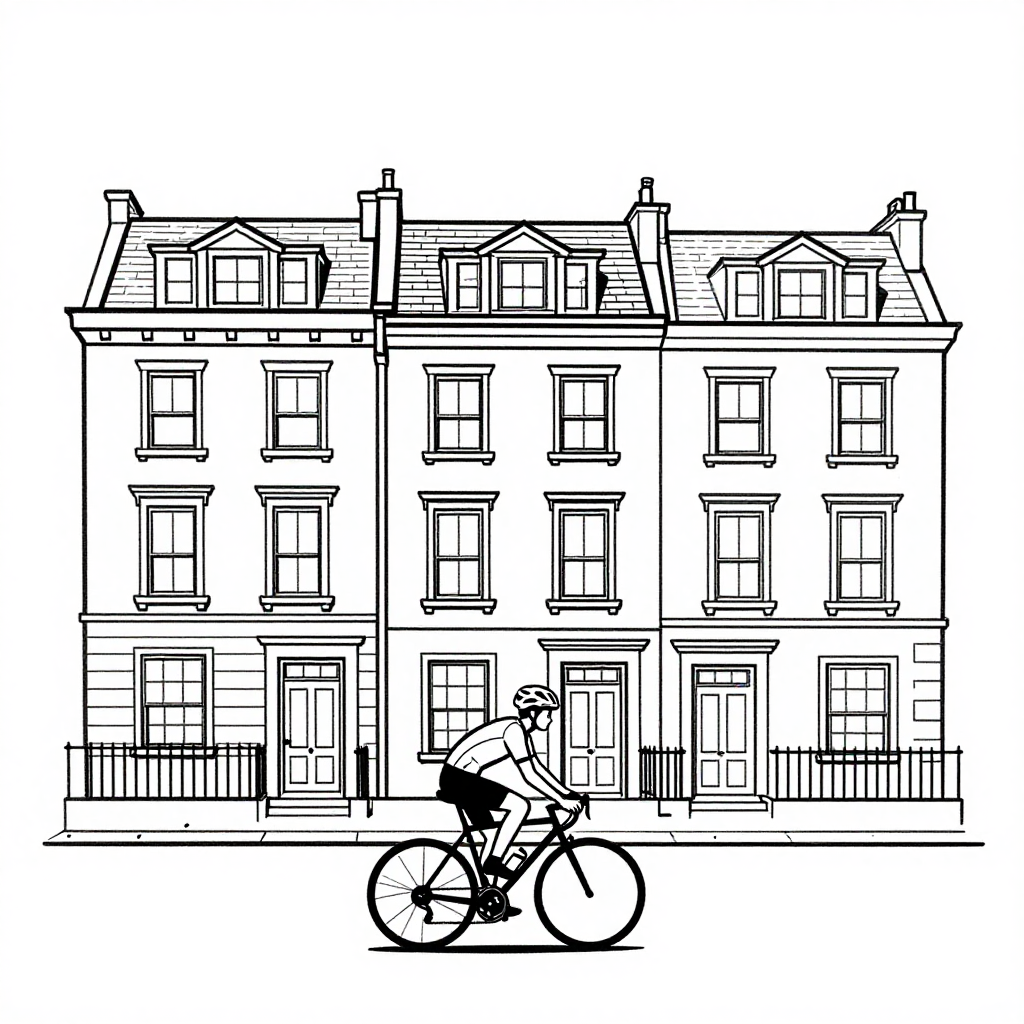
Z Image Turbo
15sCheapest and fastest at 0.5 credits in 15 seconds, but the bike and shorts came back filled solid black.
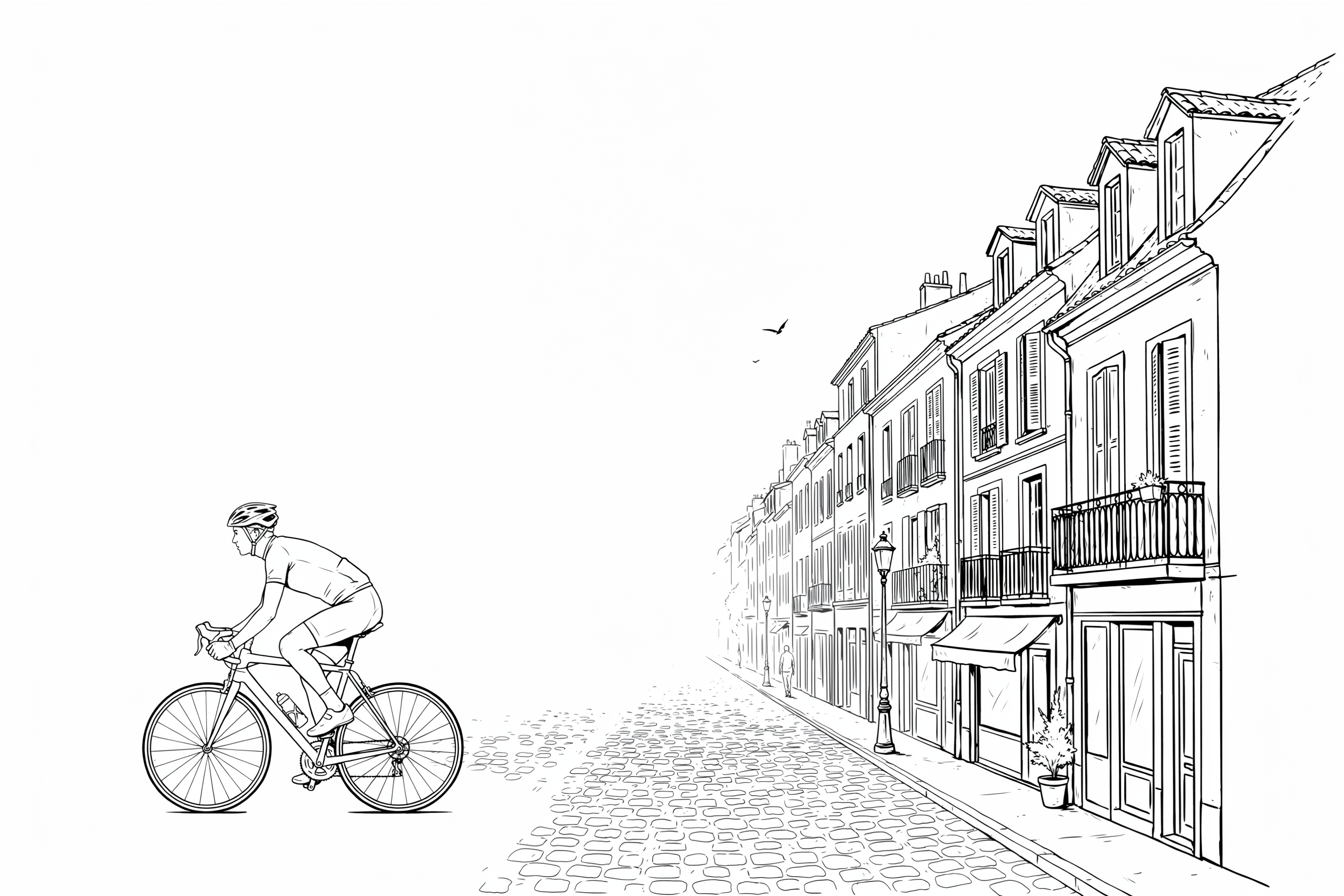
Ideogram 4 Turbo
30sRichest drawing and the biggest file at 2496 by 1664, but it added hatching. 1 credit, about 30 seconds.
What each model did with a strict no shading brief
1. Recraft V4.1, 1 credit, 16 seconds
We ranked on how literally each model took the instruction, then on price and speed. Recraft V4.1 took it completely literally. Our file is a thin black contour drawing on white: a row of stepped gable townhouses drawn in receding perspective with rows of plain rectangular windows, doors and small stoops, a cyclist in profile at the left, and a single ground line under everything. Nothing is filled, nothing is hatched, and the stroke width does not vary anywhere in the frame. That is the file you can drop straight into a colouring sheet, an icon set, or an engraving style layout. The output came back 1024 by 1024 in 16 seconds. Skip it if you want the drawing to feel handmade. Faces are left blank, limbs are simplified to a few strokes, and the result reads as diagram rather than illustration.
2. Z Image Turbo, 0.5 credits, 15 seconds
The cheapest and fastest run in the test at half a credit and 15 seconds. It drew a straight on elevation of a Georgian terrace with dormer windows, chimneys, sash windows with sills and iron railings, and put a helmeted cyclist across the foreground. The linework is tidy and the background is clean white with no hatching or tone anywhere. Where it broke the brief is fills: the bike frame, the wheels and the rider's shorts are solid black shapes, not outlines, so the stroke width is not constant. That is fine for a poster or a sticker and wrong for a colouring page. Output was 1024 by 1024. Skip it if you need depth. The buildings are drawn flat on with no perspective at all, so it composes as a facade study rather than a street scene.
3. Ideogram 4 Turbo, 1 credit, about 30 seconds
The best drawing here and the least faithful to what we asked for. Ideogram 4 Turbo built a wide cobbled European street receding to a vanishing point, with shuttered townhouses, balconies, awnings, a street lamp, a potted plant, a distant walker and a bird in the sky, plus a cyclist on a road bike in the left third. It also came back at 2496 by 1664, by a distance the largest file in the test. But the cobbles are stippled, the walls carry cross hatching and the rooflines are textured, so the no shading instruction did not survive. Roughly the top left third of the frame is empty white sky, which is useful if you are laying type over it and wasteful if you are not. Skip it when you need flat uniform outlines to trace, fill or plot.
One prompt, three models, one session. Prices ran 0.5 to 1 credit. Every file arrived inside 30 seconds. Only one of the three actually obeyed the no shading instruction.
Why Choose Pixel Dojo for Line Art Models
Professional-quality results with cutting-edge AI technology
Line art means three different things
Uniform contour, filled silhouette and pen and ink illustration all came out of the same prompt. Decide which one you need first.
Half a credit is the floor
Z Image Turbo drew this for 0.5 credits. The other two cost 1 credit each. No line art image in this test cost more than a single credit.
Frame size varied by a lot
Two models returned 1024 by 1024. Ideogram 4 Turbo returned 2496 by 1664 from the same prompt with no size setting from us.
How It Works
How the comparison was run, so you can repeat it:
One prompt with the constraints spelled out
All three models got the same wording, including single weight black ink outlines, no shading and no colour. No negative prompts, no style presets, no retries, first result kept.
Clock brackets around every request
We recorded the time before submitting and the time the file arrived. That is where 15 seconds, 16 seconds and about 30 seconds come from.
Opened all three files at full size
We judged stroke width, fills, hatching and frame size on the actual images. The ranking follows what the files showed, with price and speed as the tiebreak.
Loved by creators on PixelDojo
Real feedback from people using PixelDojo, pulled from our in-product surveys.
super easy to use
it's very easy to use
Practically every Ai suite in one place? Who wouldn't?
versatile menu of tools
Best AI tool availble the suite is rad
Versatility quality, value, ROI, innovation
Explore more AI tools on PixelDojo
AI Tools
Compare & Switch
- Best AI Image Generators
- Best AI Video Generators
- Midjourney Alternatives
- Civitai Alternatives
- Runway Alternatives
- Leonardo Alternatives
- Pika Alternatives
- Luma Alternatives
- Magnific Alternatives
- Veo Alternatives
- Flux Alternatives
- Freepik Alternatives
- Seedance Alternatives
- Seedream Alternatives
- Pixverse Alternatives
- GPT Image Alternatives
- Synthesia Alternatives
- Playground Alternatives
- NightCafe Alternatives
- Canva AI Alternatives
- ElevenLabs Alternatives
- ComfyUI Alternatives
- Fal Alternatives
- Replicate Alternatives
Common Questions
Everything you need to know about Line Art Models
Which AI model is best for line art?
Recraft V4.1 on this test. It was the only one of the three that held a single stroke width with no fills and no hatching, for 1 credit in 16 seconds. Z Image Turbo is the cheaper option if solid black fills are acceptable.
How much does one line art image cost?
0.5 credits on Z Image Turbo, 1 credit each on Recraft V4.1 and Ideogram 4 Turbo. Those are the flat per image prices in the live catalogue.
Which one was fastest?
Z Image Turbo at 15 seconds, with Recraft V4.1 one second behind at 16. Ideogram 4 Turbo took about 30 seconds. All three finished inside half a minute.
How do I stop a model adding shading?
Naming it is not enough on its own. All three of our prompts said no shading and one model still hatched the walls and cobbles. Pick a model that respects it, then check the file, rather than adding more words to the prompt.
Can I get line art as a vector file?
The Recraft V4.1 SVG entry returns vector output rather than a raster image, which is what you want for plotting, laser cutting or clean scaling. It is a separate model id from the one we ran here.
Can I call these models from an API?
Yes. POST to /api/v1/models/recraft-v4.1/run, /api/v1/models/z-image-turbo/run or /api/v1/models/ideogram-v4-turbo/run with the same key and the same request shape.