Oil Painting Models AI Generator
Generated on PixelDojo. Produced by PixelDojo's generation pipeline.
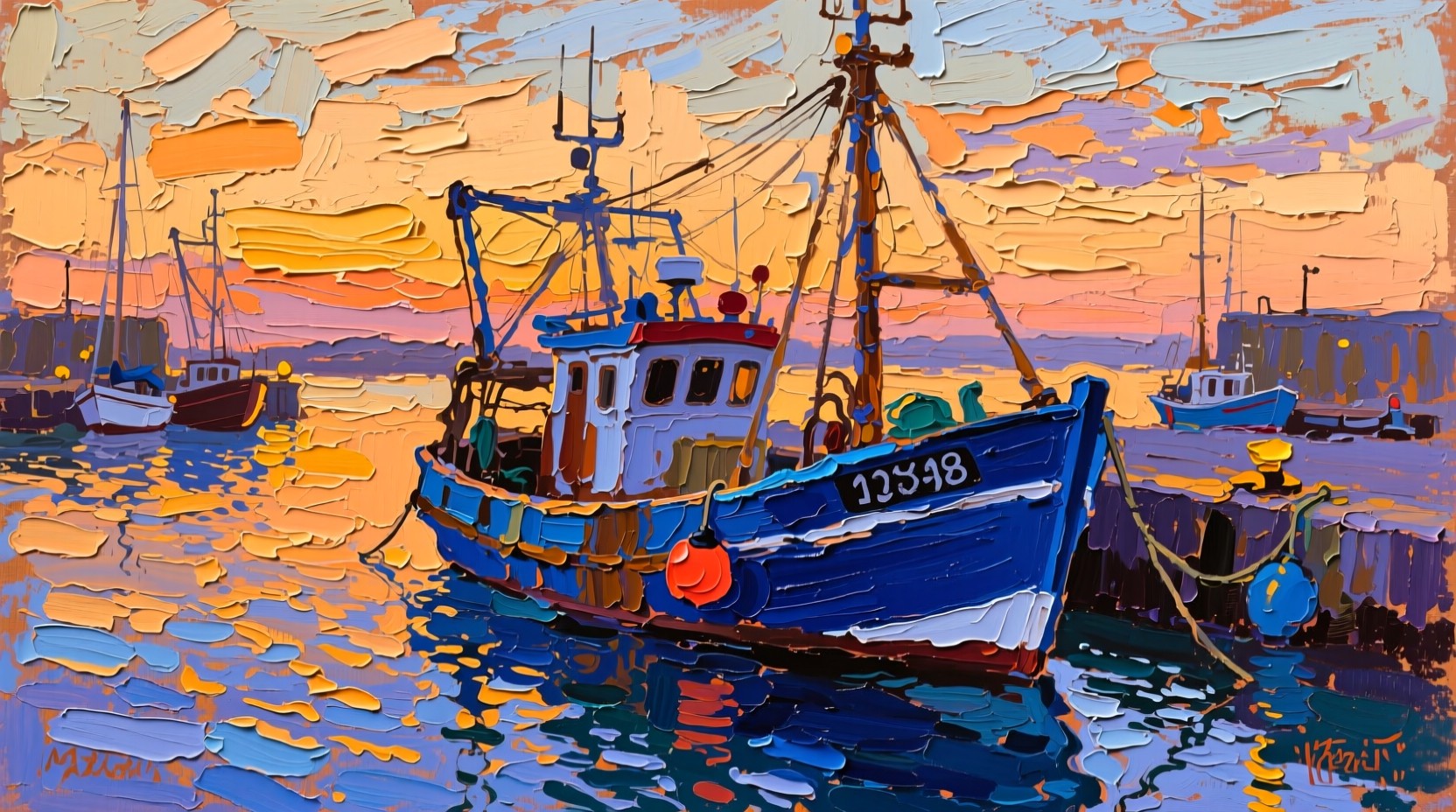
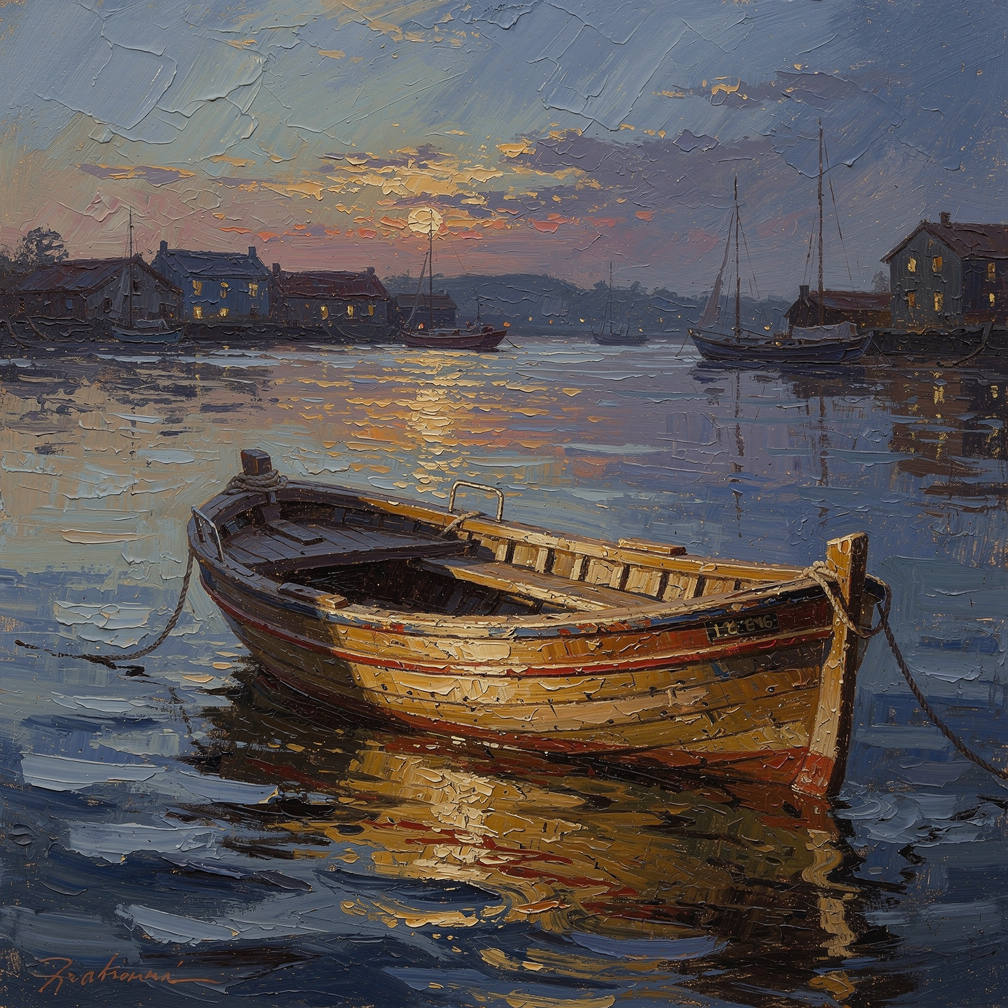
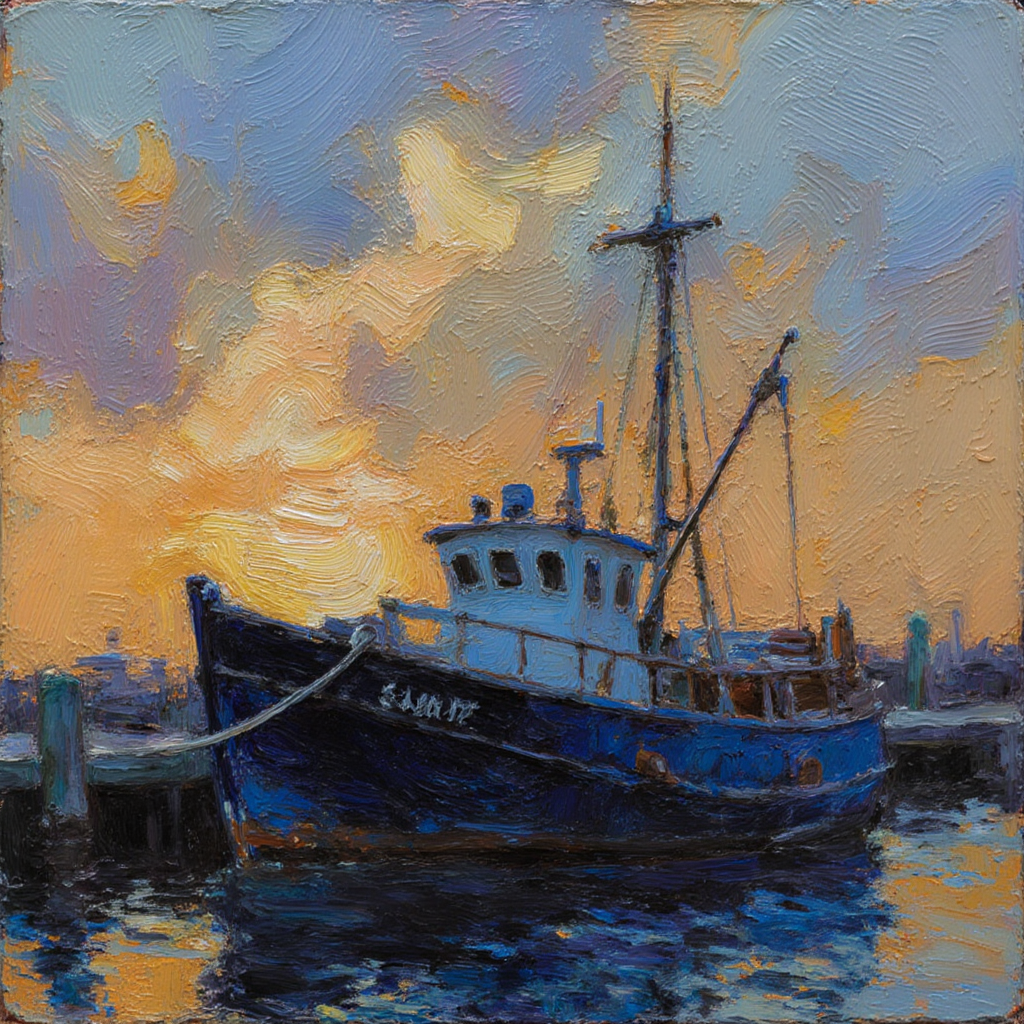
QWEN Image Plus gave us the most convincing palette knife texture, and it did it for 1 credit in 28 seconds. We sent one harbour prompt asking for thick impasto and visible knife work to three image models on August 26, 2026, timed each request, and opened all three files at full size. QWEN Image Plus laid the paint down in broad flat slabs and returned the only wide frame at 1664 by 928. Flux 2 Pro cost 1.5 credits, finished fastest at 23 seconds, and produced the most gallery realistic canvas. Flux Krea Dev matched the requested colour palette best for 1 credit but took 115 seconds.
Side-by-side, same prompt
Every model below ran the identical prompt on PixelDojo so the outputs are directly comparable: “An oil painting of a fishing boat moored in a harbour at dusk, thick impasto brushwork, visible palette knife texture, warm ochre and deep blue palette”
QWEN Image Plus
28sMost literal palette knife work, and the only wide frame at 1664 by 928. 1 credit, 28 seconds.
Flux 2 Pro
23sThe most believable canvas of the three and the fastest run. 1.5 credits, 23 seconds, 1008 by 1008.
Flux Krea Dev
115sClosest match to the ochre and deep blue brief, but brush weave rather than knife. 1 credit, 115 seconds.
How much paint each model actually put on the canvas
1. QWEN Image Plus, 1 credit, 28 seconds
Our basis for the ranking is how visible the paint is, then price, then measured speed. QWEN Image Plus won on the first and tied on the second. It painted the sky as horizontal knife strokes of cream, orange and lilac, and the water as a mosaic of separate orange and blue dabs, so the surface reads as loaded paint rather than a smooth render. The boat is cobalt with a white wheelhouse, red trim and an orange buoy. It also returned the only wide file in the test at 1664 by 928, which frames a harbour far better than a square does. Skip it if you asked for a restrained palette. Ours came back far more saturated than the warm ochre and deep blue the prompt described, and the registration numerals on the hull are not real characters, so crop them or expect a second pass.
2. Flux 2 Pro, 1.5 credits, 23 seconds
The most convincing painting of the three and the fastest run in the test. Flux 2 Pro built a full harbour scene at dusk with a wooden dory in the foreground, moored sailboats behind it, houses with lit windows along the far shore and a low sun laying a broken ochre reflection across the water. The impasto is real: ridged paint stands up on the hull, the sky is scraped in directional strokes, and the whole surface holds together as one canvas rather than an effect applied to a photo. Output was 1008 by 1008 in 23 seconds. Skip it if you are producing a set. At 1.5 credits it is the priciest of the three, and it signed our canvas with an illegible painted squiggle in the corner that you will want to crop out of every image.
3. Flux Krea Dev, 1 credit, 115 seconds
The best colour match to the brief and the slowest thing we ran. Flux Krea Dev painted a deep blue trawler with a white wheelhouse and full mast and rigging, moored against a piling dock, under a sky of curled ochre and lilac cloud, with the water dropping to near black navy under orange reflections. It is the only one of the three that stayed inside the warm ochre and deep blue palette we asked for, and canvas weave is visible across the whole surface. Where it misses is the knife: the texture is a fine woven brush weave, not thick slabs. Output was 1024 by 1024 in 115 seconds. Skip it when you are iterating on composition. Five times the wait for the same 1 credit as QWEN Image Plus is a poor trade when you are still deciding what the picture is.
One harbour prompt, three models, one session. Prices ran 1 to 1.5 credits. Turnaround ran 23 seconds to 115 seconds, a five times spread on near identical prices.
Why Choose Pixel Dojo for Oil Painting Models
Professional-quality results with cutting-edge AI technology
Impasto and palette knife are not the same request
One model gave us slab like knife work, one gave photographed ridged paint, one gave a fine brush weave. All three came from the same sentence.
The price spread is half a credit
1 credit for two of the three, 1.5 for the third. Cost is not what separates these models, so pick on texture and frame size.
Signatures and lettering come out fake
Two of the three files carry invented painted signatures or garbled hull numerals. Plan to crop, or edit them out in a second pass.
How It Works
How the three paintings were produced, so you can repeat it:
One prompt, default settings, first result kept
All three models got the identical harbour prompt including the impasto and palette knife wording. No negative prompts, no style presets, no size instruction and no retries.
Clock brackets around every request
We recorded the time before submitting and the time the file arrived. That is where 23 seconds, 28 seconds and 115 seconds come from.
Judged the surface, not the subject
We opened all three at full size and looked at stroke shape, paint thickness, palette and frame size. Every model painted a boat, so the texture is what decided the order.
Loved by creators on PixelDojo
Real feedback from people using PixelDojo, pulled from our in-product surveys.
exceptional quality and great overall design of platform and interface. very intuative. love the creative freedom.
Qwen image 2 is amazing!!
Creative freedom, range of tools and options.
I love the training feature
the quality is the best
All the tools needed in one dashboard
Explore more AI tools on PixelDojo
AI Tools
Compare & Switch
- Best AI Image Generators
- Best AI Video Generators
- Midjourney Alternatives
- Civitai Alternatives
- Runway Alternatives
- Leonardo Alternatives
- Pika Alternatives
- Luma Alternatives
- Magnific Alternatives
- Veo Alternatives
- Flux Alternatives
- Freepik Alternatives
- Seedance Alternatives
- Seedream Alternatives
- Pixverse Alternatives
- GPT Image Alternatives
- Synthesia Alternatives
- Playground Alternatives
- NightCafe Alternatives
- Canva AI Alternatives
- ElevenLabs Alternatives
- ComfyUI Alternatives
- Fal Alternatives
- Replicate Alternatives
Common Questions
Everything you need to know about Oil Painting Models
Which AI model is best for oil painting style?
QWEN Image Plus on this test. It produced the most literal palette knife texture and the only wide frame, for 1 credit in 28 seconds. Choose Flux 2 Pro when you want the picture to look like a photographed canvas rather than a stylised one.
How much does one oil painting style image cost?
1 credit each on QWEN Image Plus and Flux Krea Dev, 1.5 credits on Flux 2 Pro at its default megapixel setting. All three are flat per image prices.
Which one was fastest?
Flux 2 Pro at 23 seconds, then QWEN Image Plus at 28 seconds. Flux Krea Dev took 115 seconds on the same afternoon. Queue load moves these figures.
How do I get thicker paint texture in the output?
Name the tool, not just the style. Our prompt asked for thick impasto brushwork and visible palette knife texture, and the two words did different work: impasto got us ridged paint, palette knife got us flat slabs.
Why does the painting have a signature on it?
Models trained on photographed canvases learn that paintings carry a signature, so they invent one. It is never real writing. Crop it or remove it with an edit pass before you use the image.
Can I call these models from an API?
Yes. POST to /api/v1/models/qwen-image-plus/run, /api/v1/models/flux-2-pro/run or /api/v1/models/flux-krea-dev/run with the same key and the same request shape.