Product Shot Models AI Generator
Generated on PixelDojo with Seedream 5, Flux 2 Max, Google Nano Banana Pro. Produced by PixelDojo's generation pipeline.
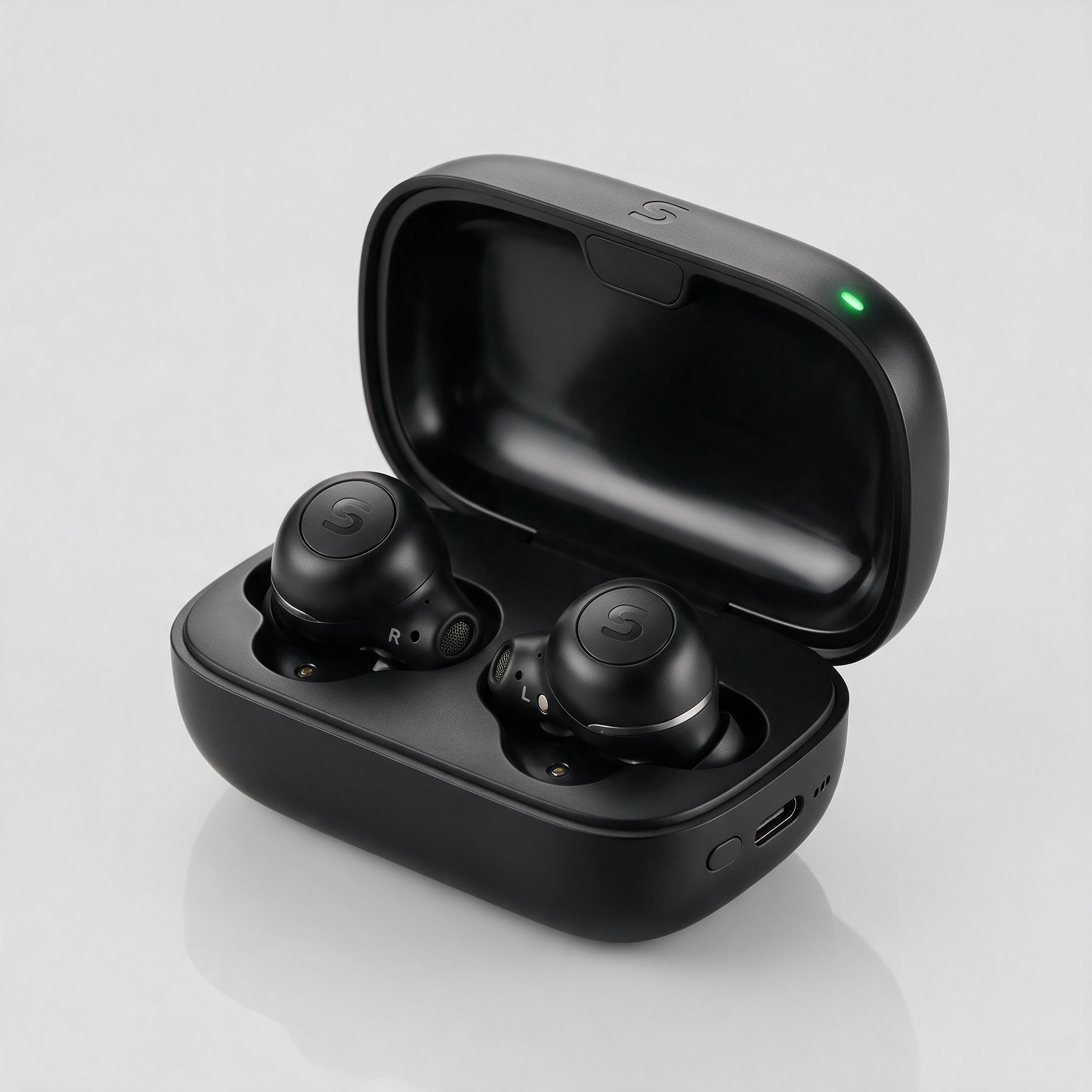
Seedream 5 produced the best product shot of the three we ran. We sent one studio earbuds prompt to Seedream 5, Flux 2 Max and Nano Banana Pro on August 26, 2026 and timed each request. Seedream 5 cost 2.5 credits, took about 50 seconds, and returned a 2048 by 2048 image with charging pins, a status light and left and right markings on the buds. Flux 2 Max cost 2 credits and finished in about 34 seconds with the cleanest unlabelled surfaces. Nano Banana Pro was fastest at about 27 seconds and cost the most at 3 credits, and it stamped a real consumer electronics brand name across both earbuds that our prompt never asked for. We ranked on how usable each file is without retouching first, then on price and measured speed.
Side-by-side, same prompt
Every model below ran the identical prompt on PixelDojo so the outputs are directly comparable: “Studio product photograph of matte black wireless earbuds in an open charging case on a seamless light gray background, soft diffused lighting, subtle reflection under the case”
Seedream 5
50sMost convincing hardware. Charging pins, status light, mic grilles and L and R markings, at 2048 by 2048. 2.5 credits, about 50 seconds.
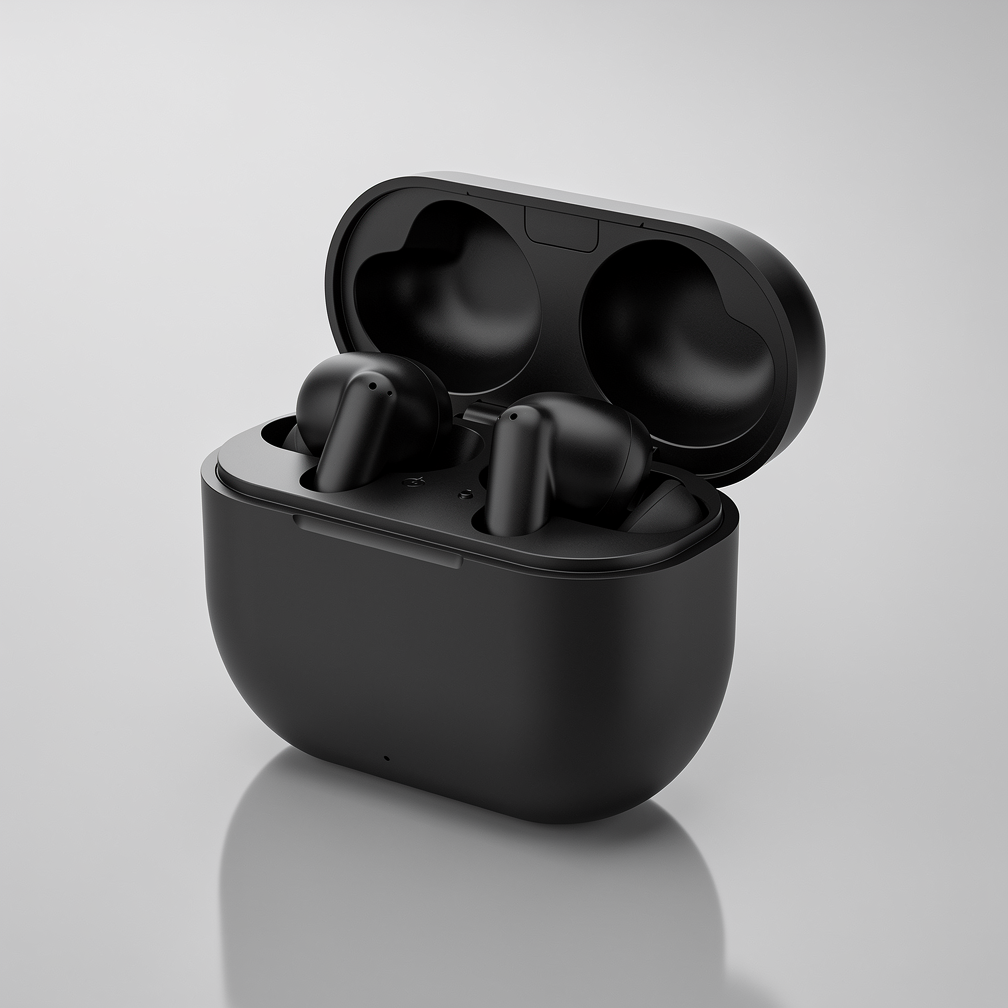
Flux 2 Max
34sThe only one with no lettering anywhere on the product. Clean matte surfaces to brand yourself. 2 credits, about 34 seconds.
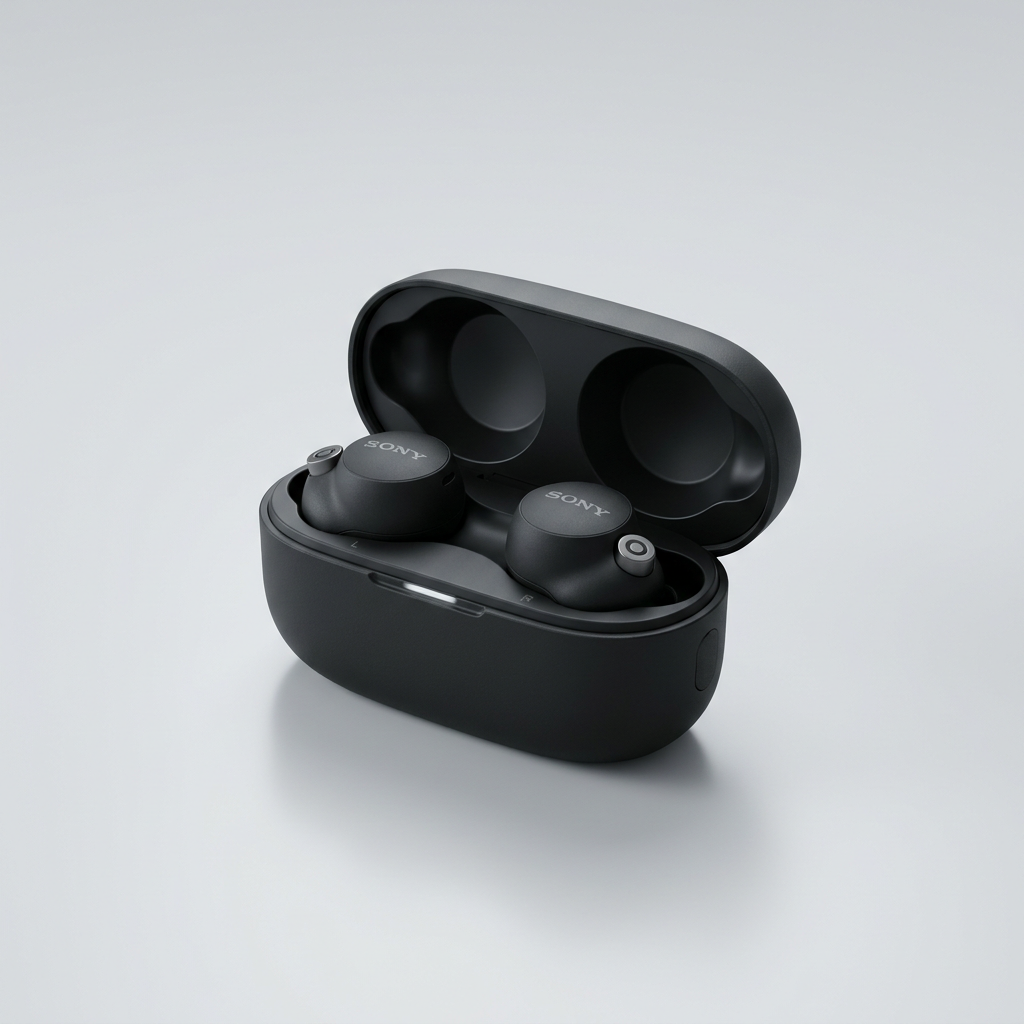
Google Nano Banana Pro
27sFastest at about 27 seconds, but it printed a real brand name on both earbuds unprompted. 3 credits.
The order we put them in, and the reason for each place
1. Seedream 5, 2.5 credits, about 50 seconds
Seedream 5 gave us the file closest to a real catalog photo. The case is a matte black clamshell with a visible hinge, a charging port on the front edge, a small green status light on the lid and a row of battery indicator dots. Both buds sit in their wells with gold charging contacts, mesh microphone ports, and small L and R letters printed on the tray beside each one. There is a soft reflection under the case exactly as the prompt asked. It came back at 2048 by 2048, the largest of the three, so it crops for a hero banner and a thumbnail from the same file. The one thing you would still fix is a plain monogram it invented on the buds and the lid. Skip it if you are iterating on lighting, because at about 50 seconds it was the slowest run of the three and you will feel that on the tenth attempt.
2. Flux 2 Max, 2 credits, about 34 seconds
Flux 2 Max was the cheapest of the three and the only one that put no lettering on the product at all. Our image is a rounded matte black case with the lid propped open and two stem style buds resting in the tray, lit softly from above with a clean gradient falling off behind it and a gentle reflection under the case. No logo, no monogram, no invented model name anywhere in the frame. If the point of the render is a base plate you will put your own branding on, that blankness is the whole value and it saves a retouching pass. The trade is physical detail. There is no charging port, no status light and no left and right marking, so the object reads as a well lit concept model rather than a shipping product. Output was 1008 by 1008. Skip it if the shot has to look like a photo of a real device on a shelf.
3. Google Nano Banana Pro, 3 credits, about 27 seconds
Nano Banana Pro was the quickest thing we ran and it understood studio lighting well. The frame is a three quarter view of an open case on a pale grey sweep with a soft shadow beneath it, and the surface finish reads as genuine matte plastic. It also has the sharpest problem for this job. Our prompt described unbranded matte black earbuds and never named a company, and the model printed a real consumer electronics brand name across both buds anyway. For a mood board that is harmless. For anything you would publish as your own product it is a legal cleanup task before the file can ship, and it is the most expensive of the three at 3 credits. Skip it when the render is going anywhere commercial, unless you plan to paint the lettering out. Pick it when you want a fast look at lighting and framing before you commit.
One packshot prompt, three models, one afternoon. Prices ran 2 to 3 credits. Measured turnaround ran about 27 to about 50 seconds.
Why Choose Pixel Dojo for Product Shot Models
Professional-quality results with cutting-edge AI technology
Invented branding is the real risk
Two of three models put lettering on an unbranded product. Check every packshot for logos before it goes near a store listing.
Under 3 credits buys a usable packshot
The whole test cost 7.5 credits. The most expensive single image was 3 credits.
File size is not the same across models
Seedream 5 returned 2048 by 2048 on the same prompt where the other two returned about 1024 square.
How It Works
How we ran the test, so you can repeat it on your own product:
Write one prompt and do not change it
We described the object, the surface, the lighting and the reflection in a single sentence and sent that exact text to all three models. Changing a word between runs makes the comparison worthless.
Time the request, keep the first result
We bracketed each call with a clock and kept whatever came back first. No rerolls, no cherry picking a fourth attempt, because that is not what your tenth product will get either.
Zoom in before you judge
Open each file at full size and look at the product surfaces. That is where the invented lettering showed up, and it is invisible at thumbnail size.
Loved by creators on PixelDojo
Real feedback from people using PixelDojo, pulled from our in-product surveys.
ease of use, variety of tools, high quality trainings, and a well-maintained discord channel
Ease of use, friendliness and support of the owner, continued innovation.
it is an amazing site to create a pics and vids for those who don't have the hardware themselves
good tools in one place
Prompt updates, strong features, and a community that is always willing to help and hear/act on professional feedback. I've never had a better experience.
user friendly all in one thing
Explore more AI tools on PixelDojo
AI Tools
Compare & Switch
- Best AI Image Generators
- Best AI Video Generators
- Midjourney Alternatives
- Civitai Alternatives
- Runway Alternatives
- Leonardo Alternatives
- Pika Alternatives
- Luma Alternatives
- Magnific Alternatives
- Veo Alternatives
- Flux Alternatives
- Freepik Alternatives
- Seedance Alternatives
- Seedream Alternatives
- Pixverse Alternatives
- GPT Image Alternatives
- Synthesia Alternatives
- Playground Alternatives
- NightCafe Alternatives
- Canva AI Alternatives
- ElevenLabs Alternatives
- ComfyUI Alternatives
- Fal Alternatives
- Replicate Alternatives
Common Questions
Everything you need to know about Product Shot Models
What is the best AI model for product shots?
Seedream 5 in our August 26, 2026 test. It cost 2.5 credits, took about 50 seconds, and produced the only image with real hardware detail such as charging contacts, a status light and left and right markings. Flux 2 Max is the pick if you want a product with no lettering on it at all.
Why did one model add a brand logo I did not ask for?
Product photography training data is full of branded devices, so a model can attach a familiar mark to a generic description. Nano Banana Pro did exactly that on our unbranded earbuds prompt. Always zoom in on the product surfaces before publishing, and prefer a model that left them blank if you are adding your own mark.
How much does an AI product shot cost?
In this test, 2 credits for Flux 2 Max, 2.5 for Seedream 5 and 3 for Nano Banana Pro. All three prices are per image, so a three model comparison like ours is 7.5 credits.
How fast are these models?
Measured on August 26, 2026 from request to finished file: about 27 seconds for Nano Banana Pro, about 34 seconds for Flux 2 Max, about 50 seconds for Seedream 5. Turnaround moves with queue load, so treat these as typical rather than fixed.
Can I run these from the API?
Yes. POST to /api/v1/models/seedream-5/run, /api/v1/models/flux-2-max/run or /api/v1/models/nano-banana-pro/run with your API key. Same key and same request shape for all three, so a comparison sweep is one string change per call.
Can I use a photo of my actual product instead of generating one?
Yes. Send your own photo to an image editing model and describe the studio setup you want around it. That keeps the real object and changes only the background and lighting, which avoids the invented branding problem entirely.