Text Rendering Models AI Generator
Generated on PixelDojo. Produced by PixelDojo's generation pipeline.
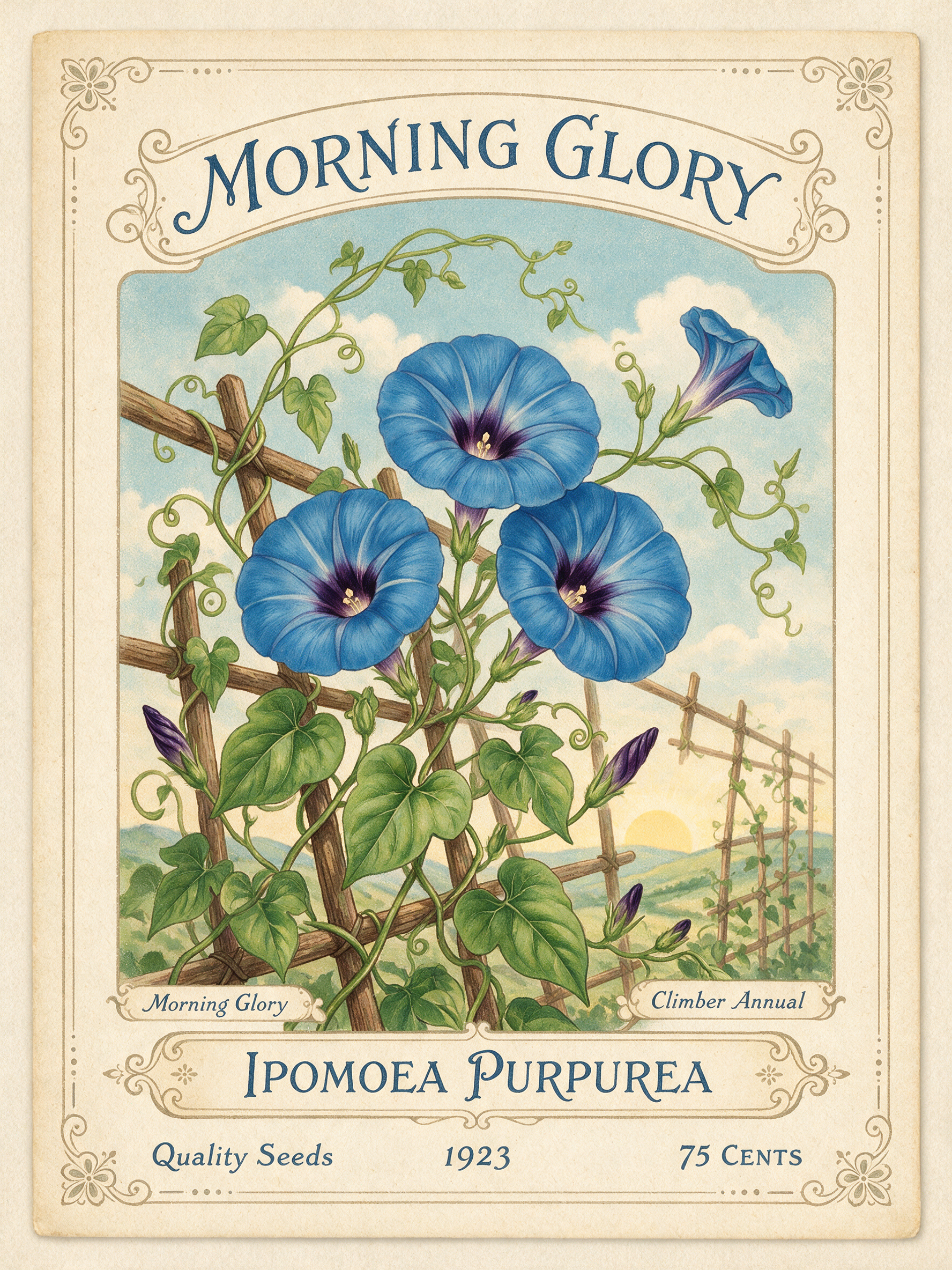
Seedream 5 rendered the most text correctly. We gave three models the same vintage seed packet brief on August 26, 2026 and then read every word in every file at full size. Seedream 5 set seven separate strings and got all seven right, including a Latin plant name it added itself, for 2.5 credits in about 67 seconds. QWEN Image 2.0 Pro set the headline cleanly for 2 credits in 41 seconds and stopped there. Flux 2 Pro was the cheapest and by far the fastest at 1.5 credits and about 13 seconds, with one small stray glyph in the lettering. If your layout has one line, all three work. If it has six, only one did.
Side-by-side, same prompt
Every model below ran the identical prompt on PixelDojo so the outputs are directly comparable: “A vintage seed packet design with the words 'MORNING GLORY' in hand-lettered type, botanical illustration of blue flowers, cream paper texture”
Seedream 5
67sSeven separate strings, all spelled correctly, including a Latin plant name it invented. 2.5 credits, 1776 by 2368.

QWEN Image 2.0 Pro
41sOne headline, evenly spaced small caps, no stray marks anywhere in the frame. 2 credits, 2048 by 2048.

Flux 2 Pro
13sCorrect headline in ornate arched lettering, with one stray glyph after the last letter. 1.5 credits, about 13 seconds.
What each model actually spelled, word for word
1. Seedream 5, 2.5 credits, about 67 seconds
Seedream 5 designed a full packet instead of a picture with a title on it. Reading top to bottom, the file carries MORNING GLORY as the headline, Ipomoea Purpurea across a ruled panel near the base, two small tab labels reading Morning Glory and Climber Annual, and a bottom row of Quality Seeds, 1923 and 75 Cents. Seven strings, every one spelled correctly, and the botanical name is the real binomial for morning glory rather than invented Latin. Letterforms stay consistent between the headline and the small type. The file came back at 1776 by 2368, a portrait shape that suits packaging. Skip it if you are iterating quickly. It was the slowest and the most expensive run in this test, and if all you need is a title, you are paying for copy you will not use.
2. QWEN Image 2.0 Pro, 2 credits, 41 seconds
QWEN Image 2.0 Pro produced the cleanest single line. MORNING GLORY is set in a slab serif with small caps, evenly spaced, correctly spelled, with no doubled strokes or half formed letters anywhere in the word. The rest of the packet is a detailed botanical drawing of blue morning glories on cream stock, photographed as a physical envelope with a visible flap and worn corners. Nothing else on the packet is set in type, so there is no second line to get wrong. Output was 2048 by 2048. Skip it if your design needs a body copy block, a price, or small print. On this brief it chose to stop at the headline, which is a clean result but a narrower one than Seedream 5 delivered for half a credit more.
3. Flux 2 Pro, 1.5 credits, about 13 seconds
Flux 2 Pro was the cheapest and the fastest by a wide margin, finishing in about 13 seconds. The lettering is the most decorative of the three: MORNING GLORY arched across a ribbon banner in an ornate slab serif with inline detailing, correctly spelled, on aged and distressed paper. One flaw to know about, and it is the kind that matters for brand work. There is a small stray glyph tucked in after the final letter, the size of a registered trademark mark, which nothing in the prompt asked for. There is also no secondary copy. Output was 1008 by 1008. Skip it if the file goes to print as is. Fix the stray mark in an editor, or generate a batch and pick a clean one, which at 1.5 credits a run is cheap to do.
Seven correct strings from the winner. One headline each from the other two. Prices ran 1.5 to 2.5 credits, and turnaround ran 13 to 67 seconds.
Why Choose Pixel Dojo for Text Rendering Models
Professional-quality results with cutting-edge AI technology
Count the strings, not the words
One correct headline is a low bar. The difference between these models showed up in whether they set a second and third line at all.
Speed and text quality are not linked
The fastest run here took about 13 seconds and spelled its headline correctly. The slowest took about 67 seconds and set six more strings on top of it.
Check small type at full size
Every claim on this page came from opening the files and zooming into the type. Downscaled previews hide stray marks and half formed letters.
How It Works
How the text was checked:
Quote the words in the prompt
The brief put MORNING GLORY in single quotes so every model got the same string to set. Quoting the exact words is the single biggest thing you can do for spelling accuracy.
Open each file at full resolution
We cropped into the type bands at native size on all three images. Small type and stray marks disappear at thumbnail scale, and that is where these models differ.
Score strings, then price and speed
First how many strings came back correct, then what the run cost and how long it took. That order produced the ranking above.
Loved by creators on PixelDojo
Real feedback from people using PixelDojo, pulled from our in-product surveys.
Tons of variety. Ease of use. Tools for beginners and advance users.
easiest workflow to get best output image or video
awesome functionality, UX, constant flood of improvements, discord interactivity
Awesome site with so many features
Love how I can almost create anything
The Flux Pro Ultra is just amazing!
Explore more AI tools on PixelDojo
AI Tools
Compare & Switch
- Best AI Image Generators
- Best AI Video Generators
- Midjourney Alternatives
- Civitai Alternatives
- Runway Alternatives
- Leonardo Alternatives
- Pika Alternatives
- Luma Alternatives
- Magnific Alternatives
- Veo Alternatives
- Flux Alternatives
- Freepik Alternatives
- Seedance Alternatives
- Seedream Alternatives
- Pixverse Alternatives
- GPT Image Alternatives
- Synthesia Alternatives
- Playground Alternatives
- NightCafe Alternatives
- Canva AI Alternatives
- ElevenLabs Alternatives
- ComfyUI Alternatives
- Fal Alternatives
- Replicate Alternatives
Common Questions
Everything you need to know about Text Rendering Models
Which AI model is best at text in images?
Seedream 5 in this test. It set seven separate strings on one packet design and spelled all of them correctly, for 2.5 credits in about 67 seconds. QWEN Image 2.0 Pro and Flux 2 Pro both got their single headline right but added no other copy.
How many words can a model get right in one image?
Seedream 5 handled seven strings here, including a headline, a Latin plant name, two small labels and a price. Reliability drops as you add lines, so check every string at full size before you ship the file.
Which one is cheapest for text heavy designs?
Flux 2 Pro at 1.5 credits per image on the 1 megapixel setting, and it finished in about 13 seconds. It handled the headline but produced one stray glyph, so budget for a couple of attempts.
Do these models ever misspell words?
Yes, that is the normal failure mode for image models, which is why we read every string in these three files rather than trusting the thumbnail. In this run all the words came back correct. The only defect was a small stray glyph after the headline in the Flux 2 Pro file.
Can I edit text in an image I already have?
Yes. Use an editing model with your image plus an instruction describing the change. That is usually a better fix for one wrong letter than regenerating the whole design.
Can I generate these from an API?
Yes. POST to /api/v1/models/seedream-5/run, /api/v1/models/qwen-image-2.0-pro/run or /api/v1/models/flux-2-pro/run with the same key and request shape. Put the exact words in single quotes inside the prompt.