Vintage Photo Look Models
Generated on PixelDojo. Produced by PixelDojo's generation pipeline.
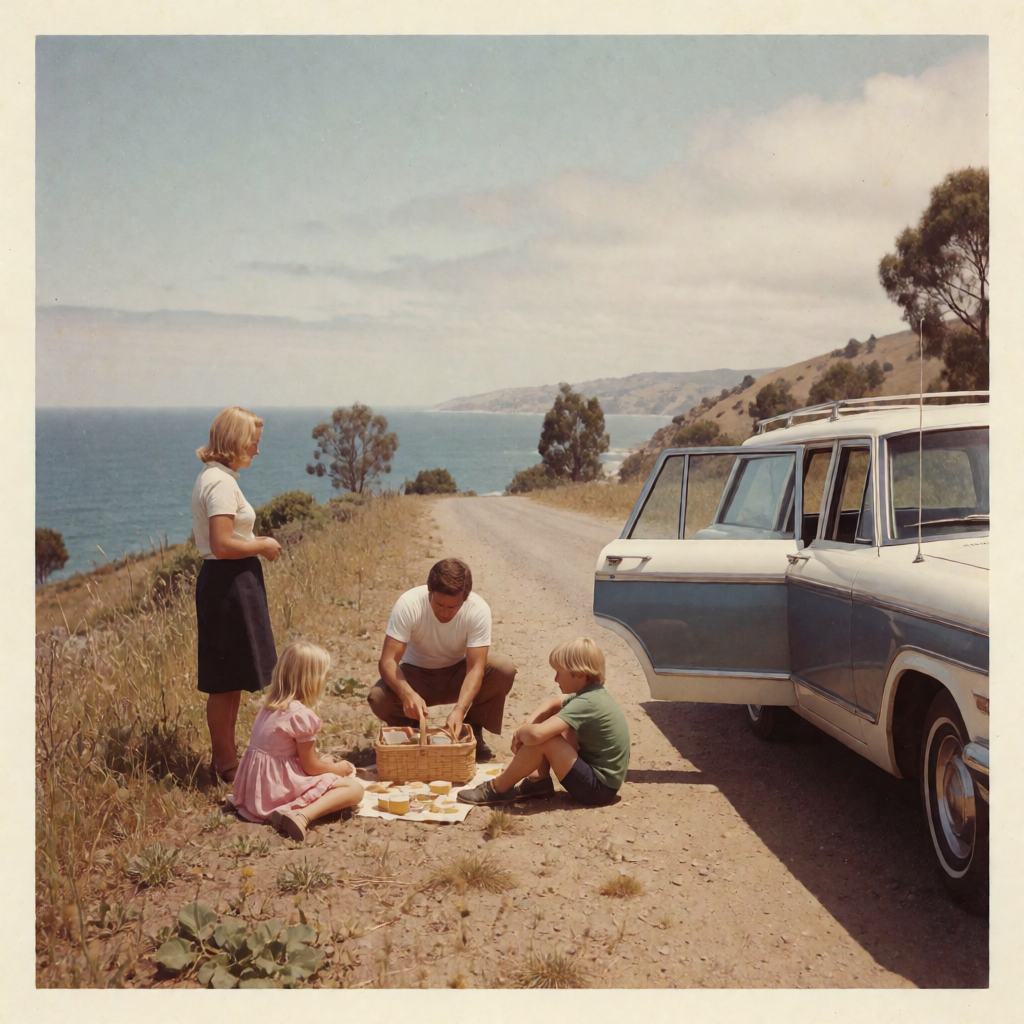
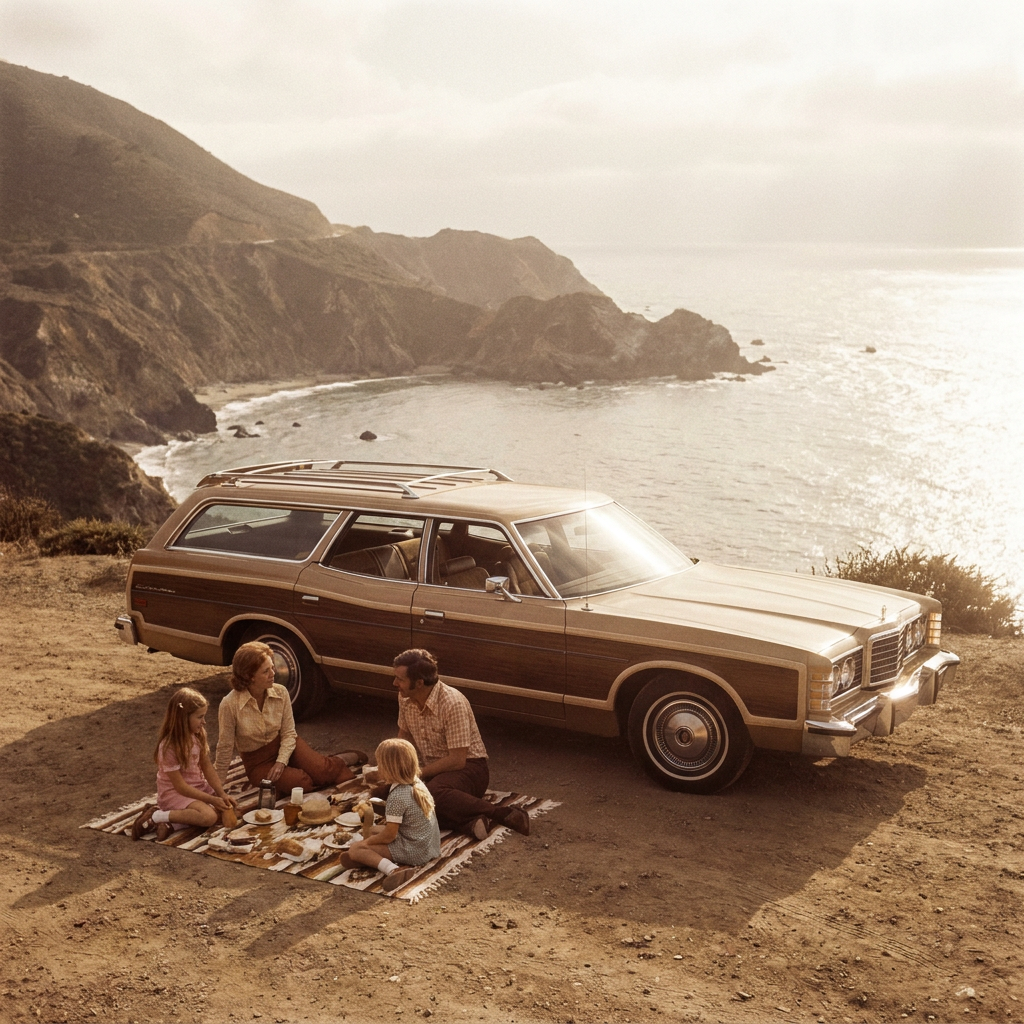
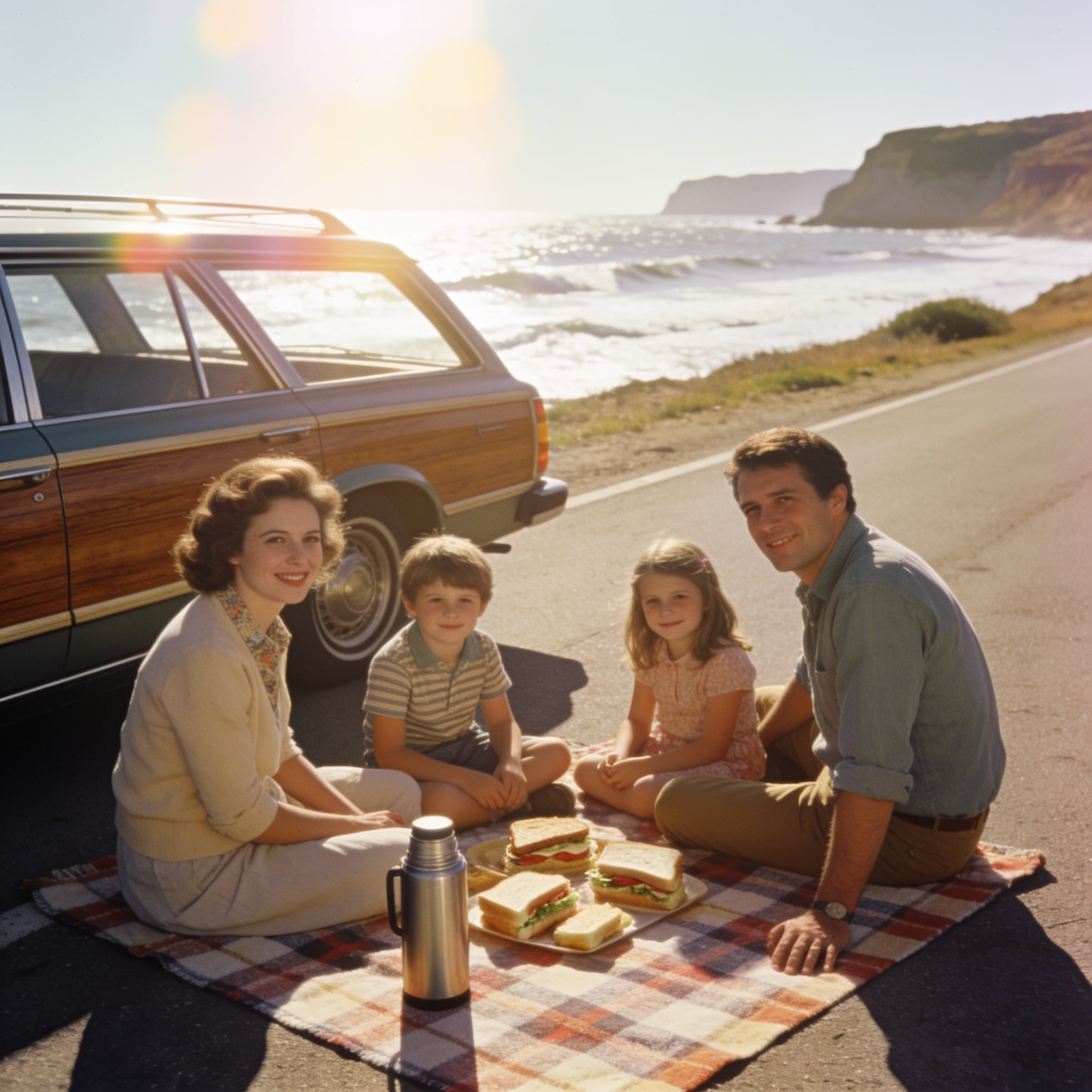
Krea Image produced the most convincing vintage photograph and it was the cheapest model in the test. We sent one 1970s family picnic prompt to three models on August 26, 2026 and timed each request. Krea Image cost 0.5 credits, answered in about 17 seconds, and rendered the print itself: cream border, square snapshot format, period dye shift. Nano Banana Pro cost 3 credits, took about 34 seconds, and pushed the hardest colour wash but flattened everything to one amber note. Seedream 4.5 cost 1 credit, took about 19 seconds, and gave the sharpest and largest file at 2048 by 2048, though it reads as a modern photo with a warm grade rather than film.
Side-by-side, same prompt
Every model below ran the identical prompt on PixelDojo so the outputs are directly comparable: “A 1970s color film photograph of a family picnic beside a station wagon on a coastal road, faded warm tones, soft grain, slight halation around the highlights, shot on 35mm”
Krea Image
17sRendered the print, cream border and all, with a period dye shift that still leaves colour in the clothes. 0.5 credits, about 17 seconds.
Nano Banana Pro
34sHardest faded amber wash and the best car and landscape detail, but almost no colour separation left. 3 credits, about 34 seconds.
Seedream 4.5
19sSharpest and largest at 2048 by 2048 with excellent faces, but it looks like a modern digital photo with a warm grade. 1 credit, about 19 seconds.
Which one looked like film, and which looked filtered
1. Krea Image, 0.5 credits, about 17 seconds
Krea Image was the only model that produced an artefact rather than an image. Ours came back as a square snapshot inside a cream white print border with slightly uneven edges, the way a drugstore print from that era actually looked. Inside the border: a two tone blue and white wagon parked on a dirt coastal road, a mother standing in a white tee and dark skirt, a father crouched over a wicker basket, two children on a white cloth, eucalyptus trees and a blue sea behind. The colour is period correct without being destroyed. You can still read the pink of the girl's dress and the green of the boy's shirt, with a mild cyan shift in the shadows and real softness in the corners. It was the cheapest thing in the test by half. Skip it if you need a full bleed image. Part of the frame is spent on that border, and 1024 by 1024 is what we got, so a large print would need an upscale pass first.
2. Nano Banana Pro, 3 credits, about 34 seconds
Nano Banana Pro committed harder to the grade than either of the others. The entire frame sits in faded amber: a wood panelled station wagon on a dirt pull off above a rocky cove, a family of four on a striped blanket with plates and a thermos, headlight flare, a hazy white sky and the sea washing out toward the horizon. The car and the coastline carry the best detail of the three, and the light genuinely looks like a print that spent thirty years in a drawer. It was also the most expensive image in the test at 3 credits and the slowest at about 34 seconds. Skip it if you need any colour left in the wardrobe. It pushed every hue to the same amber note, so the clothes, the blanket and the dirt all read as one tone, and there is no cheap way to pull separation back out afterwards.
3. Seedream 4.5, 1 credit, about 19 seconds
Seedream 4.5 gave us the technically strongest photograph and the least convincing period one. It arrived at 2048 by 2048, twice the resolution of the other two, with a wood panelled wagon on the shoulder of a coast road, four people facing camera on a plaid blanket, a chrome thermos and a tray of sandwiches in the foreground, and surf breaking under cliffs behind. Faces, fabric and chrome all hold up under a full size crop. The problem is the finish. There is no grain, the shadows are clean, and the big rainbow flare across the upper left is a modern lens artefact rather than a 1970s one. It reads as a photograph taken last week and warmed up in an editor. Skip it if the point is that the image must pass as film. Take it if you want a clean retro styled shoot at high resolution for 1 credit, which is a genuinely good deal.
One picnic prompt, three models, same session. Prices ran 0.5 to 3 credits. Measured turnaround ran 17 to 34 seconds. The cheapest one won.
Why Choose Pixel Dojo for Vintage Photo Look Models
Professional-quality results with cutting-edge AI technology
The cheapest model won
0.5 credits and about 17 seconds beat a 3 credit model on the thing the prompt actually asked for. Spend more only when you know what the extra buys.
Grade strength is a real tradeoff
The hardest amber wash also destroyed the colour separation. A period look that keeps some hue in the wardrobe is usually more useful.
Resolution and authenticity split
The 2048 by 2048 file was the sharpest and the least like film. Size and believability did not land on the same model here.
How It Works
The test, step by step:
One period prompt, sent as written
Each model got the same 1970s picnic prompt at default settings, with no size instruction and no film preset. We kept the first result in every case.
Timed each submission
A timestamp went out with every request and was read against the delivered file. About 17, about 19 and about 34 seconds come from those brackets.
Judged against a real print
We looked for the three things a period print has: an edge or border, a dye shift rather than a warm filter, and corner softness. That decided the order before price was applied.
Loved by creators on PixelDojo
Real feedback from people using PixelDojo, pulled from our in-product surveys.
A "one-stop-shop" for creators! Thanks!!
Lots of different tools. It's easy to purchase more credits.
Amazing performance!
Excellent website for creating all types of media
Very eay to use, works well to train SDXL loras.
The amazing tools
Explore more AI tools on PixelDojo
AI Tools
Compare & Switch
- Best AI Image Generators
- Best AI Video Generators
- Midjourney Alternatives
- Civitai Alternatives
- Runway Alternatives
- Leonardo Alternatives
- Pika Alternatives
- Luma Alternatives
- Magnific Alternatives
- Veo Alternatives
- Flux Alternatives
- Freepik Alternatives
- Seedance Alternatives
- Seedream Alternatives
- Pixverse Alternatives
- GPT Image Alternatives
- Synthesia Alternatives
- Playground Alternatives
- NightCafe Alternatives
- Canva AI Alternatives
- ElevenLabs Alternatives
- ComfyUI Alternatives
- Fal Alternatives
- Replicate Alternatives
Common Questions
Everything you need to know about Vintage Photo Look Models
Which AI model is best for vintage photography looks?
Krea Image on this test. At 0.5 credits and about 17 seconds it rendered the print itself, border and all, with a period dye shift that still left colour in the clothes. Choose Nano Banana Pro when you want the heaviest faded grade, and Seedream 4.5 when you want a clean high resolution retro shoot.
How much does a vintage style image cost?
Between 0.5 and 3 credits for the three models here. Krea Image is 0.5 credits per image, Seedream 4.5 is 1 credit, and Nano Banana Pro is 3 credits at its 1K and 2K settings.
Which one was fastest?
Krea Image at about 17 seconds, then Seedream 4.5 at about 19 seconds and Nano Banana Pro at about 34 seconds. Queue load moves these numbers, so treat them as typical rather than guaranteed.
What makes an AI image actually look like film?
In our run it came down to three things: a visible print border or edge, a dye shift that changes hues rather than just warming them, and softness that falls off toward the corners. The model that skipped all three still made a lovely photograph, but it read as modern.
Can I add a vintage look to a photo I already have?
Yes. Use an image editing model instead of a generator and describe the finish you want, referencing your own file. That keeps your subject and changes only the grade, which is usually what people mean by a vintage look.
Can I call these models from an API?
Yes. POST to /api/v1/models/krea-v2/run, /api/v1/models/nano-banana-pro/run or /api/v1/models/seedream-4/run with the same key and the same request shape. Changing models means changing one string.