Flux 2 Dev vs Flux 2 Pro
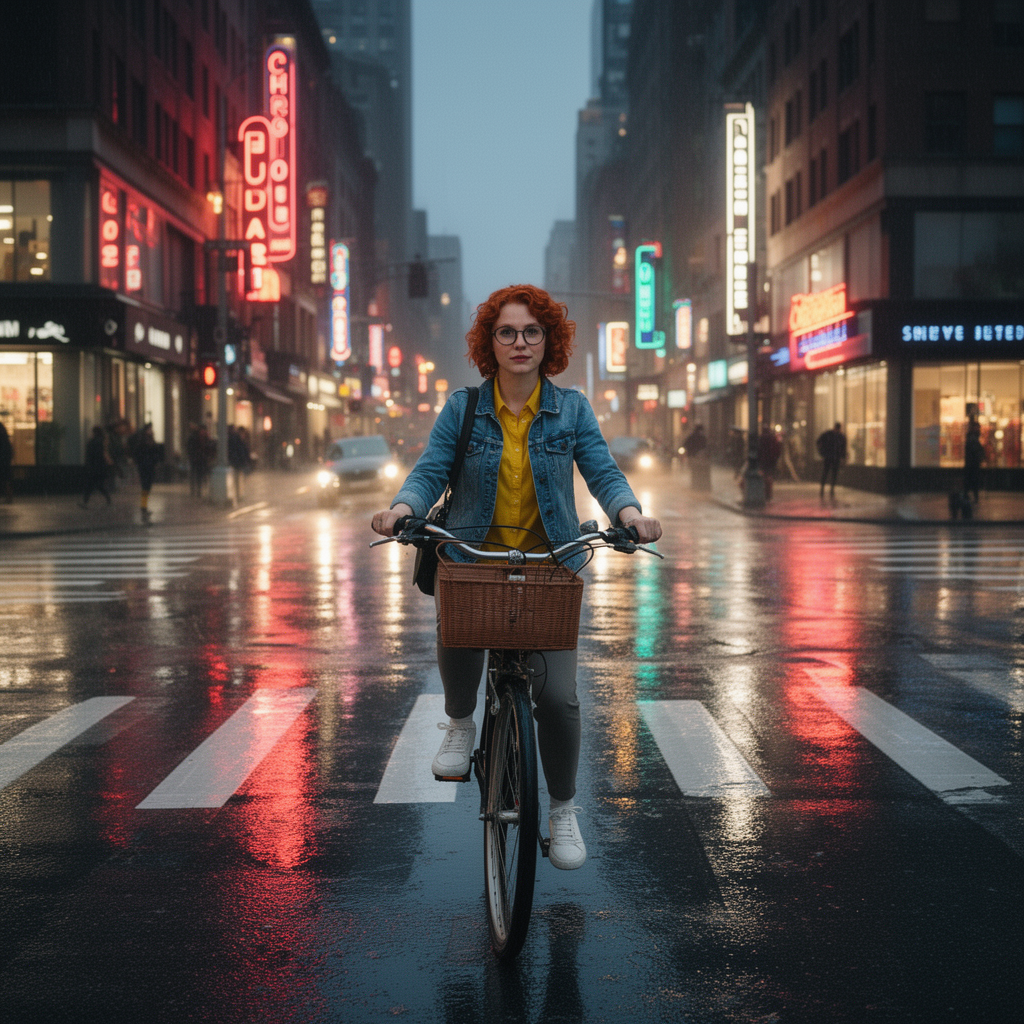
Generated on PixelDojo. Produced by PixelDojo's generation pipeline.
Flux 2 Dev costs a flat 1 credit no matter which resolution tier you choose, and it returned our edit in about 21 seconds. Flux 2 Pro starts at 1.5 credits at its default 1 megapixel tier and climbs to 2 credits at 2 or 4 megapixels, and it took about 26 seconds on the identical prompt. We sent both the same reference image and the same instruction on August 26, 2026, so the difference below is the models, not the setup.
The same edit, run on both tiers
Every example below was produced on PixelDojo. Hover to see the prompt.
Place this exact woman on a bicycle crossing a rainy city crosswalk at dusk, neon shop signs reflecting in puddles, cinematic wide shot, keep her face, glasses, red curly hair, denim jacket and yellow shirt identical
Flux 2 Dev
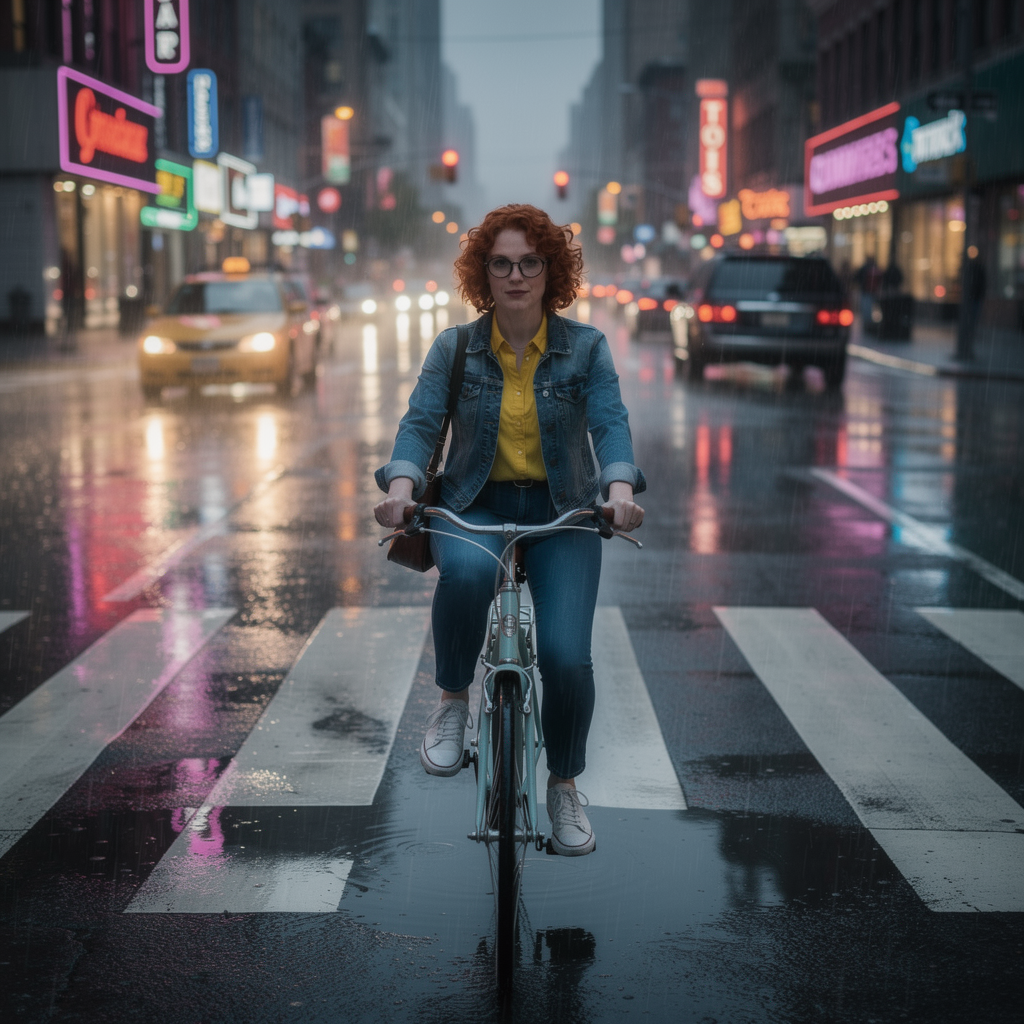
Place this exact woman on a bicycle crossing a rainy city crosswalk at dusk, neon shop signs reflecting in puddles, cinematic wide shot, keep her face, glasses, red curly hair, denim jacket and yellow shirt identical
Flux 2 Pro
Same reference image, same instruction, two Flux 2 tiers. Dev: 1 credit flat, about 21 seconds. Pro: 1.5 to 2 credits depending on resolution, about 26 seconds.
Why Choose Pixel Dojo for Flux 2 Dev vs Flux 2 Pro
Professional-quality results with cutting-edge AI technology
Dev's price never moves
1 credit at 0.5, 1, 2 or 4 megapixels. A large batch at full resolution costs the same per image as a quick draft.
Both kept the character identical
Face, glasses, red curly hair, denim jacket and yellow shirt all carried over correctly on the first try, no retries needed on either model.
How It Works
How we ran the comparison, so you can repeat it:
Send the same edit to both
Identical reference image, identical instruction, sent once to flux-2-dev and once to flux-2-pro with default settings on each.
Bracket each request with a timestamp
We recorded the second before submitting and the second the finished file arrived for both runs.
Compare the actual files
We downloaded both outputs and looked at what changed beyond price and speed, not just the numbers.
The Pixel Dojo Advantage
Same edit, same reference image, two Flux 2 tiers. The difference is how far the price moves with resolution and how much extra atmosphere the model adds on its own.
| Others | Pixel Dojo |
|---|---|
| Flux 2 Dev: 1 credit flat at any of the four resolution tiers, 0.5 to 4 megapixels | Flux 2 Pro: 1.5 credits at the default 1 megapixel tier, rising to 2 credits at 2 or 4 megapixels |
| Flux 2 Dev: about 21 seconds on our run | Flux 2 Pro: about 26 seconds on the identical prompt |
| Flux 2 Dev: 9 aspect ratios, up to 10 reference images per edit | Flux 2 Pro: the same 9 aspect ratios and the same 10 image reference limit |
| Flux 2 Dev: added a wicker bicycle basket, kept the rain to wet reflections rather than visible streaks | Flux 2 Pro: rendered visible diagonal rain streaks and put a taxi and a parked car in the background |
| Flux 2 Dev: still 1 credit at the full 4 megapixel output | Flux 2 Pro: 2 credits at 4 megapixels, the same rate as its 2 megapixel tier |
Loved by creators on PixelDojo
Real feedback from people using PixelDojo, pulled from our in-product surveys.
it's very easy to use
Practically every Ai suite in one place? Who wouldn't?
versatile menu of tools
Best AI tool availble the suite is rad
Versatility quality, value, ROI, innovation
variety of tools available and prompt tools
Explore more AI tools on PixelDojo
AI Tools
Compare & Switch
- Best AI Image Generators
- Best AI Video Generators
- Midjourney Alternatives
- Civitai Alternatives
- Runway Alternatives
- Leonardo Alternatives
- Pika Alternatives
- Luma Alternatives
- Magnific Alternatives
- Veo Alternatives
- Flux Alternatives
- Freepik Alternatives
- Seedance Alternatives
- Seedream Alternatives
- Pixverse Alternatives
- GPT Image Alternatives
- Synthesia Alternatives
- Playground Alternatives
- NightCafe Alternatives
- Canva AI Alternatives
- ElevenLabs Alternatives
- ComfyUI Alternatives
- Fal Alternatives
- Replicate Alternatives
Common Questions
Everything you need to know about Flux 2 Dev vs Flux 2 Pro
Which is cheaper, Flux 2 Dev or Flux 2 Pro?
Flux 2 Dev, and by more the higher the resolution goes. Dev is a flat 1 credit at every tier. Pro starts at 1.5 credits at 1 megapixel and reaches 2 credits at 2 or 4 megapixels, so the gap doubles at full resolution.
Which one is faster?
Dev, in our test. It returned the edit in about 21 seconds against about 26 seconds for Pro on the same prompt and reference image.
Do Flux 2 Dev and Flux 2 Pro accept the same inputs?
Yes. Both take up to 10 reference images in one request and offer the same 9 aspect ratio presets, so switching between them is a one word change in the model field.
Is there a real quality difference?
On our run both kept the subject's face, glasses, hair and outfit identical. Pro rendered more visible rain streaks and added background traffic. Dev stayed a little closer to the original framing and added a bicycle basket the prompt did not ask for.
How do I call either one from the API?
POST to /api/v1/models/flux-2-dev/run or /api/v1/models/flux-2-pro/run with the same API key and the same request shape. Changing tiers means changing one string in the URL.
Which should I default to for a large batch?
Dev, if you need the highest resolution tier without the price climbing. At 4 megapixels Dev is still 1 credit while Pro is 2, so a batch at full size costs half as much on Dev.