Flux 2 Dev vs QWEN Image 2.0
Generated on PixelDojo. Produced by PixelDojo's generation pipeline.
Flux 2 Dev and QWEN Image 2.0 both cost 1 credit per image and both actually took our reference photo as input, not just a text description. Flux 2 Dev edited it in about 21 seconds; QWEN Image 2.0 took about 16 seconds on the identical photo and instruction. With price tied, this comparison comes down to speed and how much extra scene each model built. We ran both on August 26, 2026.
The same reference photo, edited two ways
Every example below was produced on PixelDojo. Hover to see the prompt.
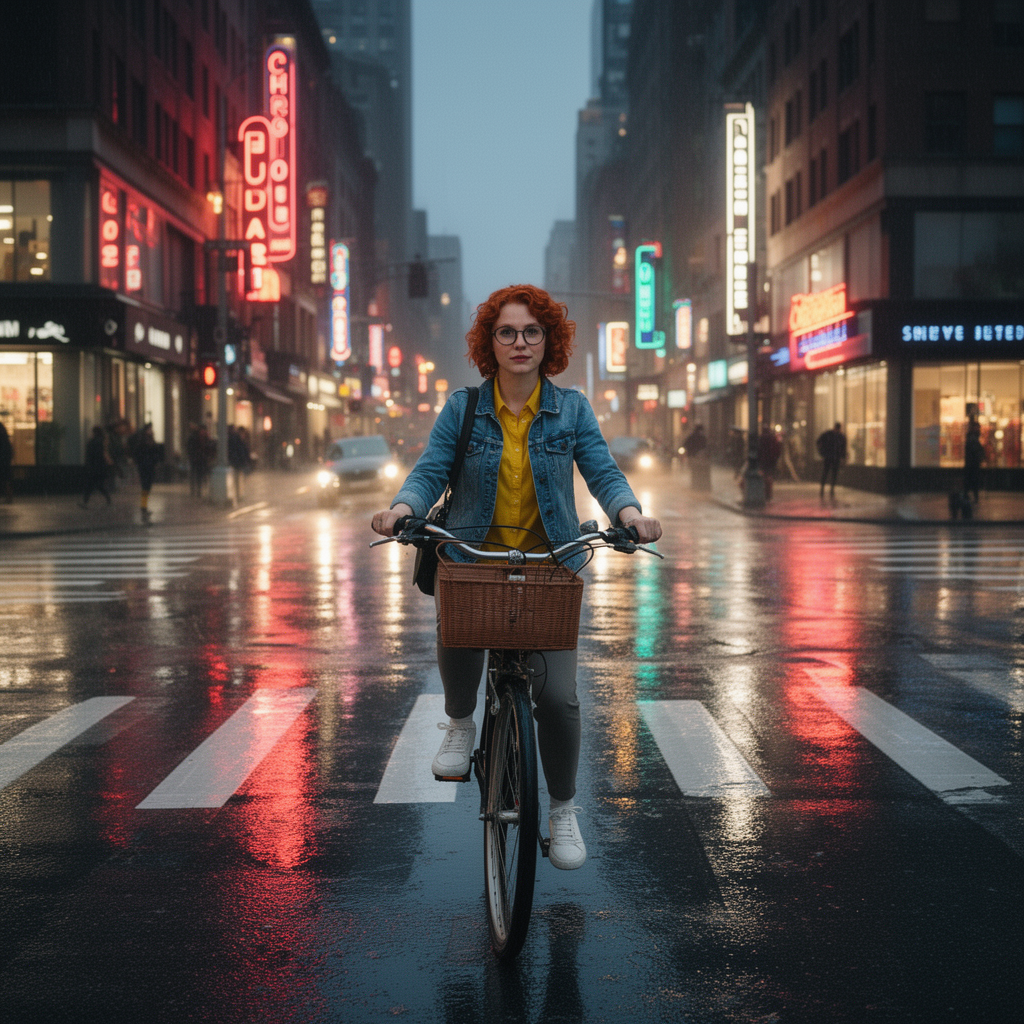
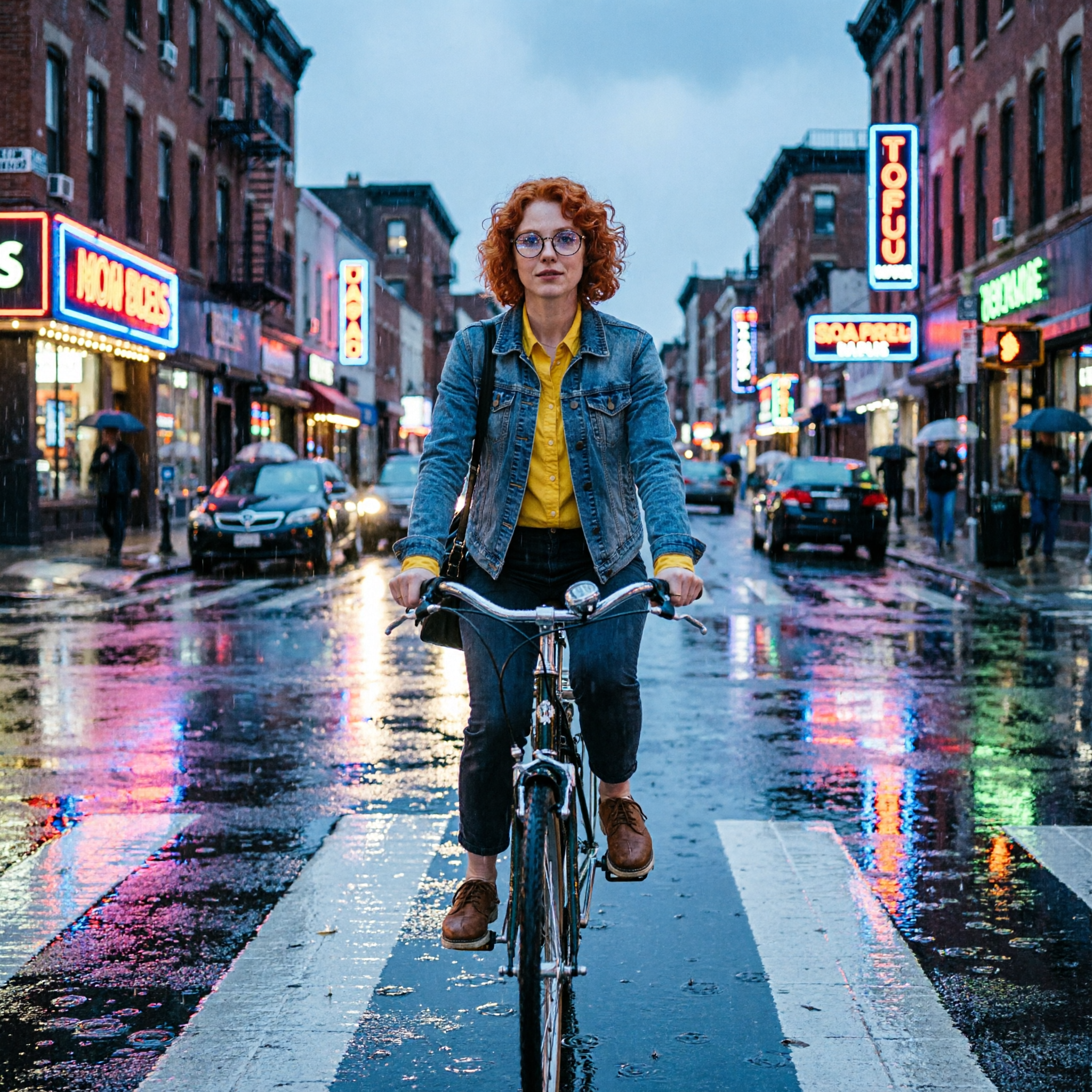
Place this exact woman on a bicycle crossing a rainy city crosswalk at dusk, neon shop signs reflecting in puddles, cinematic wide shot, keep her face, glasses, red curly hair, denim jacket and yellow shirt identical
Flux 2 Dev
Place this exact woman on a bicycle crossing a rainy city crosswalk at dusk, neon shop signs reflecting in puddles, cinematic wide shot, keep her face, glasses, red curly hair, denim jacket and yellow shirt identical
QWEN Image 2.0
Price, speed, and what each edit actually added
Both are genuine reference-photo edits
Flux 2 Dev and QWEN Image 2.0 both accept an image alongside the prompt and edit from it. We attached the same character-sheet photo, a woman with red curly hair, round glasses, a denim jacket and a yellow shirt, to both requests.
Price
Both are a flat 1 credit per image at their entry-level settings. Flux 2 Dev holds that price at every resolution tier up to 4 megapixels. QWEN Image 2.0 also holds 1 credit at any of its 21 preset sizes, so this pairing ties on cost regardless of output size.
Measured speed
QWEN Image 2.0 finished in about 16 seconds. Flux 2 Dev took about 21 seconds on the identical prompt and reference photo. Both numbers move with queue load.
What Flux 2 Dev's edit looked like
A 1024 by 1024 square: the woman riding through a rainy crosswalk, red curly hair, round glasses, denim jacket and yellow shirt matching the reference, with a wicker bicycle basket added to the front of the bike and rain kept to wet reflections rather than visible streaks.
What QWEN Image 2.0's edit looked like
A 2048 by 2048 square, the model's default output size: the same woman standing with the bike at a crosswalk, hair, glasses, jacket and shirt recognizable from the reference, set against a full brick-lined street with two tiers of neon signs, parked cars, umbrellas and pedestrians, a noticeably busier scene than Flux 2 Dev's.
Reference image limits
Flux 2 Dev accepts up to 10 reference images per request. QWEN Image 2.0 caps at 3, routed internally through its dedicated edit endpoint whenever a reference image is supplied.
Same reference photo, same instruction, same price. Flux 2 Dev: 1 credit, about 21 seconds. QWEN Image 2.0: 1 credit, about 16 seconds.
How It Works
How we ran the comparison, so you can repeat it:
Attach the same reference photo to both
The same character-sheet photo, sent as an image reference to flux-2-dev and to qwen-image-2.0 alongside the identical scene-placement instruction.
Bracket each request with a timestamp
We recorded the start of each submission and the moment the finished file arrived. QWEN Image 2.0 took about 16 seconds; Flux 2 Dev took about 21 seconds.
Compare the actual files, not just the numbers
We downloaded both outputs and looked at how much extra scene each model built around the same preserved subject.
The Pixel Dojo Advantage
Same edit, same reference photo, tied on price.
| Others | Pixel Dojo |
|---|---|
| Flux 2 Dev: 1 credit flat at any of the four resolution tiers, 0.5 to 4 megapixels. | QWEN Image 2.0: 1 credit flat at any of its 21 preset sizes, including the 2048x2048 default our run used. |
| Flux 2 Dev measured turnaround: about 21 seconds on our run. | QWEN Image 2.0 measured turnaround: about 16 seconds on the identical edit. |
| Flux 2 Dev output: 1024x1024, a wicker basket added, rain kept to wet reflections. | QWEN Image 2.0 output: 2048x2048, a busier full street scene with more background detail. |
| Flux 2 Dev accepts up to 10 reference images per request. | QWEN Image 2.0 accepts up to 3 reference images, routed through its edit mode automatically. |
| Flux 2 Dev offers 9 aspect ratio presets. | QWEN Image 2.0 offers 21 preset sizes across a 1K, 2K, and maximum tier. |
Loved by creators on PixelDojo
Real feedback from people using PixelDojo, pulled from our in-product surveys.
Ease of use, friendliness and support of the owner, continued innovation.
it is an amazing site to create a pics and vids for those who don't have the hardware themselves
good tools in one place
Prompt updates, strong features, and a community that is always willing to help and hear/act on professional feedback. I've never had a better experience.
user friendly all in one thing
I really like the schedule of AI work performed!
Explore more AI tools on PixelDojo
AI Tools
Compare & Switch
- Best AI Image Generators
- Best AI Video Generators
- Midjourney Alternatives
- Civitai Alternatives
- Runway Alternatives
- Leonardo Alternatives
- Pika Alternatives
- Luma Alternatives
- Magnific Alternatives
- Veo Alternatives
- Flux Alternatives
- Freepik Alternatives
- Seedance Alternatives
- Seedream Alternatives
- Pixverse Alternatives
- GPT Image Alternatives
- Synthesia Alternatives
- Playground Alternatives
- NightCafe Alternatives
- Canva AI Alternatives
- ElevenLabs Alternatives
- ComfyUI Alternatives
- Fal Alternatives
- Replicate Alternatives
Common Questions
Everything you need to know about Flux 2 Dev vs QWEN Image 2.0
Can both of these edit an existing photo?
Yes. Both took our reference photo, a woman with red curly hair, round glasses, a denim jacket and a yellow shirt, and edited it into the new scene rather than generating a fresh person from text.
Which is cheaper, Flux 2 Dev or QWEN Image 2.0?
Neither. Both cost a flat 1 credit per image at the settings we used, and both hold that price across their full range of output sizes.
Which one is faster?
QWEN Image 2.0, in our test. It returned the edit in about 16 seconds against about 21 seconds for Flux 2 Dev on the same prompt and reference photo.
How many reference images can each one take?
Flux 2 Dev accepts up to 10 in one request. QWEN Image 2.0 accepts up to 3, and supplying any turns the request into an edit call internally.
Which one should I pick for a busier background?
QWEN Image 2.0, based on our test. It filled its default 2048x2048 frame with more street detail: extra pedestrians, umbrellas and shop signs. Flux 2 Dev stayed closer to the original framing and added a bicycle basket the prompt did not ask for.
How do I call either one from the API?
POST to /api/v1/models/flux-2-dev/run or /api/v1/models/qwen-image-2.0/run with the same API key, an image_urls or reference_images field, and the prompt.