Flux 2 Klein 9B + LoRA AI Generator
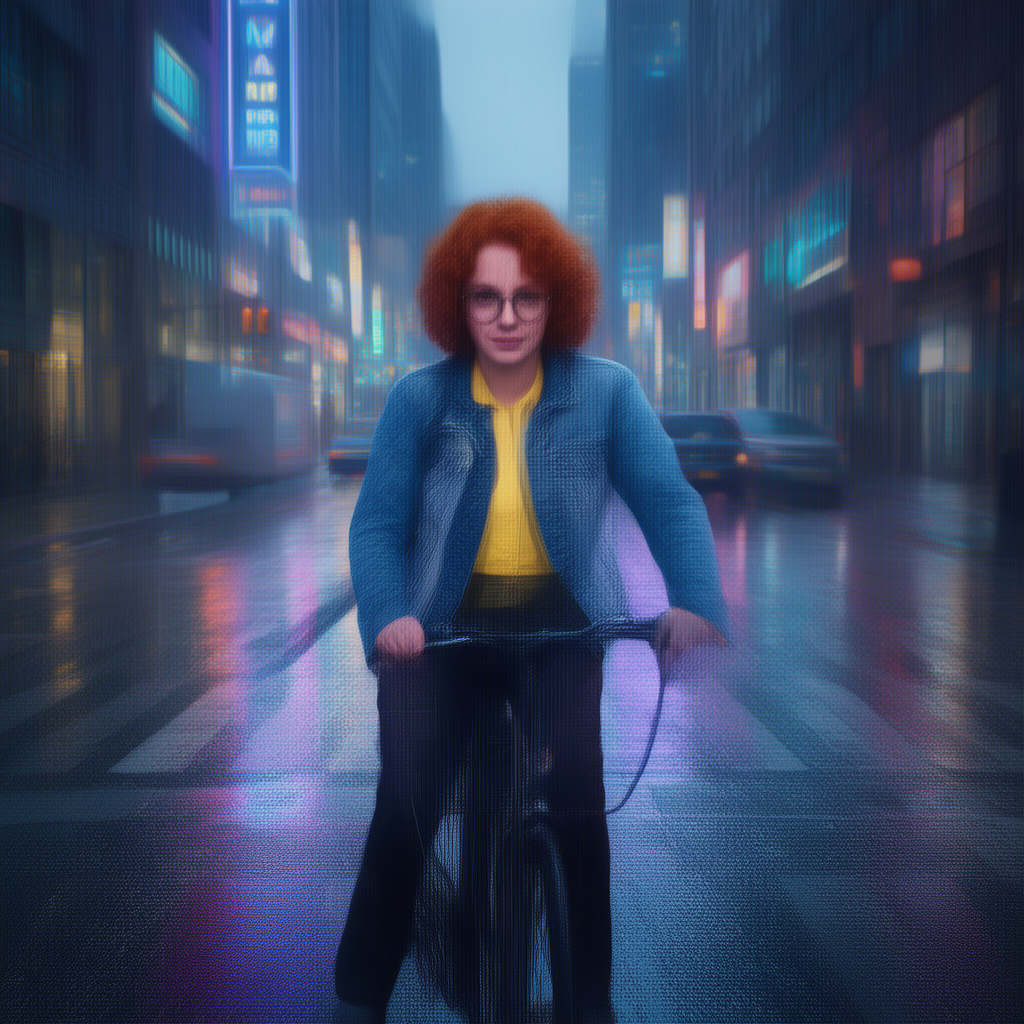
Generated on PixelDojo with Flux 2 Klein 9B + LoRA. Produced by PixelDojo's generation pipeline.
Flux 2 Klein 9B + LoRA costs 1 credit per image at its default 1 megapixel setting, and our edit run on August 26, 2026 finished in about 15 seconds. It is the only Flux 2 tier on PixelDojo that loads a custom LoRA safetensors file on top of the base model, up to three stacked at once, so a style or subject you already trained can carry into new scenes. This page covers the price table, the measured speed, what the edit output looked like, and when the plain Klein 9B or another Flux 2 tier is the better pick instead.
What the LoRA-enabled edit returned, no custom LoRA loaded
Every example below was produced on PixelDojo. Hover to see the prompt.
Place this exact woman on a bicycle crossing a rainy city crosswalk at dusk, neon shop signs reflecting in puddles, cinematic wide shot, keep her face, glasses, red curly hair, denim jacket and yellow shirt identical
Flux 2 Klein 9B + LoRA
What custom LoRA support adds to Flux 2 Klein 9B
What we asked it to do
We sent a saved character reference sheet and one instruction: put this exact woman on a bicycle crossing a rainy city crosswalk at dusk, keeping her face, glasses, red curly hair, denim jacket and yellow shirt identical. No custom LoRA was attached to this run, so it is a plain edit test of the base Klein 9B weights the LoRA variant sits on top of.
What came back
A front facing, medium shot of the same woman, red curls, round glasses, blue denim jacket over the yellow top, hands on the handlebars, framed by wet street and neon-lit buildings with pink and blue reflections streaking across the crosswalk stripes. Identity held up. Two things did not match the brief: the pose reads as a stopped, camera-facing portrait rather than the side-on crossing motion we asked for, and the whole frame has a soft, faintly woven texture, less crisp than a typical Flux 2 result.
Custom LoRA is the actual reason to pick this tier
The loras field takes an array of objects, each one a safetensors URL from a LoRA trained on PixelDojo or pulled from Hugging Face or Civitai, plus an optional scale. Drop in a style or a trained face and reference its trigger word in the prompt the same way you would with the base training set.
Five reference images, aspect ratio only
The cap is 5 input images, half of Flex's 10, and there is no custom width and height option, only the nine listed aspect ratio presets. Output size is set through the resolution field instead of dimensions.
Roughly double the plain Klein 9B price
Plain Flux 2 Klein 9B is a flat 0.5 credit at any resolution and does not accept LoRA weights at all. The LoRA variant runs 1 credit at the same default resolution, the toll for the ability to load your own trained file.
1 credit at 1 megapixel, about 15 seconds measured, on an edit prompt asking the model to keep a specific face, hairstyle and outfit while changing the entire scene.
Why Choose Pixel Dojo for Flux 2 Klein 9B + LoRA
Professional-quality results with cutting-edge AI technology
1 credit at 1 MP
The resolution table runs 1, 1, 1 and 2 credits across 0.5, 1, 2 and 4 megapixel, so raising resolution barely moves the price until the top tier.
Up to 3 stacked LoRAs
Each entry is a safetensors URL plus a scale value that defaults to 1.0. It is the only Flux 2 variant on PixelDojo that reads this field at all.
About 15 seconds, measured
Timed on August 26, 2026 from request to finished file, on an edit call with one reference image and no custom LoRA loaded.
How It Works
Getting a LoRA-driven result from Klein 9B:
Call the flux-2-lora variant, not plain Klein 9B
Same base model, but only this apiId reads the loras field. Sending it to plain Klein 9B silently drops the weights.
Attach your LoRA and its trigger word
One safetensors URL plus an optional scale, up to three stacked, and mention the trigger word in the prompt the way our example call does.
Run it in the app or over the API
Generate from the Flux 2 Studio tool page, or POST to /api/v1/models/flux-2-lora/run. Our edit call took about 15 seconds and charged 1 credit.
Loved by creators on PixelDojo
Real feedback from people using PixelDojo, pulled from our in-product surveys.
versatile menu of tools
Best AI tool availble the suite is rad
Versatility quality, value, ROI, innovation
variety of tools available and prompt tools
A "one-stop-shop" for creators! Thanks!!
Lots of different tools. It's easy to purchase more credits.
Explore more AI tools on PixelDojo
AI Tools
Compare & Switch
- Best AI Image Generators
- Best AI Video Generators
- Midjourney Alternatives
- Civitai Alternatives
- Runway Alternatives
- Leonardo Alternatives
- Pika Alternatives
- Luma Alternatives
- Magnific Alternatives
- Veo Alternatives
- Flux Alternatives
- Freepik Alternatives
- Seedance Alternatives
- Seedream Alternatives
- Pixverse Alternatives
- GPT Image Alternatives
- Synthesia Alternatives
- Playground Alternatives
- NightCafe Alternatives
- Canva AI Alternatives
- ElevenLabs Alternatives
- ComfyUI Alternatives
- Fal Alternatives
- Replicate Alternatives
Common Questions
Everything you need to know about Flux 2 Klein 9B + LoRA
What does Flux 2 Klein 9B + LoRA cost?
1 credit at 0.5, 1 or 2 megapixel, and 2 credits at 4 megapixel. Reference images and a loaded LoRA file do not change the price.
How fast is it?
About 15 seconds in our August 26, 2026 edit run, from one reference image and a scene-placement prompt to the finished file, with no custom LoRA attached.
How does it differ from plain Flux 2 Klein 9B?
Plain Klein 9B is a flat 0.5 credit at any resolution and ignores any loras field you send. The LoRA variant costs 1 credit at the same 1 megapixel default and is the only Flux 2 tier that actually loads a custom safetensors file, up to three stacked.
How does it compare to Flux 2 Klein 4B or Flux 2 Flex?
Klein 4B is a flat 0.1 credit, a tenth of the LoRA variant's price, but has no LoRA support and a smaller 4 billion parameter base. Flux 2 Flex runs 1.5 credits at 1 megapixel and accepts up to 10 reference images against 5 here, but it also cannot load a custom LoRA.
How do I load my own LoRA?
Pass a loras array with a safetensors URL and an optional scale, up to three entries. Include the LoRA's trigger word in your prompt the same way the model was trained to expect it.
How do I call it from the API?
POST to /api/v1/models/flux-2-lora/run with your API key, a prompt, and optionally input_images and loras. It is the same key and request shape as every other model in the catalog.