Flux Kontext Pro AI Generator
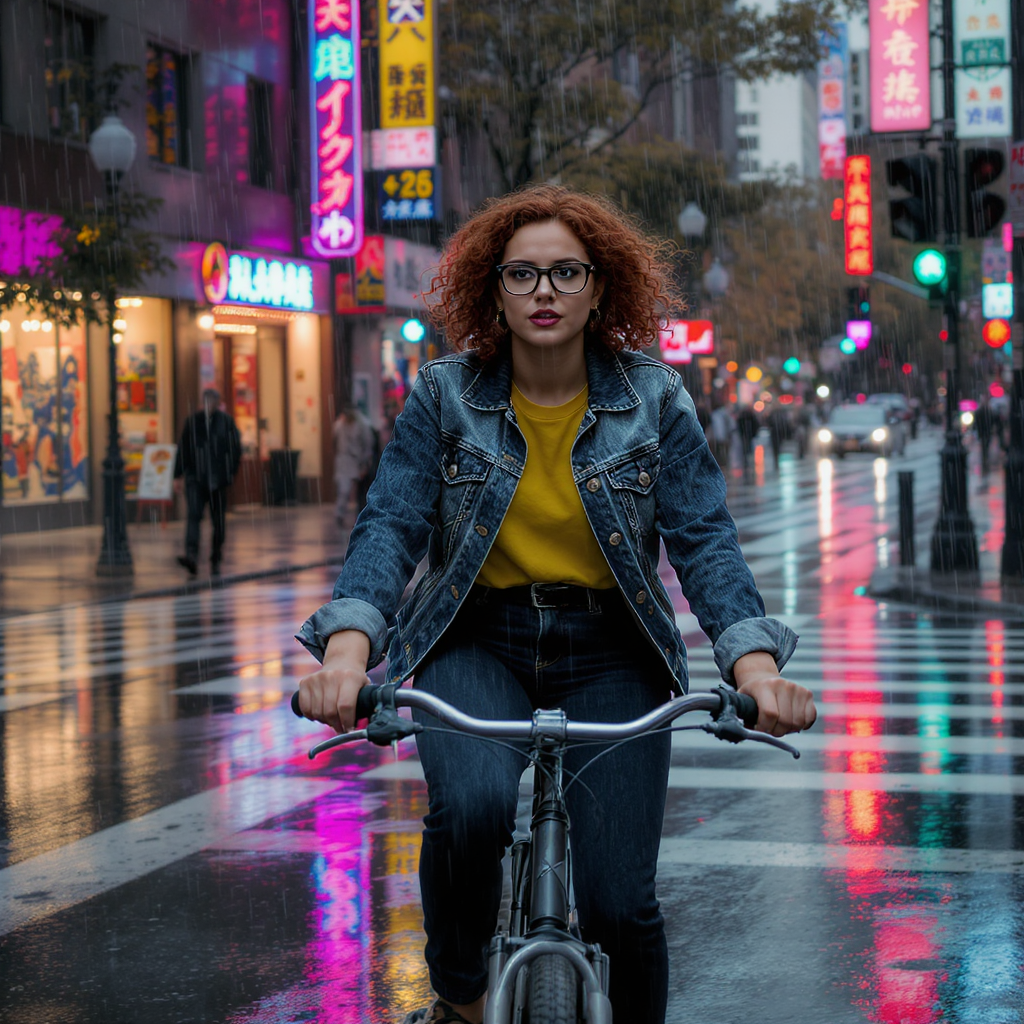
Generated on PixelDojo with Flux Kontext Pro. Produced by PixelDojo's generation pipeline.
Flux Kontext Pro costs 1 credit per image and took about 21 seconds on August 26, 2026 to place a reference character into a brand new scene. We sent it a studio portrait of a woman with red curly hair and round glasses, plus an instruction to put her on a bicycle in a rainy city crosswalk at dusk. The scene changed completely. The person did not.
The reference photo, moved into a new scene, first result
Every example below was produced on PixelDojo. Hover to see the prompt.
Place this exact woman on a bicycle crossing a rainy city crosswalk at dusk, neon shop signs reflecting in puddles, cinematic wide shot, keep her face, glasses, red curly hair, denim jacket and yellow shirt identical
Flux Kontext Pro
Where character work lives on the platform
Switch models without switching tools. Each one runs in the same PixelDojo studio.
How well a 1 credit edit preserved the character
What we sent it
A plain studio headshot: a woman with red curly hair, round black glasses, a denim jacket over a mustard yellow shirt, against a flat tan background, plus the instruction to place her on a bicycle in a rainy neon-lit crosswalk at dusk.
What came back
A wide cinematic shot of a woman on a bicycle stopped at a crosswalk, red curly hair, round glasses, denim jacket over a mustard shirt, rain visibly falling, wet asphalt reflecting pink and green neon signage in the background. The face, hair color and outfit read as a clear match to the reference rather than a new person the model invented from the words alone.
What did not carry over exactly
The hair is styled slightly fuller and the pose and framing are entirely new, which is expected: this is a scene edit, not a copy-paste. The identity markers held, the pixels did not.
One image per call
Like the base Pro tier, Kontext Pro returns a single image per request rather than a batch count.
One reference photo, one new scene, 1 credit, about 21 seconds. The hair, glasses and outfit all came through.
Why Choose Pixel Dojo for Flux Kontext Pro
Professional-quality results with cutting-edge AI technology
1 credit per image
The entry price for the Kontext tier, half of Flux Kontext Max.
About 21 seconds, measured
Timed from request to finished file on August 26, 2026, for a scene edit built from a reference photo and a text instruction.
The named features carried over
Red curly hair, round glasses, denim jacket and a mustard shirt all showed up in the new scene, on a different pose in a different setting.
How It Works
Reproduce the character placement test:
Start from a clean reference image
We used a plain studio portrait with the subject's defining features clearly visible: hair, glasses, and outfit.
Name every feature that has to survive the edit
Our instruction listed her face, glasses, red curly hair, denim jacket and yellow shirt explicitly, and all of those carried into the new scene.
Generate in the app or over the API
Run it from the tool page, or POST to /api/v1/models/flux-kontext-pro/run with the reference image URL. Ours charged 1 credit and returned in about 21 seconds.
Loved by creators on PixelDojo
Real feedback from people using PixelDojo, pulled from our in-product surveys.
Great for all your ideas use it encourage more people to use it
Because it is awesome
exceptional quality and great overall design of platform and interface. very intuative. love the creative freedom.
Qwen image 2 is amazing!!
Creative freedom, range of tools and options.
I love the training feature
Explore more AI tools on PixelDojo
AI Tools
Compare & Switch
- Best AI Image Generators
- Best AI Video Generators
- Midjourney Alternatives
- Civitai Alternatives
- Runway Alternatives
- Leonardo Alternatives
- Pika Alternatives
- Luma Alternatives
- Magnific Alternatives
- Veo Alternatives
- Flux Alternatives
- Freepik Alternatives
- Seedance Alternatives
- Seedream Alternatives
- Pixverse Alternatives
- GPT Image Alternatives
- Synthesia Alternatives
- Playground Alternatives
- NightCafe Alternatives
- Canva AI Alternatives
- ElevenLabs Alternatives
- ComfyUI Alternatives
- Fal Alternatives
- Replicate Alternatives
Common Questions
Everything you need to know about Flux Kontext Pro
How much does Flux Kontext Pro cost?
1 credit per image, one image per request. Half the price of Flux Kontext Max.
How fast is Flux Kontext Pro?
About 21 seconds in our August 26, 2026 run, timed from request to finished file and returned in the same call.
Does it actually keep the same character across scenes?
In our test, yes on the features that mattered: hair color and curl, glasses shape, jacket and shirt color all carried into a completely different pose and setting. The pose itself and the exact framing are new each time, which is what a scene edit is supposed to do.
How does it differ from Flux Kontext Max?
Kontext Max costs 2 credits, twice the price, and is described as the higher tier with stronger typography handling for generation and editing. Kontext Pro is the lower cost entry point for the same editing task.
What do I send it to edit a scene?
A prompt describing the new scene and naming the specific features to keep, plus a reference image URL. Being explicit about what has to stay the same, as we were with hair, glasses and outfit, is what keeps those details intact.
How do I call Flux Kontext Pro from the API?
POST to /api/v1/models/flux-kontext-pro/run with your API key, a prompt, and a reference image URL. Same key and endpoint shape as every other model in the catalog.