Flux Krea Dev AI Generator
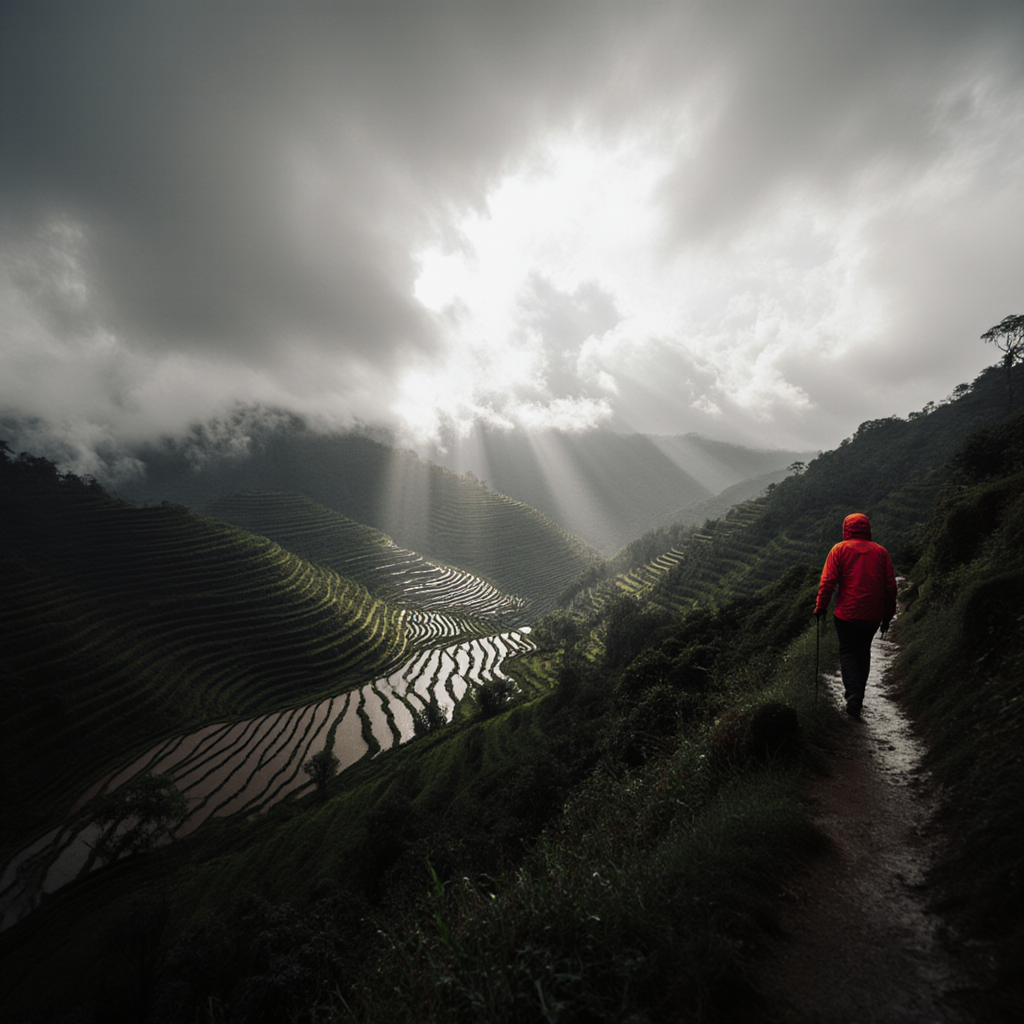
Generated on PixelDojo with Flux Krea Dev. Produced by PixelDojo's generation pipeline.
Flux Krea Dev costs 1 credit per image and took about 101 seconds in our August 26, 2026 test, arriving as a polled job rather than in the first response. We ran a storm light landscape through it once and kept the first result. The point of this variant is a photographic look that avoids the oversaturated glow most image models drift toward, and on this prompt that is exactly what came back. Here is the picture, the read, and the case for paying more.
The landscape test, one run, first result
Every example below was produced on PixelDojo. Hover to see the prompt.
Storm light over a terraced rice valley after rain, low clouds drifting through, a hiker in a red jacket on the ridge path, epic scale
Flux Krea Dev
Where Krea Dev lives and what sits next to it
Switch models without switching tools. Each one runs in the same PixelDojo studio.
Settings and trade-offs worth knowing
Speed is the trade
Our Flux 2 Pro run earlier the same day returned a portrait in about 21 seconds for 1.5 credits. Krea Dev took about 101 seconds for 1. If you are iterating and the wait is the bottleneck, half a credit buys back most of the time.
It takes one custom LoRA
Krea Dev is the Flux 1 variant that accepts a single LoRA, passed as a weights reference with a scale value. The multi LoRA variant stacks several instead, and the plain Dev variant takes none.
Nine aspect ratios
1:1, 16:9, 9:16, 21:9, 9:21, 3:2, 2:3, 4:5 and 5:4. The 21:9 and 9:21 options are useful for the wide landscape framing this model does well.
Batch in one call
An output count field returns several images per request at 1 credit each. Given the wait, batching is the efficient way to explore a composition.
Where it is the wrong pick
Readable text in the image, dense product detail, and anything where a fast turnaround matters more than the look. Its strength is atmosphere, not typography or speed.
One variant among several under the same key
The Flux family exposes each variant as its own model id, so switching between Krea Dev, plain Dev and the higher tiers is a one word change in the request body.
One prompt, one run, 1 credit, about 101 seconds. The wait is the price you pay for this look.
Why Choose Pixel Dojo for Flux Krea Dev
Professional-quality results with cutting-edge AI technology
The colour restraint is real
The valley is muted greens and greys under heavy cloud, and the only strong colour in the frame is the hiker's red jacket. Nothing is pushed. That restraint is the reason to pick this variant over the general purpose one.
It built the scene we asked for
Terraced rice paddies stepping down the hillside with water in the terraces reflecting the sky, a cloud bank spilling over the far ridge, and shafts of light breaking through a bright gap in the overcast. A hiker in a red hooded jacket walks away from camera along a dirt ridge path with a trekking pole.
1 credit per image
Flat per image, the same price as the standard Flux Dev variant. Aspect ratio and batch size do not change the per image rate.
About 101 seconds is the honest number
Timed from request to finished file on August 26, 2026. It ran past the API's 30 second synchronous window and returned through a job poll.
How It Works
Reproduce our landscape test:
Select the Krea Dev variant
The Flux studio tool lists each variant separately. Krea Dev is the photorealistic one at 1 credit, and picking it is what decides the look.
Write for weather and light, then plant one small subject
Our prompt named storm light, low cloud and a hiker in a red jacket. The weather gives the model atmosphere to work with and the single figure gives the frame its sense of scale.
Generate, and expect to wait
From the tool page or by posting to /api/v1/models/flux-krea-dev/run. Ours charged 1 credit and took about 101 seconds, returning through a job poll.
Loved by creators on PixelDojo
Real feedback from people using PixelDojo, pulled from our in-product surveys.
Great site and so much fun to use!
very useful set of tools for image creation, upscaling and enhancement
ease of use, variety of tools, high quality trainings, and a well-maintained discord channel
Ease of use, friendliness and support of the owner, continued innovation.
it is an amazing site to create a pics and vids for those who don't have the hardware themselves
good tools in one place
Explore more AI tools on PixelDojo
AI Tools
Compare & Switch
- Best AI Image Generators
- Best AI Video Generators
- Midjourney Alternatives
- Civitai Alternatives
- Runway Alternatives
- Leonardo Alternatives
- Pika Alternatives
- Luma Alternatives
- Magnific Alternatives
- Veo Alternatives
- Flux Alternatives
- Freepik Alternatives
- Seedance Alternatives
- Seedream Alternatives
- Pixverse Alternatives
- GPT Image Alternatives
- Synthesia Alternatives
- Playground Alternatives
- NightCafe Alternatives
- Canva AI Alternatives
- ElevenLabs Alternatives
- ComfyUI Alternatives
- Fal Alternatives
- Replicate Alternatives
Common Questions
Everything you need to know about Flux Krea Dev
How much does Flux Krea Dev cost?
1 credit per image, the same as the standard Flux Dev variant. Aspect ratio, output format and batch size do not change the per image price.
How long does Flux Krea Dev take?
About 101 seconds in our August 26, 2026 run. It went past the API's 30 second synchronous window, so the first response returned a job id and the image arrived on a later status check. Turnaround moves with queue load.
What is different about Flux Krea Dev compared with Flux Dev?
Same 1 credit price, different tuning. Krea Dev is the photorealistic variant that avoids the oversaturated look, and it is the one that accepts a single custom LoRA. Plain Flux Dev is the general purpose model and takes no LoRA input.
Should I pay 1.5 credits for Flux 2 Pro instead?
If speed matters, probably. Our Flux 2 Pro run the same day finished in about 21 seconds against 101 for Krea Dev, for half a credit more. Stay on Krea Dev when the restrained photographic look is the reason you are generating at all.
Can I use a custom LoRA with it?
Yes, one at a time. The request takes a LoRA weights reference plus a scale value that controls how strongly it applies. For stacking several LoRAs in one image, use the multi LoRA variant of Flux Dev.
How do I call Flux Krea Dev from the API?
POST to /api/v1/models/flux-krea-dev/run with your API key and a prompt. Every Flux variant is its own model id on the same endpoint shape and the same key.