Hunyuan Image 3
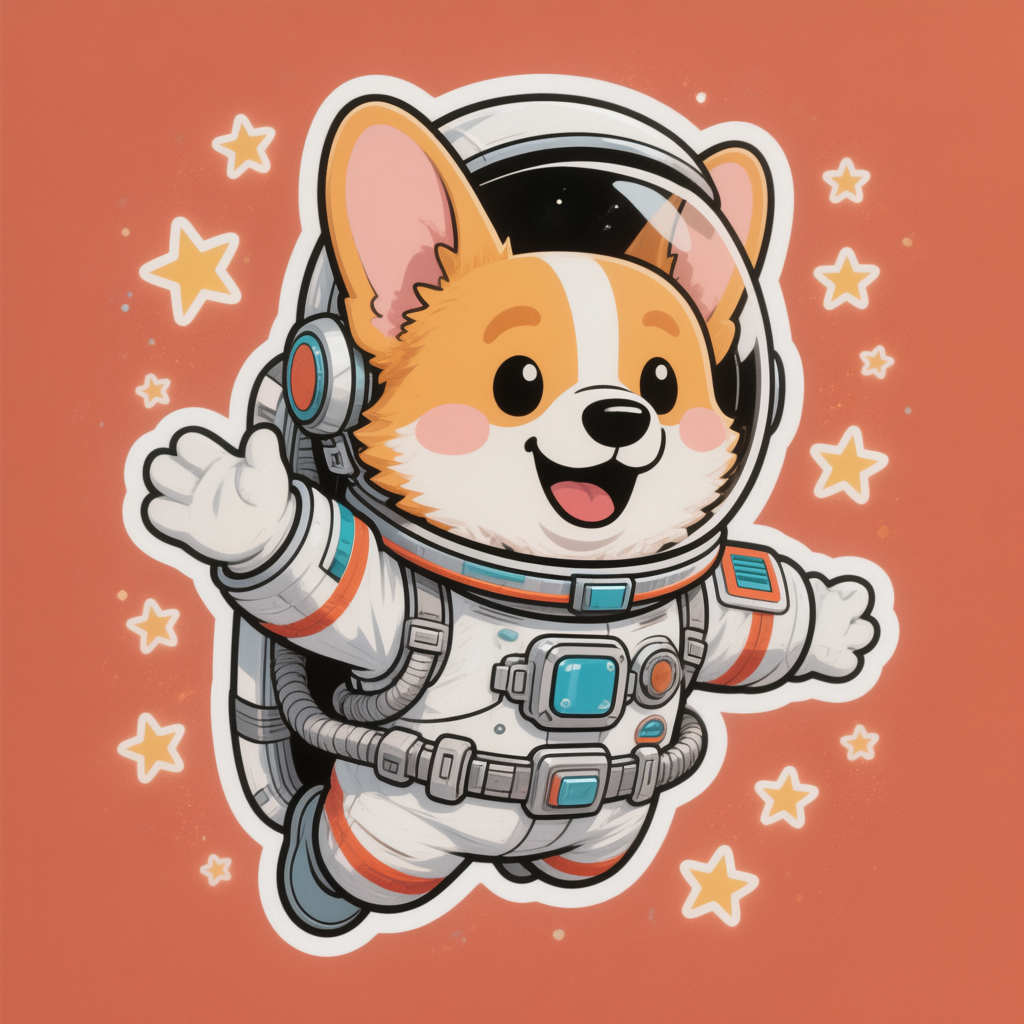
Generated on PixelDojo with Hunyuan Image 3. Produced by PixelDojo's generation pipeline.
Hunyuan Image 3 costs 2 credits per image and returned our sticker test prompt in about 39 seconds on August 26, 2026. The 80 billion parameter model held the character pose and prop detail well, but it rendered a solid color background rather than a transparent one, even though the prompt asked for die-cut style. This page covers what 2 credits buys, how fast it actually ran, and which model to reach for instead when the job needs a real cutout.
The 2 credit sticker test, first result kept
Every example below was produced on PixelDojo. Hover to see the prompt.
A cheerful sticker design of a corgi astronaut floating among stars, bold outlines, flat colors, die-cut style
Hunyuan Image 3
What 2 credits buys
Seven aspect ratios, one flat price
Pick from 1:1, 16:9, 9:16, 4:3, 3:4, 3:2, or 2:3. Every ratio costs the same 2 credits, and the model returns one image per request.
Fast mode is on by default
The go_fast setting defaults to true, which is what produced our about-39-second turnaround. Turning it off trades speed for a slower, more deliberate pass.
What we saw in the output
A corgi in a full astronaut suit, one paw raised in a wave, an open-mouthed grin with its tongue out, and small yellow stars scattered around it. Clean bold linework and a white sticker-style border sat around the corgi itself.
No cutout, no alpha channel
The file came back as a standard RGB PNG, not RGBA, with a solid coral background filling the square canvas. A project that needs a background-free sticker has to remove that background in a separate step.
Negative prompts and seeds are optional
A seed locks the composition for repeat requests. A negative prompt steers the model away from specific elements without changing the price.
One prompt, one model, one try. 2 credits, about 39 seconds, fast mode on by default.
Why Choose Pixel Dojo for Hunyuan Image 3
Professional-quality results with cutting-edge AI technology
2 credits per image
Flat price regardless of aspect ratio. No separate charge for fast mode or for setting a seed.
About 39 seconds, measured
Timed on August 26, 2026 from request to finished file, fast mode on, no retries.
Confident prop and character rendering
The astronaut suit's straps, buckles, and helmet reflections all came back clean on the first attempt.
How It Works
How we ran it, so you can repeat it:
Name the style directly in the prompt
We asked for bold outlines, flat colors, and die-cut style. The model followed the character and color instructions but not the transparency implied by die-cut.
Leave fast mode on for the quoted speed
go_fast defaults to true, and that default is what produced the about-39-second turnaround we measured.
Generate from the tool page or the API
POST the prompt to /api/v1/models/hunyuan-image-3/run. Ours cost 2 credits and returned in about 39 seconds.
Loved by creators on PixelDojo
Real feedback from people using PixelDojo, pulled from our in-product surveys.
very useful set of tools for image creation, upscaling and enhancement
ease of use, variety of tools, high quality trainings, and a well-maintained discord channel
Ease of use, friendliness and support of the owner, continued innovation.
it is an amazing site to create a pics and vids for those who don't have the hardware themselves
good tools in one place
Prompt updates, strong features, and a community that is always willing to help and hear/act on professional feedback. I've never had a better experience.
Explore more AI tools on PixelDojo
AI Tools
Compare & Switch
- Best AI Image Generators
- Best AI Video Generators
- Midjourney Alternatives
- Civitai Alternatives
- Runway Alternatives
- Leonardo Alternatives
- Pika Alternatives
- Luma Alternatives
- Magnific Alternatives
- Veo Alternatives
- Flux Alternatives
- Freepik Alternatives
- Seedance Alternatives
- Seedream Alternatives
- Pixverse Alternatives
- GPT Image Alternatives
- Synthesia Alternatives
- Playground Alternatives
- NightCafe Alternatives
- Canva AI Alternatives
- ElevenLabs Alternatives
- ComfyUI Alternatives
- Fal Alternatives
- Replicate Alternatives
Common Questions
Everything you need to know about Hunyuan Image 3
What does Hunyuan Image 3 cost?
2 credits per image, flat. The price does not change with aspect ratio, fast mode, or whether you set a seed.
How fast is Hunyuan Image 3?
About 39 seconds in our August 26, 2026 run, fast mode on, from request to finished PNG. Real turnaround moves with queue load, so treat this as typical rather than guaranteed.
Does it produce a transparent background for stickers?
No, not in our test. A die-cut style sticker prompt came back as a full RGB image with a solid color background, not a cutout PNG. Plan on a background-removal step if the final asset needs to sit on top of other art.
How do I call it from the API?
POST to /api/v1/models/hunyuan-image-3/run with your API key and a prompt. aspect_ratio, go_fast, negative_prompt, and seed are all optional.
How is Hunyuan Image 3 different from Hunyuan 3D?
Different modality entirely. Hunyuan Image 3 renders a flat image for 2 credits. Hunyuan 3D turns an image into a 3D asset for 4 credits. Reach for Hunyuan 3D only when the deliverable actually needs to be a 3D model.
What if the job needs a true cutout sticker?
Try Ideogram 4 Balanced instead. The identical die-cut sticker prompt came back from it as a genuine transparent PNG with a proper sticker outline, for 2 credits, the same price as Hunyuan Image 3.